AnalyticDB for MySQL
一个供AI代理与AnalyticDB for MySQL数据库交互的接口,允许其检索元数据并执行SQL操作。
文档
AnalyticDB for MySQL MCP Server
English | 中文
AnalyticDB for MySQL MCP Server is a universal interface between AI Agents and AnalyticDB MySQL. It provides two tool groups:
- SQL Tools & Resources (
sqlgroup): Connect directly to ADB MySQL clusters to execute SQL, view execution plans, and browse database metadata. Thesqlgroup is only a tool-group switch;execute_sqlruns in read-only mode by default, and full SQL execution mode requires the additional explicit settingENABLE_SQL_WRITE_TOOLS=true. - OpenAPI Tools (
openapigroup): Manage clusters, whitelists, accounts, networking, monitoring, diagnostics, and audit logs via Alibaba Cloud OpenAPI.
Read-only tools are annotated with ToolAnnotations(readOnlyHint=True) per the MCP protocol, allowing clients to distinguish them from mutating operations.
一、Prerequisites
- Python >= 3.13
- uv (recommended package manager and runner)
- Alibaba Cloud AccessKey (required for OpenAPI tools)
- Optional: ADB MySQL connection credentials (for SQL tools in direct-connection mode)
二、Quick Start
2.0 Choose a Configuration
Choose the tool groups and extra switches for your scenario before copying a client configuration:
| Scenario | Tool groups | Extra switch | Best for |
|---|---|---|---|
| Read-only SQL queries, EXPLAIN, and metadata browsing | sql | None | Recommended default for querying, troubleshooting, and read-only analysis |
Full SQL execution through execute_sql | sql | ENABLE_SQL_WRITE_TOOLS=true | INSERT/UPDATE/DELETE/DDL/multi-statement SQL when the MCP client is trusted |
| OpenAPI cluster management tools + SQL read tools | openapi,sql | Alibaba Cloud AK/SK + ADB_MYSQL_* direct connection settings | Cluster, account, whitelist, diagnostics, and monitoring operations while keeping SQL read access |
| OpenAPI + full SQL execution | openapi,sql | Alibaba Cloud AK/SK + ADB_MYSQL_* direct connection settings + ENABLE_SQL_WRITE_TOOLS=true | Administration plus full SQL execution |
MCP_TOOLSETS=sqlonly enables the SQL tool group. Full SQL execution is not a separate tool group, and there is nosql_writetool group. It must be enabled separately withENABLE_SQL_WRITE_TOOLS=true.
Before configuring a client, check:
- Direct database mode: configure
ADB_MYSQL_HOST,ADB_MYSQL_PORT,ADB_MYSQL_USER,ADB_MYSQL_PASSWORD, and optionallyADB_MYSQL_DATABASE. - Temporary account mode: if
ADB_MYSQL_USER/ADB_MYSQL_PASSWORDare not configured but AK/SK is available, the server creates a temporary database account through OpenAPI; SQL tool calls must provideregion_idanddb_cluster_id. - Remote SSE / Streamable HTTP: when
SERVER_HOSTis not a loopback address, configureAPI_KEYon the server andAuthorization: Bearer <API_KEY>on the client. - Full SQL execution: enable it only for trusted users and trusted MCP clients, and use a least-privilege database account.
2.1 Using cherry-studio (Recommended)
- Download and install cherry-studio
- Follow the documentation to install
uv, which is required for the MCP environment - Configure and use ADB MySQL MCP according to the documentation. You can quickly import the configuration using the JSON below.
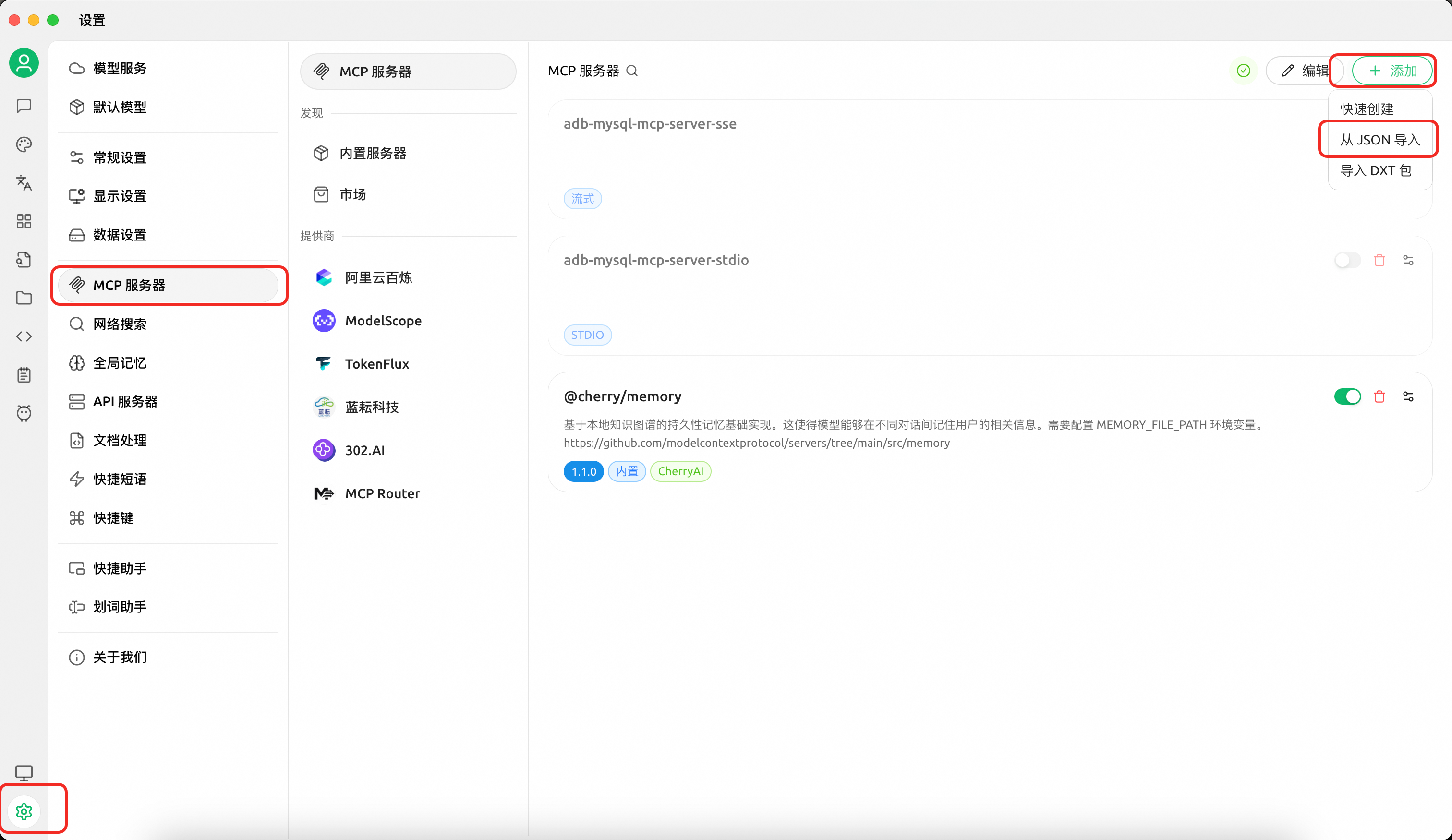
Configuration A — SQL read tools only (execute read-only queries, view plans, browse metadata):
{
  "mcpServers": {
    "adb-mysql-mcp-server": {
      "name": "adb-mysql-mcp-server",
      "type": "stdio",
      "isActive": true,
      "command": "uv",
      "args": [
        "--directory",
        "/path/to/alibabacloud-adb-mysql-mcp-server",
        "run",
        "adb-mysql-mcp-server"
      ],
      "env": {
        "ADB_MYSQL_HOST": "your_adb_mysql_host",
        "ADB_MYSQL_PORT": "3306",
        "ADB_MYSQL_USER": "your_username",
        "ADB_MYSQL_PASSWORD": "your_password",
        "ADB_MYSQL_DATABASE": "your_database",
        "MCP_TOOLSETS": "sql"
      }
    }
  }
}
Configuration B — OpenAPI tools + SQL read tools:
Note: OpenAPI tools include mutating administration capabilities such as account creation, whitelist modification, and query termination. Enable them only when you intentionally need management operations. The example below also keeps the
sqltool group enabled, so it includes direct database connection settings.
{
  "mcpServers": {
    "adb-mysql-mcp-server": {
      "name": "adb-mysql-mcp-server",
      "type": "stdio",
      "isActive": true,
      "command": "uv",
      "args": [
        "--directory",
        "/path/to/alibabacloud-adb-mysql-mcp-server",
        "run",
        "adb-mysql-mcp-server"
      ],
      "env": {
        "ALIBABA_CLOUD_ACCESS_KEY_ID": "your_access_key_id",
        "ALIBABA_CLOUD_ACCESS_KEY_SECRET": "your_access_key_secret",
        "ADB_MYSQL_HOST": "your_adb_mysql_host",
        "ADB_MYSQL_PORT": "3306",
        "ADB_MYSQL_USER": "your_username",
        "ADB_MYSQL_PASSWORD": "your_password",
        "ADB_MYSQL_DATABASE": "your_database",
        "MCP_TOOLSETS": "openapi,sql"
      }
    }
  }
}
If you only want OpenAPI management tools and do not need SQL tools or resources, change MCP_TOOLSETS to openapi and remove the ADB_MYSQL_* direct database settings.
Configuration C — Full SQL execution through execute_sql:
Warning: With
ENABLE_SQL_WRITE_TOOLS=true,execute_sqlexposes full SQL execution. The server only performs basic input validation and does not restrict statement type, comments, semicolons, multi-statement SQL, DDL, DML, DCL, or TCL. Enable it only for trusted users and use a least-privilege database account.
{
  "mcpServers": {
    "adb-mysql-mcp-server": {
      "name": "adb-mysql-mcp-server",
      "type": "stdio",
      "isActive": true,
      "command": "uv",
      "args": [
        "--directory",
        "/path/to/alibabacloud-adb-mysql-mcp-server",
        "run",
        "adb-mysql-mcp-server"
      ],
      "env": {
        "ADB_MYSQL_HOST": "your_adb_mysql_host",
        "ADB_MYSQL_PORT": "3306",
        "ADB_MYSQL_USER": "your_username",
        "ADB_MYSQL_PASSWORD": "your_password",
        "ADB_MYSQL_DATABASE": "your_database",
        "MCP_TOOLSETS": "sql",
        "ENABLE_SQL_WRITE_TOOLS": "true"
      }
    }
  }
}
Configuration D — OpenAPI tools + full SQL execution:
Warning: This configuration enables both OpenAPI management capabilities and full SQL execution through
execute_sql. Use it only with trusted clients, trusted users, and a least-privilege database account.
{
  "mcpServers": {
    "adb-mysql-mcp-server": {
      "name": "adb-mysql-mcp-server",
      "type": "stdio",
      "isActive": true,
      "command": "uv",
      "args": [
        "--directory",
        "/path/to/alibabacloud-adb-mysql-mcp-server",
        "run",
        "adb-mysql-mcp-server"
      ],
      "env": {
        "ALIBABA_CLOUD_ACCESS_KEY_ID": "your_access_key_id",
        "ALIBABA_CLOUD_ACCESS_KEY_SECRET": "your_access_key_secret",
        "ADB_MYSQL_HOST": "your_adb_mysql_host",
        "ADB_MYSQL_PORT": "3306",
        "ADB_MYSQL_USER": "your_username",
        "ADB_MYSQL_PASSWORD": "your_password",
        "ADB_MYSQL_DATABASE": "your_database",
        "MCP_TOOLSETS": "openapi,sql",
        "ENABLE_SQL_WRITE_TOOLS": "true"
      }
    }
  }
}
Without
MCP_TOOLSETS, only thesqlgroup is enabled, andexecute_sqlstill runs in read-only mode by default. When AK/SK is not configured, OpenAPI tools are automatically disabled even if requested.
2.2 Using Claude Code
Download from GitHub and sync dependencies:
git clone https://github.com/aliyun/alibabacloud-adb-mysql-mcp-server
cd alibabacloud-adb-mysql-mcp-server
uv sync
Add the following configuration to the Claude Code MCP config file (project-level: .mcp.json in the project root, or user-level: ~/.claude/settings.json):
stdio transport:
{
  "mcpServers": {
    "adb-mysql-mcp-server": {
      "command": "uv",
      "args": [
        "--directory",
        "/path/to/alibabacloud-adb-mysql-mcp-server",
        "run",
        "adb-mysql-mcp-server"
      ],
      "env": {
        "MCP_TOOLSETS": "sql",
        "ADB_MYSQL_HOST": "your_adb_mysql_host",
        "ADB_MYSQL_PORT": "3306",
        "ADB_MYSQL_USER": "your_username",
        "ADB_MYSQL_PASSWORD": "your_password",
        "ADB_MYSQL_DATABASE": "your_database"
      }
    }
  }
}
For OpenAPI management tools, add ALIBABA_CLOUD_ACCESS_KEY_ID, ALIBABA_CLOUD_ACCESS_KEY_SECRET, and explicitly include openapi in MCP_TOOLSETS. The example below uses the common setting MCP_TOOLSETS=openapi,sql, so it also includes direct database connection settings and the SQL read tools work after copying the config:
{
  "mcpServers": {
    "adb-mysql-mcp-server": {
      "command": "uv",
      "args": [
        "--directory",
        "/path/to/alibabacloud-adb-mysql-mcp-server",
        "run",
        "adb-mysql-mcp-server"
      ],
      "env": {
        "ALIBABA_CLOUD_ACCESS_KEY_ID": "your_access_key_id",
        "ALIBABA_CLOUD_ACCESS_KEY_SECRET": "your_access_key_secret",
        "MCP_TOOLSETS": "openapi,sql",
        "ADB_MYSQL_HOST": "your_adb_mysql_host",
        "ADB_MYSQL_PORT": "3306",
        "ADB_MYSQL_USER": "your_username",
        "ADB_MYSQL_PASSWORD": "your_password",
        "ADB_MYSQL_DATABASE": "your_database"
      }
    }
  }
}
If you only want OpenAPI management tools and do not need SQL tools or resources, change MCP_TOOLSETS to openapi and remove the ADB_MYSQL_* direct database settings.
For full SQL execution through execute_sql, keep MCP_TOOLSETS=sql and set ENABLE_SQL_WRITE_TOOLS=true. Note that neither MCP_TOOLSETS=sql nor MCP_TOOLSETS=all enables full SQL execution by itself:
{
  "mcpServers": {
    "adb-mysql-mcp-server": {
      "command": "uv",
      "args": [
        "--directory",
        "/path/to/alibabacloud-adb-mysql-mcp-server",
        "run",
        "adb-mysql-mcp-server"
      ],
      "env": {
        "MCP_TOOLSETS": "sql",
        "ENABLE_SQL_WRITE_TOOLS": "true",
        "ADB_MYSQL_HOST": "your_adb_mysql_host",
        "ADB_MYSQL_PORT": "3306",
        "ADB_MYSQL_USER": "your_username",
        "ADB_MYSQL_PASSWORD": "your_password",
        "ADB_MYSQL_DATABASE": "your_database"
      }
    }
  }
}
If you need both OpenAPI management and full SQL execution, use MCP_TOOLSETS=openapi,sql and set ENABLE_SQL_WRITE_TOOLS=true:
{
  "mcpServers": {
    "adb-mysql-mcp-server": {
      "command": "uv",
      "args": [
        "--directory",
        "/path/to/alibabacloud-adb-mysql-mcp-server",
        "run",
        "adb-mysql-mcp-server"
      ],
      "env": {
        "ALIBABA_CLOUD_ACCESS_KEY_ID": "your_access_key_id",
        "ALIBABA_CLOUD_ACCESS_KEY_SECRET": "your_access_key_secret",
        "MCP_TOOLSETS": "openapi,sql",
        "ENABLE_SQL_WRITE_TOOLS": "true",
        "ADB_MYSQL_HOST": "your_adb_mysql_host",
        "ADB_MYSQL_PORT": "3306",
        "ADB_MYSQL_USER": "your_username",
        "ADB_MYSQL_PASSWORD": "your_password",
        "ADB_MYSQL_DATABASE": "your_database"
      }
    }
  }
}
SSE transport — start the server first, then configure the client:
export MCP_TOOLSETS=sql
export ADB_MYSQL_HOST="your_adb_mysql_host"
export ADB_MYSQL_PORT="3306"
export ADB_MYSQL_USER="your_username"
export ADB_MYSQL_PASSWORD="your_password"
export ADB_MYSQL_DATABASE="your_database"
export SERVER_TRANSPORT=sse
export SERVER_HOST=127.0.0.1
export SERVER_PORT=8000
# API_KEY is required when SERVER_HOST is not a loopback address. Use at least 32 characters.
# export API_KEY="replace-with-a-random-token-at-least-32-chars"
# To enable OpenAPI management tools, add AK/SK and explicitly include openapi:
# export ALIBABA_CLOUD_ACCESS_KEY_ID="your_access_key_id"
# export ALIBABA_CLOUD_ACCESS_KEY_SECRET="your_access_key_secret"
# export MCP_TOOLSETS=openapi,sql
# To enable full SQL execution through execute_sql, explicitly set:
# export ENABLE_SQL_WRITE_TOOLS=true

uv --directory /path/to/alibabacloud-adb-mysql-mcp-server run adb-mysql-mcp-server
{
  "mcpServers": {
    "adb-mysql-mcp-server": {
      "url": "http://localhost:8000/sse"
    }
  }
}
If the server is bound to a non-loopback host, configure API_KEY on the server side and send it from the client side as an HTTP header. In short: API_KEY is the server-side token, and Authorization: Bearer <API_KEY> is the client-side request header.
# Server side
export SERVER_TRANSPORT=sse
export SERVER_HOST=0.0.0.0
export API_KEY="replace-with-a-random-token-at-least-32-chars"
uv --directory /path/to/alibabacloud-adb-mysql-mcp-server run adb-mysql-mcp-server
{
  "mcpServers": {
    "adb-mysql-mcp-server": {
      "url": "http://your-server-host:8000/sse",
      "headers": {
        "Authorization": "Bearer replace-with-a-random-token-at-least-32-chars"
      }
    }
  }
}
Streamable HTTP transport — start the server first, then configure the client:
export MCP_TOOLSETS=sql
export ADB_MYSQL_HOST="your_adb_mysql_host"
export ADB_MYSQL_PORT="3306"
export ADB_MYSQL_USER="your_username"
export ADB_MYSQL_PASSWORD="your_password"
export ADB_MYSQL_DATABASE="your_database"
export SERVER_TRANSPORT=streamable_http
export SERVER_HOST=127.0.0.1
export SERVER_PORT=8000
# API_KEY is required when SERVER_HOST is not a loopback address. Use at least 32 characters.
# export API_KEY="replace-with-a-random-token-at-least-32-chars"
# To enable OpenAPI management tools, add AK/SK and explicitly include openapi:
# export ALIBABA_CLOUD_ACCESS_KEY_ID="your_access_key_id"
# export ALIBABA_CLOUD_ACCESS_KEY_SECRET="your_access_key_secret"
# export MCP_TOOLSETS=openapi,sql
# To enable full SQL execution through execute_sql, explicitly set:
# export ENABLE_SQL_WRITE_TOOLS=true

uv --directory /path/to/alibabacloud-adb-mysql-mcp-server run adb-mysql-mcp-server
{
  "mcpServers": {
    "adb-mysql-mcp-server": {
      "url": "http://localhost:8000/mcp"
    }
  }
}
For streamable_http on a non-loopback host, use the same server-side API_KEY and client-side Authorization: Bearer <API_KEY> header pattern shown above. Full client JSON configuration example:
{
  "mcpServers": {
    "adb-mysql-mcp-server": {
      "url": "http://your-server-host:8000/mcp",
      "headers": {
        "Authorization": "Bearer replace-with-a-random-token-at-least-32-chars"
      }
    }
  }
}
Note: When
ADB_MYSQL_USERandADB_MYSQL_PASSWORDare not configured but AK/SK is available, a temporary database account is automatically created via OpenAPI for SQL execution and cleaned up afterward.
2.3 Using Cline
Set environment variables and run the MCP server:
export MCP_TOOLSETS=sql
export ADB_MYSQL_HOST="your_adb_mysql_host"
export ADB_MYSQL_PORT="3306"
export ADB_MYSQL_USER="your_username"
export ADB_MYSQL_PASSWORD="your_password"
export ADB_MYSQL_DATABASE="your_database"
export SERVER_TRANSPORT=sse
export SERVER_HOST=127.0.0.1
export SERVER_PORT=8000
# To enable OpenAPI management tools, add AK/SK and explicitly include openapi:
# export ALIBABA_CLOUD_ACCESS_KEY_ID="your_access_key_id"
# export ALIBABA_CLOUD_ACCESS_KEY_SECRET="your_access_key_secret"
# export MCP_TOOLSETS=openapi,sql

uv --directory /path/to/alibabacloud-adb-mysql-mcp-server run adb-mysql-mcp-server
Then configure the Cline remote server:
remote_server = "http://127.0.0.1:8000/sse"
2.4 Smoke Test
After the server is started and connected to your MCP client, run these read-only statements to verify the setup without modifying data:
select 1 as ok;
select current_date as today, current_timestamp as now_time;
You can also test query-plan tools with get_query_plan or get_execution_plan:
select 1 as plan_test;
In default read-only mode, the following multi-statement SQL should be rejected, which confirms single-statement protection is active:
select 1; select 2;
To further confirm write protection, run the following only in a test database or after confirming the table name. It should be rejected in default read-only mode:
update your_table set id = id where 1 = 0;
If you do not know a real table name yet, do not run table-specific SQL. Start with show databases;, the MCP resource adbmysql:///databases, or adbmysql:///{database}/tables to inspect metadata.
三、Environment Variables
| Variable | Required | Description |
|---|---|---|
ALIBABA_CLOUD_ACCESS_KEY_ID | Yes (OpenAPI tools) | Alibaba Cloud AccessKey ID |
ALIBABA_CLOUD_ACCESS_KEY_SECRET | Yes (OpenAPI tools) | Alibaba Cloud AccessKey Secret |
ALIBABA_CLOUD_SECURITY_TOKEN | No | STS temporary security token |
ADB_MYSQL_HOST | No | Database host (direct-connection mode) |
ADB_MYSQL_PORT | No | Database port, default 3306 (direct-connection mode) |
ADB_MYSQL_USER | No | Database username (direct-connection mode) |
ADB_MYSQL_PASSWORD | No | Database password (direct-connection mode) |
ADB_MYSQL_DATABASE | No | Default database name (direct-connection mode) |
ADB_MYSQL_CONNECT_TIMEOUT | No | Database connection timeout in seconds, default 2 |
ADB_MYSQL_MAX_SQL_LENGTH | No | Maximum accepted SQL statement length, default 10000. Must be a positive integer |
ADB_API_CONNECT_TIMEOUT | No | OpenAPI connection timeout in milliseconds, default 10000 (10s) |
ADB_API_READ_TIMEOUT | No | OpenAPI read timeout in milliseconds, default 300000 (5min) |
MCP_TOOLSETS | No | Comma-separated tool groups to enable. Default: sql. Supported groups: sql, openapi; shortcut: all expands to openapi,sql. This variable only controls tool-group exposure and does not control full SQL execution permission |
SERVER_TRANSPORT | No | Transport protocol: stdio (default), sse, streamable_http |
SERVER_HOST | No | SSE/HTTP bind host, default 127.0.0.1; non-loopback hosts require API_KEY |
SERVER_PORT | No | SSE/HTTP server port, default 8000 |
API_KEY | No | MCP HTTP auth token; clients must send Authorization: Bearer <API_KEY> when configured. Required on non-loopback hosts; use at least 32 characters |
ENABLE_SQL_WRITE_TOOLS | No | Controls whether execute_sql enters full SQL execution mode. Default: false; it must be explicitly set to true to enter full SQL execution mode. The actual executable scope is still limited by the database account privileges, database driver, and maximum SQL length |
四、Tool List
By default, only the sql group is enabled and execute_sql only allows read-only SQL. The openapi group is enabled only when openapi is explicitly included in MCP_TOOLSETS. MCP_TOOLSETS only controls tool-group exposure; full SQL execution through execute_sql must be enabled separately with ENABLE_SQL_WRITE_TOOLS=true.
4.1 Cluster Management (group: openapi)
| Tool | Description |
|---|---|
describe_db_clusters | List ADB MySQL clusters in a region |
describe_db_cluster_attribute | Get detailed cluster attributes |
describe_cluster_access_whitelist | Get cluster IP whitelist |
modify_cluster_access_whitelist | Modify cluster IP whitelist |
describe_accounts | List database accounts in a cluster |
describe_cluster_net_info | Get cluster network connection info |
get_current_time | Get current server time |
4.2 Diagnostics & Monitoring (group: openapi)
| Tool | Description |
|---|---|
describe_db_cluster_performance | Query cluster performance metrics (CPU, memory, QPS, etc.) |
describe_db_cluster_health_status | Query cluster health status |
describe_diagnosis_records | Query SQL diagnosis summary records |
describe_diagnosis_sql_info | Get SQL execution details (plan, runtime info) |
describe_bad_sql_detection | Detect bad SQL impacting cluster stability |
describe_sql_patterns | Query SQL pattern list |
describe_table_statistics | Query table-level statistics |
4.3 Administration & Audit (group: openapi)
| Tool | Description |
|---|---|
create_account | Create a database account |
modify_db_cluster_description | Modify cluster description |
describe_db_cluster_space_summary | Get cluster storage space summary |
describe_audit_log_records | Query SQL audit log records |
4.4 Advanced Diagnostics (group: openapi)
| Tool | Description |
|---|---|
describe_executor_detection | Compute node diagnostics |
describe_worker_detection | Storage node diagnostics |
describe_controller_detection | Access node diagnostics |
describe_available_advices | Get optimization advices |
kill_process | Kill a running query process |
describe_db_resource_group | Get resource group configuration |
describe_excessive_primary_keys | Detect tables with excessive primary keys |
describe_oversize_non_partition_table_infos | Detect oversized non-partition tables |
describe_table_partition_diagnose | Diagnose table partitioning issues |
describe_inclined_tables | Detect data-skewed tables |
4.5 SQL Tools (group: sql)
| Tool | Description |
|---|---|
execute_sql | Execute SQL on an ADB MySQL cluster. Read-only SQL is allowed by default; full SQL execution requires ENABLE_SQL_WRITE_TOOLS=true |
get_query_plan | Get EXPLAIN execution plan for a single SELECT or read-only WITH CTE statement |
get_execution_plan | Get EXPLAIN ANALYZE actual execution plan for a single SELECT or read-only WITH CTE statement |
4.6 MCP Resources (group: sql)
MCP resources are assigned to the sql group because they read database metadata through the SQL connection, such as SHOW DATABASES, SHOW TABLES, SHOW CREATE TABLE, and SHOW adb_config. They are read-only metadata resources and are available together with the default SQL read group.
| Resource URI | Description |
|---|---|
adbmysql:///databases | List all databases |
adbmysql:///{database}/tables | List all tables in a database |
adbmysql:///{database}/{table}/ddl | Get table DDL |
adbmysql:///config/{key}/value | Get a config key value |
五、Security Policy
5.1 Read-only SQL Mode
When ENABLE_SQL_WRITE_TOOLS is not set to true, execute_sql runs in read-only mode. The server validates SQL before opening a database connection:
- Allows read-only SQL such as
SELECT,SHOW,DESCRIBE,DESC,EXPLAIN, and read-onlyWITHCTE statements. - Allows one optional terminal semicolon and removes it before execution.
- Rejects multi-statement SQL.
- Rejects SQL comments outside strings or quoted identifiers.
- Rejects unclosed strings or quoted identifiers.
- Rejects write keywords in
SELECTorWITHbodies, including nested write operations. - Rejects
SELECT ... INTO OUTFILEandSELECT ... INTO DUMPFILE.
This mode is intended to reduce accidental or unauthorized mutations by AI clients.
5.2 Full SQL Execution Mode
Risk notice: Full SQL execution mode means the MCP server provides a general-purpose SQL execution entry point. After it is enabled, the server no longer attempts to classify SQL as read or write, and it does not block multi-statement SQL, comments, DDL, DML, DCL, or TCL. Enable it only for trusted users, trusted MCP clients, and least-privilege database accounts.
When ENABLE_SQL_WRITE_TOOLS=true, execute_sql becomes a full SQL execution entry point. The server only performs basic input validation: the value must be a string, must not be empty after trimming, and must not exceed ADB_MYSQL_MAX_SQL_LENGTH.
After this mode is enabled, the server no longer restricts statement type, comments, semicolons, multi-statement SQL, DDL, DML, DCL, or TCL, and it does not perform SQL syntax validation. Any SQL accepted by the configured database account and database driver may be executed.
get_query_plan and get_execution_plan are not full SQL execution tools. They always validate their input as a single read-only SELECT or read-only WITH CTE statement, even when ENABLE_SQL_WRITE_TOOLS=true.
5.3 Operational Recommendations
- Do not expose SSE or Streamable HTTP on a public or shared network without a strong
API_KEY. - Use high-entropy API keys and rotate them when they may have been shared.
- Use read-only database accounts for read-only deployments.
- Use least-privilege database accounts when full SQL execution is enabled.
- Enable OpenAPI tools only in trusted administration scenarios.
六、Local Development
git clone https://github.com/aliyun/alibabacloud-adb-mysql-mcp-server
cd alibabacloud-adb-mysql-mcp-server
uv sync
Run tests:
uv run python -m pytest test/ -v
Debug with MCP Inspector:
npx @modelcontextprotocol/inspector \
  -e ALIBABA_CLOUD_ACCESS_KEY_ID=your_ak \
  -e ALIBABA_CLOUD_ACCESS_KEY_SECRET=your_sk \
  -e ADB_MYSQL_HOST=your_adb_mysql_host \
  -e ADB_MYSQL_PORT=3306 \
  -e ADB_MYSQL_USER=your_username \
  -e ADB_MYSQL_PASSWORD=your_password \
  -e ADB_MYSQL_DATABASE=your_database \
  -e MCP_TOOLSETS=openapi,sql \
  uv --directory /path/to/alibabacloud-adb-mysql-mcp-server run adb-mysql-mcp-server
七、SKILL
In addition to the MCP server above, this project also provides an independent SKILL under the skill/ directory. The Skill can be deployed directly to Claude Code without relying on this MCP server (it calls ADB MySQL OpenAPI through call_adb_api.py in the SKILL directory).
The Skill covers cluster information queries, performance monitoring, slow query diagnosis, SQL Pattern analysis, and SQL execution, with built-in guided diagnostic workflows for common scenarios.
For setup and usage details, see skill/skill_readme.md.
Note: The evolution of this Skill will be aligned with our next-generation Agent in the future. Stay tuned.
License
Apache License 2.0