Jakarta Migration MCP
用于分析和迁移Java应用程序从Java EE 8(javax.*)到Jakarta EE 9+(jakarta.*)的专业工具。
文档
🚀 Jakarta Migration (javax → jakarta)
Analyze, plan, and automate your Java EE → Jakarta EE migration — directly inside IntelliJ.
Migrate from Java EE 8 (javax.*) to Jakarta EE 9+ with confidence.
This plugin detects migration blockers, analyzes dependencies, and helps you refactor safely using OpenRewrite.
⚠️ Free Trial Temporarily Unavailable
The free trial has been paused. We want to bring it back, but we need your help to make this project sustainable.
Sponsor this project on GitHub to help cover the time and effort of ongoing development. If this plugin has saved you hours of migration work, please consider giving back so we can continue building features and restore free trial access for the wider Java community.
Premium features (Advanced Refactor, platform detection, advanced scans, PDF reports, and AI-assisted migration) are available with a paid subscription. The free tier still includes migration risk analysis, dependency scans, version recommendations, and strategy insights.
Note: The free trial can still be accessed by installing v1.0 of this plugin.
⚠️ Why This Matters
The transition from javax.* to jakarta.* is not a simple rename.
- Dependencies break
- Frameworks require upgrades
- Application servers must change
- Hidden references cause runtime failures
This plugin helps you identify risks early and migrate systematically.
� Privacy & Analytics
Anonymous Data Collection
This plugin collects anonymous usage statistics and error reports to help improve the product:
What we collect:
- Anonymous user ID (randomly generated UUID)
- Plugin version and environment
- Usage events (credit usage, upgrade clicks)
- Error reports with stack traces (when errors occur)
- Current UI tab and action context
What we DON'T collect:
- Personal information or identifying data
- Source code or project content
- IP addresses or location data
- User names or email addresses
How we use it:
- Improve migration detection accuracy
- Fix bugs and crashes faster
- Understand which features are most useful
- Plan future improvements
Data Storage:
- All data is stored securely in Supabase (GDPR compliant)
- Anonymous user IDs are stored locally in your IDE config
Opt-Out Options
You can disable data collection at any time:
Via About Tab:
- Open File → Settings → Plugins → Jakarta Migration
- Click the About tab
- Toggle off "Usage Analytics" and/or "Error Reporting"
- Changes are saved automatically
What happens when you opt-out:
- No new usage events will be collected
- No new error reports will be sent
- Previously collected anonymous data remains in Supabase
- Plugin functionality is not affected - all features work normally
��️ IntelliJ IDEA Plugin
Download
Get it from JetBrains Marketplace →
🔍 What You Can Do
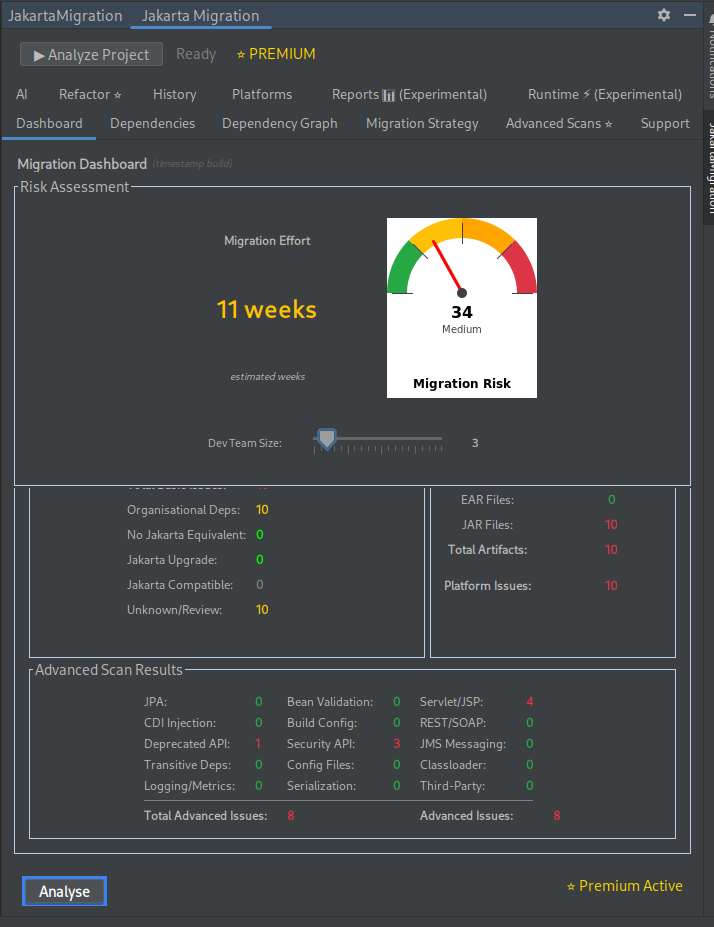
📊 Analyze Your Project
- Scan your entire codebase for
javax.*usage - Identify migration blockers and compatibility issues
- Estimate migration effort and risk
📦 Understand Dependencies
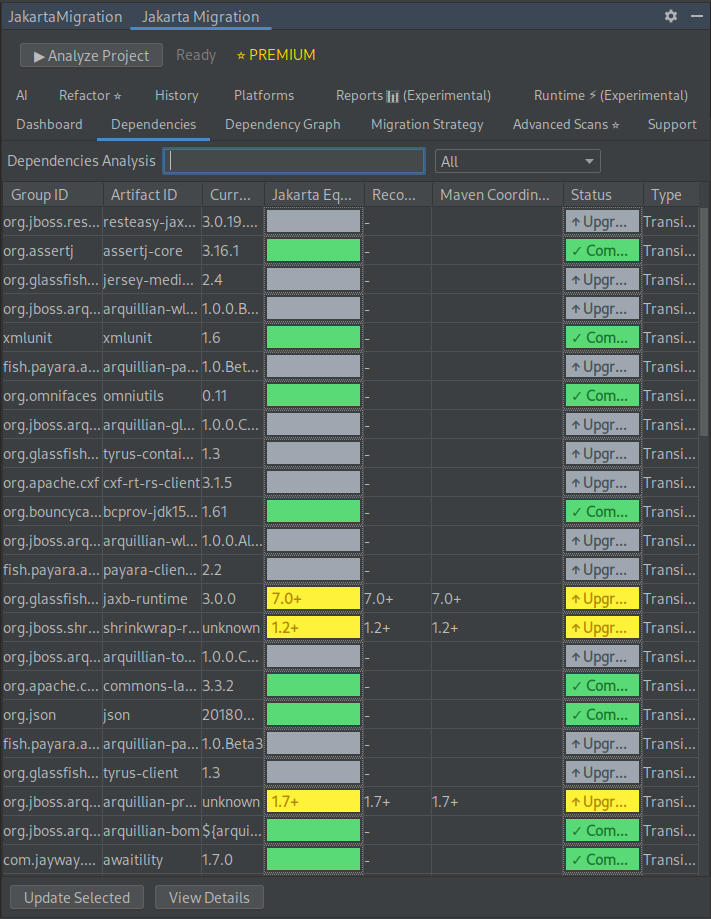
- Detect which dependencies are Jakarta-compatible
- Deep transitive scanning — find hidden
javax.*references in your full dependency tree - Get recommendations for compatible versions
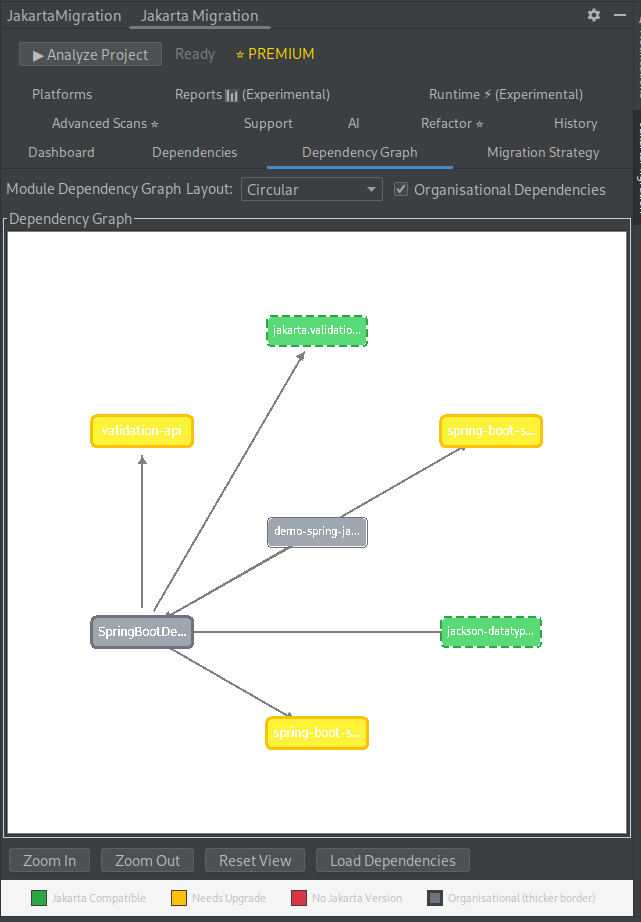
- Visualize module relationships with dependency graphs
🧠 Plan Your Migration
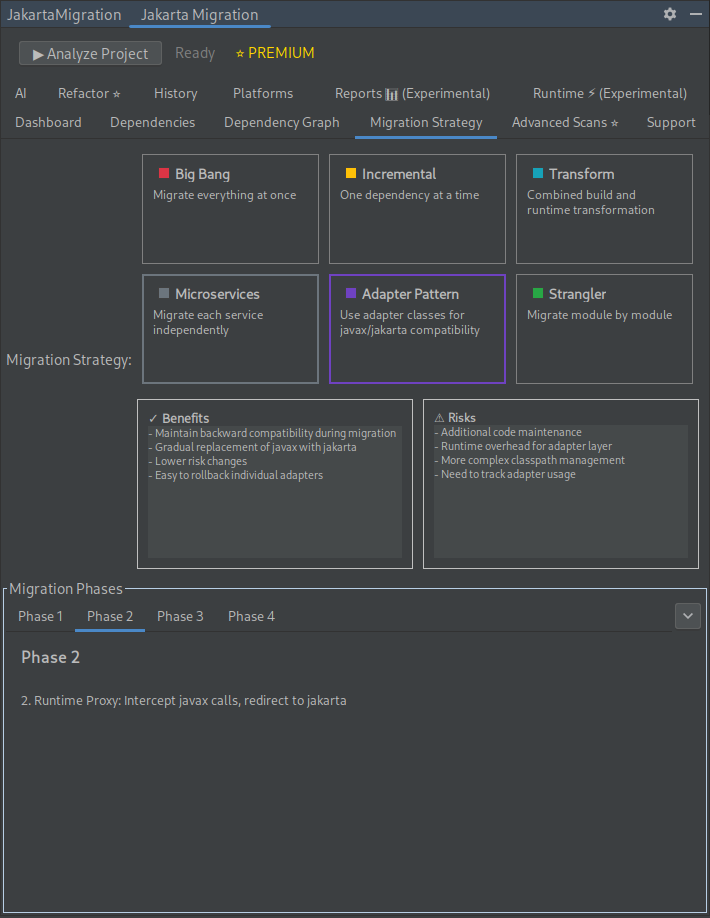
- Compare migration strategies
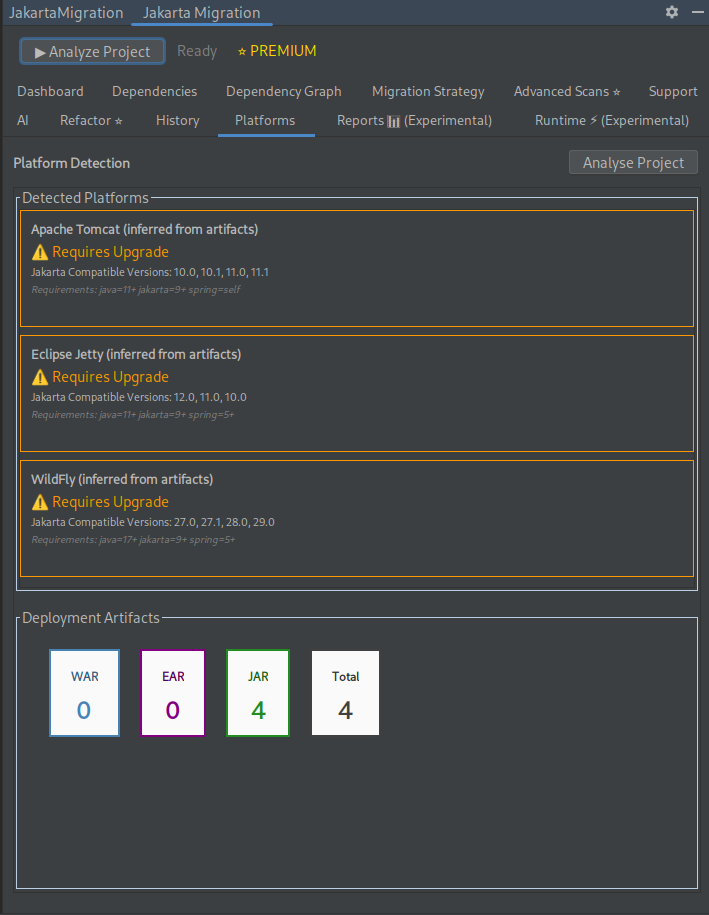
- Identify required platform upgrades (Spring, app servers, etc.)
✅ Validate Migration Readiness
- Enhanced Test Coverage Analysis: Detects integration tests that actually validate javax/jakarta compatibility
- Critical Risk Zone Detection: Identifies modules with migration issues AND insufficient test coverage
- Migration-Aware Confidence Scoring: Prioritizes tests that catch real migration issues over mocked unit tests
📄 Generate Professional Reports
- HTML-to-PDF Reports: Beautiful, professional reports with executive summaries
- Multiple Templates: Professional, Technical, and Minimal report styles
- Comprehensive Analysis: Dependencies, platforms, advanced scanning, and recommendations
- Make informed decisions before changing code
⚡ Refactor with Confidence
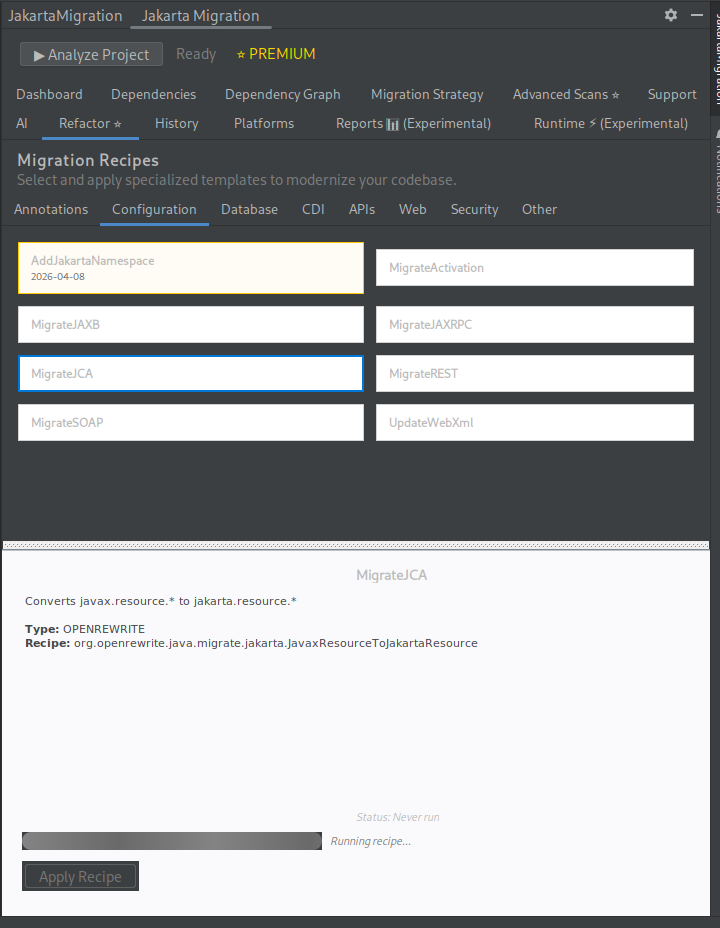
- Apply OpenRewrite-powered refactoring recipes
- Automatically transform
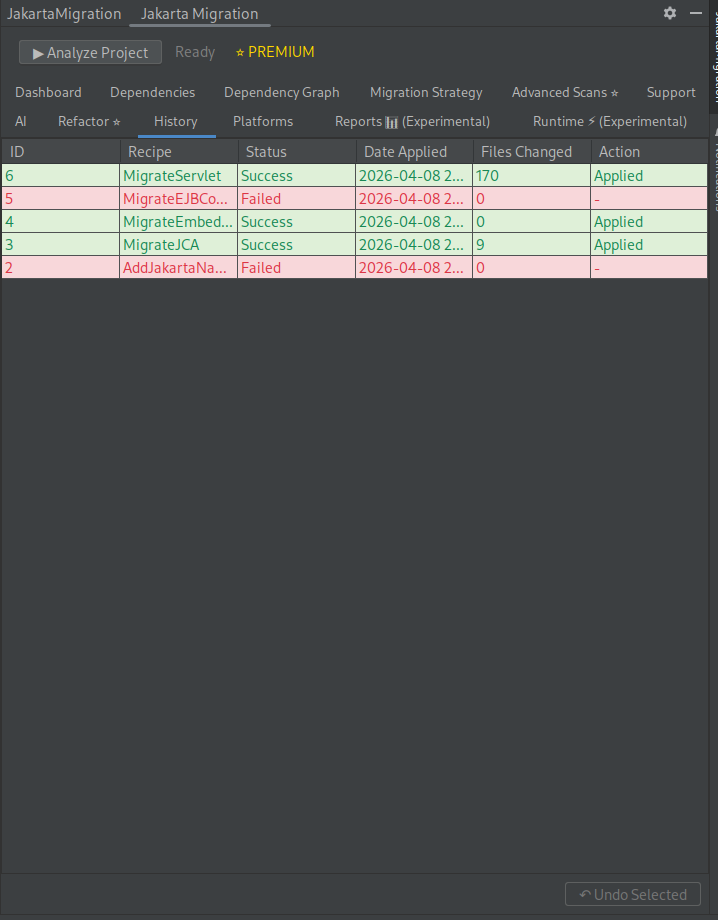
javax.*→jakarta.* - Undo changes with built-in history
🧪 Advanced Refactor (Premium)
- Build complex multi-step refactor sequences
- Test refactors in isolated sandboxed testcontainers before applying
- Experiment history — compare results, re-run, and clone past experiments
- Safely validate that refactors won't break your build
🤖 AI-Powered Capabilities
- MCP tools integrated with JetBrains AI Assistant
- Assist with migration decisions and code changes
🧪 Experimental Features
- Runtime Analysis – Detect runtime issues and suggest fixes
- Reports – Export migration analysis as PDF
🧰 Supported Technologies
- Java: 11, 17, 21, 25
- Build Tools: Maven, Gradle
- Frameworks: Spring Boot 3+, Spring Framework 6+, Jakarta EE 9+
- Application Servers: Tomcat 10+, WildFly 27+, Jetty 12+, Open Liberty 23+, Payara 7+, JBoss EAP 8+, WebSphere, WebLogic
- Jakarta APIs: Servlet, JSP, JPA, CDI, Bean Validation, JAX-RS, JAX-WS, JMS, WebSocket, JSON-B, JSON-P
🚀 Getting Started
- Run Analysis – Scan your project for
javax.*usage - Review Results – Understand risks and migration effort
- Plan Strategy – Choose the best migration approach
- Refactor – Apply automated OpenRewrite recipes
- Verify – Re-run analysis to confirm migration success
⚙️ Technical Details
- Built on the IntelliJ Platform
- Uses OpenRewrite for safe, automated transformations
- Performs static analysis across source code, dependencies, and configs
- Compatible with IntelliJ IDEA 2023.3+ (Community & Ultimate)
💡 Free vs Premium
Free
- Migration risk analysis
- Dependency scans
- Version recommendations
- Migration strategy insights
Premium
- One-click refactoring
- Advanced Refactor — test refactor sequences in sandboxed testcontainers
- Platform detection (frameworks, app servers)
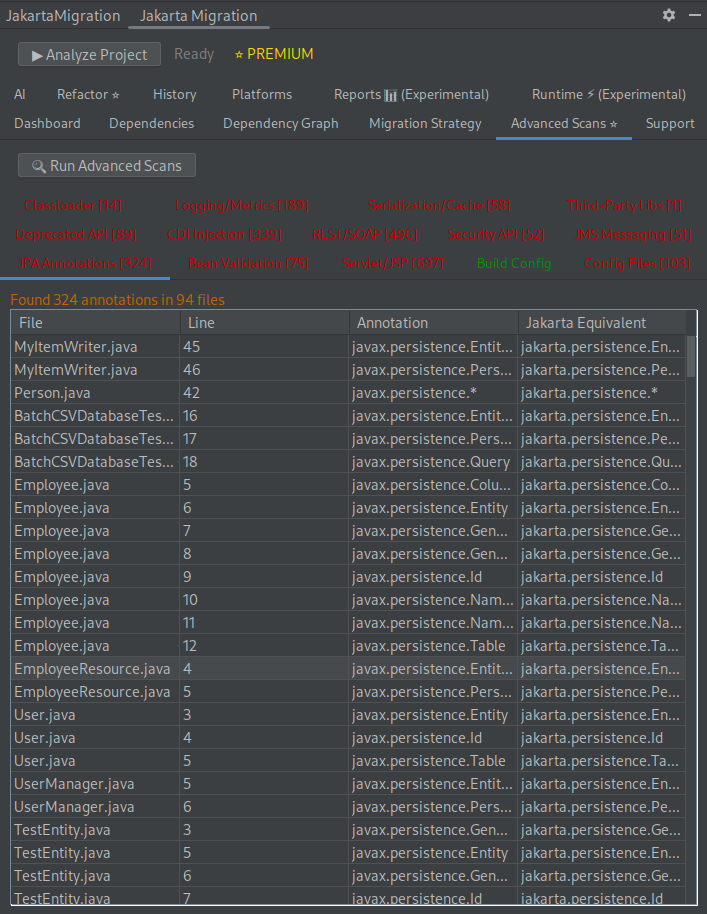
- Advanced scans and analysis
- PDF reports
- AI-assisted migration tools
🎯 Who This Is For
- Enterprise Java teams upgrading to Jakarta EE
- Developers maintaining legacy Java EE systems
- Teams migrating to Spring Boot 3+ or modern app servers
Technical Documentation
Screenshots
.gallery { display: flex; flex-wrap: wrap; gap: 10px; justify-content: center; } .gallery-item { width: 25%; /* Adjust based on desired columns */ box-sizing: border-box; } .gallery-item img { width: 100%; height: auto; object-fit: cover; border-radius: 8px; } @media (max-width: 768px) { .gallery-item { width: 50%; } } @media (max-width: 480px) { .gallery-item { width: 100%; } }