DICOM MCP Server
Enables AI assistants to query, read, and move data on DICOM servers like PACS and VNA.
DICOM MCP Server for Medical Imaging Systems 🏥



The dicom-mcp server enables AI assistants to query, read, and move data on DICOM servers (PACS, VNA, etc.).
🤝 Contribute • 📝 Report Bug •
---------------------------------------------------------------------
🧑⚕️ User: "Any significant findings in John Doe's previous CT report?"
🧠 LLM → ⚙️ Tools:
query_patients → query_studies → query_series → extract_pdf_text_from_dicom
💬 LLM Response: "The report from 2025-03-26 mentions a history of splenomegaly (enlarged spleen)"
🧑⚕️ User: "What's the volume of his spleen at the last scan and the scan today?"
🧠 LLM → ⚙️ Tools:
(query_studies → query_series → move_series → query_series → extract_pdf_text_from_dicom) x2
(The move_series tool sends the latest CT to a DICOM segmentation node, which returns volume PDF report)
💬 LLM Response: "last year 2024-03-26: 412cm³, today 2025-04-10: 350cm³"
---------------------------------------------------------------------
✨ Core Capabilities
dicom-mcp provides tools to:
- 🔍 Query Metadata: Search for patients, studies, series, and instances using various criteria.
- 📄 Read DICOM Reports (PDF): Retrieve DICOM instances containing encapsulated PDFs (e.g., clinical reports) and extract the text content.
- 📥 Download DICOM Files: Download DICOM instances from the server to a local directory using C-GET. Retrieve entire series or specific instances for local analysis and processing.
- ➡️ Send DICOM Images: Send series or studies to other DICOM destinations, e.g. AI endpoints for image segmentation, classification, etc.
- ⚙️ Utilities: Manage connections and understand query options.
🚀 Quick Start
📥 Installation
Install using uv or pip:
uv tool install dicom-mcp
Or by cloning the repository:
# Clone and set up development environment
git clone https://github.com/Y5ive9ine/dicom-mcp
cd dicom mcp

# Create and activate virtual environment
uv venv
source .venv/bin/activate

# Install with test dependencies
uv pip install -e ".[dev]"
⚙️ Configuration
dicom-mcp requires a YAML configuration file (config.yaml or similar) defining DICOM nodes and calling AE titles. Adapt the configuration or keep as is for compatibility with the sample ORTHANC Server.
nodes:
  main:
    host: "localhost"
    port: 4242
    ae_title: "ORTHANC"
    description: "Local Orthanc DICOM server"

current_node: "main"
calling_aet: "MCPSCU"
[!WARNING] DICOM-MCP is not meant for clinical use, and should not be connected with live hospital databases or databases with patient-sensitive data. Doing so could lead to both loss of patient data, and leakage of patient data onto the internet. DICOM-MCP can be used with locally hosted open-weight LLMs for complete data privacy.
(Optional) Sample ORTHANC server
If you don't have a DICOM server available, you can run a local ORTHANC server using Docker:
Clone the repository and install test dependencies pip install -e ".[dev]
cd tests
docker ocmpose up -d
cd ..
pytest # uploads dummy pdf data to ORTHANC server
UI at http://localhost:8042
🔌 MCP Integration
Add to your client configuration (e.g. claude_desktop_config.json):
{
  "mcpServers": {
    "dicom": {
      "command": "uv",
      "args": ["tool","dicom-mcp", "/path/to/your_config.yaml"]
    }
  }
}
For development:
{
    "mcpServers": {
        "arxiv-mcp-server": {
            "command": "uv",
            "args": [
                "--directory",
                "path/to/cloned/dicom-mcp",
                "run",
                "dicom-mcp",
                "/path/to/your_config.yaml"
            ]
        }
    }
}
🛠️ Tools Overview
dicom-mcp provides four categories of tools for interaction with DICOM servers and DICOM data.
🔍 Query Metadata
query_patients: Search for patients based on criteria like name, ID, or birth date.query_studies: Find studies using patient ID, date, modality, description, accession number, or Study UID.query_series: Locate series within a specific study using modality, series number/description, or Series UID.query_instances: Find individual instances (images/objects) within a series using instance number or SOP Instance UID
📄 Read DICOM Reports (PDF)
extract_pdf_text_from_dicom: Retrieve a specific DICOM instance containing an encapsulated PDF and extract its text content.
📥 Download DICOM Files
retrieve_dicom_instances: Download DICOM instances from the server to a local directory using C-GET. Retrieve entire series or specific instances for local analysis and processing.
➡️ Send DICOM Images
move_series: Send a specific DICOM series to another configured DICOM node using C-MOVE.move_study: Send an entire DICOM study to another configured DICOM node using C-MOVE.
⚙️ Utilities
list_dicom_nodes: Show the currently active DICOM node and list all configured nodes.switch_dicom_node: Change the active DICOM node for subsequent operations.verify_connection: Test the DICOM network connection to the currently active node using C-ECHO.get_attribute_presets: List the available levels of detail (minimal, standard, extended) for metadata query results.
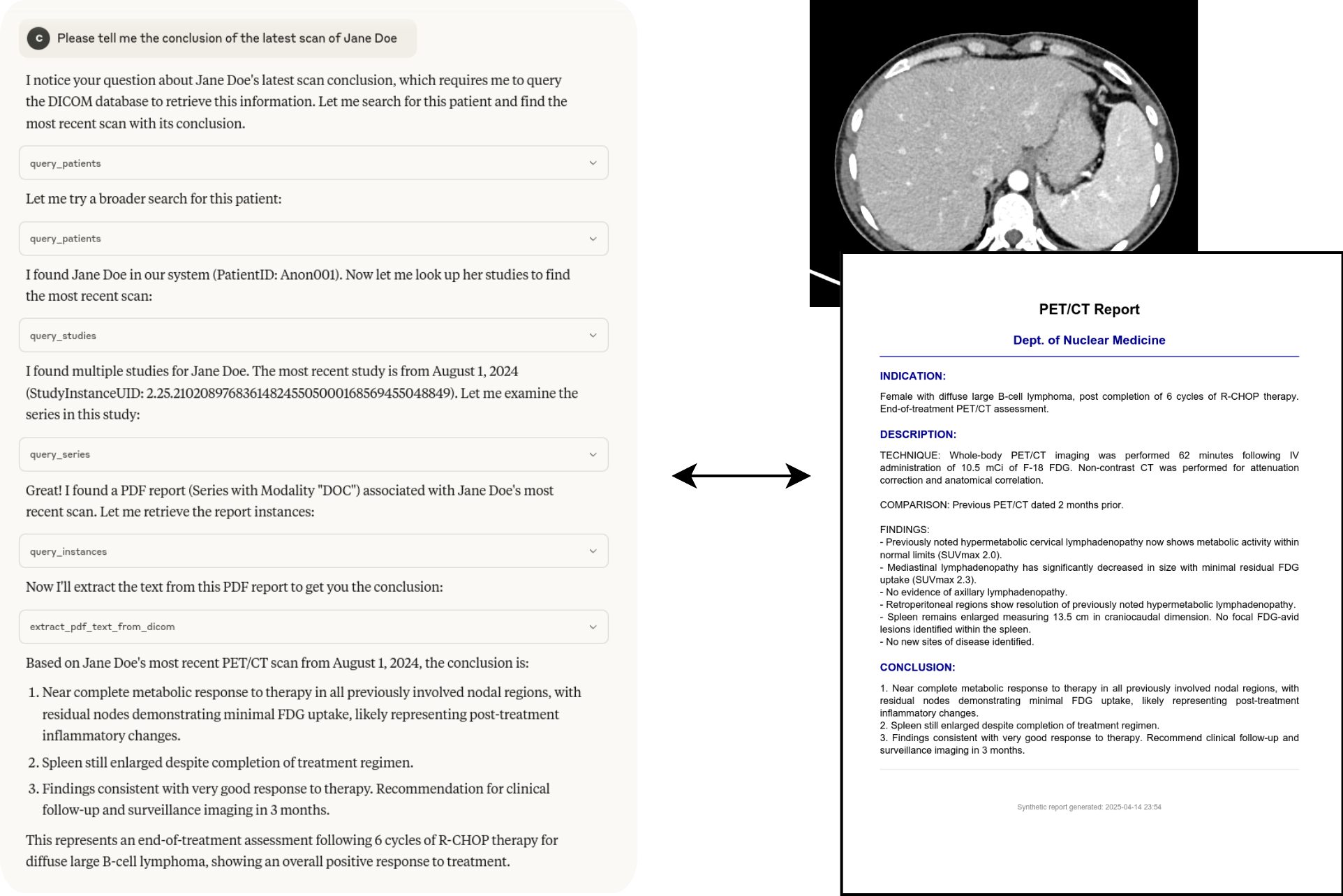
Example interaction
The tools can be chained together to answer complex questions:
📈 Contributing
Running Tests
Tests require a running Orthanc DICOM server. You can use Docker:
# Navigate to the directory containing docker-compose.yml (e.g., tests/)
cd tests
docker-compose up -d
Run tests using pytest:
# From the project root directory
pytest
Stop the Orthanc container:
cd tests
docker-compose down
Debugging
Use the MCP Inspector for debugging the server communication:
npx @modelcontextprotocol/inspector uv run dicom-mcp /path/to/your_config.yaml --transport stdio
🙏 Acknowledgments
- Built using pynetdicom
- Uses PyPDF2 for PDF text extraction
Usage Examples
Basic Patient Query
# Find all patients with name starting with "SMITH"
patients = query_patients(name_pattern="SMITH*")
Study Query with Date Range
# Find CT studies from January 2023
studies = query_studies(
    modality_in_study="CT",
    study_date="20230101-20230131"
)
Download DICOM Files
# Download entire series to local directory
result = retrieve_dicom_instances(
    series_instance_uid="1.2.840.113619.2.1.1.322.1600364094.412.2005",
    output_directory="/path/to/local/dicom/files"
)

# Download specific instance only
result = retrieve_dicom_instances(
    series_instance_uid="1.2.840.113619.2.1.1.322.1600364094.412.2005",
    sop_instance_uid="1.2.840.113619.2.1.1.322.1600364094.412.3001",
    output_directory="/path/to/local/dicom/files"
)

print(f"Downloaded {result['total_files']} files ({result['total_size_mb']} MB)")
print(f"Files saved to: {result['output_directory']}")

# Files will be named with meaningful information like:
# "12345_SMITH_20230215_CT_CHEST_AXIAL_Inst001.dcm"
# "12345_SMITH_20230215_CT_CHEST_AXIAL_Inst002.dcm"
Extract PDF Reports
# Extract text from a DICOM PDF report
result = extract_pdf_text_from_dicom(
    study_instance_uid="1.2.840.113619.2.1.1.322.1600364094.412.1009",
    series_instance_uid="1.2.840.113619.2.1.1.322.1600364094.412.2005",
    sop_instance_uid="1.2.840.113619.2.1.1.322.1600364094.412.3001"
)

if result["success"]:
    print("Report text:", result["text_content"])
相关服务器
OmniMem
A self-hosted MCP server that gives AI Agents persistent memory across sessions, projects, and machines.
CoinGecko MCP Server
Crypto prices, market data, and token metadata via CoinGecko.
AgentBazaar
A2A marketplace with 1800+ AI agents. Search, invoke, trade capabilities, datasets, prompts.
Geneva Forecasting MCP
MCP server that gives Claude and other AI assistants enterprise-grade time series forecasting powered by the Geneva Forecasting engine - the same forecasting engine shipped in Oracle products for 25+ years.
Nano Currency MCP Server
Send Nano currency and retrieve account and block information using the Nano node RPC.
Memory Bank MCP
A production-ready Model Context Protocol (MCP) server that provides a powerful, vector-native memory bank for AI agents. Built with the Protocol-Lattice Go Agent Framework, this server offers persistent, searchable, and shareable memory with multiple database backends.
sats4ai
Bitcoin-powered tools marketplace. Image, text, video, music, speech, 3D, file conversion, SMS — all via Lightning micropayments. No signup required.
GiveReady
Search 41,000+ verified nonprofits across 29 cause areas, submit enrichments back to thin profiles, and donate via x402 USDC with zero platform fees.
prediction-market-mcp
A simple MCP server that grabs prediction market data from polymarket, PredictIt, & Kalshi.
UN World Population Demographics
Global population data from 1950-2023. Fertility rates, life expectancy, mortality, and migration for 298 countries via MCP.