MCP-PDF2MD
一个基于MinerU API的高性能PDF转Markdown转换服务,支持本地文件和URL的批量处理。
文档
MCP-PDF2MD
MCP-PDF2MD Service
An MCP-based high-performance PDF to Markdown conversion service powered by MinerU API, supporting batch processing for local files and URL links with structured output.
Key Features
- Format Conversion: Convert PDF files to structured Markdown format.
- Multi-source Support: Process both local PDF files and URL links.
- Intelligent Processing: Automatically select the best processing method.
- Batch Processing: Support multi-file batch conversion for efficient handling of large volumes of PDF files.
- MCP Integration: Seamless integration with LLM clients like Claude Desktop.
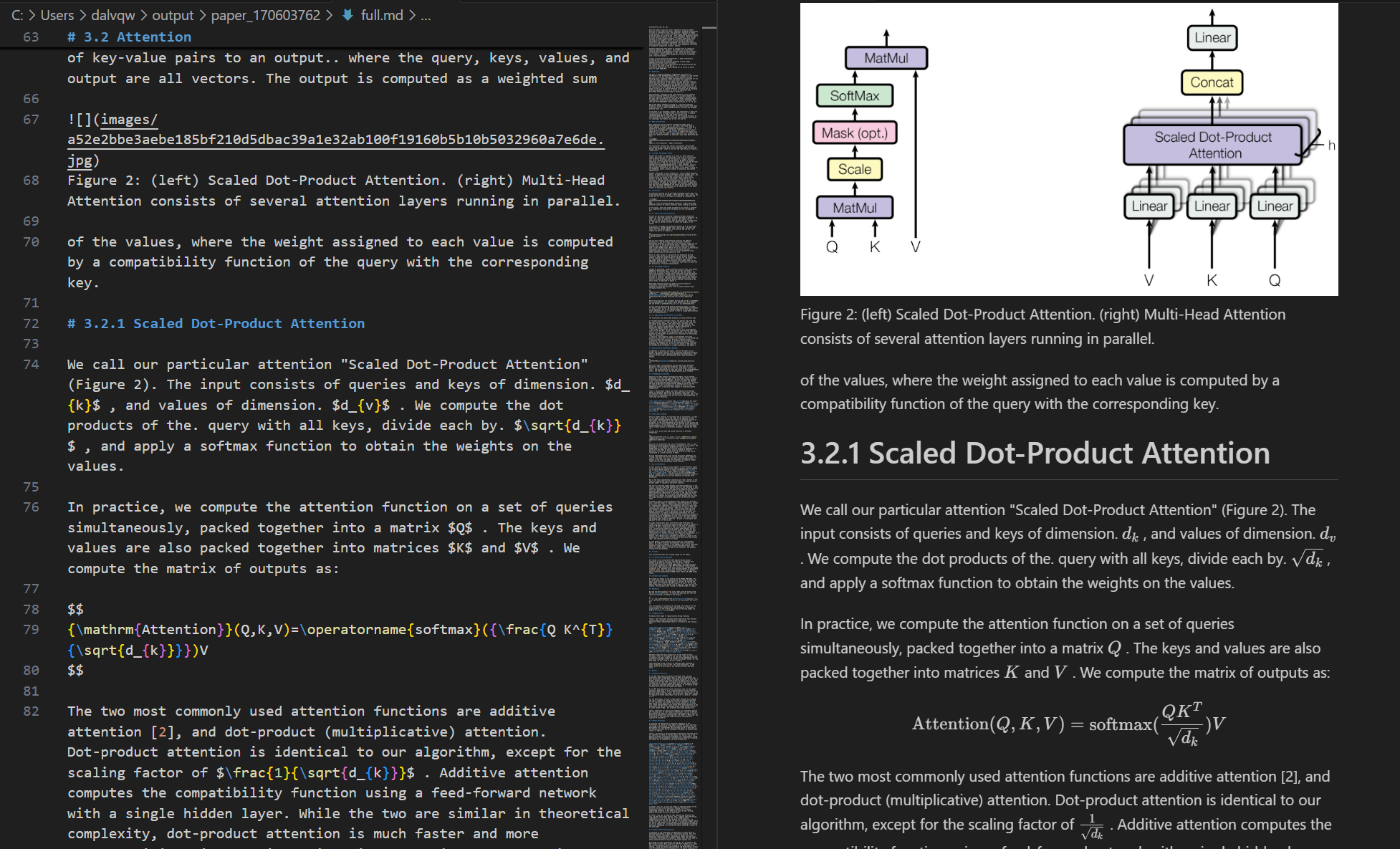
- Structure Preservation: Maintain the original document structure, including headings, paragraphs, lists, etc.
- Smart Layout: Output text in human-readable order, suitable for single-column, multi-column, and complex layouts.
- Formula Conversion: Automatically recognize and convert formulas in the document to LaTeX format.
- Table Extraction: Automatically recognize and convert tables in the document to structured format.
- Cleanup Optimization: Remove headers, footers, footnotes, page numbers, etc., to ensure semantic coherence.
- High-Quality Extraction: High-quality extraction of text, images, and layout information from PDF documents.
System Requirements
- Software: Python 3.10+
Quick Start
-
Clone the repository and enter the directory:
git clone https://github.com/FutureUnreal/mcp-pdf2md.git cd mcp-pdf2md -
Create a virtual environment and install dependencies:
Linux/macOS:
uv venv source .venv/bin/activate uv pip install -e .Windows:
uv venv .venv\Scripts\activate uv pip install -e . -
Configure environment variables:
Create a
.envfile in the project root directory and set the following environment variables:MINERU_API_BASE=https://mineru.net/api/v4/extract/task MINERU_BATCH_API=https://mineru.net/api/v4/extract/task/batch MINERU_BATCH_RESULTS_API=https://mineru.net/api/v4/extract-results/batch MINERU_API_KEY=your_api_key_here -
Start the service:
uv run pdf2md
Command Line Arguments
The server supports the following command line arguments:
Claude Desktop Configuration
Add the following configuration in Claude Desktop:
Windows:
{
    "mcpServers": {
        "pdf2md": {
            "command": "uv",
            "args": [
                "--directory",
                "C:\\path\\to\\mcp-pdf2md",
                "run",
                "pdf2md",
                "--output-dir",
                "C:\\path\\to\\output"
            ],
            "env": {
                "MINERU_API_KEY": "your_api_key_here"
            }
        }
    }
}
Linux/macOS:
{
    "mcpServers": {
        "pdf2md": {
            "command": "uv",
            "args": [
                "--directory",
                "/path/to/mcp-pdf2md",
                "run",
                "pdf2md",
                "--output-dir",
                "/path/to/output"
            ],
            "env": {
                "MINERU_API_KEY": "your_api_key_here"
            }
        }
    }
}
Note about API Key Configuration: You can set the API key in two ways:
- In the
.envfile within the project directory (recommended for development) - In the Claude Desktop configuration as shown above (recommended for regular use)
If you set the API key in both places, the one in the Claude Desktop configuration will take precedence.
MCP Tools
The server provides the following MCP tools:
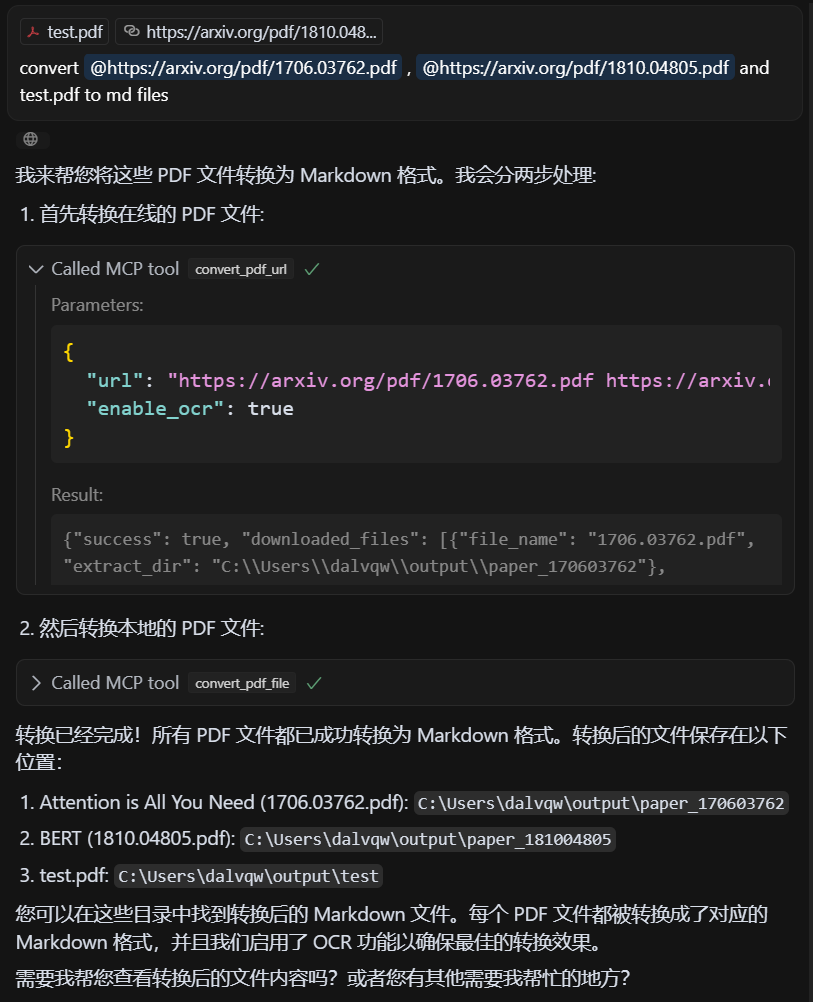
- convert_pdf_url: Convert PDF URL to Markdown
- convert_pdf_file: Convert local PDF file to Markdown
Getting MinerU API Key
This project relies on the MinerU API for PDF content extraction. To obtain an API key:
- Visit MinerU official website and register for an account
- After logging in, apply for API testing qualification at this link
- Once your application is approved, you can access the API Management page
- Generate your API key following the instructions provided
- Copy the generated API key
- Use this string as the value for
MINERU_API_KEY
Note that access to the MinerU API is currently in testing phase and requires approval from the MinerU team. The approval process may take some time, so plan accordingly.
Demo
Input PDF
Output Markdown
License
MIT License - see the LICENSE file for details.
Credits
This project is based on the API from MinerU.