Screen Control
Gives AI agents safe computer use on Windows: screen perception via OCR, single frames and a live MJPEG stream, plus safety-gated mouse, keyboard, window, virtual-desktop and game-mode control over a local token-authenticated HTTP API and MCP (16 tools).
Tài liệu
🖥️ Screen Control







A local remote-control system for AI agents: watch your computer's screen live and send mouse/keyboard commands to it. Everything runs on your own machine — no data ever leaves it, no cloud middleman.
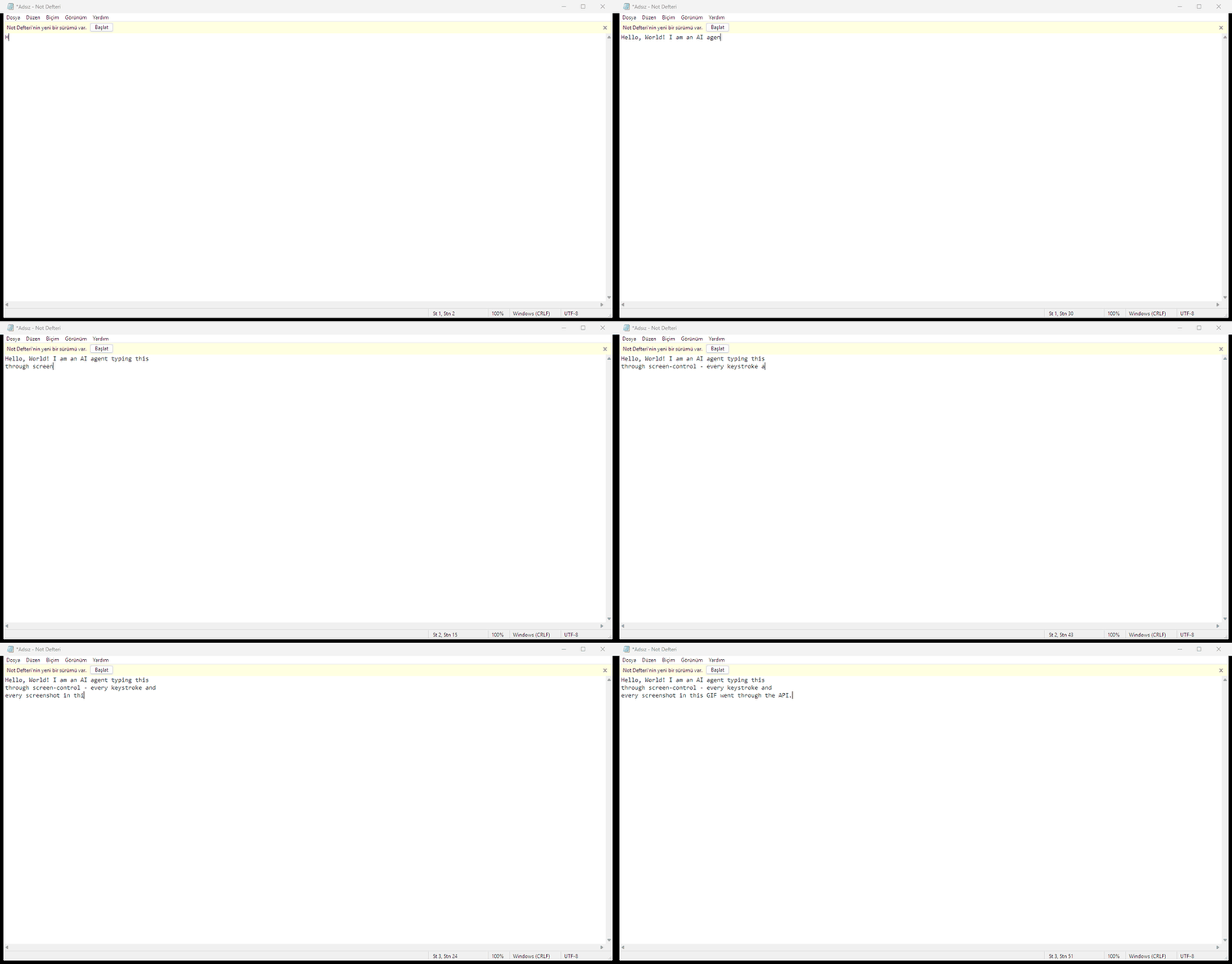
Every keystroke and every screenshot in this GIF went through the API — the agent never touched a physical keyboard.
Why Screen Control?
AI agents today can write code and call APIs — but they can't see or touch your desktop. Screen Control gives any agent general-purpose computer use over a clean, safety-gated HTTP/MCP interface:
- Perceive — OCR for text, single frames or a live MJPEG stream for vision-capable models, and a text-only diff endpoint for models that can't consume images at all.
- Act — absolute and relative mouse, Unicode-safe keyboard, window management, background (focus-free) control, virtual desktops.
- Stay safe — token auth, blocked deadly shortcuts, focus guard, a stuck-input watchdog and an emergency failsafe are all enforced server-side, no matter how confused the agent gets.
One process, zero configuration, works with any language that can speak HTTP — or natively through MCP in Claude Desktop, Cursor, VS Code and cloud agents.
Performance Is Agent-Bound
Screen Control is the perception and actuation layer — the eyes and hands. The effective speed and capability of any agent using it are bounded by that agent itself and by the environment it runs in:
- Thinking speed — one action per agent "turn": the perceive → plan → act → verify loop lives in the agent, so model inference latency and reasoning depth directly set the pace. The API itself adds only milliseconds per call.
- Context capacity — screen readings (OCR text, frames, diffs) consume the agent's context window; a larger window means more situational awareness before verification degrades.
- Runtime environment — network latency, MCP/HTTP round-trip overhead, tool-call limits and hosting constraints all stack on top of the loop.
In practice this means: the same repo makes a fast reasoning model fast and capable, and makes a slow model slow — the toolchain is not the bottleneck. Real-time or action-heavy tasks need an agent with fast inference and tight tool-loop latency; slower agents should prefer deliberate, verification-heavy tasks.
Table of Contents
- Why Screen Control?
- Features
- Architecture
- Installation
- Quick Start
- API Reference
- 🤖 For AI Agents
- MCP Support (One-Click Cloud Agents)
- Security Model
- Game Mode Guide
- Vision Access Guide
- Troubleshooting
- Testing
- Contributing
- License
Features
| Feature | Description |
|---|---|
| 🖼️ Live screen feed | Continuously refreshing screenshot in the browser |
| 🖱️ Mouse control | Click, right-click, double-click, scroll, drag & drop via live screenshot |
| ⌨️ Keyboard control | Text typing (Unicode/Turkish included, layout-independent), keys and shortcuts (Ctrl+C, Alt+Tab…) |
| 👁️ OCR | Converts on-screen text to machine-readable format |
| 📷 Vision access | Raw-pixel paths for image-capable models: single frames, MJPEG stream, text-based motion detection |
| 🪟 Window management | List, focus, safe close (WM_CLOSE), kill (task-manager style) |
| 🖥️ Focus-free control | Read/write background windows via PostMessage without stealing focus |
| 🎮 Game mode | Camera look via relative mouse movement, hold-to-move keys |
| 🔐 Token auth | Every request requires X-Auth-Token (CSRF protection) |
| 🦺 Stuck-input watchdog | Auto-releases held keys after 30 s of inactivity |
| 🛟 Failsafe | Cursor to top-left corner aborts all commands (disabled in game mode) |
Architecture
┌─────────────────────────────────────────────────────────┐
│                    Browser (Web UI)                      │
│  ┌──────────┐  ┌──────────┐  ┌────────────────────────┐ │
│  │  Live     │  │  Control  │  │  Windows / Game Mode   │ │
│  │  View     │  │  Panel    │  │  Panel                 │ │
│  └────┬─────┘  └────┬─────┘  └───────────┬────────────┘ │
│       │              │                     │              │
└───────┼──────────────┼─────────────────────┼──────────────┘
        │              │                     │
        ▼              ▼                     ▼
┌─────────────────────────────────────────────────────────┐
│                  HTTP API (Flask)                        │
│                  127.0.0.1:8745                           │
│                                                         │
│  /api/screenshot    /api/mouse     /api/key              │
│  /api/vision/*      /api/ocr       /api/window           │
│  /api/game          /api/held      /api/release_all      │
│  /api/windows       /api/desktops  /api/desktop          │
│                                                         │
│  ┌─────────────┐  ┌──────────────┐  ┌──────────────┐   │
│  │ Auth Layer  │  │  Watchdog    │  │  OCR Engine  │   │
│  │ (token)     │  │  (30s auto)  │  │  (RapidOCR)  │   │
│  └─────────────┘  └──────────────┘  └──────────────┘   │
└─────────────────────────────────────────────────────────┘
        │              │                     │
        ▼              ▼                     ▼
┌─────────────────────────────────────────────────────────┐
│                  control.py (Core)                        │
│                                                         │
│  Screen:  mss (fast capture), PIL (processing)          │
│  Mouse:   pyautogui (absolute), SendInput (relative)    │
│  Keyboard: pyautogui + SendInput+KEYEVENTF_UNICODE      │
│  Windows: Win32 API (EnumWindows, SetForegroundWindow)   │
│  Background: PrintWindow (capture), PostMessage (input)  │
│  Virtual Desktops: pyvda                                 │
│  Game Mode: ClipCursor + MOUSE_MOVE_RELATIVE             │
└─────────────────────────────────────────────────────────┘
┌──────────────────────────────────────────────┐
│              backends/ (pluggable)           │
│  WindowsBackend  │ LinuxBackend │ MacOSBackend│
│      (full)      │   (stub)     │   (stub)   │
└──────────────────────────────────────────────┘
Coordinates & Concurrency
Per-Monitor DPI awareness. control.py calls
SetProcessDpiAwarenessContext(PER_MONITOR_AWARE_V2) at import time —
before the pyautogui import, because pyautogui touches coordinate APIs
during import and would otherwise lock the process to the interpreter
manifest's default (system-aware). With PMv2 active, every coordinate in the
system is a physical pixel end to end: mss capture, OCR bounding boxes,
pyautogui/SendInput clicks, ClipCursor. On High-DPI displays (125%/150%
scaling) nothing drifts between what OCR reports and where the mouse clicks.
Lock architecture. The server uses two independent locks instead of one global lock:
| Lock | Protects | Endpoints |
|---|---|---|
_input_lock | mouse, keyboard, game mode, window ops | /api/mouse, /api/key, /api/game, /api/window/post, ... |
_read_lock | capture, OCR, vision, enumeration | /api/screenshot, /api/ocr, /api/vision/*, /api/windows, ... |
A slow OCR (3–5 s on a busy screen) no longer freezes concurrent screenshot or vision reads — reads queue behind reads, inputs behind inputs.
Live-Loop Working Principle
This system is designed for a live perceive-act loop, not pre-written command chains:
- READ — OCR or vision reads the screen before and after every action
- ONE ACTION — each round sends a single command
- VERIFY — acceptance is "it appeared on screen", not "I sent it"
- ADAPT — if verification fails, the next step changes based on what is actually seen
This is enforced by the expect_hwnd guard: typing is refused (409) if
the foreground window doesn't match the target.
Installation
cd screen-control
pip install -r requirements.txt
Requirements
| Package | Purpose | Required? |
|---|---|---|
mss | Fast screen capture | ✅ Yes |
pyautogui | Mouse/keyboard control | ✅ Yes |
pyvda | Virtual desktop management | ✅ Yes |
flask | HTTP server | ✅ Yes |
Pillow | Image processing | ✅ Yes |
rapidocr-onnxruntime | OCR (screen text reading) | ⚠️ Optional |
Note: The OCR package is large and may take a while to install. If it fails, everything else still works — only the OCR feature is unavailable.
System Requirements
- OS: Windows 10/11 (x64)
- Python: 3.10+
- Display: Any resolution; the system adapts automatically
Quick Start
# 1. Start the server
cd screen-control
python server.py

# 2. Open in browser
#    http://127.0.0.1:8745

# 3. Or control via API
TOKEN=$(cat .token)
curl -H "X-Auth-Token: $TOKEN" http://127.0.0.1:8745/api/screenshot -o screen.jpg
API Reference
Capabilities
Returns the active backend name and what it can do. Agents should call this first (see ROADMAP.md for the multi-platform plan).
GET /api/capabilities
→ {"ok": true, "backend": "windows",
   "capabilities": {"screen_capture": true, "game_mode": true, ...}}
Feature values: true (supported), false (absent), null (unknown —
stub backend), "optional" (depends on an optional dependency).
Platform Support Matrix
| Capability | Windows | Linux X11 | Linux Wayland | macOS |
|---|---|---|---|---|
| Screen capture | Full | Full | Portal-dependent | Permission required |
| OCR | Full/optional | Full/optional | Full/optional | Full/optional |
| Mouse control | Full | Full | Restricted | Accessibility permission |
| Keyboard control | Full | Full | Restricted | Accessibility permission |
| Window enumeration | Full | WM-dependent | Limited | Accessibility/API-dependent |
| Background input | Strong | WM/app-dependent | Usually unavailable | Limited |
| Virtual desktops | Supported | DE/WM-dependent | DE/WM-dependent | Spaces-specific |
| Game mode | Supported | Experimental | Limited | Experimental |
Linux and macOS backends are currently fail-closed stubs: every operation returns
BACKEND_UNAVAILABLE(501) until implemented (ROADMAP Phases 5–7). Windows is the reference backend.
Authentication
Every request must include the X-Auth-Token header. The token is
generated on each server start and written to .token.
TOKEN=$(cat .token)
| Code | Meaning |
|---|---|
| 401 | Missing or invalid token |
| 415 | POST without Content-Type: application/json |
Token bootstrap (for the bundled web UI):
GET /token
→ {"ok": true, "token": "abc123..."}
The
/tokenendpoint is safe: Same-Origin Policy prevents foreign pages from reading it.
Screen Capture
GET /api/screenshot
Returns a JPEG screenshot.
| Parameter | Type | Default | Description |
|---|---|---|---|
monitor | int | 1 | Monitor index |
region | string | — | x,y,w,h sub-region |
curl -H "X-Auth-Token: $TOKEN" -o screen.jpg http://127.0.0.1:8745/api/screenshot
curl -H "X-Auth-Token: $TOKEN" "http://127.0.0.1:8745/api/screenshot?region=0,0,800,600"
GET /api/info
Returns screen dimensions and system state.
{"ok": true, "width": 1920, "height": 1080, "ocr_available": true,
 "failsafe": true, "game_mode": false}
Mouse Control
POST /api/mouse
| action | Required params | Optional params | Description |
|---|---|---|---|
move | x, y | duration (default 0.15) | Move cursor to absolute position |
click | x, y | button (left/right), clicks (default 1) | Click at position |
scroll | clicks | x, y | Scroll wheel (positive=up) |
drag | x1, y1, x, y | duration, button | Drag between two points |
down | button (default "left") | — | Press and hold mouse button |
up | button (default "left") | — | Release held mouse button |
# Click at center of screen
curl -X POST http://127.0.0.1:8745/api/mouse -H "X-Auth-Token: $TOKEN" \
  -H "Content-Type: application/json" \
  -d '{"action":"click","x":960,"y":540,"button":"left"}'

# Right-click
curl -X POST http://127.0.0.1:8745/api/mouse -H "X-Auth-Token: $TOKEN" \
  -H "Content-Type: application/json" \
  -d '{"action":"click","button":"right","x":960,"y":540}'

# Scroll down
curl -X POST http://127.0.0.1:8745/api/mouse -H "X-Auth-Token: $TOKEN" \
  -H "Content-Type: application/json" \
  -d '{"action":"scroll","clicks":-3}'
Keyboard Control
POST /api/key
| action | Required params | Description |
|---|---|---|
press | key | Press and release a key |
down | key | Hold a key down (tracked for watchdog) |
up | key | Release a held key |
hotkey | keys (array) | Key combination (e.g. ["ctrl","c"]) |
type | text | Type text (Unicode, layout-independent) |
| Optional param | Default | Description |
|---|---|---|
expect_hwnd | — | Window handle to verify focus (409 if mismatch) |
interval | 0.03 | Delay between characters for type |
# Press Enter
curl -X POST http://127.0.0.1:8745/api/key -H "X-Auth-Token: $TOKEN" \
  -H "Content-Type: application/json" -d '{"action":"press","key":"enter"}'

# Ctrl+C
curl -X POST http://127.0.0.1:8745/api/key -H "X-Auth-Token: $TOKEN" \
  -H "Content-Type: application/json" -d '{"action":"hotkey","keys":["ctrl","c"]}'

# Type text (Turkish characters supported)
curl -X POST http://127.0.0.1:8745/api/key -H "X-Auth-Token: $TOKEN" \
  -H "Content-Type: application/json" -d '{"action":"type","text":"Merhaba dünya"}'

# Hold W key down (for walking in games)
curl -X POST http://127.0.0.1:8745/api/key -H "X-Auth-Token: $TOKEN" \
  -H "Content-Type: application/json" -d '{"action":"down","key":"w"}'
OCR (Screen Reading)
POST /api/ocr
Converts on-screen text to machine-readable format.
| Param | Type | Default | Description |
|---|---|---|---|
region | array | — | [x, y, w, h] sub-region (faster) |
{
  "ok": true,
  "text": "Hello World\nFile Edit View",
  "lines": ["Hello World", "File Edit View"],
  "items": [
    {"text": "Hello World", "x": 960, "y": 40},
    {"text": "File Edit View", "x": 100, "y": 15}
  ]
}
# Full screen OCR
curl -X POST http://127.0.0.1:8745/api/ocr -H "X-Auth-Token: $TOKEN" \
  -H "Content-Type: application/json" -d '{}'

# Region-only (faster, ~10x for small regions)
curl -X POST http://127.0.0.1:8745/api/ocr -H "X-Auth-Token: $TOKEN" \
  -H "Content-Type: application/json" -d '{"region":[0,0,800,100]}'
Vision Access (Image Models)
Three endpoints for models that can consume images:
| Endpoint | Description |
|---|---|
GET /api/vision/frame | Single JPEG frame (raw or base64) |
GET /api/stream | MJPEG live stream |
POST /api/vision/diff | Text-based motion detection (no vision needed) |
GET /api/vision/frame
| Param | Default | Description |
|---|---|---|
scale | 1.0 | Downscale factor (0.5 = half size) |
gray | 0 | 1 for greyscale |
quality | 80 | JPEG quality (20-95) |
format | — | base64 for JSON response |
region | — | x,y,w,h sub-region |
# Half-size greyscale frame as base64 (for text-only models)
curl "http://127.0.0.1:8745/api/vision/frame?scale=0.5&gray=1&format=base64" \
  -H "X-Auth-Token: $TOKEN"
GET /api/stream
MJPEG live stream. Drop into <img src> or consume frame-by-frame.
| Param | Default | Description |
|---|---|---|
fps | 10 | Frames per second (1-30) |
quality | 70 | JPEG quality |
scale | 1.0 | Downscale factor |
region | — | x,y,w,h sub-region |
POST /api/vision/diff
Text-based motion detection — no vision model required.
| Body | Description |
|---|---|
{} | Compare against last stored frame |
{"grab":"gray"} | Store current frame for next comparison |
{"b64_prev":"..."} | Compare against provided previous frame |
{
  "ok": true,
  "changed": true,
  "changed_pct": 12.5,
  "bbox": [100, 200, 400, 350],
  "tiles": [
    {"row": 2, "col": 4, "pct": 35.2, "center": [1000, 390]}
  ]
}
Window Management
GET /api/windows
List all visible windows.
{
  "ok": true,
  "windows": [
    {
      "hwnd": 123456,
      "title": "My Application",
      "process": "app.exe",
      "pid": 7890,
      "focused": true,
      "rect": [0, 0, 1920, 1080],
      "desktop": 1
    }
  ]
}
POST /api/window
| action | Required | Optional | Description |
|---|---|---|---|
focus | hwnd | — | Bring window to foreground |
close | hwnd | expect_title, expect_process | Safe close via WM_CLOSE |
kill | hwnd, pid | — | Force kill (task-manager style) |
topmost | hwnd | — | Set always-on-top |
untopmost | hwnd | — | Remove always-on-top |
maximize | hwnd | — | Maximise window |
# Focus a window
curl -X POST http://127.0.0.1:8745/api/window -H "X-Auth-Token: $TOKEN" \
  -H "Content-Type: application/json" -d '{"hwnd":12345,"action":"focus"}'

# Safe close (with title verification)
curl -X POST http://127.0.0.1:8745/api/window -H "X-Auth-Token: $TOKEN" \
  -H "Content-Type: application/json" \
  -d '{"action":"close","hwnd":12345,"expect_title":"Notepad"}'

# Kill process
curl -X POST http://127.0.0.1:8745/api/window -H "X-Auth-Token: $TOKEN" \
  -H "Content-Type: application/json" -d '{"action":"kill","hwnd":12345,"pid":7890}'
Focus-Free (Background) Control
Read and control windows without stealing focus — the user keeps working on their main desktop.
GET /api/window/capture
Capture a window via PrintWindow (works even on another virtual desktop).
| Param | Description |
|---|---|
hwnd (required) | Window handle |
client | 1 = client area only |
ocr | 1 = return OCR text instead of image |
# Capture window as PNG
curl "http://127.0.0.1:8745/api/window/capture?hwnd=12345" \
  -H "X-Auth-Token: $TOKEN" -o window.png

# Capture + OCR in one call
curl "http://127.0.0.1:8745/api/window/capture?hwnd=12345&ocr=1" \
  -H "X-Auth-Token: $TOKEN"
POST /api/window/post
Send input to a window, choosing the delivery path automatically.
| action | Description |
|---|---|
type | Type text (Unicode-safe) |
key | Send a key press |
hotkey | Send a key combination |
click | Click at client coordinates |
scroll | Scroll the window |
drag | Drag inside the window |
Optional mode parameter controls routing:
| mode | Behavior |
|---|---|
auto (default) | Decided by input-mode probe (see below) |
background | Force PostMessage path (window keeps focus/z-order) |
focused | Force focus + SendInput path |
# Type into a background Notepad
curl -X POST http://127.0.0.1:8745/api/window/post -H "X-Auth-Token: $TOKEN" \
  -H "Content-Type: application/json" \
  -d '{"hwnd":12345,"action":"type","text":"Hello from background!"}'
Routing rules (mode=auto):
postmessage— classic Win32 app: background PostMessage, no focus change.uia— WinUI/UWP/XAML surface (single DirectX canvas, no Win32 child controls): posted messages are silently swallowed, so the window is focused and the action is replayed through SendInput (client coords converted to screen). This is the documented fallback for modern apps.focused— window is already foreground: focused SendInput path.invalid— HTTP 409; not a reachable top-level window.
GET /api/window/input-mode
Classify how a window receives input before posting to it. Returns one of
focused | postmessage | uia | invalid.
curl "http://127.0.0.1:8745/api/window/input-mode?hwnd=12345" \
  -H "X-Auth-Token: $TOKEN"
WinUI note: New Notepad (and other XAML-hosted apps) has no classic child Edit control to post to — the whole UI is one DirectX surface.
input-modereportsuiafor these;/api/window/postthen automatically uses the focused SendInput path./api/window/childrenremains useful for classic apps with real child controls.
GET /api/window/children
List child controls of a window (class name + title + hwnd).
curl "http://127.0.0.1:8745/api/window/children?hwnd=12345" -H "X-Auth-Token: $TOKEN"
Virtual Desktops
GET /api/desktops
List all virtual desktops.
POST /api/desktop
| action | Params | Description |
|---|---|---|
switch | number | Switch to desktop N |
create | — | Create a new desktop |
curl http://127.0.0.1:8745/api/desktops -H "X-Auth-Token: $TOKEN"

curl -X POST http://127.0.0.1:8745/api/desktop -H "X-Auth-Token: $TOKEN" \
  -H "Content-Type: application/json" -d '{"action":"switch","number":2}'
Game Mode
| action | Params | Description |
|---|---|---|
start | sensitivity (default 12) | Lock cursor to center, enable game input |
move | dx, dy, sensitivity | Rotate camera (relative mouse) |
stop | — | Release cursor + all held input |
heartbeat | — | Keep-alive for long holds |
# Start game mode
curl -X POST http://127.0.0.1:8745/api/game -H "X-Auth-Token: $TOKEN" \
  -H "Content-Type: application/json" -d '{"action":"start","sensitivity":12}'

# Look right
curl -X POST http://127.0.0.1:8745/api/game -H "X-Auth-Token: $TOKEN" \
  -H "Content-Type: application/json" -d '{"action":"move","dx":50,"dy":0}'

# Hold W to walk forward
curl -X POST http://127.0.0.1:8745/api/key -H "X-Auth-Token: $TOKEN" \
  -H "Content-Type: application/json" -d '{"action":"down","key":"w"}'

# ... later ...
curl -X POST http://127.0.0.1:8745/api/key -H "X-Auth-Token: $TOKEN" \
  -H "Content-Type: application/json" -d '{"action":"up","key":"w"}'

# Stop game mode
curl -X POST http://127.0.0.1:8745/api/game -H "X-Auth-Token: $TOKEN" \
  -H "Content-Type: application/json" -d '{"action":"stop"}'
Safety Endpoints
GET /api/held
Returns currently held keys/buttons and watchdog status.
{
  "ok": true,
  "keys": ["w", "shift"],
  "buttons": ["left"],
  "game_mode": true,
  "idle_seconds": 5.2,
  "watchdog_count": 0,
  "last_watchdog": null
}
POST /api/release_all
Emergency: release everything (held keys, mouse buttons, game-mode cursor lock).
curl -X POST http://127.0.0.1:8745/api/release_all -H "X-Auth-Token: $TOKEN" \
  -H "Content-Type: application/json" -d '{}'
🤖 For AI Agents
A dedicated, comprehensive guide for AI agents (LLMs, vision models, automation frameworks) is available in AGENT_GUIDE.md.
It covers:
- Perceive-act loop (read → plan → act → verify)
- Focus guard (
expect_hwnd) to prevent wrong-window accidents - App automation and game control workflows
- Vision access for image-capable models
- Text-based motion detection
- Bandwidth optimization
- Complete curl examples
MCP Support (One-Click Cloud Agents)
Model Context Protocol (MCP) turns this project into a plug-and-play toolbox for any MCP-capable agent: Claude Desktop, Claude Code, Cursor, VS Code Copilot Agent mode, custom cloud agents — no custom glue code, no curl scripts. The agent discovers and calls the tools natively.
How it works
MCP agent (cloud or desktop)
        │  MCP protocol (stdio or streamable-HTTP)
        ▼
  mcp_server.py   ← thin wrapper: tools → HTTP calls, token auto-read
        │  REST + X-Auth-Token (localhost only)
        ▼
  server.py       ← the single source of truth:
                    auth, locks, watchdog, focus guard, all safety rules
mcp_server.py adds no new powers — every safety mechanism
(auth token, input/read locks, watchdog, Alt+F4 block, focus guard,
failsafe) stays enforced by server.py.
Setup
pip install mcp            # optional dependency (see requirements.txt)
python server.py           # start the REST server first (it writes .token)
The MCP server auto-reads the token from .token (or the
SCREEN_CONTROL_TOKEN env var) — zero configuration.
Desktop agents (stdio transport)
Claude Desktop — claude_desktop_config.json:
{
  "mcpServers": {
    "screen-control": {
      "command": "python",
      "args": ["C:/path/to/screen-control/mcp_server.py"]
    }
  }
}
Claude Code: claude mcp add screen-control -- python C:/path/to/screen-control/mcp_server.py
Cursor / VS Code: add the same entry to their MCP config files.
Remote / cloud agents (streamable-HTTP transport)
python mcp_server.py --http --port 8751
# MCP endpoint: http://127.0.0.1:8751/mcp
The HTTP transport is token-protected: every request must carry the
X-Auth-Token header (same token as the REST server). Query-string tokens
(?token=...) are rejected by design — URLs leak into proxy/tunnel
logs, browser history and shared links, and this token grants full desktop
control. Clients that cannot send custom headers should run a local stdio
mcp_server.py instead. Only GET /health is open, for liveness probes.
DNS-rebinding protection is disabled on this transport deliberately —
tunneled requests arrive with a foreign Host header, and the rebinding
threat is already covered by the token guard.
For a cloud agent, expose it through a tunnel:
cloudflared tunnel --url http://127.0.0.1:8751
# → prints a https://<random>.trycloudflare.com URL
Then configure the agent's MCP connection with <tunnel-url>/mcp plus the
token from .token as a header (X-Auth-Token).
Headerless connectors (scoped keys)
For clients that cannot send custom headers (e.g. web connectors that only take an endpoint URL), create a scoped API key — a persistent, optionally time-limited credential — and embed it in the URL path:
# Create a 24-hour scoped key (requires the server to be running)
curl -X POST http://127.0.0.1:8745/api/keys -H "X-Auth-Token: $TOKEN" \
  -H "Content-Type: application/json" \
  -d '{"action":"create","name":"spark","expires_in_hours":24}'

# Connector endpoint becomes:
#   https://<tunnel-url>/mcp/<scoped-key>
Design guarantees (SC-06):
- The master session token is refused in URLs (403) — only scoped keys may travel there
- Scoped keys expire automatically; expired keys authenticate nothing
- Scoped keys are revocable by name at any moment via
POST /api/keys({"action":"revoke","name":"spark"}) — revocation takes effect immediately on every endpoint - The
.apikeysfile stores only SHA-256 hashes, never raw keys
⚠️ A tunnel exposes PC control to the internet. Keep the token secret, prefer short-lived tunnels and scoped keys for headerless connectors, and stop the server when not in use.
One-Command Startup (launcher + auto-tunnel)
start-server.bat automates the whole cloud setup and prints everything
your cloud agent needs, ready to paste:
- Downloads
cloudflared.exeif missing (portable, no admin required) - Stops leftover instances from a previous run
- Starts the REST server (port 8745) and the MCP HTTP server (port 8751)
- Waits until both are healthy (
/tokenand/healthprobes) - Starts a cloudflared quick tunnel, extracts its public URL from
tunnel.log, and prints the summary:
 ============================================================
  ALL SYSTEMS RUNNING
 ============================================================
  Local REST API  : http://127.0.0.1:8745
  Local MCP       : http://127.0.0.1:8751/mcp
  Public MCP URL  : https://<random>.trycloudflare.com/mcp

  ------------------------------------------------------------
  PASTE INTO YOUR CLOUD AGENT  (MCP connector settings)
  ------------------------------------------------------------
  Endpoint : https://<random>.trycloudflare.com/mcp
  Header   : X-Auth-Token: <token>
  URL form : https://<random>.trycloudflare.com/mcp?token=<token>
             (only if the connector cannot send headers)
  ------------------------------------------------------------
stop-server.bat stops all three (REST, MCP, tunnel) in one go.
Available tools (16)
| Category | Tools |
|---|---|
| Perception | get_info, ocr_screen, screenshot (real image block for vision models), motion_diff |
| Mouse / keyboard | mouse, keyboard (with expect_hwnd), get_held, release_all |
| Windows | list_windows, focus_window, window_children, window_input_mode, window_post, window_capture_ocr, close_window |
| Game mode | game (start / move / stop / heartbeat) |
Which transport for whom
| Consumer | Transport | Command |
|---|---|---|
| Claude Desktop / Cursor / VS Code (local) | stdio | python mcp_server.py |
| Claude Code | stdio | claude mcp add ... (above) |
| Cloud / remote agents | streamable-HTTP | start-server.bat (recommended) or python mcp_server.py --http --port 8751 + cloudflared tunnel --url http://127.0.0.1:8751 |
Note: This project targets MCP Python SDK 2.x (
MCPServerAPI). With SDK 1.x, replace the import withfrom mcp.server.fastmcp import FastMCP, ImageandMCPServerwithFastMCP.
Security Model
Threat: Malicious Web Pages (CSRF)
Even bound to 127.0.0.1, a malicious page in the browser can trigger
non-preflighted requests (text/plain fetch, HTML form POST) to localhost.
The browser blocks the response but not the request — the server
would still execute the command.
Mitigation: Every request requires X-Auth-Token. A foreign page
cannot read this token (Same-Origin Policy), so it cannot authenticate.
Additional layers:
- POST requests must use
Content-Type: application/json(415 otherwise) - This blocks form-encoded and text-plain POSTs even if the token leaked
- Host header trust (DNS rebinding): when bound to loopback, requests
carrying a non-loopback
Hostheader are refused with421— a rebinding page that resolves its domain to127.0.0.1cannot read/tokenor call the API /tokenand/responses carryCache-Control: no-storeso the credential is never persisted by browsers or proxies
Threat: Stuck Keys / Game Mode Lock
In game mode, ClipCursor pins the cursor to a 2×2 box — the classic
pyautogui failsafe (cursor to top-left) does not work.
Mitigations:
- Physical
Esc/Alt+Tab— real hardware input; this API cannot block it, and it always works POST /api/release_all— instant release of everything- Watchdog (automatic) — 30 s of server-side inactivity with held input triggers automatic release
Threat: Wrong Window Typing
Mitigations:
expect_hwndguard on/api/key— if the foreground window doesn't match, typing is refused with 409- The focused path of
/api/window/postverifies the focus after the focus switch and before any synthetic input (409 on mismatch) — input is never replayed into whatever window happens to be foreground focus_window()raises on failure instead of silently returning
Threat: Dangerous Key Combos
Mitigation: Blocked at the API level (403) on every delivery path —
the direct /api/key route, the background /api/window/post route
(PostMessage), and the focused fallback route share one safety policy
(control._assert_allowed):
Alt+F4— the only banned Alt combo (Alt+Tab, Alt+menu are legitimate)- Win key — prevents Start menu, task switching
Ctrl+Alt+Del— system security screenShift+Deletestyle — prevents permanent deletion
Threat: Killing System Processes
Mitigations:
- The process name is resolved from the PID directly (Win32 toolhelp snapshot), not from the visible-window inventory — windowless/background system processes get the same protection as visible ones
- Critical system processes are blacklisted (default-deny for unknown PIDs):
winlogon.exe,csrss.exe,smss.exe,services.exe,lsass.exe,svchost.exe,system,registry,dwm.exe - Optional
expect_processconfirmation: a mismatch aborts the kill with409— protects against killing a newly-reused PID
Threat: Resource Exhaustion (rogue agent / DoS)
A token-holding but misbehaving client should not be able to exhaust memory or starve the input lock.
Mitigations:
MAX_CONTENT_LENGTH= 1 MB — oversized request bodies are rejected (413)regionwidth/height/area andscaleare bounded (400 otherwise)textpayloads are capped at 10,000 characters per input call- MJPEG streams are capped at 10 concurrent clients (429 beyond that)
- Pillow decompression-bomb limit is set for client-supplied images
Network Access
The server binds to 127.0.0.1 by default. To expose it to the network:
python server.py --host 0.0.0.0 # ⚠️ anyone on the network can control this machine
Game Mode Guide
Setup
# 1. Focus the game window
curl -X POST http://127.0.0.1:8745/api/window -H "X-Auth-Token: $TOKEN" \
  -H "Content-Type: application/json" -d '{"hwnd":GAME_HWND,"action":"focus"}'

# 2. Start game mode
curl -X POST http://127.0.0.1:8745/api/game -H "X-Auth-Token: $TOKEN" \
  -H "Content-Type: application/json" -d '{"action":"start","sensitivity":12}'
Camera Look
# Look right
curl -X POST http://127.0.0.1:8745/api/game -H "X-Auth-Token: $TOKEN" \
  -H "Content-Type: application/json" -d '{"action":"move","dx":50,"dy":0}'

# Look down
curl -X POST http://127.0.0.1:8745/api/game -H "X-Auth-Token: $TOKEN" \
  -H "Content-Type: application/json" -d '{"action":"move","dx":0,"dy":30}'
Movement
# Walk forward (hold W)
curl -X POST http://127.0.0.1:8745/api/key -H "X-Auth-Token: $TOKEN" \
  -H "Content-Type: application/json" -d '{"action":"down","key":"w"}'

# ... walk for a while ...

# Release W
curl -X POST http://127.0.0.1:8745/api/key -H "X-Auth-Token: $TOKEN" \
  -H "Content-Type: application/json" -d '{"action":"up","key":"w"}'
Minecraft-Specific
# Place block (right-click)
curl -X POST http://127.0.0.1:8745/api/mouse -H "X-Auth-Token: $TOKEN" \
  -H "Content-Type: application/json" \
  -d '{"action":"click","button":"right","x":960,"y":540}'

# Break block (hold left-click)
curl -X POST http://127.0.0.1:8745/api/mouse -H "X-Auth-Token: $TOKEN" \
  -H "Content-Type: application/json" -d '{"action":"down","button":"left"}'

# ... after breaking ...

curl -X POST http://127.0.0.1:8745/api/mouse -H "X-Auth-Token: $TOKEN" \
  -H "Content-Type: application/json" -d '{"action":"up","button":"left"}'

# Select hotbar slot
curl -X POST http://127.0.0.1:8745/api/key -H "X-Auth-Token: $TOKEN" \
  -H "Content-Type: application/json" -d '{"action":"press","key":"1"}'

# Open inventory
curl -X POST http://127.0.0.1:8745/api/key -H "X-Auth-Token: $TOKEN" \
  -H "Content-Type: application/json" -d '{"action":"press","key":"e"}'
Suitability
| Game Type | Suitable? | Notes |
|---|---|---|
| Minecraft (building) | ✅ Yes | Place blocks, walk, mine |
| Minecraft (PvP) | ❌ No | Too slow for fast combat |
| Turn-based games | ✅ Yes | Ample time for read→act→verify |
| RPG / adventure | ✅ Yes | Inventory, dialogue, exploration |
| Fast FPS | ❌ No | Reaction time insufficient |
| Puzzle games | ✅ Yes | Click-based, read-heavy |
Vision Access Guide
For Image-Capable Models
If the consuming model can process images, use the vision endpoints directly:
GET /api/vision/frame?scale=0.5&gray=1&quality=70
This returns a single JPEG that the model can analyze for:
- Game HUD elements (health, mana, inventory)
- On-screen text (menus, chat, tooltips)
- Visual scene understanding (blocks, entities, terrain)
For Text-Only Models
Use the diff endpoint for motion detection without vision:
POST /api/vision/diff {"grab":"gray"}   → first call: stores frame
POST /api/vision/diff                    → subsequent calls: returns diff
The response tells you where things changed (tile coordinates) and how much (percentage), which is sufficient for:
- Detecting that an action had an effect
- Locating moving elements on screen
- Tracking animation state changes
Bandwidth Optimization
| Approach | Payload | Use Case |
|---|---|---|
scale=1.0, gray=0 | ~500 KB | Full detail |
scale=0.5, gray=1 | ~50 KB | Good for most vision models |
scale=0.25, gray=1 | ~10 KB | Maximum compression |
diff (text) | ~1 KB | Text-only agents |
region=... | Variable | Focus on specific area |
Troubleshooting
"OCR engine not installed"
pip install rapidocr-onnxruntime
Server won't start (port in use)
# Find the process using port 8745
netstat -ano | findstr ":8745"

# Kill it
taskkill /PID <pid> /F
"Focus mismatch" (409) when typing
The foreground window changed between the focus call and the type call.
Solution: always pass expect_hwnd and verify focus before typing.
Window not found
The window may have been closed or may be a system window that
EnumWindows doesn't expose. Try:
curl http://127.0.0.1:8745/api/windows -H "X-Auth-Token: $TOKEN"
Game mode cursor stuck
Use POST /api/release_all or press Esc / Alt+Tab physically.
High OCR latency
OCR on a full 1920×1080 screen can take from a few seconds up to ~30 s depending on your CPU and on-screen complexity. Use a region — small crops are typically 10× faster:
{"region": [0, 0, 800, 100]}
Turkish characters not appearing
The system uses SendInput + KEYEVENTF_UNICODE which is layout-independent.
If characters still don't appear, the target app may not support Unicode
input — try POST /api/window/post with action: "type" instead.
Project Structure
screen-control/
├── server.py            # Flask HTTP server + all API endpoints
├── core/                # PlatformBackend interface + standardized errors
│   ├── backends.py      # Abstract backend + lazy discovery
│   └── errors.py        # ApiError envelope + error codes
├── backends/            # OS implementations behind PlatformBackend
│   ├── windows.py       # Reference backend (moved from control.py)
│   ├── linux.py         # Fail-closed stub (ROADMAP Phase 5)
│   ├── macos.py         # Fail-closed stub (ROADMAP Phase 7)
│   ├── fake.py          # In-memory backend for tests
│   └── forbidden.py     # Shared blocked-key policy
├── control.py           # Compatibility shim re-exporting backends.windows
├── tests/unit/          # Offline unit + integration tests (no real input)
├── mcp_server.py        # MCP server (stdio + streamable-HTTP) — thin wrapper over the API
├── sdk/
│   └── screen_control.py  # Python SDK client (pip-installable style)
├── index.html           # Bundled web UI (live view + control panels)
├── docs/images/         # README assets (demo GIF captured by the API itself)
├── requirements.txt     # Python dependencies
├── start-server.bat     # One command: REST + MCP + cloud tunnel (Windows)
├── stop-server.bat      # Stop all three processes
├── test-security.py     # Security + game-mode test suite (34 checks)
├── test-game.py         # Live game-mechanics test (app launch → draw → safe close)
├── test-endtoend.py     # End-to-end test: open Notepad → type → save → verify
├── .github/workflows/   # CI: runs the security suite on every push
├── AGENT_GUIDE.md       # AI agent integration guide (separate from this file)
├── README.md            # This file
└── .token               # Auto-generated auth token (gitignored)
Testing
Prerequisites
The server must be running:
cd screen-control
python server.py
Security test suite
Tests authentication, blocked key combos, window management, safe close, critical process protection, and game mode — all non-destructive.
cd screen-control
python test-security.py
Expected output:
== Token Authentication ==
✓ Missing token -> 401
✓ Wrong token -> 401
✓ Correct token -> 200
✓ Non-JSON POST -> 415

== Blocked Key Combos ==
✓ Alt+F4 blocked (403)
✓ Win key blocked (403)
✓ Win+D blocked (403)
✓ Delete blocked (403)

== Window List ==
✓ Windows list requires GET
✓ Window list is non-empty  — 8 windows
✓ Exactly one focused window

== Safe Close Verification ==
✓ Wrong title aborts close

== Critical Process Protection ==
✓ System process (pid 4) rejected (403)
✓ pid 0 rejected (403)

== Game Mode ==
✓ Game mode started
✓ Relative camera look
✓ Game mode stopped

== Watchdog (dry run) ==
✓ Held state returns ok
✓ Watchdog count reported

========================================
RESULT: 19 passed, 0 failed
Live game-mechanics test
Launches a real application (mspaint or notepad), performs hold-to-draw game mechanics, verifies via pixel analysis, then safely closes with "Don't Save" dialog handling.
cd screen-control
python test-game.py
Note: This test launches a real application. It handles cleanup automatically (sends WM_CLOSE and clicks "Don't Save" if a dialog appears).
Contributing
- Fork the repository
- Create a feature branch
- Make your changes
- Test on a Windows machine
- Submit a pull request
Code Style
- Python: PEP 8, type hints, docstrings on all public functions
- Docstrings: English, Google style
- Error messages: English, descriptive
- Comments: English, explain why not what
License
MIT License. See LICENSE for details.
Built with ❤️ for local automation and AI agent research.