Review Assist
Biến phiên làm việc của tác nhân mã hóa AI thành một Tài liệu Ý định có thể xem xét: vấn đề, các giả định, các phương án bị loại bỏ, và một bài hướng dẫn có neo về sự khác biệt.
Tài liệu
Review Assist
Review AI-written code as fast as agents write it.
Turn a coding agent's session into a guided, verifiable pull-request review.
Install · Update · Uninstall · How it works · Architecture · Developing · Contributing

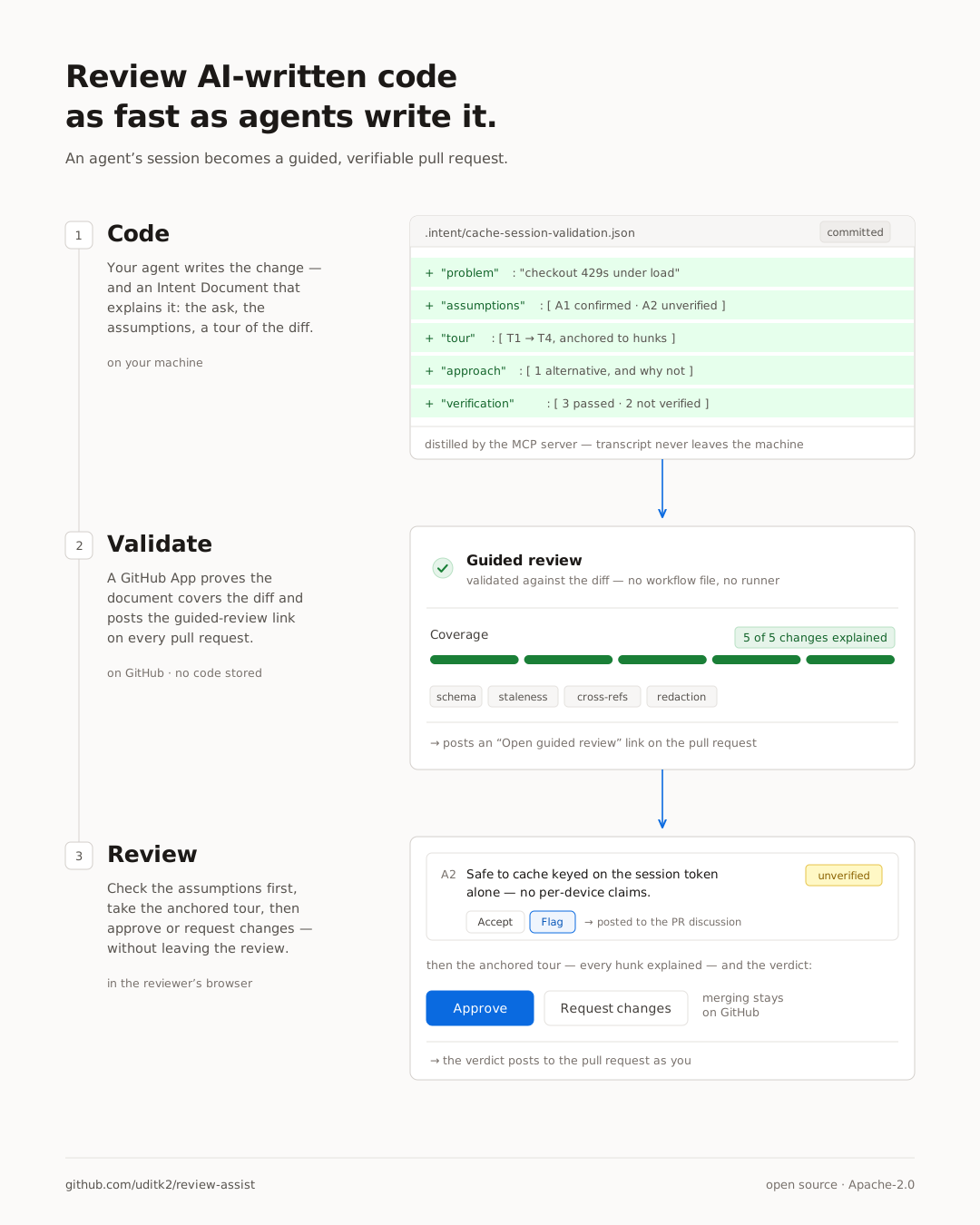
AI agents write code faster than anyone can read diffs — and the context that makes review fast (what was asked, what was assumed, what was tried and abandoned, what was tested) is thrown away the moment the PR opens. Review Assist captures it at the source: an agent's session becomes an Intent Document, a validator proves it actually covers the diff, and a GitHub App renders it as a guided review on top of the pull request.
Fully open source, self-hostable, and stores none of your code. Your session
transcript never leaves your machine. The app has no database: it reads the document and
diff from GitHub per request with the reviewer's own token, keeps them in memory for the
length of that request, and serves them private, no-store to a viewer that renders in
the reviewer's browser. Nothing is written down, but your code does pass through the
service in transit — if that matters to you, self-host it.
Install
Two one-time installs — the MCP server on the developer's side, the GitHub App on the repo's.
1. Register the MCP server with your agent (so it can author Intent Documents). Claude Code and Codex keep separate configs, so registering with one does not register with the other — run the section(s) you use.
Claude Code
claude mcp add -s user review-assist -- npx -y review-assist-mcp
The CLI and the VS Code extension share this one -s user config — but only when the
extension inherits your shell's PATH (launched via code ., not the Dock). Launched
from the Dock, GUI apps on macOS get just /usr/bin:/bin:/usr/sbin:/sbin, so npx
isn't found and the server shows not connected with no error. Register without npx
instead:
npm install -g review-assist-mcp
claude mcp add -s user review-assist -- "$(which node)" "$(npm root -g)/review-assist-mcp/dist/index.js"
Codex
codex mcp add review-assist -- npx -y review-assist-mcp
Shared with the IDE extension (~/.codex/config.toml) under the same code . caveat as
above. Dock-launched VS Code:
npm install -g review-assist-mcp
codex mcp add review-assist -- "$(which node)" "$(npm root -g)/review-assist-mcp/dist/index.js"
(Skip npm install -g if you already ran it for Claude Code — one global install
serves both extensions; each still needs its own mcp add.)
Claude desktop app — one-click, no terminal:
download the .mcpb
and open it.
One click. Read-only code + PR comments, no workflow files — it adds the automatic check on every PR, the summary comment, and the guided-review viewer.
Update
Only relevant if you used the global-install form above (npm install -g) — npx -y
resolves to the latest release on every launch by itself.
npm install -g review-assist-mcp@latest
Restart your agent afterward so it respawns the server process.
Uninstall
claude mcp remove -s user review-assist    # or: codex mcp remove review-assist
npm uninstall -g review-assist-mcp         # only if you used the global-install form
rm -rf ~/.review-assist                    # consent decisions and local run state
How it works
Teaching it your repository's questions
The reviewer asks a baseline set that is the same everywhere. What is true only in your
repository goes in a .reviewer/ folder at its root: an invariant a past incident bought,
a change that must travel with its migration, a directory whose churn is never incidental.
.reviewer/
  README.md        # the house rules
  verification.md  # what "verified" means here, per area
Markdown, committed with the code, reviewed like anything else. The reviewer reads the folder after the diff and before its first question, so what you write there lands in round one. It adds questions and sharpens the ones the diff provoked; it cannot add a schema field, relax a check, or excuse the interview. Most repositories need none, and an absent folder changes nothing. This repo has its own.
Architecture
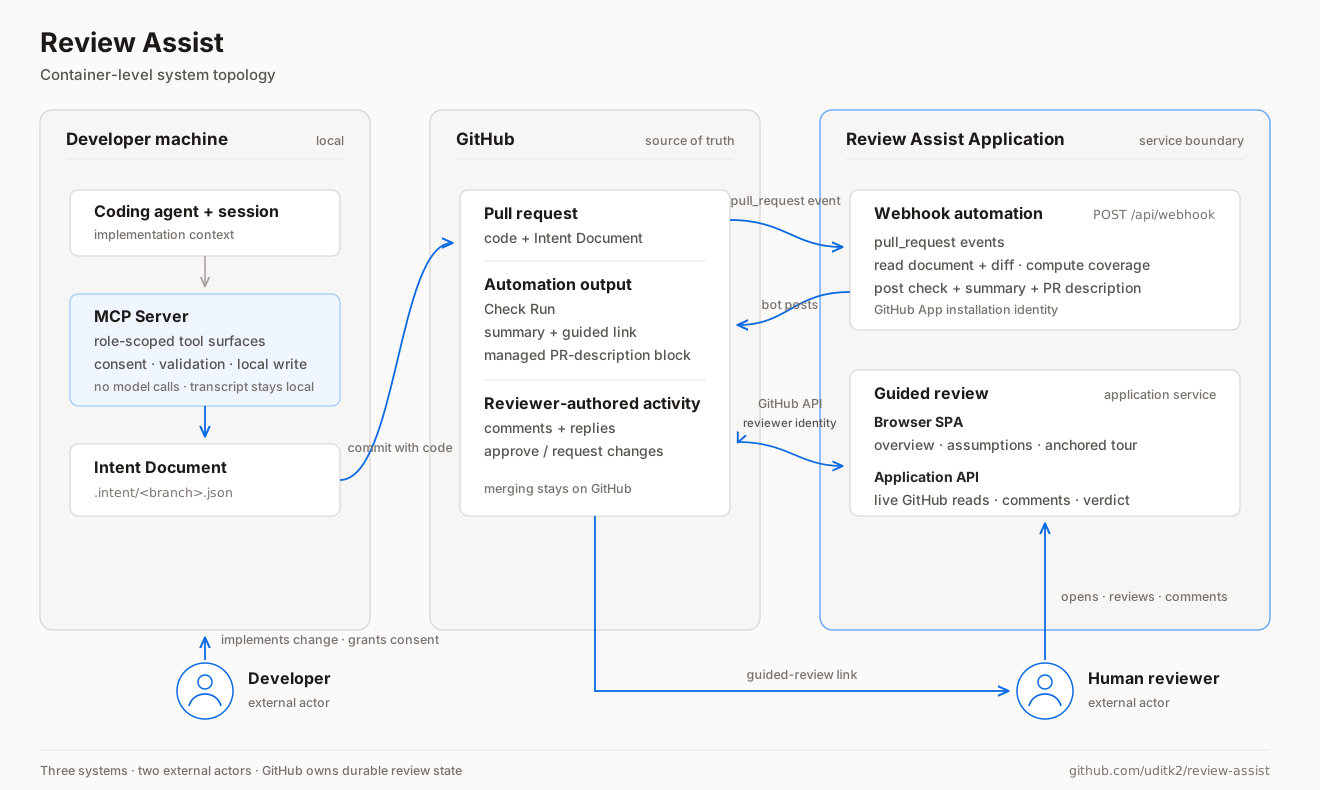
Three systems and two external actors. Your machine produces the change and its Intent
Document; the session transcript never leaves it. GitHub holds the pull request and every
durable piece of review state. The application reacts to pull_request events and posts
the check as its bot identity, then serves the guided review, reading and writing GitHub
as the signed-in reviewer.
The two-agent distillation — author and reviewer as separate role-locked contexts, and the
tools each one may reach — is a component-level view, kept in
docs/ARCHITECTURE.md along with the full route list.
Developing
| Path | Component |
|---|---|
packages/schema | The format — JSON Schema (draft 2020-12) + TypeScript types |
packages/validator | review-assist CLI + library: the five checks and the Markdown renderer |
packages/mcp-server | MCP server that drives distillation and gatekeeps submissions |
apps/github-app/worker | Stateless Cloudflare Worker: OAuth broker + thin GitHub proxy |
apps/github-app/viewer | Client-side guided-review viewer |
SPEC.md | The frozen design: the document's six sections and the five checks |
npm install
npm run build

# Validate and render the example Intent Document
node packages/validator/dist/cli.js validate packages/schema/src/example.json
node packages/validator/dist/cli.js render packages/schema/src/example.json

# Preview the guided viewer with mock data → http://localhost:8787/#acme/checkout-service/pull/42
node scripts/mockserver.mjs

# Tests
npx vitest run
Architecture and internals: docs/ARCHITECTURE.md.
Contributing
Issues and pull requests are welcome. If the guided review reads wrong on one of your
pull requests, open an issue with the
Intent Document and the diff that produced it — that pair is usually enough to reproduce.
Proposals to change the format itself are worth raising as an issue first, since
SPEC.md is deliberately frozen and any change ripples through the validator,
the viewer, and every document already committed.
Before opening a pull request, run the checks under Developing; CI runs the same build, typecheck, tests, and example validation.