FinMCP
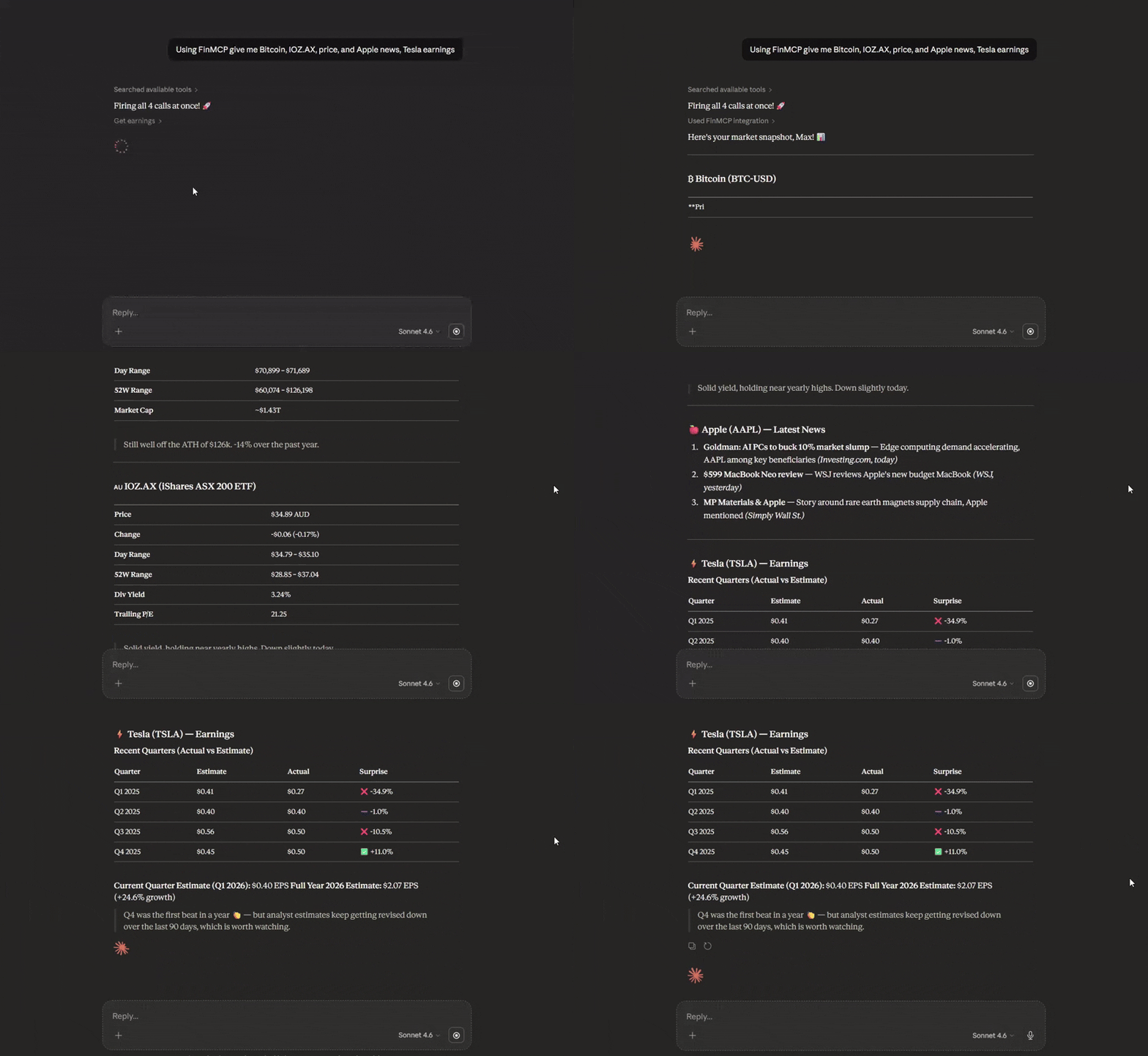
Máy chủ MCP Tài chính TypeScript nhẹ bao bọc các API Yahoo Finance. Cắm dữ liệu tài chính thời gian thực — cổ phiếu, quyền chọn, tiền điện tử, thu nhập — vào bất kỳ trợ lý AI nào. Không cần khóa API. Hoạt động qua stdio, Docker hoặc HTTP.
Tài liệu
Yahoo Finance MCP Server (Cloud)
Production-grade (Cloud) financial data infrastructure for AI assistants with enterprise-grade resilience, comprehensive data quality validation, and production-ready monitoring.
Deploy to the Cloud (Docker-based)
FinMCP ships with a Dockerfile and is fully Docker-based, so it runs on any platform that supports containers — Railway, Render, Fly.io, DigitalOcean App Platform, a VPS, or anything else.
Easiest option — Railway (recommended for beginners):
- Sign up at railway.com (referral link — gives you free credits)
- New Project → Deploy from GitHub repo → paste
https://github.com/Steve-sy/finmcp - Railway auto-detects the
Dockerfileand builds + deploys automatically - (Optional) Add
YF_MCP_API_KEYin Railway's Variables tab to protect your endpoint - Go to Settings → Networking → Generate Domain to get your public URL
- Your MCP endpoint is live at:
https://<your-app>.up.railway.app/mcp
Other platforms (Render, Fly.io, VPS, etc.):
Any platform that can run a Docker container works. Point it at this repo, and set the start command to node dist/http.js. The server listens on the PORT environment variable (automatically injected by most platforms) and defaults to 3333.
Optional: protect public deployments with YF_MCP_API_KEY and connect using ...?key=YOUR_SECRET.
Claude Desktop Integration (Cloud)
Customize -> Connectors -> Add custom connector: Name: FinMCP Remote MCP Server URL: your cloud https url: https:///mcp
Local Installation
npm install -g @mustafa.ramx/finmcp
Quick Start
Start Server
finmcp
Claude Desktop Integration (Local — npm)
Add to your claude_desktop_config.json:
{
  "mcpServers": {
    "finmcp": {
      "command": "finmcp"
    }
  }
}
Claude Desktop Integration (Local — Docker)
If you prefer Docker over installing Node.js, first build the image:
docker build -t finmcp .
Then add to your claude_desktop_config.json:
{
  "mcpServers": {
    "finmcp": {
      "command": "docker",
      "args": ["run", "-i", "--rm", "finmcp", "node", "dist/index.js"]
    }
  }
}
Note: ChatGPT Desktop MCP support may vary — check its documentation for custom connector configuration.
Other AI Tools
Cursor AI / Cline AI:
{
  "mcpServers": {
    "finmcp": {
      "command": "finmcp"
    }
  }
}
Features
- 15 Financial Data Tools: Stocks, options, crypto, forex, company intelligence, market sentiment
- Circuit Breaker Pattern: Automatic recovery from API failures
- Multi-Strategy Rate Limiting: Token bucket + adaptive + per-endpoint limiting
- Data Quality Scoring: Completeness and integrity validation
- Comprehensive Caching: Graceful fallback with high cache hit ratio (70-90%)
- Streaming HTTP Transport: Run locally or deploy to the cloud (Docker/Railway) for HTTPS access
- Optional API Key Auth: Protect public deployments with
YF_MCP_API_KEY - Enterprise Testing: Unit, integration, e2e, and chaos tests
Available Tools
Market Data
get_quote- Real-time quotes with quality reportingget_historical_prices- OHLCV data with date rangesget_historical_prices_multi- Batch historical data
Company Intelligence
get_quote_summary- Comprehensive company overviewget_balance_sheet- Assets, liabilities, equityget_income_statement- Revenue, expenses, net incomeget_cash_flow_statement- Operating, investing, financing cash flowsget_earnings- Quarterly earnings with estimatesget_analysis- Analyst recommendations and price targetsget_major_holders- Institutional and insider ownership
Market Sentiment
get_news- Latest articles with relevance scoringget_options- Options chains with Greeksget_trending_symbols- Top movers with volume metricsscreener- Filter stocks by 12+ criteria
Cross-Asset
get_crypto_quote- Cryptocurrency pricesget_forex_quote- Currency pair exchange rates
Documentation
For complete documentation including configuration, usage examples, architecture details, and best practices:
View Full Documentation on GitHub
Documentation includes:
- Complete Tool Reference
- Usage Guide with Examples
- Configuration Guide
- Architecture Details
- Data Verification Status
Configuration
Create a config.json file:
{
  "rateLimit": {
    "requestsPerMinute": 60,
    "requestsPerHour": 1500
  },
  "cache": {
    "ttlQuotes": 60000,
    "maxCacheSize": 1000
  },
  "circuitBreaker": {
    "failureThreshold": 5,
    "monitoringWindow": 60000,
    "successThreshold": 3
  }
}
For detailed configuration options, see Configuration Guide.
Performance
| Metric | Value |
|---|---|
| Quote queries | 60 requests/minute (configurable) |
| Batch operations | Up to 100 symbols per request |
| Cache hit ratio | 70-90% for frequently accessed symbols |
| Cold start time | <500ms |
| Test coverage | 95%+ for core middleware |
License
MIT