Paprika 3
Quản lý công thức nấu ăn Paprika 3 của bạn với LLM. Đọc, tạo và cập nhật công thức trong ứng dụng Paprika của bạn.
Tài liệu
paprika-3-mcp
A Model Context Protocol (MCP) server that exposes your Paprika 3 recipes as LLM-readable resources — and lets an LLM like Claude create or update recipes in your Paprika app.
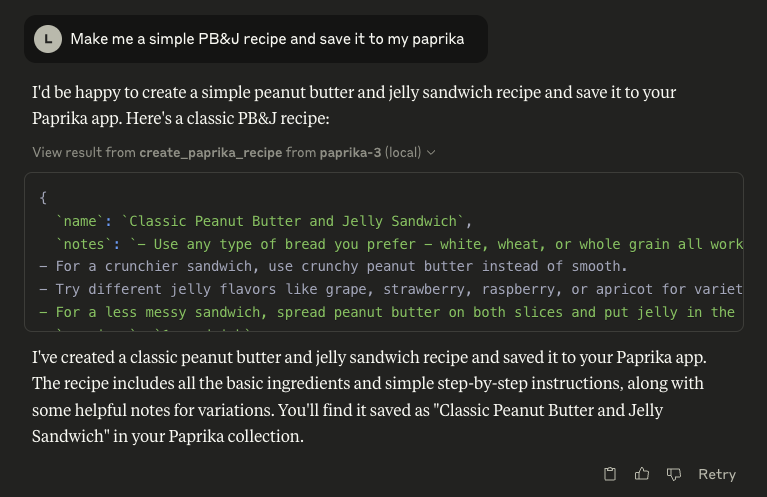
🖼️ Example: Claude using the Paprika MCP server
🚀 Features
See anything missing? Open an issue on this repo to request a feature!
📄 Resources
- Recipes ✅
- Recipe Photos 🚧
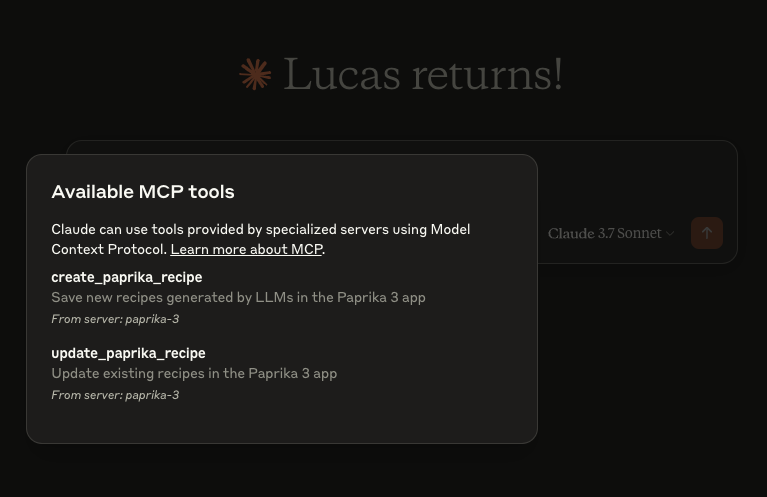
🛠 Tools
create_paprika_recipe
Allows Claude to save a new recipe to your Paprika appupdate_paprika_recipe
Allows Claude to modify an existing recipe
⚙️ Prerequisites
- ✅ A Mac, Linux, or Windows system
- ✅ Paprika 3 installed with cloud sync enabled
- ✅ Your Paprika 3 username and password
- ✅ Claude or any LLM client with MCP tool support enabled
🛠 Installation
You can download a prebuilt binary from the Releases page.
🍎 macOS (via Homebrew)
If you're on macOS, the easiest way to install is with Homebrew:
brew tap soggycactus/tap
brew install paprika-3-mcp
🐧 Linux / 🪟 Windows
-
Go to the latest release.
-
Download the appropriate archive for your operating system and architecture:
paprika-3-mcp_<version>_linux_amd64.zipfor Linuxpaprika-3-mcp_<version>_windows_amd64.zipfor Windows
-
Extract the zip archive:
- Linux:
unzip paprika-3-mcp_<version>_<os>_<arch>.zip - Windows:
- Right-click the
.zipfile and select Extract All, or use a tool like 7-Zip.
- Right-click the
- Linux:
-
Move the binary to a directory in your system's
$PATH:-
Linux:
sudo mv paprika-3-mcp /usr/local/bin/ -
Windows:
- Move
paprika-3-mcp.exeto any folder in yourPATH(e.g.,%USERPROFILE%\bin)
- Move
-
✅ Test the installation
You can verify the server is installed by checking:
paprika-3-mcp --version
You should see:
paprika-3-mcp version v0.1.0
🤖 Setting up Claude
If you haven't setup MCP before, first read more about how to install Claude Desktop client & configure an MCP server.
To add paprika-3-mcp to Claude, all you need to do is create another entry in the mcpServers section of your claude_desktop_config.json file:
{
  "mcpServers": {
    "paprika-3": {
      "command": "paprika-3-mcp",
      "args": [
        "--username",
        "<your paprika 3 username (usually email)>",
        "--password",
        "<your paprika 3 password>"
      ]
    }
  }
}
Restart Claude and you should see the MCP server tools after clicking on the hammerhead icon:
📄 License
This project is open source under the MIT License © 2025 Lucas Stephens.
🗂 Miscellaneous
📄 Where can I see the server logs?
The MCP server writes structured logs using Go’s slog with rotation via lumberjack. Log files are automatically created based on your operating system:
| Operating System | Log File Path |
|---|---|
| macOS | ~/Library/Logs/paprika-3-mcp/server.log |
| Linux | /var/log/paprika-3-mcp/server.log |
| Windows | %APPDATA%\paprika-3-mcp\server.log |
| Other / Unknown | /tmp/paprika-3-mcp/server.log |
💡 Logs are rotated automatically at 100MB, with only 5 backup files kept. Logs are also wiped after 10 days.