openEuler MCP Servers
Một bộ sưu tập các máy chủ MCP được thiết kế để nâng cao trải nghiệm tương tác với hệ điều hành openEuler.
Tài liệu
openEuler MCP Servers仓库,欢迎大家贡献
简体中文 | English
openEuler MCP Servers 仓库




介绍
MCP是Model Context Protocol的缩写,旨在提供一个通用的大模型上下文协议,用来调用各种应用,拓展大模型能力,openEuler的mcp-servers仓库用来存放各种MCP Server,聚焦于操作系统领域,结合Devstation,EulerCopilot改善openEuler交互体验
软件架构
仓库目录带一个doc目录,用来存放整体的各类文档介绍,之后servers每个文件夹为一个独立的MCP Server
mcp-servers/
├── servers
│   ├── oeDeploys/
│   │   ├── mcp_config.json
│   │   ├── mcp-rpm.yaml
│   │   └── src/
│   │       ├── icon.png
│   │       ├── mcp-oedp.py
│   │       ├── readme.md
│   │       └── requirements.txt
│   ├── oeGitExt/
│   └── xxxxx/
├── scripts/
└── doc/
以oeDeploy为例,每个server顶层需要包含以下几个内容:
1、MCP配置文件 - 包含MCP Server的配置信息
2、部署配置文件 - 包含其他相关配置文件
3、源码目录 - 包含MCP Server的具体实现代码和相关资源文件
其中doc中的 MCP描述文档 给出了 MCP Servers 的描述建议,用于提升MCP Servers的易用性
使用说明
1、使用常用的MCP客户端完成配置如EulerCopilot,Roo Code,Cline等等
2、将MCP Server的配置文件写入到MCP客户端
使用yum自动安装(推荐):
openEuler社区会将每个MCP Server构建为一个个RPM包,用户直接yum install安装即可使用,即将上线
快速开始:如何使用MCP Python-SDK编写一个自己的MCP Server服务器
MCP环境搭建
1、安装 uv Python管理工具
yum install -y uv
2、安装MCP
yum install -y python3-mcp
实战编码
1、挑选一个小工具oegitext
oegitext是一个用来和gitee交互的小工具,可以用来查询在gitee上面的一些仓库和issue,查询一些PR信息:
该工具在DevStation上预安装,如果没有安装,可以在配置openEuler-25.03 EPOL仓库后使用 yum install oegitext安装
安装完成之后,使用如下命令配置gitee令牌:
oegitext config -token ${access_token}
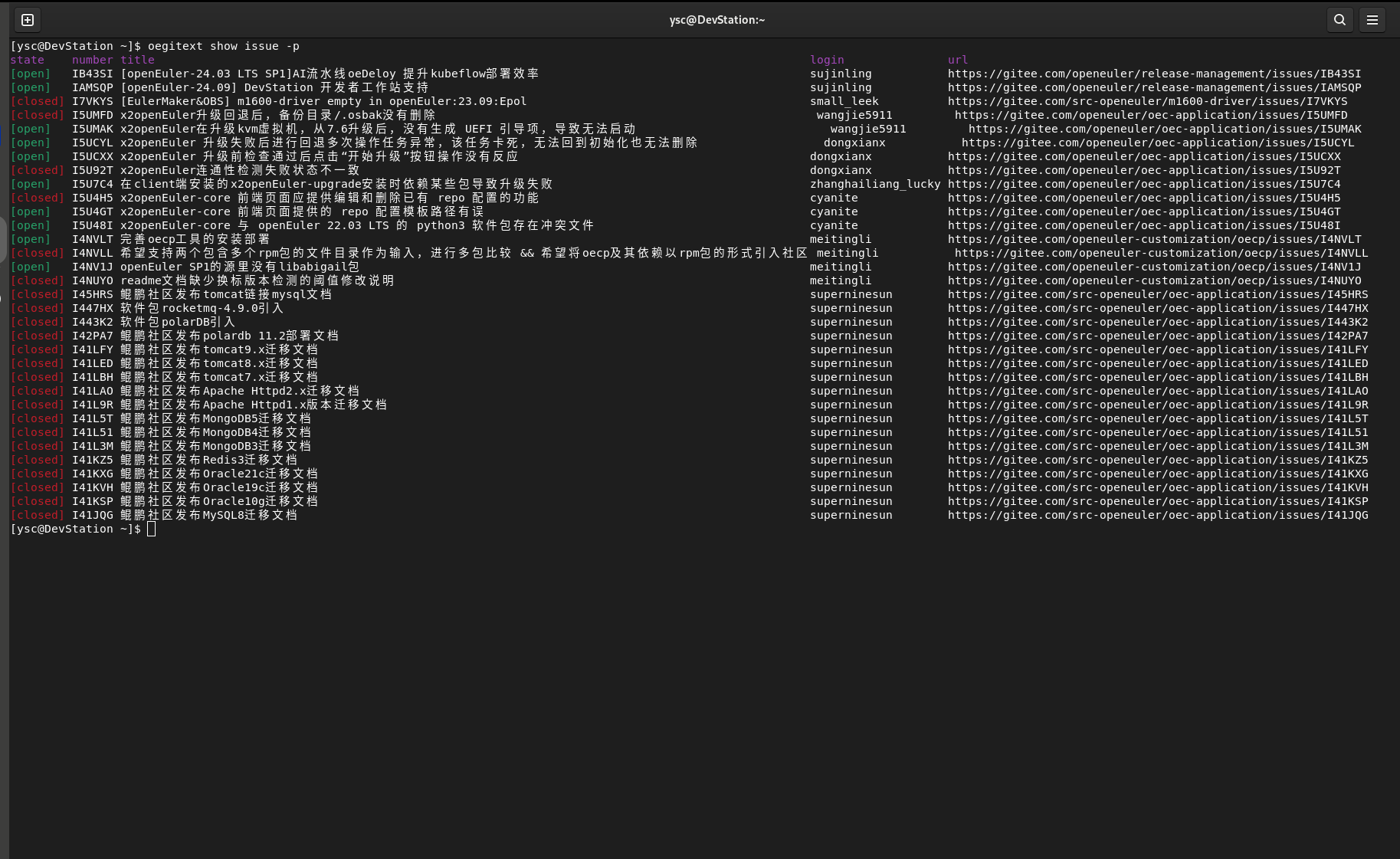
之后使用oegitext show issue -p查询当前issue:
2、使用python-sdk进行一个改造
在上面使用uv创建的虚拟环境中,新建一个oegitext_mcp.py文件 下面是代码的一个简单示例:
import subprocess
from mcp.server.fastmcp import FastMCP

mcp = FastMCP("查找openEuler社区的issue")

@mcp.tool()
def get_my_openeuler_issue() -> str:
    """统计我在openEuler社区所负责的issue"""
    try:
        # 执行oegitext命令并解析结果
        result = subprocess.check_output(['oegitext', 'show', 'issue', '-p'],
                                        text=True,
                                        stderr=subprocess.STDOUT)

        return result
    except subprocess.CalledProcessError as e:
        return e
    except Exception as e:
        return e

if __name__ == "__main__":
    # Initialize
    mcp.run()
3、openEuler MCP环境搭建
打开DevStation预安装的vscodium软件,在插件市场里安装Roo Code(后续也可以使用EulerCopilot实现) 在设置当中配置大模型,我们使用的是DeepSeeK V3的API:
API提供商:OpenAI Compatible
OpenAI基础URL:https://api.siliconflow.cn
密钥:对应的密钥
模型:Pro/deepseek-ai/DeepSeek-V3   #可以自己选择合适的模型
在Roo Code插件上方的选项卡里选择MCP服务器 点击编辑全局MCP
{
  "mcpServers": {
    "oegitext_mcp": {
      "command": "/usr/bin/uv",
      "args": [
        "--directory",
        "/home/xxx/oegitext_mcp",
        "run",
        "--python",
        "/usr/bin/python3",
        "oegitext_mcp.py"
      ],
      "disabled": false,
      "autoApprove": [],
      "alwaysAllow": []
    },
  }
}
上面的路径修改成正确的实际路径,之后保存,点击完成
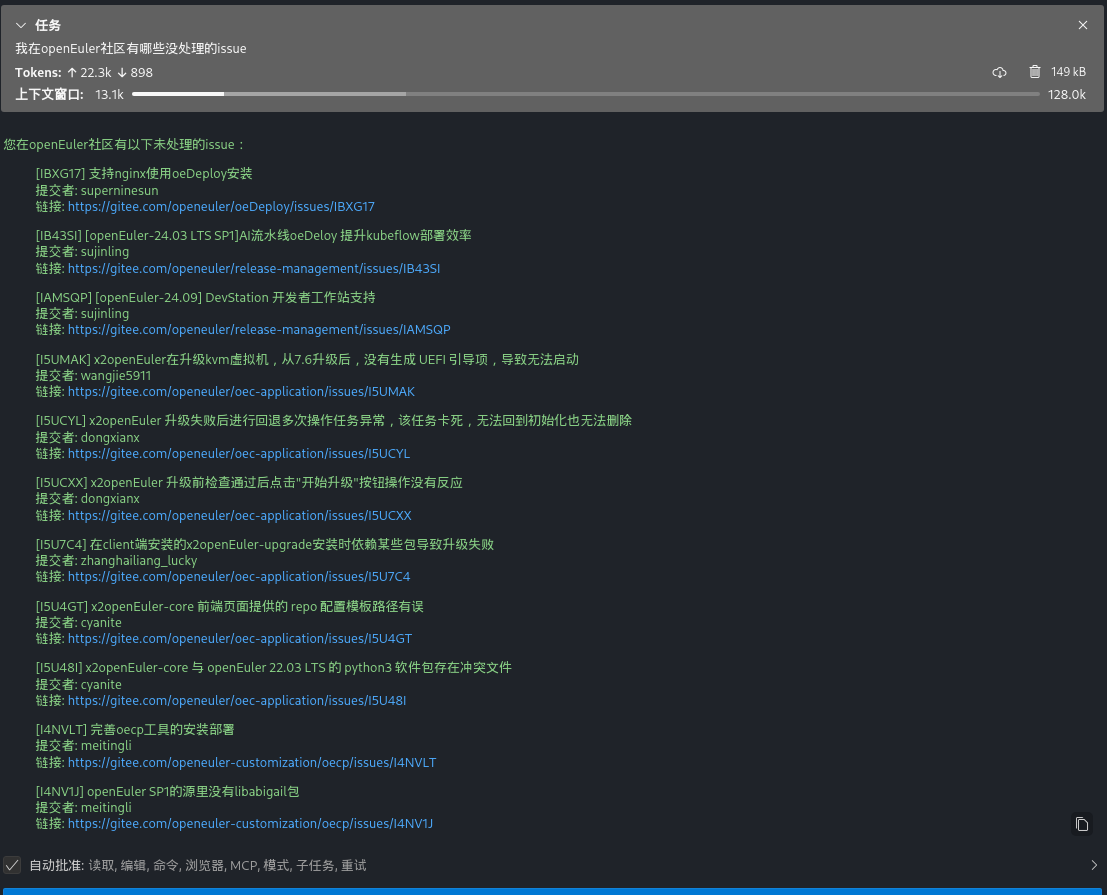
4、MCP Client调用效果