Code Reasoning
Nâng cao khả năng của Claude trong việc giải quyết các tác vụ lập trình phức tạp thông qua tư duy có cấu trúc, từng bước một.
GitHub
259
Dùng thử MCP nàyĐược tài trợTài liệu
Code Reasoning MCP Server
A Model Context Protocol (MCP) server that enhances Claude's ability to solve complex programming tasks through structured, step-by-step thinking.


Quick Installation
-
Configure Claude Desktop by editing:
- macOS:
~/Library/Application Support/Claude/claude_desktop_config.json - Windows:
%APPDATA%\Claude\claude_desktop_config.json - Linux:
~/.config/Claude/claude_desktop_config.json
{ "mcpServers": { "code-reasoning": { "command": "npx", "args": ["-y", "@mettamatt/code-reasoning"] } } } - macOS:
-
Configure VS Code:
{
  "mcp": {
    "servers": {
      "code-reasoning": {
        "command": "npx",
        "args": ["-y", "@mettamatt/code-reasoning"]
      }
    }
  }
}
Usage
-
To trigger this MCP, append this to your chat messages:
Use sequential thinking to reason about this. -
Use ready-to-go prompts that trigger Code-Reasoning:
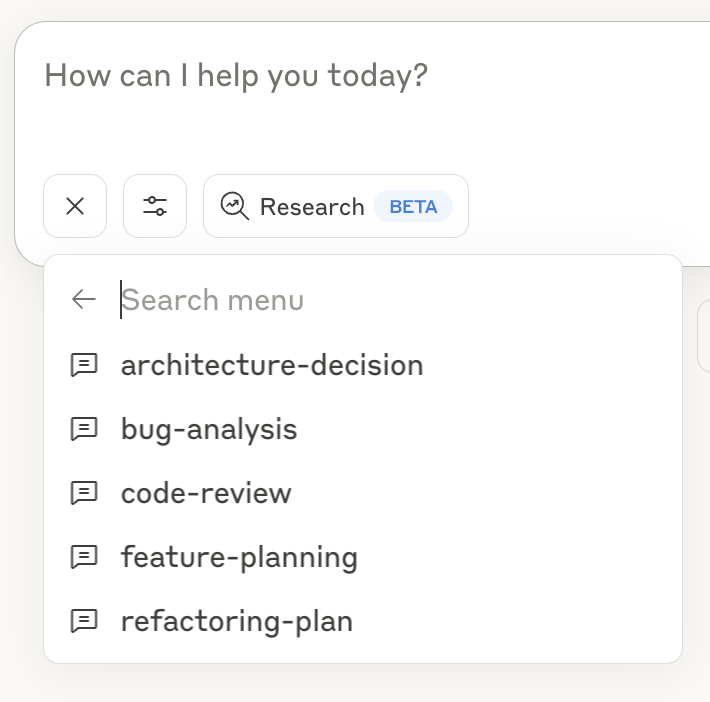
- Click the "+" icon in the Claude Desktop chat window, or in Claude Code type
/helpto see the specific commands. - Select "Add from Code Reasoning" from the available tools
- Choose a prompt template and fill in the required information
- Submit the form to add the prompt to your chat message and hit return
See the Prompts Guide for details on using the prompt templates.
Command Line Options
--debug: Enable detailed logging--helpor-h: Show help information
Key Features
- Programming Focus: Optimized for coding tasks and problem-solving
- Structured Thinking: Break down complex problems into manageable steps
- Thought Branching: Explore multiple solution paths in parallel
- Thought Revision: Refine earlier reasoning as understanding improves
- Safety Limits: Automatically stops after 20 thought steps to prevent loops
- Ready-to-Use Prompts: Pre-defined templates for common development tasks
Documentation
Detailed documentation available in the docs directory:
- Usage Examples: Examples of sequential thinking with the MCP server
- Configuration Guide: All configuration options for the MCP server
- Prompts Guide: Using and customizing prompts with the MCP server
- Testing Framework: Testing information
Project Structure
├── index.ts                  # Entry point
├── src/                      # Implementation source files
└── test/                     # Placeholder for future test utilities
License
This project is licensed under the MIT License. See the LICENSE file for details.