Synaplan Multimodal Gateway
chính thứcCung cấp đầy đủ chức năng của máy chủ Mã nguồn mở như một ví dụ MCP.
Bạn có thể làm gì với Synaplan Multimodal Gateway MCP?
-

Chat with AI and track costs — Ask your assistant to chat, generate images/video/audio, and see the real token cost of every answer.
-
Search documents semantically — Use RAG to find relevant content across uploaded PDFs, Word files, and images with
mcp_fetch-powered retrieval. -
Connect external MCP servers — Enable Jira, Confluence, or CRM tools via
mcp_actionto search, summarize, and create tickets or pages with write permissions. -
Manage AI providers and models — Configure OpenAI, Anthropic, Gemini, or local Ollama models per task, with live key validation and encrypted storage.
-
Run scheduled multi-step tasks — Pin a DAG-based plan and execute it on demand or on a schedule, with each step routed to the optimal model.
Tài liệu
The open-source AI platform — chat, knowledge, media and agents on infrastructure you control.
Website · Docs · Live instance · iPhone App · Outlook Add-in · Discord





Why Synaplan?
- We open-source artificial intelligence. The complete platform — backend, frontend, widgets, plugins — is Apache-2.0, Dockerized, and starts with one command. No core/enterprise split, no functional downgrade: self-hosted is the same software as our cloud.
- Hundreds of models, one platform. OpenAI, Anthropic, Google Gemini, Groq, Mistral, xAI, HuggingFace, sovereign EU providers, and any local model via Ollama — swap providers per task in the UI, without touching a config file. No vendor lock-in, ever.
- DAG task routing that saves tokens. An AI planner decomposes complex requests into a directed task graph (extract → summarize → generate → reply) and routes every step to the model that fits it — a cheap fast model for extraction, a strong one only where reasoning is needed. Live task cards stream while the graph executes, and every answer shows what it cost.
- Sovereign by design. Run on-prem, in the EU cloud, or fully air-gapped: chat, RAG knowledge search, document processing, transcription and speech run with zero internet connection. No training on your data, no forced telemetry — proven in production up to 5,000-workplace offline deployments.
- Everywhere you work. Web app, iPhone app, Outlook add-in, embeddable chat widget, WhatsApp, email — plus the tools you already run: Microsoft 365, Dropbox, Nextcloud / ownCloud, calendars, Jira and Confluence, and OpenCloud.
- Extensible without forking. A non-invasive plugin system, an OpenAPI-documented REST API, an MCP server and client, and an Anthropic-compatible endpoint for Claude Code and friends.
Your first answer in three steps
One line — the installer checks Docker, fetches Synaplan, and starts the stack:
curl -fsSL https://raw.githubusercontent.com/metadist/synaplan/main/install.sh | bash
Or do exactly the same by hand:
git clone https://github.com/metadist/synaplan.git
cd synaplan
docker compose up -d
- Open http://localhost:5173 immediately. A live status screen appears within seconds and shows every boot step — database, backend, AI model download, interface — then switches to the app automatically the moment it is ready (first start: 5–15 minutes; every later start: seconds). It also lists which optional building blocks (Qdrant, Centrifugo, Collabora, …) this install is running and how to switch each on or off. The same notes print in
docker compose logs -f startup-notes. - Log in as
admin@synaplan.com/admin123— the status screen shows these too. - Connect an AI provider — the app takes you there. Until a key is in place, chat answers in demo mode and points you to the setup. Open AI provider setup, paste one key (free: Groq), and you are chatting. You never touch a config file.
That is the whole local-hosting onboarding. After chat works, open Channels → Connections to hook up Outlook, Nextcloud, Dropbox, a calendar, or Jira / Confluence — then you can say "summarize the latest mail from X" or "create a picture and put it in nextcloud".
Key management, the short version
- The first-run screen is the setup. You do not have to hunt through Admin: an empty install blocks chat with a single Go to AI provider setup button. The same wizard lives at Admin → AI Providers (
/admin/setup) later. - Tested before it's saved. The key is validated against the live provider API, so a typo fails immediately instead of at your first chat.
- Encrypted at rest. It lives encrypted in your own database, not in a plaintext file on disk.
- Active instantly. No restart and no rebuild — the next message already uses it.
- Defaults repair themselves. If the default chat model points at a provider you have no key for, Synaplan repoints it to one that works, so chat is never dead on a fresh install.
- Local-model progress is visible. A download card in the setup wizard (and in
docker compose logs -f backend) shows how far the optional Ollama pull has got; cloud chat works while it runs. .envstill works. Keys already inbackend/.envare imported into the encrypted store on first use, and a key you later save in the UI wins permanently.
No cloud key at all? Start with COMPOSE_PROFILES=local-ai ENABLE_LOCAL_GPT_OSS=true docker compose up -d to run Ollama and pull a local chat model (gpt-oss:20b, ~14 GB, GPU or a strong CPU recommended). Chat begins working when the download finishes.
Host it on your own server
The commands above start the development stack (source build, Vite, MailHog, phpMyAdmin). For a production install on a Linux box, the same installer drives the published image and the deploy/ contract — it writes deploy/.env for you (the step most installs stumble over), pins the latest release, creates the first administrator, and runs the full lifecycle (prepare → pull → validate → start → smoke-test). Secrets are generated on first start and recorded in deploy/data/secrets.env:
curl -fsSL https://raw.githubusercontent.com/metadist/synaplan/main/install.sh | \
  bash -s -- --mode server --domain https://ai.example.com
Prefer manual control? The identical steps by hand:
cp deploy/selfhost.env.example deploy/.env
# Set SYNAPLAN_VERSION, public URL, and BOOTSTRAP_ADMIN_* (or leave both admin vars empty and sign up later)
deploy/scripts/prepare.sh
docker compose --env-file deploy/.env -f deploy/compose.yaml pull
deploy/scripts/validate-release.sh
docker compose --env-file deploy/.env -f deploy/compose.yaml up -d
After login, the same first-run provider screen applies. Full walkthrough: Installation · deploy/README.md.
Take the tour
▶ Watch the full demo on YouTube
Click any screenshot to see it full size.
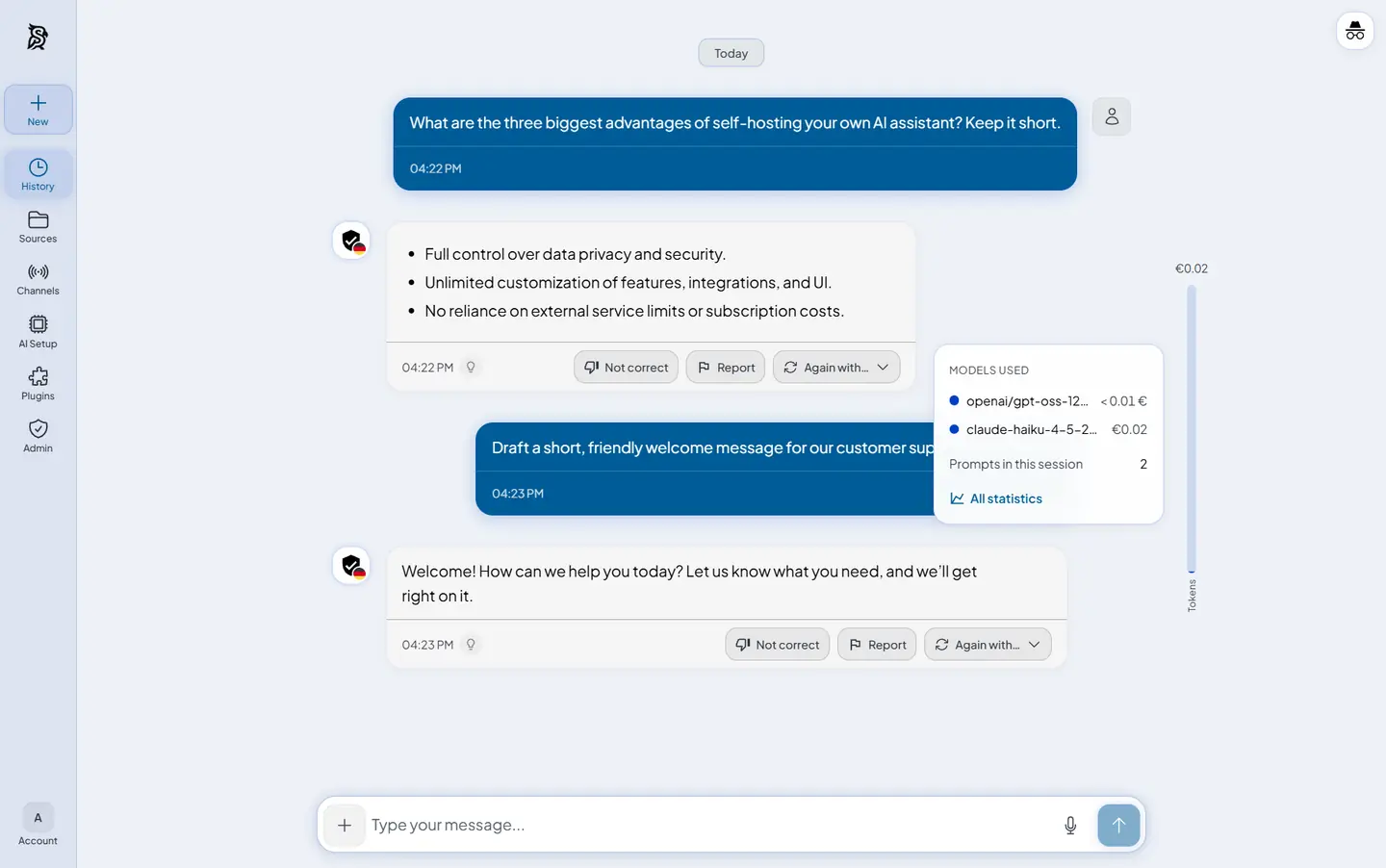 Chat Every answer shows what it cost |
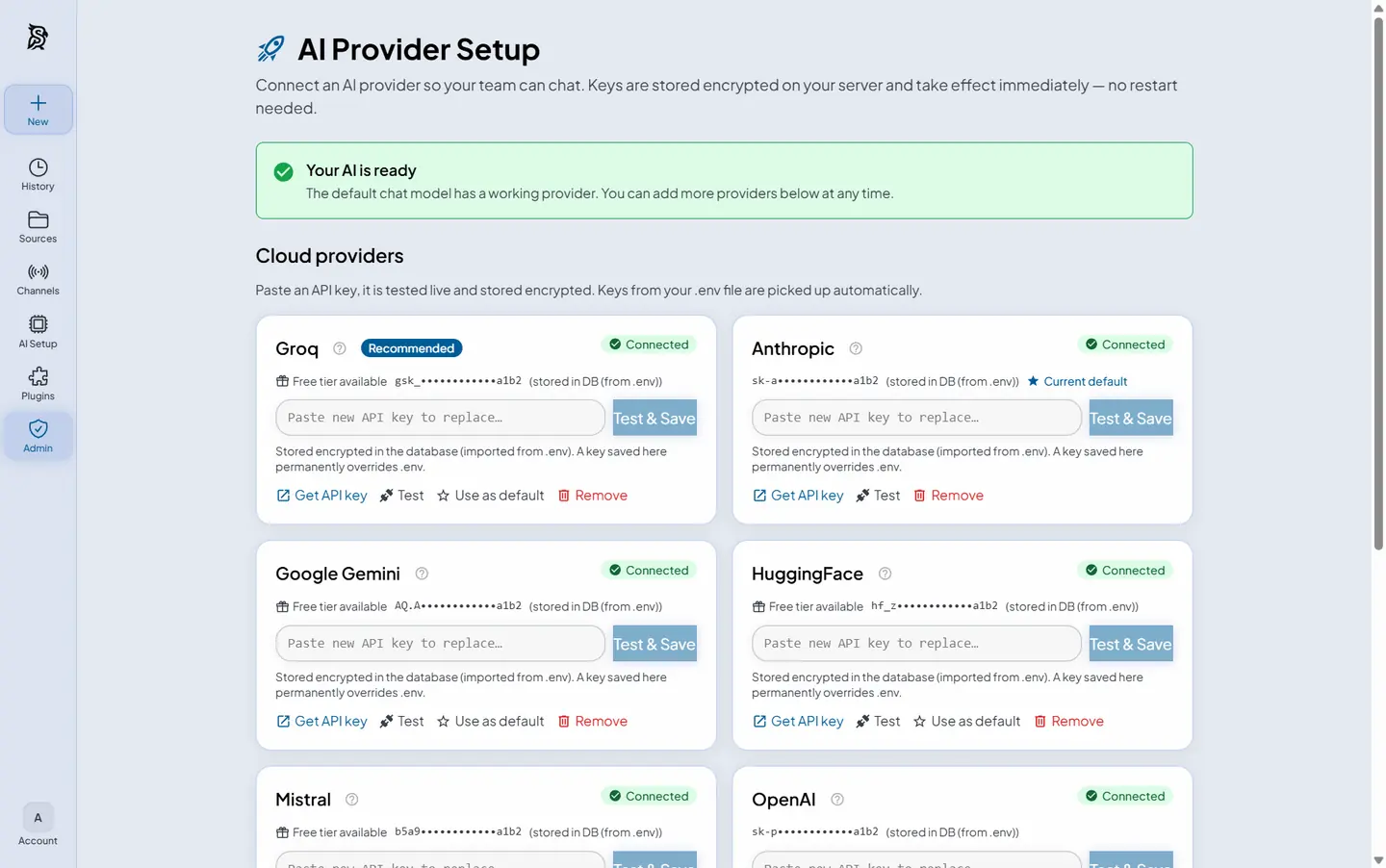 Provider setup One key, tested and encrypted |
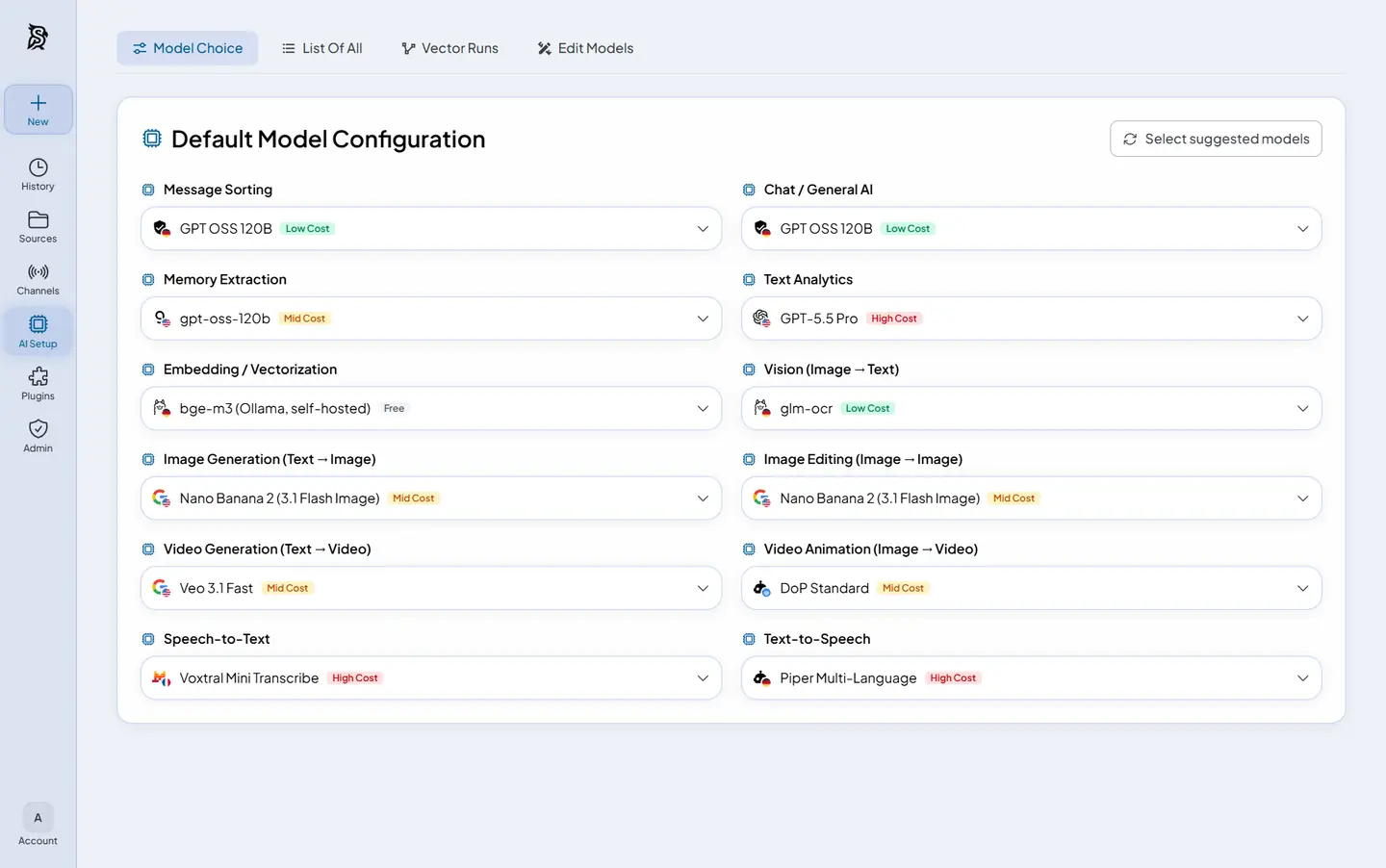 Model choice A different model per task |
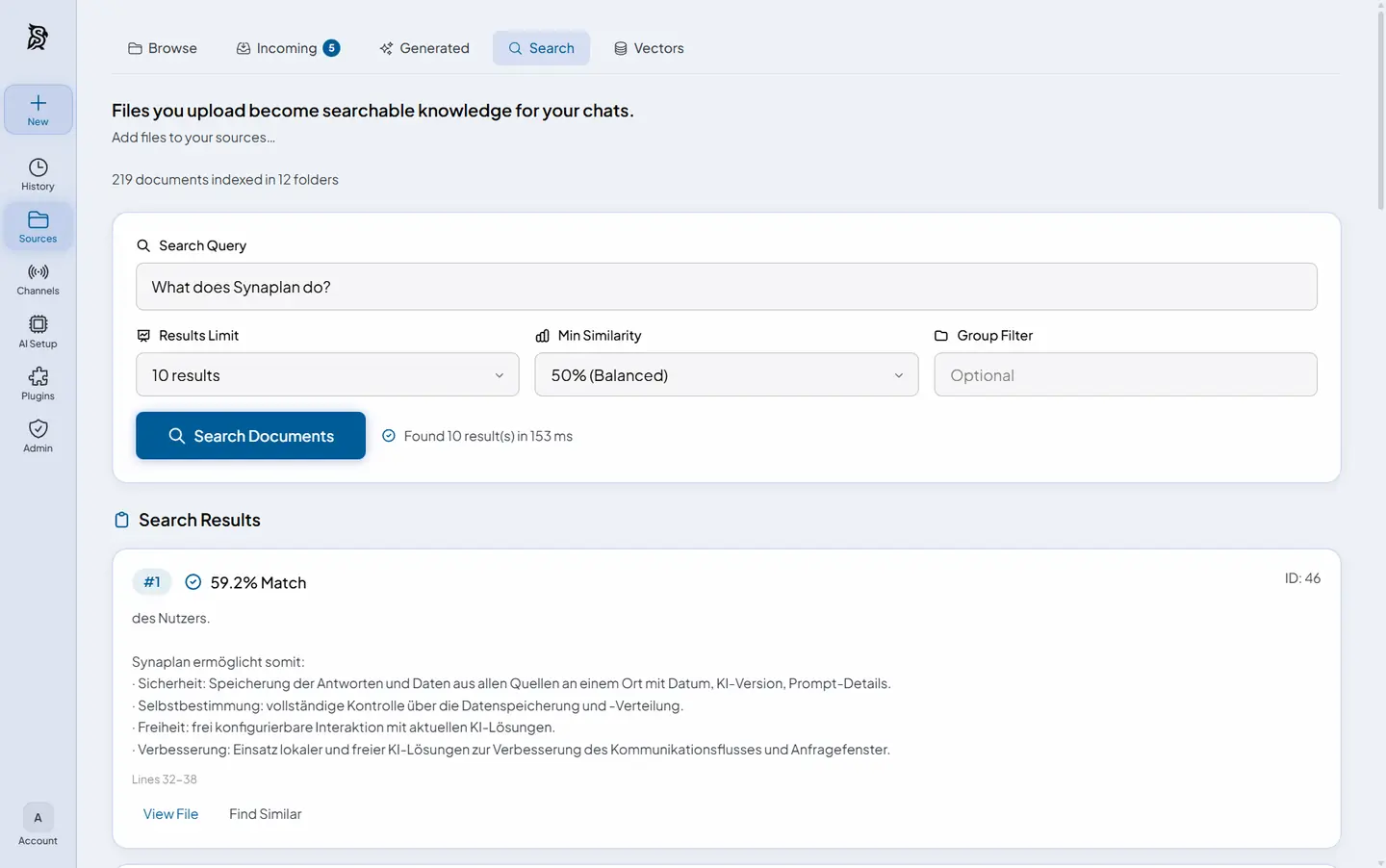 RAG search Semantic search over your files |
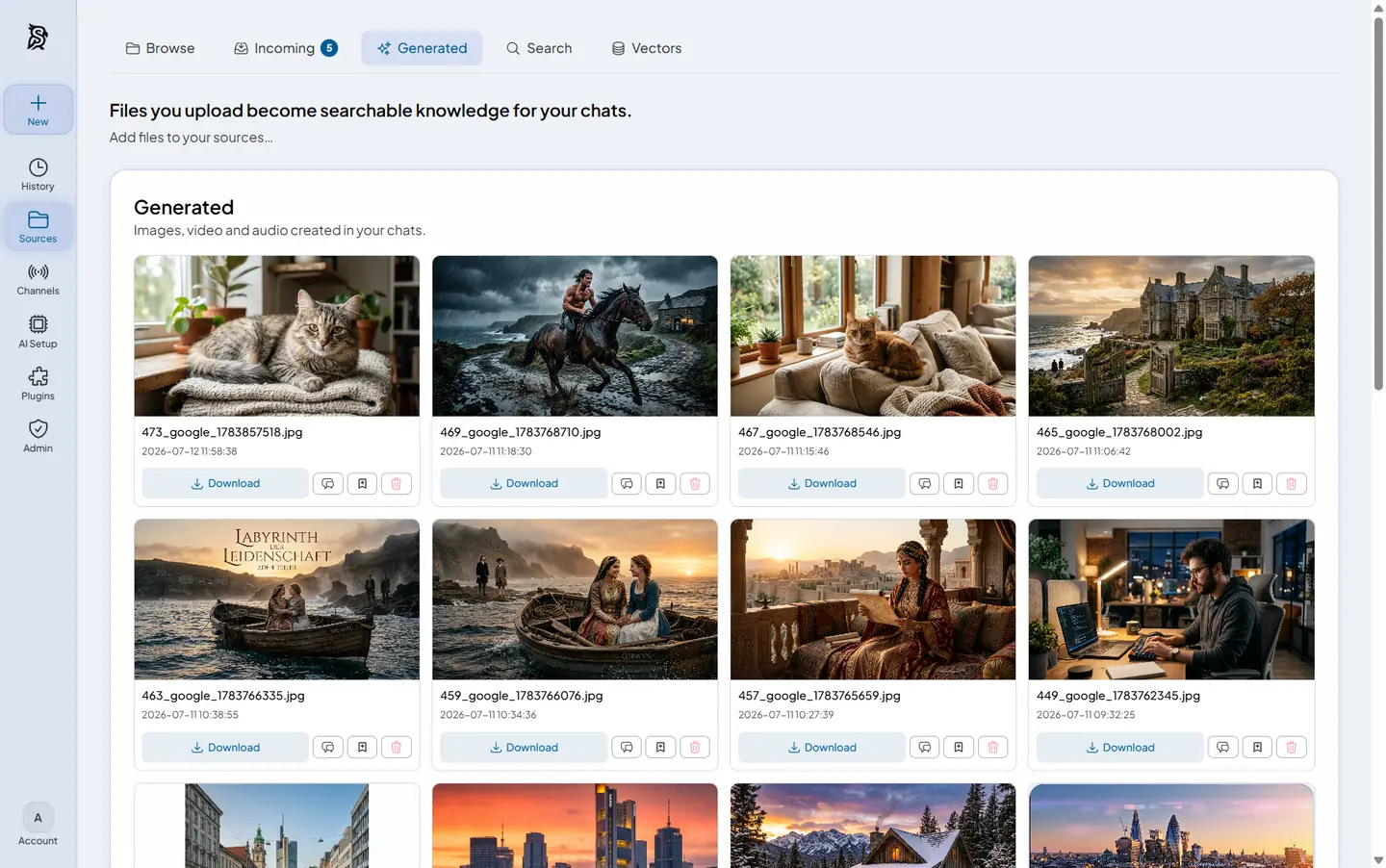 Media generation Images, video and audio in chat |
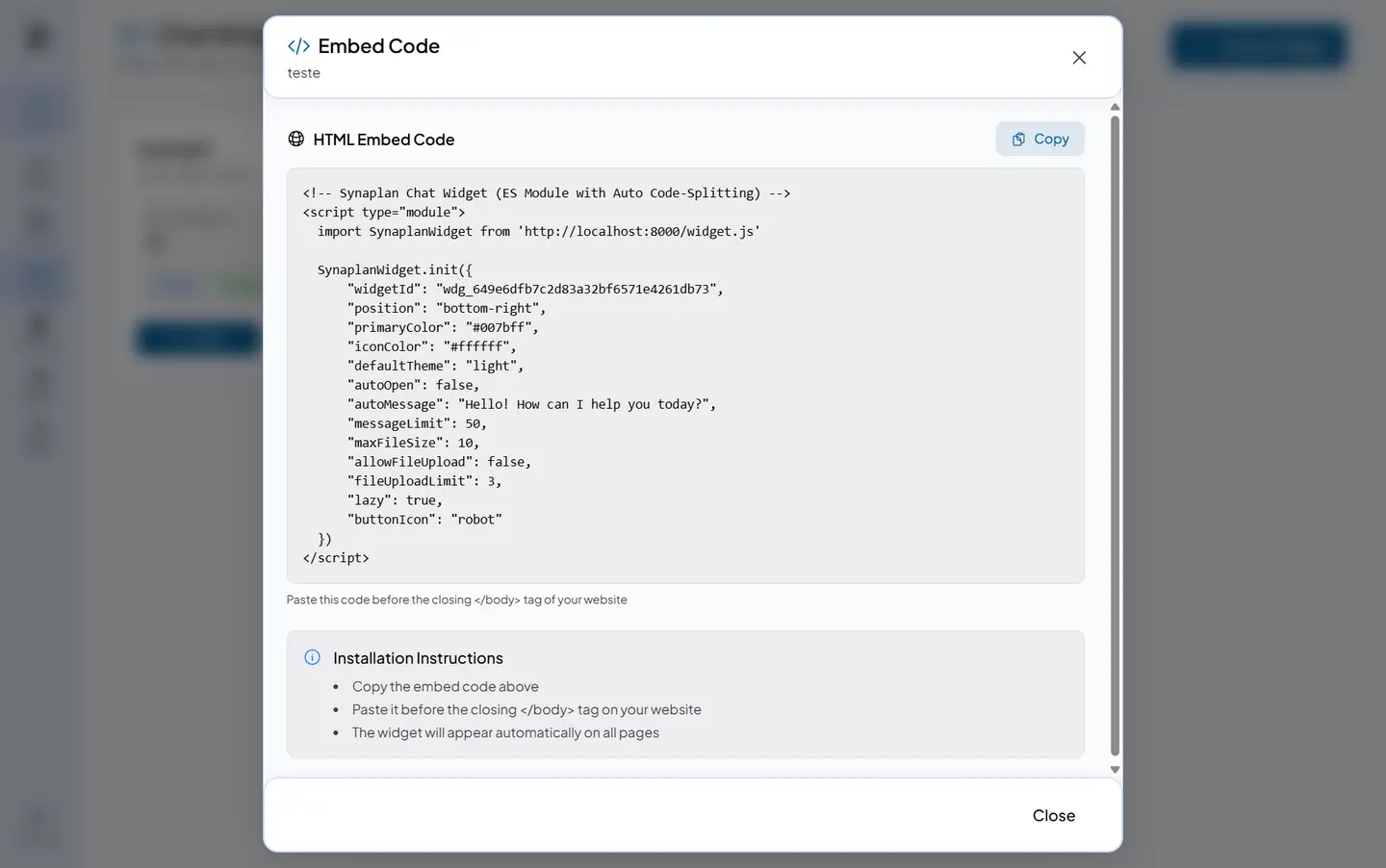 Chat widget One snippet, any website |
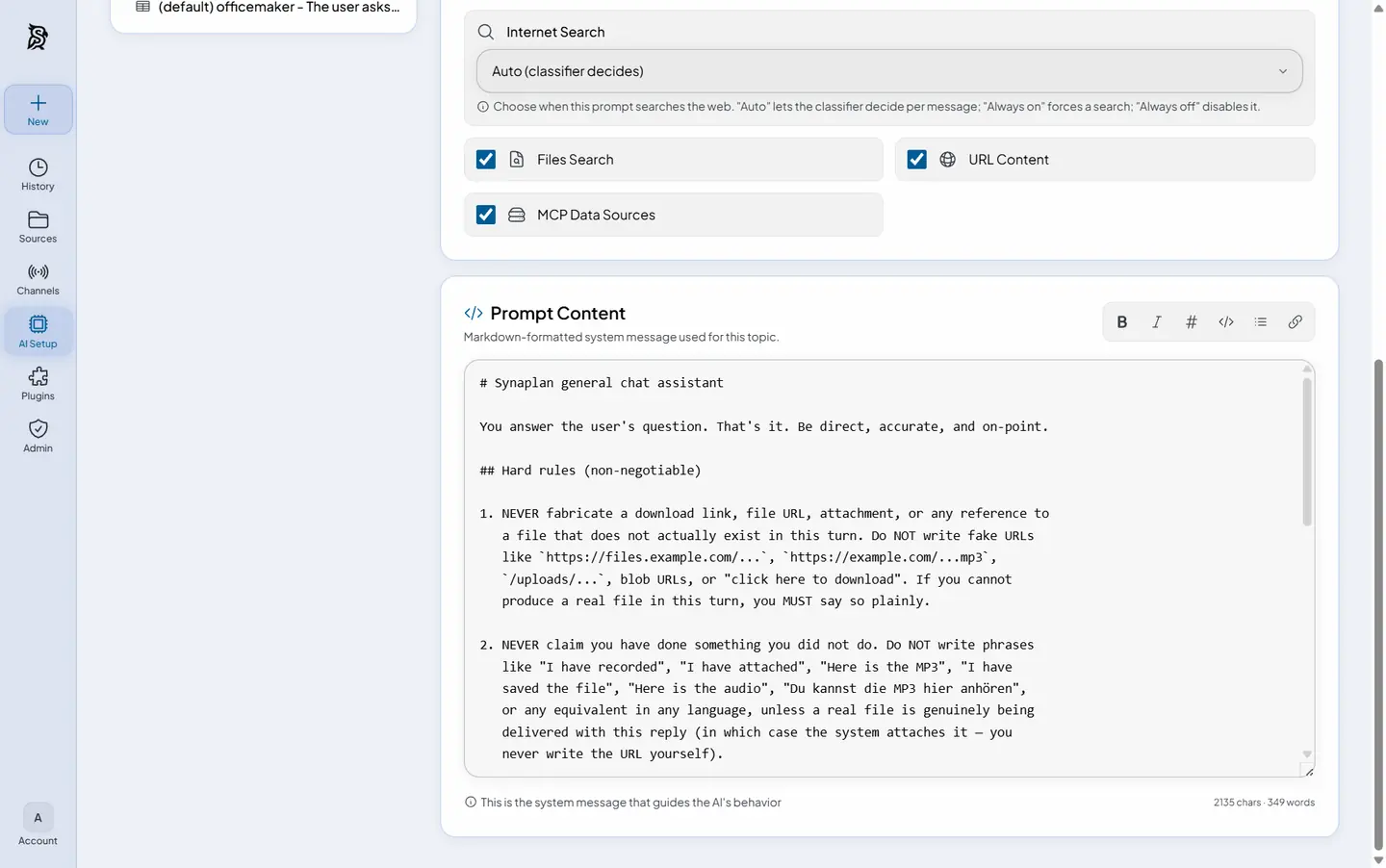 AI instructions Your own system prompts |
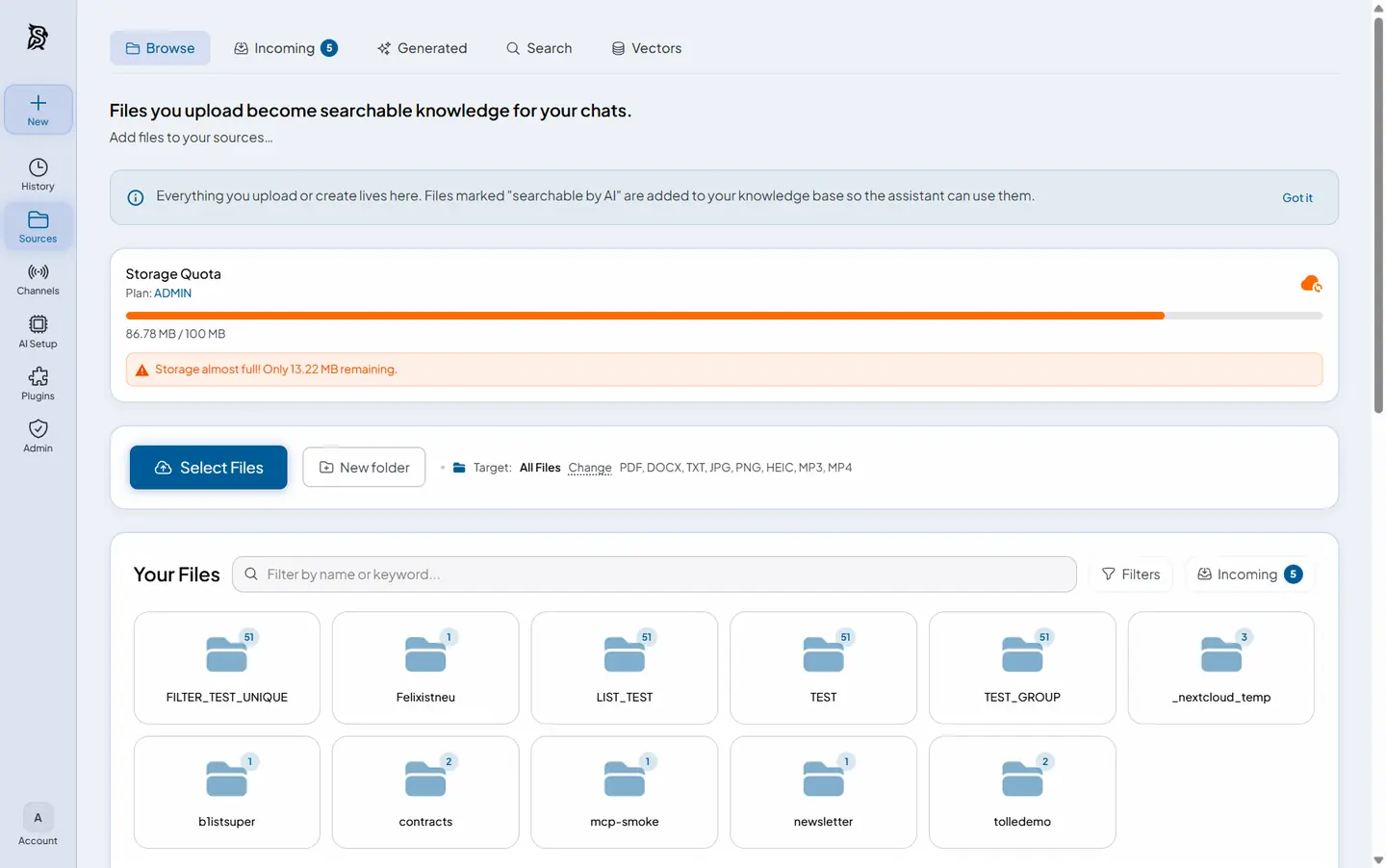 Files Uploads become knowledge |
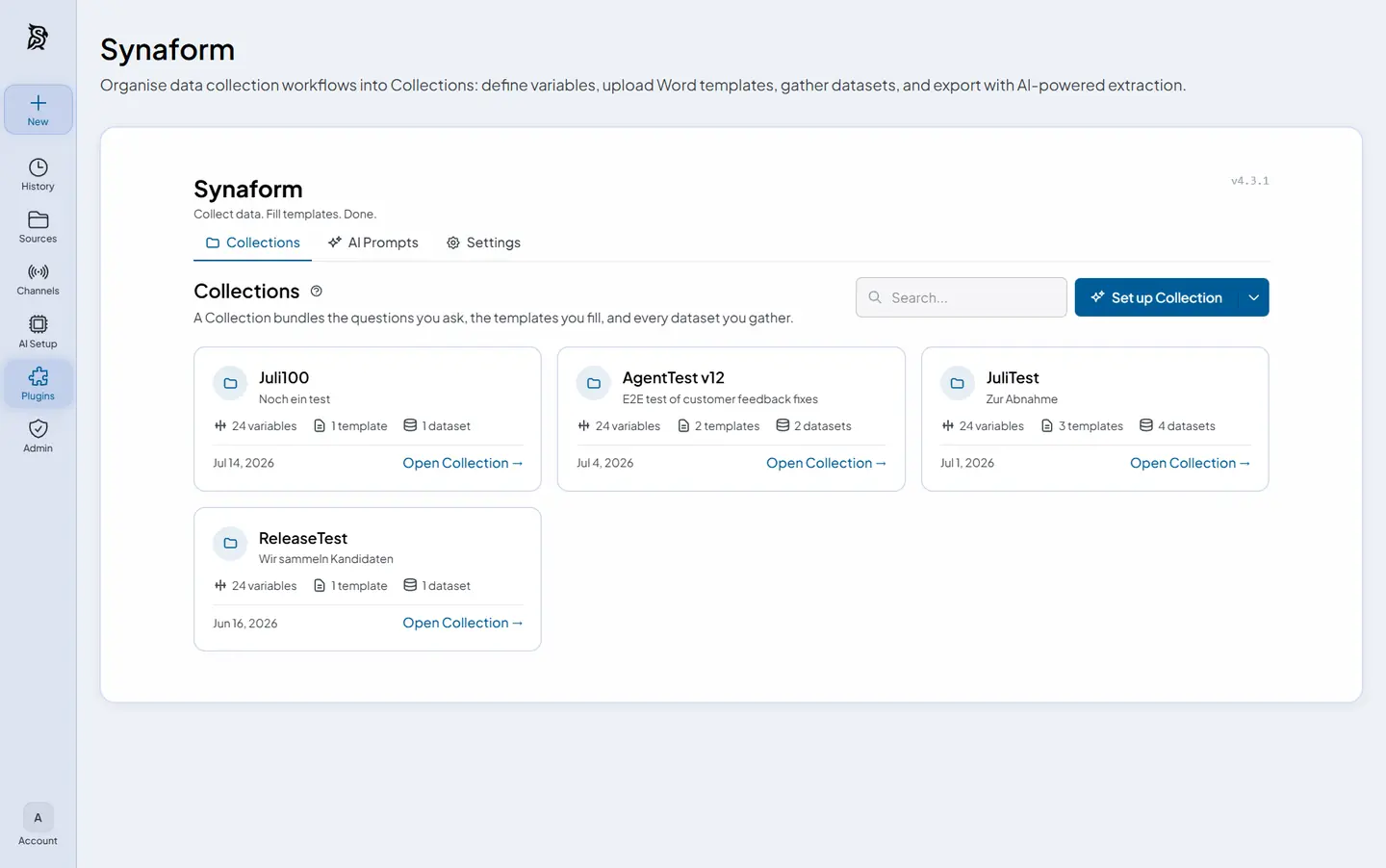 Plugins Extend without forking |
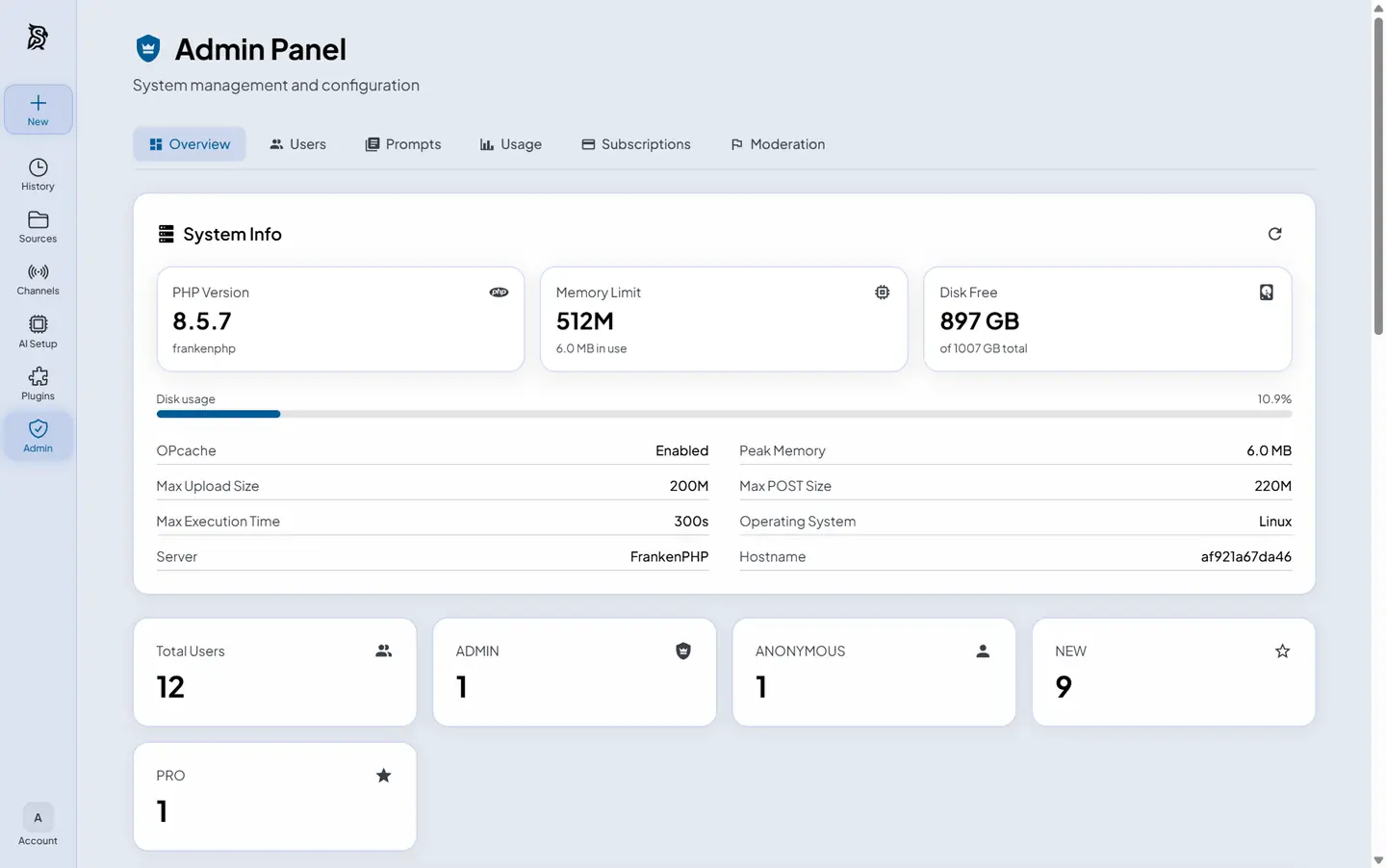 Admin Users, usage and health |
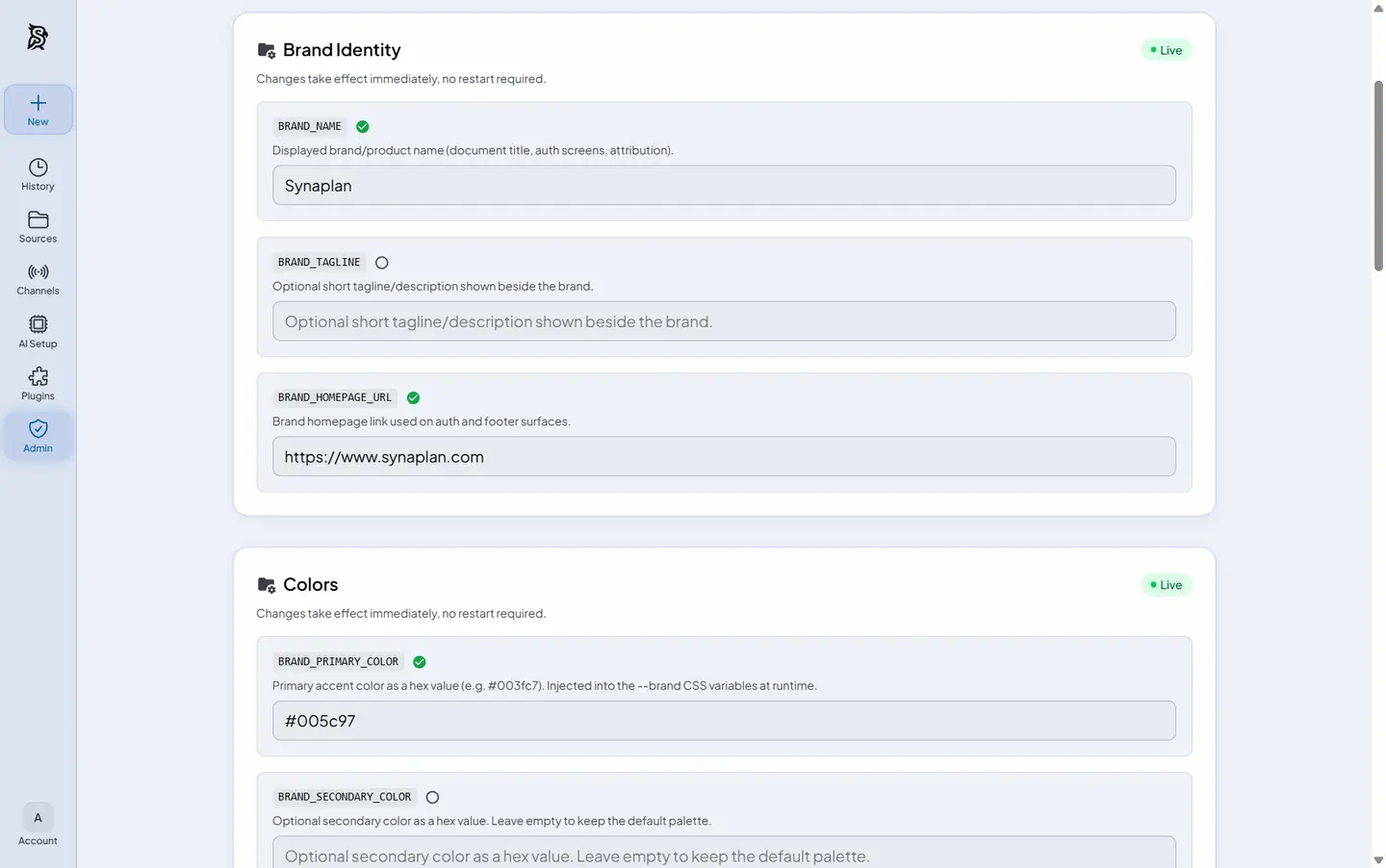 Branding White-label the whole app |
Regenerate these assets after a UI change with scripts/build-readme-tour.sh.
One AI, everywhere you work
The same assistant, the same knowledge base, the same model policy — on every channel your team already uses. Connect a system once under Channels; the planner can then read from it and deliver results into it.
Conversation surfaces
| Surface | What it does | Get it |
|---|---|---|
| Web app | Full chat + admin UI, light/dark, four languages | This repo — docker compose up -d |
| iPhone app | Chat, documents and voice on iOS — pointed at web.synaplan.com or your own server | App Store |
| Outlook add-in | Bring Synaplan into Outlook (Web, new & classic, Mac) — find and process mail without sending it anywhere | metadist/Synamail |
| Chat widget | Embed your assistant on any website with one snippet — cross-origin ready, human takeover included | Widget guide |
| WhatsApp & Email | The AI answers on the channel the question came in on | WhatsApp · Email |
| MCP & Claude Code | Your RAG and memories as MCP tools; Anthropic-compatible POST /v1/messages endpoint | MCP guide · guide |
Connected systems
Set these up under Channels → Connections (or Channels → MCP servers / Channels → Email). In chat, use the channel word shown as a pill on the Connections page — for example nextcloud, dropbox, outlook.
| Channel | What it unlocks | Setup |
|---|---|---|
| Microsoft 365 | Live Outlook mail search, calendar events (outlook), send from your own mailbox | Channels → Connections — OAuth, no password stored |
| Dropbox | Save generated files into a Dropbox folder (dropbox) | Channels → Connections — OAuth |
| Nextcloud / ownCloud / WebDAV | File results into a folder you own (nextcloud / folder) | Channels → Connections — app password, never your account password |
| CalDAV calendar | Put generated meetings into a calendar you own (calendar) | Same Nextcloud preset can create folder + calendar in one step |
| IMAP mailbox | Live search of any IMAP inbox, merged with Microsoft 365 results | Channels → Email |
| Jira & Confluence | Search and summarize; create tickets or pages when you allow writes | Channels → MCP servers — Atlassian quick-start presets |
| Saved Tasks | Pin a plan and run it on demand or on a schedule (hourly / daily / weekdays) | Channels → Saved Tasks |
| Nextcloud / OpenCloud apps | Use files from those clouds as AI knowledge — the file store stays in charge | synaplan-nextcloud · synaplan-opencloud |
Details and channel words: docs/CONNECTIONS.md.
The Synaplan ecosystem
Everything below is the same platform, packaged for different homes. Pick what fits — nothing else is required.
| Project | What it is |
|---|---|
| synaplan | The platform itself (this repo): backend, frontend, widget, plugins, dev stack, and the deploy/ production contract with Elestio, AWS Marketplace, and Umbrel adapters |
| synaplan-charts | Helm charts for Kubernetes — for partners and enterprises running K8s clusters |
| iPhone app | Native iOS app — point it at web.synaplan.com or any server you host |
| Synamail | Outlook add-in (Web, new & classic, Mac) — Synaplan inside your mailbox |
| synaplan-nextcloud / synaplan-opencloud | Apps for Nextcloud / OpenCloud — use those files as AI knowledge while the file store stays in charge (ownCloud works via the built-in WebDAV connection) |
| synaplan-tts | Optional self-hosted text-to-speech service for voice output |
| synaplan-base-php | The base Docker image (FrankenPHP + gRPC + whisper.cpp) the platform builds on |
Prerequisites
- Docker + Docker Compose v2 (Docker Desktop on macOS/Windows, or Docker Engine + the Compose plugin on Linux)
- Git
- 8 GB RAM minimum (16 GB recommended once you add the
local-aiprofile) - ~3 GB free disk for the standard install (+~1 GB for the
local-aiprofile, +~14 GB if you also enable the local chat model) - Free TCP ports
5173,8000,8082,8025,3307,6333,11435
Apple Silicon (M1–M4) Macs — build the backend image, don't pull it. The three-step start above already does this:
docker compose up -dbuilds the backend and worker locally from a multi-arch base image, so PHP/FrankenPHP runs natively onarm64with no emulation tax. That is by far the fastest setup, and it is the default — you don't have to do anything special. The pre-builtghcr.io/metadist/synaplanimage published for production deployments islinux/amd64only, so pulling it instead means running the whole backend under emulation. The first local build takes a few minutes; every later start is a cache hit. Two optional dev tools (phpMyAdmin, MailHog) are still amd64-only upstream images — if you keep them, enable Docker Desktop → Settings → General → "Use Rosetta for x86/amd64 emulation on Apple Silicon" (macOS 13+) so those two emulate quickly.
Install Options
| Mode | Command | Size | Best For |
|---|---|---|---|
| One-liner | curl -fsSL https://raw.githubusercontent.com/metadist/synaplan/main/install.sh | bash | ~3 GB | Easiest start — checks prerequisites, fetches, and starts the standard stack (--minimal and --mode server available) |
| Standard | docker compose up -d | ~3 GB | Local try-out: full features, cloud AI — add one provider key and chat works |
| + local AI | COMPOSE_PROFILES=local-ai docker compose up -d | ~4 GB | Adds Ollama and the bge-m3 embedding model on your own hardware (local chat model optional, +~14 GB) |
| Production | install.sh --mode server or deploy/ compose + scripts | published image | Self-host on a Linux server — see Installation |
| Kubernetes | synaplan-charts | published image | Helm-based cluster deployments for partners and enterprises |
No AI weights are downloaded by default, so the first boot is dominated by the Docker images and npm ci. COMPOSE_PROFILES=local-ai is the same switch a self-hosted install uses in deploy/.env, and it pulls the local embedding model (bge-m3, ~1 GB) in the background for RAG and semantic search; progress is shown in the app.
Prefer the shell to the UI for provider keys? Keys in backend/.env still work — the backend reads that file when the container starts and imports the key into the encrypted store on first use. Write the key before starting, or restart the containers afterwards:
echo "GROQ_API_KEY=your_key" >> backend/.env
docker compose up -d
# already running? pick up the new key with:
# docker compose restart backend worker
Access
| Service | URL |
|---|---|
| App | http://localhost:5173 |
| API | http://localhost:8000 |
| API Docs | http://localhost:8000/api/doc |
| phpMyAdmin | http://localhost:8082 |
| MailHog | http://localhost:8025 |
Default Login Credentials:
| Password | Level | |
|---|---|---|
| admin@synaplan.com | admin123 | ADMIN |
| demo@synaplan.com | demo123 | PRO |
| test@example.com | test123 | NEW (unverified) |
Features
- AI Chat — Ollama, OpenAI, Anthropic, Gemini, Groq, Mistral, xAI, TrustedTokens (DE), A2Agent (CN), HuggingFace (provider list)
- Self-aware assistant — Ask "What can you do here?" or type
/help; the AI assistant answers from this installation's live capabilities, not a generic brochure - Multi-Task DAG Routing — An AI planner decomposes complex requests into a directed task graph (extract → summarize → generate → reply), routes each step to the model that fits it, and streams live task cards while the steps execute — cheaper models for simple steps means fewer wasted tokens
- RAG Search — Semantic document search with MariaDB VECTOR or Qdrant
- Chat Widget — Embed on any website (widget guide)
- iPhone App — Chat, documents and voice input on iOS, pointed at web.synaplan.com or at your own server (App Store)
- Live Support — Realtime WebSocket layer (Centrifugo + Redis): human takeover of widget chats, typing indicators, operator notifications (realtime guide)
- WhatsApp — Meta Business API integration
- Email — AI-powered email responses, plus live mailbox search (IMAP and Microsoft 365)
- Connections — Microsoft 365, Dropbox, Nextcloud / ownCloud / WebDAV, CalDAV — read mail, file results, write calendar events (connections guide)
- Saved Tasks — Pin a multi-step plan and run it on demand or on a schedule (Channels → Saved Tasks)
- Audio — Whisper transcription (input) + optional synaplan-tts (output; four baked voices, UI language selects the voice)
- Documents — PDF, Word, Excel, images with OCR; optional Collabora CODE sidecar for office thumbnails, PDF export, preview and combine (office documents)
- AI Memories — User profiling with Qdrant vector search
- Feedback System — Feedback capture and analysis powered by Qdrant
- Plugins — Non-invasive plugin system (plugin guide)
- MCP Server (early access) — Connect AI clients (Claude, Cursor, …) over the Model Context Protocol; your RAG and memories become tools at
POST /mcp(MCP guide) - MCP Client (early access) — Connect your MCP servers (Jira, Confluence, CRM, wiki, n8n, …) under Channels → MCP Servers. The planner pulls live data via
mcp_fetchand, when you enable allow write actions on that server, can create tickets or pages viamcp_action— destructive tools stay refused. SSRF-guarded, per-topic opt-in. SeededBCONFIGflags (MCP.CLIENT_ENABLED,MULTITASK.MCP_FETCH_ENABLED,MULTITASK.MCP_ACTION_ENABLED) turn this on; an explicit0row is the operator kill switch. See docs/MULTITASK_DATA_NODES.md - Claude Code & Anthropic-compatible API — Point Claude Code or any Anthropic-protocol client at your instance (
POST /v1/messages); configure under Channels → AI Agents (guide)
AI Providers & Models
Synaplan is provider-neutral: connect the providers you want in Admin → AI Providers (keys are validated live and stored encrypted in the database, active without a restart), or set the env variables below in backend/.env — those are read at container start and imported into the encrypted store on first use. Each user picks a different model per task (chat, vision, image, video, audio, embeddings) — nothing is hardcoded.
| Provider | Variable in backend/.env | Models |
|---|---|---|
| OpenAI | OPENAI_API_KEY | GPT-5.6 Sol / Terra / Luna, GPT-5.5 (+ Pro), GPT-5.4 (+ mini / nano), GPT Image, Whisper, text-embedding-3 |
| Anthropic | ANTHROPIC_API_KEY | Claude Opus 5, Sonnet 5, Fable 5, Opus 4.8, Haiku 4.5 (chat + vision) |
| Google Gemini | GOOGLE_GEMINI_API_KEY | Gemini 3.x / 2.5 chat + vision, Imagen 4, Nano Banana, Veo 3.1, Gemini TTS |
| Groq | GROQ_API_KEY | Qwen 3.6 27B (chat + vision), GPT-OSS 20B/120B, Whisper Large v3 |
| Mistral 🇫🇷 | MISTRAL_API_KEY | Mistral Medium 3.5 (+ vision), Mistral Large 3, Voxtral transcription + TTS |
| xAI | XAI_API_KEY | Grok 4.5 (+ vision, 500K context), Grok Imagine image + video (incl. Pro / 1.5 tiers) |
| TrustedTokens 🇩🇪 | TRUSTEDTOKENS_API_KEY | GLM 5.2 / 5.3 (+ Flash vision), DeepSeek V4 / Chimera, Qwen3.6 35B (+ vision), GPT OSS 120B — sovereign inference on German GPUs (TNG), zero data retention |
| A2Agent 🇨🇳 | A2AGENT_API_KEY | Qwen3.8 MAX / Flash (+ vision), DeepSeek V4 Pro / Flash, MiniMax M3 — Chinese frontier models via the A2Agent gateway |
| HuggingFace | HUGGINGFACE_API_KEY | Kimi K3 / K2.5 / K2.6 / K2.7 Code (chat + vision) |
| TheHive | THEHIVE_API_KEY | Flux Schnell, SDXL |
| Higgsfield | HIGGSFIELD_API_KEY + HIGGSFIELD_API_SECRET | Soul, Reve, DoP, Kling 2.1 |
| Cloudflare Workers AI | CLOUDFLARE_ACCOUNT_ID + CLOUDFLARE_API_TOKEN | bge-m3 embeddings (also usable as embedding fallback) |
| Ollama 🇩🇪 self-hosted | OLLAMA_BASE_URL (no key) | Any local model — chat, vision, bge-m3 embeddings |
Transparent pricing. Every model carries its provider's own rate (USD per 1M tokens in/out, or per image / second / character for media) — no proprietary credit unit in between. The selector shows a Free / Low / Mid / High cost badge next to each model and on every answer, GET /api/v1/config/models returns priceIn / priceOut, and the Statistics page logs the real cost of each call. On the hosted instance at web.synaplan.com that same catalog is what your plan meters against; self-hosted with Ollama, the per-token cost is simply zero. Details: Model pricing & cost transparency.
Model catalog changes (new models, retired generations, price updates) ship as seeders plus a migration, so an existing install is repointed to a supported successor instead of silently keeping a dead model. See docs/PRICING_MAINTENANCE.md.
Lean by design: core vs optional building blocks
docker compose up -d starts a complete platform, but the core is deliberately small: the app, its database and Redis. Everything else is a building block that adds one capability and costs RAM. Switch a block on when you need it and off when you don't — Synaplan keeps running either way and simply hides the matching feature. The boot status screen at http://localhost:5173 lists the live on/off state of every block, and Admin → System Status (/admin/features) does the same after login.
| Block | Gives you | Default | Switch |
|---|---|---|---|
Core — frontend, backend, worker, db (MariaDB), redis | The app, its API, async jobs, storage, cache and queues | always on | — |
Ollama (ollama) | Local AI on your hardware: bge-m3 embeddings for document search, optional local chat (ENABLE_LOCAL_GPT_OSS=true) | off | COMPOSE_PROFILES=local-ai docker compose up -d — the same switch as deploy/.env in production |
Qdrant (qdrant) | Vector database for AI memories, feedback analysis and large-scale RAG | on | docker compose stop qdrant — document search itself runs on MariaDB VECTOR (the default VECTOR_STORAGE_PROVIDER), so RAG keeps working; memories pause |
Centrifugo (centrifugo) | Live support: human takeover of widget chats, typing indicators, operator notifications (realtime guide) | on | REALTIME_ENABLED=false docker compose up -d (then docker compose stop centrifugo) — the dashboard falls back to plain REST refreshes |
Apache Tika (tika) | Text extraction from PDF, Word, Excel and 1000+ formats for RAG | on | docker compose stop tika — uploads then index plain text / OCR only |
Collabora CODE (collabora) | Office files: thumbnails, “Download as PDF”, inline preview, “Combine as PDF” (~2 GB RAM) — details | off | docker compose --profile office up -d |
Text-to-speech (tts) | Spoken answers, four built-in voices — details | off | docker compose --profile tts up -d |
Keycloak (keycloak) | SSO test realm for OIDC development (configuration) | off | docker compose --profile oidc up -d |
Keep a default-on block off across restarts. docker compose stop is undone by the next up -d. To make a block opt-in permanently, give it a profile in a docker-compose.override.yml (not tracked by git) — plain up -d then skips it, --profile optional brings it back:
services:
  qdrant:
    profiles: [optional]
Production follows the same rule set: deploy/compose.yaml ships the core plus Qdrant, Centrifugo and Tika, with office and local-ai as profiles (COMPOSE_PROFILES=office,local-ai in deploy/.env); Kubernetes installs wire the same services via synaplan-charts. The other dev-only containers (phpmyadmin, mailhog, frontend-widgets, startup-notes) never ship to production.
Realtime & Background Processing
Both compose files also start three internal services (no host ports, no setup needed):
| Service | Role |
|---|---|
redis | Mandatory shared infrastructure: cache, sessions, locks, rate limits, message queues (Redis Streams), Centrifugo engine |
centrifugo | WebSocket gateway for realtime features (live chat takeover, typing indicators, operator notifications) — browsers connect same-origin via /connection/websocket |
worker | Symfony Messenger consumer that executes async jobs (AI processing, document indexing, widget crawling) |
In a multi-node cluster all nodes share one Redis, so WebSocket events published on one node reach browsers connected to any other. Details: docs/REALTIME.md.
Text-to-Speech (Optional)
Voice output is an optional companion, not part of the core stack — synaplan-tts, image ghcr.io/metadist/synaplan-tts. The image already contains four Piper voices (English, German, Spanish, Turkish). Synaplan runs fully without it; the speaker control appears when the service answers.
# Same compose file (recommended)
docker compose --profile tts up -d

# Or standalone, on this host or another machine
docker run -d --name synaplan-tts -p 127.0.0.1:10200:10200 ghcr.io/metadist/synaplan-tts:latest
The backend looks at SYNAPLAN_TTS_URL (compose default http://host.docker.internal:10200).
The UI language selects the voice. Chat sends the active frontend locale (en / de / es / tr); if the backend detects a different reply language, that wins. Piper then maps the short code to the matching baked voice (German UI → Thorsten, Spanish → davefx, …). There is no separate voice picker. Add more Piper models by dropping .onnx + .onnx.json into the extra-voices volume — see synaplan-tts README and docs.synaplan.com/tts.
Office documents (Optional Collabora CODE)
Office thumbnails, “Download as PDF”, inline preview, officemaker PDF output,
legacy / Apple format conversion, and “Combine as PDF” need a Collabora CODE
sidecar (collabora/code). Chat, Tika RAG and officemaker DOCX / XLSX / PPTX
work without it. The sidecar is off by default (--profile office) so
docker compose up -d does not pull the image or spend the extra ~2 GB RAM.
# Dev / minimal — compose already defaults OFFICE_CONVERT_URL to http://collabora:9980
docker compose --profile office up -d

# Production (deploy/) — env, not backend/.env
# in deploy/.env:  COMPOSE_PROFILES=office
docker compose --env-file deploy/.env -f deploy/compose.yaml --profile office up -d

# Already running CODE (Nextcloud, OpenCloud, another compose)
OFFICE_CONVERT_URL=http://<existing-collabora-host>:9980 docker compose up -d
Do not put OFFICE_CONVERT_URL in backend/.env: Compose injects the
variable, so the file cannot override it. Deployments set the env on the host
or in compose. OFFICE_CONVERT_URL=disabled turns the engine off.
Collabora never sees Synaplan users. Convert-to is a server-to-server POST
of a file; identity stays in Synaplan (login + file ownership). No Collabora
accounts, no WOPI token on this path. HTTP 403 is usually CODE’s
net.post_allow.host rejecting the compose subnet.
Full operator guide: docs.synaplan.com/office-documents.
Kubernetes / reuse in other projects:
synaplan-charts docs/collabora-office-engine.md.
Common Commands
# Startup progress ("please wait..." notes + READY message)
docker compose logs -f startup-notes

# Logs
docker compose logs -f backend

# Restart
docker compose restart backend

# Reset database
docker compose down -v && docker compose up -d

# Run tests
make test

# Code quality
make lint
Documentation
User-facing & API docs live at docs.synaplan.com. Source: metadist/synaplan-docs.
In-repo guides (for developers working on this codebase):
| Guide | Description |
|---|---|
| Installation | Local development stack and production self-hosting (deploy/) |
| Configuration | Environment variables, API keys |
| Feature flags | Every wave feature (people & sharing, assistants, tools, saved-task steps, desktop, …): admin toggle, FEATURE_* env pin, defaults |
| Connections | Microsoft 365, Dropbox, Nextcloud / WebDAV, CalDAV, Jira / Confluence |
| AI Model Pricing | Model catalog, provider prices, retiring a model |
| Development | Commands, testing, architecture |
| Realtime / WebSockets | Centrifugo + Redis realtime layer, multi-node deployment |
| Observability | Request correlation ids, redacted event ring, admin logs API |
| Office documents | Optional Collabora CODE sidecar (PDF export, previews, convert-to) |
| RAG System | Document search and processing |
| Chat Widget | Embed chat on websites |
| Meta Business API setup | |
| Email channel integration | |
| Anthropic-compatible API | Claude Code / Messages API gateway (POST /v1/messages) |
Related Repositories
| Repo | Purpose |
|---|---|
| synaplan | Main app (this repo) |
| synaplan-docs | Public docs site (docs.synaplan.com) |
| Synamail | Outlook add-in |
| synaplan-nextcloud | Nextcloud integration |
| synaplan-opencloud | OpenCloud integration |
| synaplan-tts | Optional Piper TTS — image with 4 baked voices |
| synaplan-sortx | Document-sorting plugin + local tool |
| synaplan-charts | Helm charts for Kubernetes |
| synaplan-platform | Production deployment configs |
Project Structure
synaplan/
├── backend/        # Symfony PHP API
├── frontend/       # Vue.js SPA
├── docs/           # Documentation
├── deploy/         # Production self-host compose + lifecycle scripts
├── _docker/        # Docker configs
└── plugins/        # Plugin system
Community & Support
- Discord — chat with the team and community; the fastest place for self-hosting and configuration questions
- GitHub Issues — bugs and feature requests
- www.synaplan.com — product, hosting and enterprise contact
Contributing
See AGENTS.md for development guidelines and code standards.
License