jevnav
Sự thật trang và quyết định có thể phát lại cho các tác nhân trình duyệt: một mô hình chọn phần tử, một cổng chặn các hành động rủi ro, và mỗi lần chạy phát lại ngoại tuyến trong CI.
Tài liệu
jevnav
Page truth for browser agents — and decisions that replay, test and audit.






https://github.com/user-attachments/assets/502550ec-77d4-439e-b334-fe7007f946b9
jevnav is a browser layer for agents and tests. It reads a page as facts
(structure, computed styles, the controls on screen), lets
Jev — TypeSafe's model for structured
questions — pick the element for an intent with a calibrated probability,
gates risky or uncertain actions to a human, and records every decision in a
trace that replay re-checks offline in CI.
- Page truth, not pixels.
outline,stylesanddiffreturn what the browser resolved —font-size 32px → 28pxbetween a mockup and the running app is something an agent can fix. No screenshots in the decision loop. - Evidence, not confidence. Each decision carries its probability, the gate
verdict and its cost. A site change that breaks a recorded decision makes
replayexit 1 — no model call, no API key. - Works where your agent works. CLI, Python/pytest, an MCP server for Claude Code, Cursor, Codex and friends, and a GitHub Action.
Why it exists — selector tests break when a label changes; LLM browser agents
are confident, unauditable and occasionally wrong: docs/why.md.
Install
uv tool install jevnav          # or: pip install jevnav  (the MCP server is included)
playwright install chromium     # one-time browser download
Requires Python 3.10+. Deciding (go, run, browse, goal) needs a TypeSafe
API key in TYPESAFE_API_KEY or ~/.config/typesafe/apikey.txt. replay,
diff, outline and styles need no key — that is the point.
Quickstart
1. Let Jev drive — state a goal and the outcome that proves it:
jevnav go --goal "sign in with the demo account and open the pricing page" \
  --start https://app.example.com/login \
  --context email=demo@example.com --context password="${ACME_PASSWORD}" \
  --success "#pricing.visible" \
  --report goal.md
status: done — outcome verified against the page
steps: 5 — auto 4, review 0, blocked 0
One Jev request per step; every step is gated and traced. The loop stops when
the goal is met, when nothing on the page can make progress (stuck), when the
gate wants a human (review), when the page stops changing (no_progress), or
at --max-steps. done is a claim — --success turns it into evidence
(verified, or unverified and the run fails). --dry-run decides without
acting.
2. Or script the flow and let Jev resolve each intent:
# flows/acme-login/flow.yaml
id: acme-login
start: https://app.example.com/login
steps:
  - intent: "Sign in to the existing account"
    action: click
  - intent: "Type the password"
    action: fill
    value: "${ACME_PASSWORD}"   # read from the environment, never written to the trace
  - intent: "Submit the login form"
    action: click
jevnav run flows/acme-login/flow.yaml --report run.md
3. Replay it in CI — offline, deterministic, no key:
jevnav replay acme-login.trace.jsonl            # re-resolve every recorded decision
jevnav replay acme-login.trace.jsonl --execute  # also re-run the actions + check --success
steps 3 verdicts: ok 3
Change Sign in to Log in on the site and the same replay fails:
[01] changed   Sign in to the existing account
      no element now has 'button|sign in' (was 'Sign in' / 'button')
Exit code 1, with the reason. That is the regression test.
Page truth for your agent
The facts a coding agent needs about a rendered page, without a screenshot:
outline(selector) for a region's structure (tags, headings, text, boxes),
styles(selector, props) for the computed values, page_state() for the
controls jevnav can act on.
jevnav diff compares a mockup with the running app as facts and exits 1 on
drift:
jevnav diff new-ui.html http://localhost:3000 --report ui-diff.md
| element | property | mockup | app |
|---|---|---|---|
| h1 [Pricing] | font-size | 32px | 28px |
| button#cta [Start free] | border-radius | 8px | 4px |
The report also lists structure differences (missing, new and moved elements;
boxes compared with a 4px --tolerance). The loop for "here is a new UI, update
the codebase": the agent reads both pages with jevnav, edits the code itself,
re-runs diff until it exits 0, then pins the outcome with
goal(..., success="<selector>") so replay --execute keeps checking it.
jevnav reports; it never edits your repository and never compares pixels.
Gates
Every decision gets one of three verdicts:
| verdict | meaning |
|---|---|
auto | confidence at or above the threshold and nothing risky — the action runs |
review | a human confirms first: low p, a risky intent, or a truncated candidate list |
blocked | no decision was possible (the model answered none, or the call failed) |
review and blocked never execute. Thresholds and risky patterns live in an
optional gates.yaml; defaults ship for nine languages:
# flows/acme-login/gates.yaml
min_confidence: 0.9        # scripted flows: one question per step, well calibrated
loop_min_confidence: 0.5   # goal loop: four questions at once, p runs lower
risky:
  - "\\b(delete|remove|purchase|pay)\\b"   # matched against intent + element name + role
intents:
  "delete the *": { min_confidence: 0.99 }
truncated: review          # the page had more than 255 candidates
The goal loop uses a lower threshold on purpose: measured correct loop decisions
land at p 0.41–0.99 and wrong ones at 0.39–0.47, so its safety comes from
deterministic checks instead — fill on a button is refused, a field with no
context value is blocked, two steps that change nothing stop the run, risky
patterns always go to review, and the outcome is verified against --success.
MCP server
claude mcp add --scope user jevnav -- uvx jevnav mcp
Or, for Cursor, Claude Desktop, VS Code and other clients:
{
  "mcpServers": {
    "jevnav": {
      "command": "uvx",
      "args": ["jevnav", "mcp"],
      "env": { "TYPESAFE_API_KEY": "..." }
    }
  }
}
No URL or flags needed: the agent opens pages with goto, one server serves
every site, and each session writes an auditable jevnav-session.trace.jsonl
(--no-trace opts out). The deciding tools are what no other browser MCP has:
| tool | what it does |
|---|---|
browse(intent, action, value, min_confidence) | one step: Jev picks the element, the gate decides, only auto acts |
goal(goal, context_json, max_steps, success) | drive the whole way; returns done / stuck / review plus the verification |
goto(url) · page_state() · summary() | open a page, list what jevnav can act on, session totals |
Plus 28 acting and inspecting tools (forms, keys, uploads, tabs, console,
network, styles, outline, emulation, tracing, Lighthouse), each with MCP
annotations so the host knows which calls change state. A decision costs about
$0.00004 and ~330ms, and the page never enters the LLM's context. Full tool
reference, security flags and when to pick jevnav vs. Playwright or
chrome-devtools-mcp: docs/mcp.md.
CI — GitHub Action
- uses: dtduc-git/jevnav@v0
  with:
    trace: examples/local-demo/demo.trace.jsonl
    execute: "true"          # also re-run the recorded actions
    report: replay.md
No model call, no API key, ~30 seconds. Fails when a recorded target changed,
became ambiguous, or a recorded --success selector is no longer visible.
Inputs: trace, report, execute, json, version (default latest from
PyPI, or local for a checkout). @v0 floats; pin a release tag such as
@v0.2.2 for fully reproducible CI.
pytest
The jev fixture ships with the package: an ordinary Playwright test gets Jev
decisions, and every test writes a trace that replays in CI.
def test_sign_in(jev):
    jev.goto("https://app.example.com/login")
    jev.fill("the email address", "demo@example.com")
    jev.fill("the password field", "${DEMO_PASSWORD}")
    jev.click("the sign-in button")
    jev.expect("#welcome")
DEMO_PASSWORD=... pytest --jev-trace-dir=traces
DEMO_PASSWORD=... jevnav replay --execute traces/test_sign_in.trace.jsonl   # offline, no key
A review verdict fails the test before the action runs, ${VAR} values are
recorded by name only, and jev.page is the real Playwright page for everything
else. Runnable example with a committed trace:
examples/pytest-interop/.
Your own browser
jevnav go --goal "..."                                          # fresh headless Chromium (default)
jevnav go --goal "..." --user-data-dir ~/.cache/jevnav-profile --headed   # persistent profile
jevnav go --goal "..." --cdp http://127.0.0.1:9222              # attach to a running Chrome
Log in once with --headed and every later run reuses the profile; --cdp
drives the Chrome you already have open, keeps its own settings (so it refuses
--user-data-dir, --locale, --timezone and --user-agent) and never
closes it. Both work on run,
go, replay and mcp, and so does --browser for firefox or webkit (plus
--locale, --timezone, --user-agent). Profile paths and cookies never reach
a trace.
Evidence
| what | result | source |
|---|---|---|
element picks on real sites (9 sites, jev-1.13.0) | 41/41 scored cases correct; 30/30 at the p ≥ 0.9 gate | research/browser-element-selection.md |
| decision latency and cost | p50 365ms, $0.000153 per decision | same |
| goal loop (local fixture, 4 goals × 2 wordings) | 8/8 goals correct, incl. the impossible one (stuck) | docs/evidence.md |
| driving tasks vs. chrome-devtools-mcp (same LLM, n=2) | jevnav 8/8, chrome-devtools-mcp 6/8; chrome-devtools 2.4× faster end to end | research/driving-benchmark.md |
| replay | deterministic: offline, no key, exit 1 on a broken decision | run it on your own traces |
Small samples with a single annotator: read them as direction, not proof.
jevnav's advantage is decision cost and evidence, not wall-clock speed on small
pages. Method, caveats and the tool-level comparison:
docs/evidence.md.
How it works
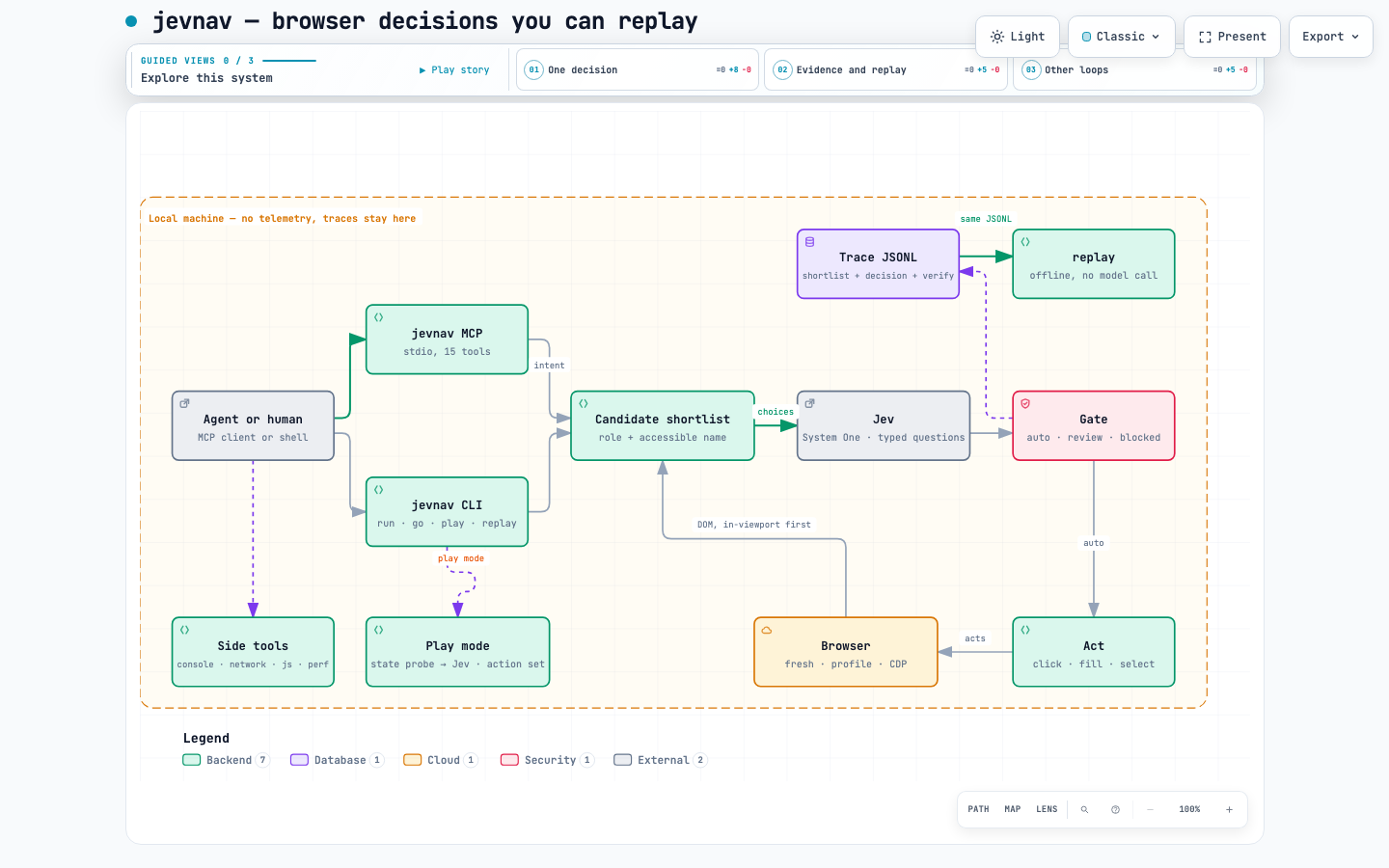
- A shortlist, not the page. Visible interactive elements from every frame
and open shadow root, ranked by how likely a human would act on them and
capped at 120 (
--max-candidates, hard cap 254). Each carries role, accessible name, type, href, placeholder and a scope, so three "Email" fields stay distinguishable. - One question per step. The shortlist plus
nonebecomes a choice question; Jev answers with one element and its probability. - Fingerprints, never positions. An element's identity is
role|name. The trace stores every candidate's fingerprint as the model saw it, and actions and replay resolve by fingerprint with a uniqueness check, so a shifted page cannot click the wrong thing. - Replay verdicts.
ok,moved,changed,ambiguous,error— the last three fail.--normalize REGEXrelaxes known churn such asCart (3)→Cart (4); strict is the default.
The trace format is a public contract: SPEC.md. Interactive
architecture diagram: docs/architecture.html.
Beyond the web: docs/games.md (Jev playing a game from
structured state, measured against a random control).
Non-goals
- Not a planner.
go/goaldrive toward a goal you state; deciding what to do stays with you or your agent — jevnav decides where, and records why. - No pixel decisions. No screenshots or canvas vision in the decision loop
(
screenshotexists for humans), and no text generation —fillvalues come from your flow, context or environment. - No hosted service, no telemetry. Nothing leaves the machine except the question sent to your configured Jev endpoint.
Privacy
Traces contain page URLs, element names and your actions — never screenshots.
The goal loop also sends a short digest of the page's visible text and current
form values (passwords masked); scripted flows send neither. ${ENV} values are
recorded by name only. Add *.trace.jsonl to your .gitignore and audit a
trace before sharing it. See SECURITY.md for the authority
boundary of the MCP server.
Suite
jevnav is the browser piece of a verification stack: mcplint (MCP configs), harnessguard (agent harnesses), jevassert + jev-packs (calibrated decision packs), and jev-table.
License
Apache-2.0 · Releases and changelog