Mythex
Máy chủ MCP từ xa cho trình tạo ứng dụng AI Mythex: Claude, Cursor hoặc Codex tạo dự án, chỉnh sửa mã và chạy bash trong sandbox đám mây, xem trước, thêm cơ sở dữ liệu Postgres và xuất bản lên URL trực tiếp.
Máy chủ MCP được lưu trữ
npx add-mcp 'https://mcp.mythex.ai/mcp'Cài vào Claude Code, Codex, Cursor và nhiều công cụ khác
Tài liệu
MCP (Claude, Codex, Cursor)
How to connect Claude, Codex or Cursor to Mythex over MCP — paste the MCP URL, click Connect, approve on Mythex. Tool calls need a Pro account and credits.
MCP — build from Claude, Codex, or Cursor
Mythex exposes a remote MCP server. External agents (Claude, Cursor, Codex) code in your cloud sandbox; Mythex provides the VM, preview, and publish.
The simple flow (recommended)
-
Copy your MCP URL. It is in two places, whichever you reach first:
- Account settings → MCP / Claude
- Connectors (left sidebar) → Custom MCP, at the foot of the panel
Production:
https://mcp.mythex.ai/mcp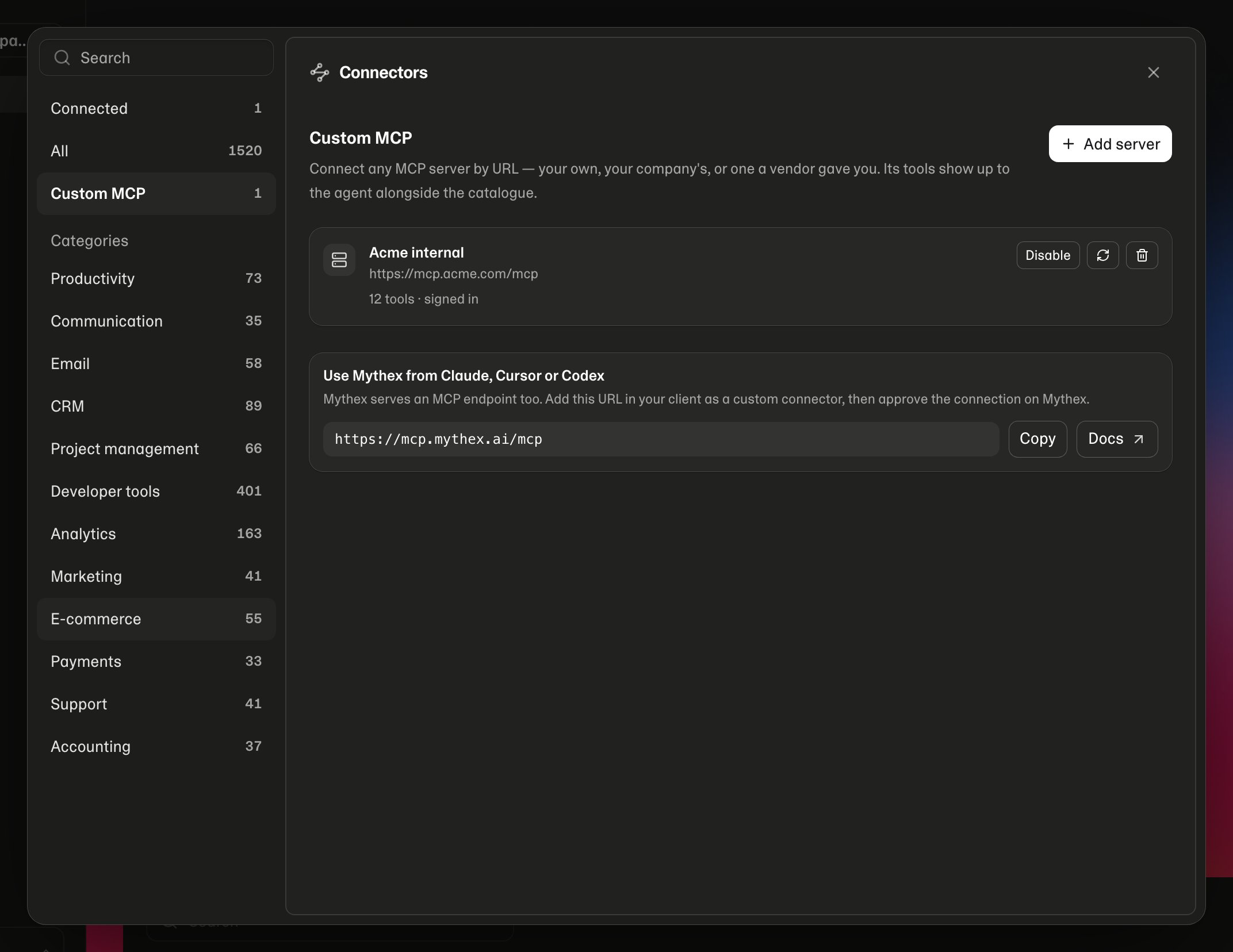
-
In the client, add that URL as a custom MCP / connector
-
Click Connect
-
Your browser opens Mythex
/mcp/consent— sign in if needed, then Allow access or Deny -
You’re done. Chat in Claude/Cursor and build
Anyone can Connect. Tool calls need a Mythex Pro account (and credits for sandbox time). Free can still Allow access; tools show an upgrade panel until the account is Pro.
Claude
Settings → Connectors → Add custom connector → paste MCP URL → Connect → approve on Mythex.
Cursor
Add the server with only the URL (Settings → MCP, or .cursor/mcp.json):
{
  "mcpServers": {
    "mythex": {
      "url": "https://mcp.mythex.ai/mcp"
    }
  }
}
Toggle the server on → Connect when Cursor prompts → approve on Mythex.
Local dev can use http://localhost:4000/mcp the same way.
Requirements for tools
- Pro plan (Connect works without it; tools return an upgrade error)
- Credits on your balance (empty balance → sandbox wake refused / sandboxes pause)
What the client can do
- Create / open projects and wake sandboxes
- Read, write, edit, search files; run
bash - Preview via
set_run_config/ start / logs - Env keys (set secrets you provide — values are not listed back)
- Database, storage, publish, checkpoints
- Browser run, web/media helpers, export/import, GitHub, domains
Tool results include a workspace_url (https://mythex.ai/p/{id}?from=mcp). Open it to watch the live preview and progress in Mythex while the client works in Cursor/Claude.
If you run out of credits (or need Pro), the tool returns an upgrade_url and Cursor shows a Mythex panel in chat (pricing / credits) — the same idea as inline image and video previews. Open the URL if you want checkout in the browser.
Preview tools (set_run_config, start_preview, get_preview) return preview_url for the in-chat live iframe. browser_run attaches Playwright screenshot() PNGs as images in chat (Claude/Cursor can display them).
What stays private
- Mythex agent system prompts and internals
- Platform secrets and other users’ projects
- Raw secret values via
list_env_keys(keys only)
Credits
- The external model is billed by that provider (Claude / Cursor / etc.)
- Mythex credits pay for live sandbox time and published hosting
- Empty balance → sandbox wake refused / sandboxes pause
Related
This documentation is built and hosted on Mintlify, a developer documentation platform.