Apra-fleet
Vận hành một đội ngũ tác nhân AI trên các thiết bị, nhà cung cấp và quy trình làm việc của bạn.
Tài liệu

apra-fleet
Run a fleet of AI agents across your devices, your providers, your workflows.
What Kubernetes did for containers, apra-fleet does for AI agents: scheduling, credentials, isolation, and observability for an agentic workforce -- on any machine, anywhere, using every LLM provider at once.





Quick Start - Live Demo - How It Works - fleet-sprint Getting Started Guide - Website
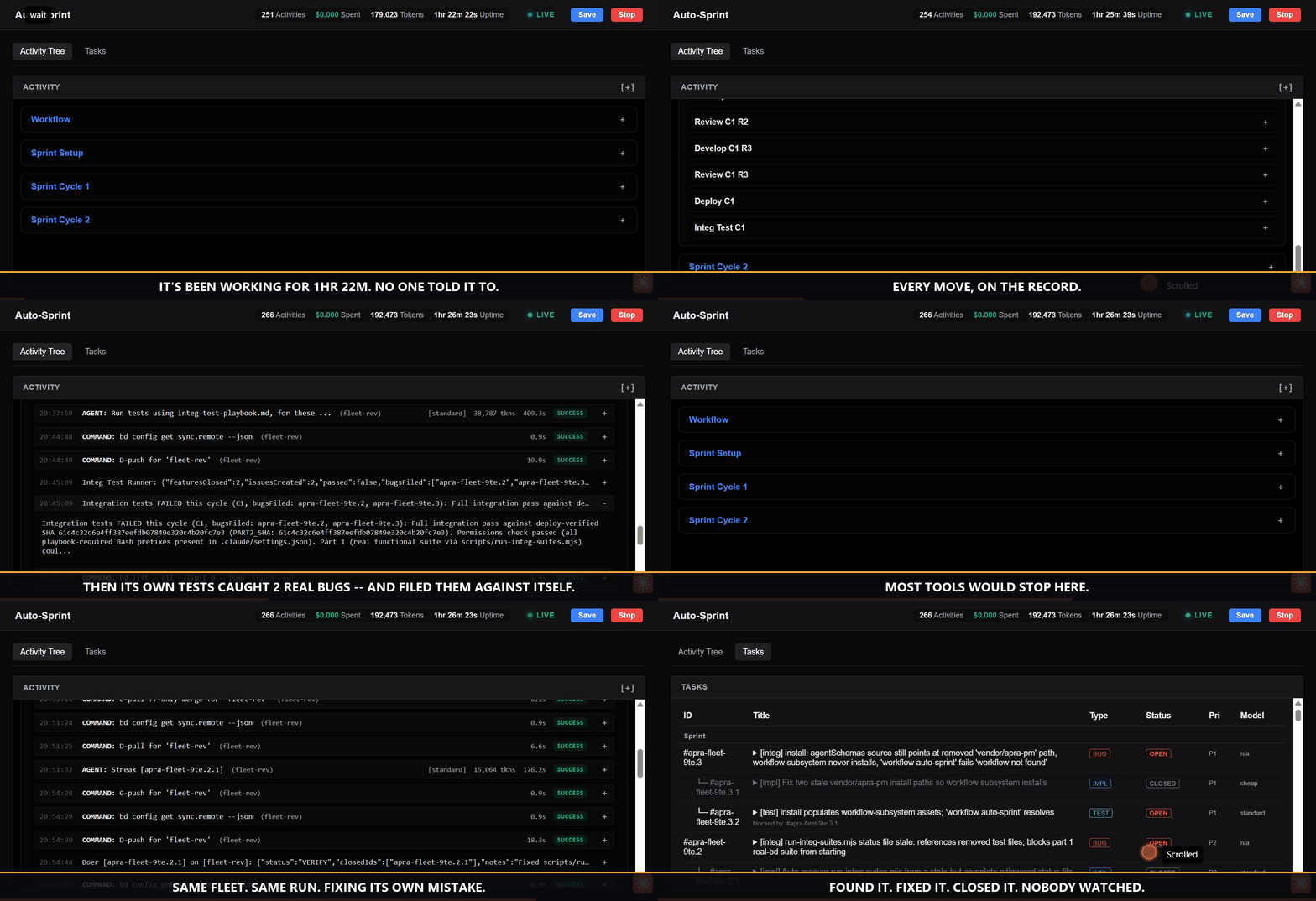
This repository is built by the product you are looking at. An autonomous apra-fleet workflow plans, codes, reviews, tests, and ships this codebase in multi-hour sprints -- filing bugs against itself and fixing them. The recording above is a real run, not a mockup.
Why a fleet?
Running one AI agent is a demo. Running fifty -- across a MacBook in the office, a GPU box in the lab, three cloud VMs, and your CI -- is an operations problem nobody else has solved:
- Which machine runs which agent? Real devices, not throwaway sandboxes: registered, credentialed, health-checked members you already own.
- Which model does which job? Claude for review, a cheap tier for mechanical edits, a local vLLM model for private data -- all in one fleet, routed by cost tier, switchable per task.
- Who watches the agents? Durable workflows with supervisors, watchdogs, reservations, and live dashboards. Agents that die get detected. Work that stalls gets resumed. Nothing runs silently.
- Who holds the keys? Secrets entered out-of-band, never visible to any model. Per-provider permission composition. Network egress policy per credential.
One control plane. Any device. Any model. Any workflow. Any domain.
What you get
| Pillar | Concretely |
|---|---|
| Any device | Register any Windows / macOS / Linux machine (local or over SSH) as a fleet member in one command. Cloud members auto-start on demand. Windows members are fully supported for dispatch, command execution, and background long-running tasks (launched detached via WMI). |
| Any model | Claude, Codex, Copilot, Antigravity, local models (any OpenAI-compatible endpoint via OpenCode) -- mixed freely. Tier-based routing (cheap / standard / premium) keeps cost governance built in. Cross-provider review is a quality mechanism: a different model, with different blind spots, checks every change. |
| Any workflow | Workflows are durable programs, not prompt chains: multi-hour, resumable, observable, with member reservations and atomic state. Write your own; ship it to the fleet. |
| Any domain | Not just software development. The pattern fits wherever work decomposes into agent-sized pieces that need orchestration and an audit trail: nightly retail replenishment (reconcile inventory deltas, draft purchase orders for sign-off), logistics exception handling (triage a delayed shipment, re-book, notify), healthcare intake (summarize referrals, check completeness, route), back-office runs (invoice matching, compliance evidence collection). Software engineering is the vertical running today -- your domain is a workflow away. |

Watch a fleet work
Our flagship workflow, fleet-sprint, develops software autonomously: plan -> develop -> review -> deploy -> integration-test -> harvest, in cycles, until the goal is met or the evidence says stop.
It is not a toy. It builds apra-fleet itself:
- Multi-cycle sprints running for hours, unattended
- 2,300+ unit tests and an 81-file integration suite against real backends
- Files bugs against itself, decomposes them, fixes them, and blocks its own release until quality gates pass
- Every dispatch, verdict, and dollar visible live on the dashboard
- Every sprint's raw child stdout/stderr is captured to a per-sprint log and linked from the dashboard, so a run's output is traceable even if it crashes before reporting anything back
A fleet that has run in production:
pm-1      Opus (premium)      orchestrator
doer-1    Sonnet (standard)   feature work
doer-2    Antigravity         large-context tasks
reviewer  Opus (premium)      final review
The engine does not know what a "sprint" is; it knows how to run your workflow reliably across your fleet (see Any domain above).
Quick start (5 minutes)
1. Install -- one command via npm (Node.js 22+), or grab the standalone installer binary for your platform from Releases and double-click it (installation is the default action):
npm install -g @apralabs/apra-fleet
apra-fleet install           # installs for Claude Code (default)
apra-fleet install --llm agy # or --llm opencode / codex / copilot
cd ~/.apra-fleet/bin && apra-fleet start             # start the apra-fleet
The default install includes fleet-se (fleet-sprint, supervisor, bd), which requires a system Node.js 22.16+ and npm on PATH; the installer fails up front if they are missing. Use apra-fleet install --workflows none to install the core only.
2. Connect your agent. Load the fleet server in Claude Code with
/mcp (or restart your provider CLI). Your agent now has a fleet.
3. Register members -- in plain language. apra-fleet is driven conversationally through any MCP-capable agent:
"Register a local member called
doer. Register another calledreviewer. Pair them."
"Register 192.168.1.10 as
build-server. Username akhil, work folder/home/akhil/projects/myapp."
Remote passwords are collected out-of-band -- typed into a separate terminal, never the chat -- used once to set up SSH keys, then forgotten.
4. Run your first workflow:
apra-fleet workflow hello-world
Then point the fleet at real work:
apra-fleet workflow fleet-sprint \
  --issue my-project-epic --members doer \
  --branch fleet-sprint/first-run --base main
Open the dashboard, watch your fleet PLAN->BUILD->REVIEW->TEST->SHIP in a loop till closure
New to fleet-sprint? Read the fleet-sprint Getting Started Guide (Markdown if you're reading this on GitHub -- PDF) -- a plain-English walkthrough of what it does, what you need to prepare (beads backlog,
deploy.md, test playbooks, member registration), how to launch and monitor a sprint, and what's automated versus what's still your call.
Running fleet-sprint after npm install: the apra-fleet workflow fleet-sprint ... command above is the same one command for everyone --
whether you installed via npm install -g @apralabs/apra-fleet, the
standalone binary, or a git-clone dev checkout. There is no separate
fleet-sprint command to install or remember. See
the full flag reference
for every option.
How it works
Layered Architecture

Component Docs: fleet-sprint | auto-sprint.js | apra-fleet-client | apra-pm | apra-fleet-mcp | Agent Roles
Fleet Dispatch Topology
flowchart LR
    CP["Control Plane<br/>(Server, Engine, Supervisor)"] -->|Dispatch & Sync| M1["MacBook<br/>(Claude)"] & M2["Linux GPU<br/>(vLLM)"] & M3["Cloud VM<br/>(AGY)"] & M4["Windows<br/>(OpenCode)"]
- Fleet server: the control plane. Registers members, dispatches commands and prompts, moves files, brokers credentials. Speaks MCP, so any MCP-capable agent can drive a fleet.
execute_promptsupports session forking (fork) on fork-capable providers -- branch a new, independent session from an existing one's context (e.g. a primed session reused across per-task dispatches) without continuing to write into the source session. See docs/mcp-tools.md for the parameter contract. - Members: real machines running provider CLIs. Composes provider-native permissions before every dispatch; unattended modes are scoped, never blanket.
- Workflow engine: runs workflow programs with phases, retries, turn budgets, resumable sessions, per-activity persistent state, and a cooperative pause/resume gate any workflow can hook into.
- Supervisor: always-on layer -- launch, pause/resume, & stop sprints over HTTP, member reservation ledger, crash watchdog (including a live "paused" state and base-branch-drift indicator), run history.
Knowledge Layer
Every agent session starts by calling kb_session_prime. The KB checks which
files have changed since last read and returns exactly those. Unchanged files
are served from cached summaries -- no re-read, no wasted tokens.
Cold session:  kb_session_prime returns stale_files=[a.ts, b.ts, c.ts]
               Agent reads all three, calls kb_capture for each.
Warm session:  kb_session_prime returns stale_files=[], session_warm=true
               Agent works from KB summaries. Zero file reads.
MCP tools that ship with the KB:
| Tool | What it does |
|---|---|
kb_session_prime | Prime a session: stale files, fresh summaries, GitNexus call list |
kb_capture | Store a learning, context-cache, runbook, or knowledge entry |
kb_query | Two-level FTS retrieval (L1: title+summary, L2: full content) |
kb_list | Audit-list entries by confidence/type/module/symbol (read-only, no use_count bump) |
kb_context | Batch file freshness check (single git call for N files) |
kb_invalidate | Mark files stale immediately (also called by the git hook) |
kb_promote | Advance confidence: UNVERIFIED -> INFERRED -> CONFIRMED |
kb_harvest | Extract learnings from a session transcript (auto-fires after execute_prompt) |
kb_export | Write live CONFIRMED entries to .fleet/kb-canonical.json -- the git-shareable team bible |
kb_setup | Install git hook, write provider config, store remote token encrypted |
kb_setup --remote <url> --token <key> takes effect immediately: the next
KB tool call resolves its project provider from this config, so a stock build
points at a remote KB server by configuration alone, with no code change and
no separate "server mode" build. A config with no remote, or any config the
reader cannot parse, always falls back to the local SQLite provider -- see
Client-side provider selection
for the exact selection rule and its fallback-construction invariant.
The provider config is install-wide, not per repo. There is one
knowledge/config.json per fleet install, so pointing it at a remote KB
points EVERY repo that install serves -- every member, every project -- at
that server. kb_setup's repo_path only chooses which repo gets the git
post-commit hook; it does not scope the config. On a shared fleet server,
treat kb_setup --remote as a change for all of its users.
Every KB tool call is scoped to the repo it is about -- a fleet server
handling many members across many repos never lets one repo's learnings land
in another repo's KB. Scope is normally derived from the caller's repo path;
tools also accept an explicit repo_remote_url so a remote member (whose
work folder is a path on another host, unreachable from the fleet server's
filesystem) resolves to the same project KB as a local clone of that repo
instead of a shared fallback database. The automatic post-prompt harvest and
the code_context KB enrichment path both forward this URL too, and an
unreachable work-folder path is never silently swapped for the fleet
server's own working directory -- see
Per-repo KB isolation for
the full anchor and cache-keying rules.
The backend is swappable: start with local SQLite, add a central HTTP server for a team, or plug in Postgres later -- all via a one-line config change.
See docs/knowledge-layer.md for the full guide.
Explore with agents. Operate with programs.
There are two ways to orchestrate agents, and apra-fleet is built on the observation that you need both -- at different stages of a workflow's life:
- Exploration mode. While a workflow is still being discovered, let an LLM orchestrate: flexible, adaptive, and token-hungry -- every step is a decision, and every decision costs thinking.
- Operation mode. Once you know what must happen, the control flow
becomes a deterministic workflow program. Shell, git, and file steps run
through
execute_command-- zero tokens. The model is invoked only at the corners that genuinely require judgment (execute_prompt): review this diff, plan this backlog, decide this exception.

That is not a projection -- it is this repository's own e2e setup+teardown step, before and after we hardened it. Development tokens are not operating tokens: pay once to discover the workflow, then run it free.
| LLM-orchestrated (explore) | Workflow-orchestrated (operate) | |
|---|---|---|
| Control flow | the model decides each step (tokens) | deterministic program (free) |
| Shell / git / file steps | narrated through the model | execute_command, zero tokens |
| Where the model runs | everywhere | judgment nodes only (execute_prompt) |
| Cost curve | scales with every step | scales with thinking only |
| Failure mode | drift and silent retries | typed errors, resumable state |
The collapse is two-dimensional. As a workflow hardens, control flow moves from model to program -- and the judgment nodes that remain move from frontier models to cheaper ones, because a well-specified task no longer needs discovery-grade reasoning. Develop a workflow with Claude; operationalize it on OpenCode against a local or OpenRouter model. Same fleet, same workflow -- swap the members. Tier routing makes it a registration change, not a rewrite.
Only a fleet makes that trade possible. Single-provider tools cannot leave their vendor; in-process frameworks cannot move orchestration out of the token path. Because apra-fleet's unit of execution is the member -- a machine plus a provider, swappable at registration -- the same hardened workflow runs on frontier models the day you design it and on commodity models every day after.
fleet-sprint is this principle, lived: it began as LLM-orchestrated exploration; each discovered pattern was hardened into the deterministic engine; today the engine drives hour-long autonomous runs in which models are consulted only as planner, doer, reviewer, tester, and harvester.
Compare to alternatives
| Tool | Overlap | Where apra-fleet differs |
|---|---|---|
| Single-agent coding assistants | AI writes code | A fleet adds agents that review, test, and deploy each other's work -- across vendors. |
| CI self-hosted runners | Runs work on other machines | Conversational and stateful, not pipeline-triggered; agents carry context between phases. |
| SkyPilot / dstack | Multi-machine compute | Coordinates agents and their context, credentials, and permissions -- not just jobs. |
| Google A2A | Agent-to-agent messaging | An opinionated orchestration and operations layer, not just a transport. |
| Agent frameworks (LangGraph, CrewAI, ...) | Multi-agent logic | Those compose agents inside one process; apra-fleet operates agents across real machines, providers, and days-long workflows. |
When NOT to use it: a one-off single-file change needs no fleet.
Security model, in one paragraph
Secrets are entered out-of-band into a credential store and referenced as
{{secret.NAME}} -- resolved server-side at execution, never visible to
any LLM or log; see docs/secret-variables.md.
Credentials scope to members, expire on TTL, and can carry
a network egress policy (allow / deny / confirm). Every member runs with
composed, provider-native permission files -- allow-listed tools, not
god-mode. VCS access is provisioned and revocable per member, across GitHub,
Bitbucket, and Azure DevOps -- host differences (URL shape, PR REST dialect,
auth pattern, error vocabulary) are hidden behind a per-provider descriptor
rather than leaking into shared code; see
docs/design-azure-devops-vcs-auth.md for the Azure DevOps provider's
credential-assembly and PAT-lifetime details. A credential-requiring VCS
command can be handed to the server for execution (vcs_credential_exec)
rather than the orchestrator learning the plaintext token itself: the
server substitutes the credential into the command, runs it on the member,
and redacts the token from every field of the result -- the plaintext never
transits an orchestrator-readable output. Permission
composition verifies its own delivery: a grant is read back off the target
member and structurally compared against what was intended before it is
reported as applied, so a failed or partial write is surfaced as an
explicit failure rather than a false success.
Email Configuration
The fleet send_email tool sends email via SendGrid or SMTP. Secrets
are stored in the fleet credential store. Non-secret config (provider, host,
port, from address) is passed by the workflow in each call.
Storing secrets (one-time setup)
Store email secrets via the CLI:
# SendGrid API key
apra-fleet secret --set sendgrid_api_key --persist

# SMTP password
apra-fleet secret --set smtp_password --persist
Or via the MCP tool (the path an LLM agent uses):
{ "name": "sendgrid_api_key", "prompt": "Enter your SendGrid API key", "persist": true }
Secrets are encrypted in the fleet credential store. They never appear in workflow code, config files, or environment variables.
Sending email from a workflow
The workflow passes non-secret config inline and calls send_email. Load
your config however you prefer (JSON file, hardcoded, etc.):
import { parseToolJson } from '@apralabs/apra-fleet-client';
import { connectFleet } from '@apralabs/apra-fleet-client/server-resolution';

const { fleetApi } = await connectFleet({ env: process.env });

// fleetApi wrappers return the raw MCP tool result ({ content: [...] });
// parseToolJson extracts the JSON payload.
const result = parseToolJson(await fleetApi.sendEmail({
  provider: 'smtp',
  host: 'smtp.example.com',
  port: 587,
  user: 'notifications@example.com',
  from: 'noreply@example.com',
  to: 'team@example.com',
  subject: 'Sprint Report',
  body: 'All tasks completed.'
}));
console.log(`Sent: ${result.messageId}`);
The SMTP password resolves from the credential store automatically. It never
appears in the workflow. See examples/workflows/email-notify/ for a
complete runnable example and docs/email-workflow-guide.md for the full
walkthrough.
send_email Tool Reference
| Parameter | Type | Required | Description |
|---|---|---|---|
provider | "sendgrid" or "smtp" | no (default: "sendgrid") | Email provider |
from | string | yes | Sender email address |
host | string | SMTP only | SMTP server hostname |
port | number | no (default: 587, or 465 when secure is true) | SMTP server port |
user | string | SMTP only | SMTP username |
secure | boolean | no (default: false) | Implicit TLS (port 465). When false, STARTTLS is required. |
to | string or string[] | yes | Recipient email address(es) |
subject | string | yes | Email subject line |
body | string | yes | Plain-text email body |
html | string | no | HTML email body |
cc | string[] | no | CC recipient addresses |
bcc | string[] | no | BCC recipient addresses |
attachments | attachment[] | no | File attachments (base64-encoded) |
Each attachment: filename (string), content (string, base64), contentType (string, optional).
Secrets are resolved from the credential store by name:
- SendGrid:
sendgrid_api_key - SMTP:
smtp_password
Returns: { ok: true, messageId } on success, { ok: false, error } on failure.
The packages
| Package | What it is |
|---|---|
apra-fleet | The fleet platform: server, CLI, member management, credentials, workflows runtime |
packages/apra-fleet-se | The software-engineering vertical: fleet-sprint engine, agent contracts, integration suites |
packages/apra-fleet-workflow | Workflow authoring runtime: state, viewer, checkpointing |
packages/fleet-api-contract | Typed API contract shared by server and clients |
Status and roadmap
apra-fleet is under active development -- by its own fleet. Current focus: hardening autonomous sprint execution (the toughest workflow we know of), supervisor-orchestrated multi-sprint operation, and the workflow SDK for third-party verticals.
Documentation
| Topic | Link |
|---|---|
| fleet-sprint Getting Started Guide (start here, plain English) | Website - Markdown - PDF |
| Codebase wiki (architecture, internals, AI Q&A) | DeepWiki |
Install, uninstall, the --llm flag | docs/install.md |
| Choosing a provider (roles, gotchas, mixing providers, OpenCode/local models) | docs/provider-guide.md |
| Transport, service mode, and supported interfaces | docs/transport-and-service-mode.md |
| Cost model (tiering, shell-over-prompts, measured token spend) | docs/cost-model.md |
The PM skill (doer-reviewer sprints, /pm commands) | docs/pm-skill-overview.md |
| FAQ | docs/FAQ.md |
| Troubleshooting | docs/troubleshooting.md |
Keeping Fleet updated (apra-fleet update) | docs/features/update.md |
Live member activity (apra-fleet watch, logging.previewChars) | docs/features/watch.md |
| Secret variables and passwords | docs/secret-variables.md - docs/features/oob-auth.md |
| Member category and tags | docs/features/member-tags.md |
| Enabling SSH on a remote machine (if it does not have it yet) | docs/ssh-setup.md |
| Git authentication | docs/design-git-auth.md |
| GitHub App setup (exact permissions per git_access level) | docs/github-app-setup.md |
| Cloud compute | docs/cloud-compute.md |
| Architecture | docs/architecture.md |
| Dispatch and orchestration reliability design (Windows completion-on-exit, stall detector, test-runner wall-clock bound) | docs/dispatch-reliability-hardening.md - docs/stall-detector-resilience.md |
| Windows shell selection (probe order, gitbash/pwsh7/powershell5, shell vs os) | docs/windows-shell-selection.md |
| Cross-shell command construction for member-bound commands | docs/cross-shell-command-construction.md |
| Knowledge Layer (setup, usage, provider swap) | docs/knowledge-layer.md |
| Code intelligence provider abstraction | docs/code-intelligence-providers.md |
| Hub-spoke cloud migration plan (historical; see tier-3 ownership ADR) | docs/hub-spoke-master-plan.md |
Tier-3 ownership decision (fleet-dashboard vs src/hub-service/) | docs/adr-tier3-ownership.md |
| Shared hub/dashboard API contract package | packages/fleet-api-contract/README.md |
Workflow engine internals (agent()/parallel()/pipeline(), journal, budget, pause/resume) | packages/apra-fleet-workflow/docs/apra-fleet-workflow-architecture.md |
| Cooperative workflow pause/resume (engine, viewer, supervisor, fleet-sprint) | docs/features/workflow-pause-resume.md |
Supervisor dashboard live-refresh (/state + /events SSE, tab-activation refresh, in-memory scope expansion) | docs/features/supervisor-dashboard-live-refresh.md |
| Writing and running workflow scripts | packages/apra-fleet-workflow/docs/workflow-guide.md |
Authoring a SEA-embedded apra-fleet workflow (manifest, entry contract, launcher env vars) | docs/authoring-workflows.md |
| Workflow launcher fleet-server resolution order (HTTP singleton vs. stdio) | docs/adr-workflow-server-resolution.md |
| Running fleet-sprint (full flag reference; identical for npm-install, standalone binary, and git-clone dev checkout) | packages/apra-fleet-se/fleet-sprint/docs/README.md |
| Auto-sprint overview (autonomous plan-develop-review-publish loop) | packages/apra-fleet-se/docs/overview.md |
| Auto-sprint CLI reference | packages/apra-fleet-se/docs/cli-reference.md |
| Auto-sprint internals (cycle loop, stall detection, budget, topology) | packages/apra-fleet-se/docs/architecture.md |
| Auto-sprint agent role contracts | packages/apra-fleet-se/docs/role-contracts.md |
| fleet-supervisor skill (start/stop/restart/auto-start-on-boot, sprint launch via HTTP API) | packages/apra-fleet-se/fleet-sprint/skills/fleet-supervisor/SKILL.md |
| Scoped in-cycle replan findings threading, and the wrapper-injection role KB contract | docs/scoped-replan-and-planner-kb-contract.md |
MCP client SDK overview (transports, ApraFleet API) | packages/apra-fleet-client/docs/overview.md |
| MCP client SDK API reference | packages/apra-fleet-client/docs/api-reference.md |
| MCP client SDK getting started | packages/apra-fleet-client/docs/getting-started.md |
Memory contract v1 inventory findings and invariants (kb_*/code_* tool surface) | docs/memory-contract-v1-inventory-notes.md |
| Memory contract v1 schema generation design (zod -> JSON Schema 2020-12) | docs/memory-contract-v1-generator-design.md |
| Memory contract v1 round-trip validation, drift guard, and T1/T2/T3/T7 handoff design | docs/memory-contract-v1-roundtrip-and-handoff.md |
Community
- Questions and ideas: GitHub Discussions
- Releases: GitHub Releases
- Issues: GitHub Issues
- What is planned next: ROADMAP.md
If Apra Fleet helped you ship faster with better quality, please star the repo -- it helps others find it.
Development
Build from source (also the path for Intel Macs):
git clone https://github.com/Apra-Labs/apra-fleet && cd apra-fleet
npm install && npm run build && npm test
npm test runs the full local suite: the root vitest suite, the
apra-fleet-se workspace suite, and the apra-pm suite (which is not an npm
workspace and is otherwise only reachable via an explicit --prefix
invocation) -- so a green local run and a green CI run see the same tests.
See CONTRIBUTING.md to contribute.
License
Apache 2.0 -- see LICENSE.
Stop babysitting agents. Start operating fleets.