Agentic Mermaid
Kết xuất, xác minh, mô tả và chỉnh sửa sơ đồ Mermaid một cách an toàn thông qua MCP.
Tài liệu
Agentic Mermaid
Beautiful diagrams, made with your agent.
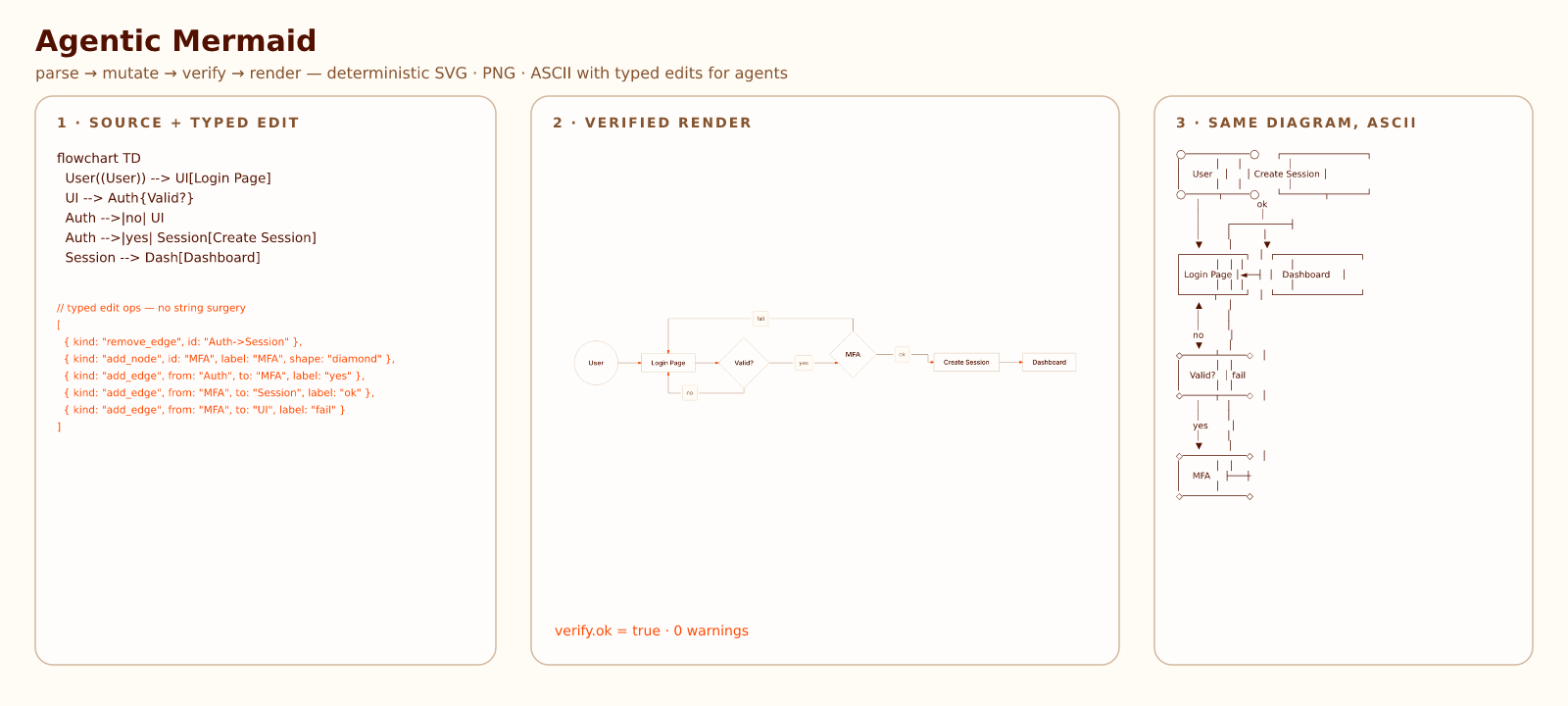
Agentic Mermaid is an open-source Mermaid toolkit for people who want AI agents to create diagrams that look finished: SVG and PNG renders, ASCII and Unicode for review, deterministic layout, and Style + Palette controls for brand colors, typography, strokes, fills, and backdrops.
It is forked from lukilabs/beautiful-mermaid. Published on npm as agentic-mermaid; the GitHub repository is adewale/agentic-mermaid; the canonical live site is agentic-mermaid.dev, a Cloudflare Workers deployment.
Live Demo & Samples · Live Editor
Docs: docs index · getting started · agent guide · agent API cookbook · design system · skills · fork differences · vs Mermaid & Beautiful Mermaid · changelog
Why Agentic Mermaid
Use it when you want to describe a diagram in plain language and get back something you can publish without a design cleanup pass.
| You want | Agentic Mermaid gives you |
|---|---|
| An agent to draft the diagram | Mermaid source plus a verified render path |
| Beautiful defaults | Built-in looks such as watercolor, blueprint, hand-drawn, and publication-figure |
| Brand fit | Style + Palette stacks and custom JSON palettes you can keep in your repo |
| Safe edits later | parseRegisteredMermaid → family narrower → mutate → verifyMermaid → serializeMermaid |
| Reviewable artifacts | SVG, PNG, ASCII, Unicode, and JSON layout from the same source |
The agent workflow is the guardrail behind the polish: agents should not guess from pixels, concatenate strings, or regenerate whole diagrams when a structured edit is available.
Highlights
- Descriptor-registered diagram families — built-ins and namespaced extensions share one discovery and capability contract.
- SVG, PNG, ASCII, Unicode, JSON — one resolved request with explicit graphical, terminal, and positioned-layout projections.
- Synchronous, zero-DOM SVG renderer — no Puppeteer, no browser flash.
- Composable styles —
{ style: ['hand-drawn', 'dracula'] }stacks a look over a palette; discoverable full looks cover sketch, watercolor, blueprint, accessibility, print, operational, physical-media, architecture, and editorial/report use cases. Custom styles are plain JSON records any agent can author (docs/style-authoring.md).seedre-rolls the ink, never the layout. - Discoverable palettes + Shiki compatibility — a theme is a palette-only style: discover the canonical catalog at runtime, theme from two colors, or adapt a VS Code theme.
- Agent-native editing — typed mutation for every registered renderable family; source-level round-trip only for opaque fallbacks containing unmodeled syntax.
- CLI + MCP + library —
am,agentic-mermaid-mcp,agentic-mermaid,agentic-mermaid/agent, and the browser/workerd-safeagentic-mermaid/agent/core. Audit reports and trusted host-resource helpers remain repository tooling instead of published runtime entry points.
Installation
npm install agentic-mermaid       # or: bun add agentic-mermaid / pnpm add agentic-mermaid
npx --no-install agentic-mermaid --help
npx --no-install agentic-mermaid mcp
For repository development, install from source and run the Bun entrypoints
(Bun 1.4.0 or later; bun upgrade if bun --version is older):
git clone https://github.com/adewale/agentic-mermaid
cd agentic-mermaid
bun install
bun run build
bun run bin/am.ts --help
bun run bin/agentic-mermaid-mcp.ts   # MCP stdio server
ESM-only.
agentic-mermaidships ES modules (there is no CommonJS build);require()consumers should use dynamicimport()instead. Requires Node ≥ 22.The
am …examples below name the published bin. After a project-local npm install, invoke it from a shell asnpx --no-install agentic-mermaid …(or from an npm script asam …). From a source checkout, usebun run bin/am.ts …instead.
Output quick starts
Use agentic-mermaid/agent when you want one import path for styled renders, output formats, and the structured edit API.
SVG
import { renderMermaidSVG } from 'agentic-mermaid/agent'

const svg = renderMermaidSVG(`flowchart TD
  Start --> Done`, { security: 'strict' })
PNG
import { writeFileSync } from 'node:fs'
import { renderMermaidPNG } from 'agentic-mermaid/agent'

const png = renderMermaidPNG(`flowchart TD
  Start --> Done`, {
  fitTo: { width: 1200 },
  background: '#fff',
})

writeFileSync('diagram.png', png)
CLI equivalent:
am render diagram.mmd --format png --output diagram.png
ASCII / Unicode
import { renderMermaidASCII } from 'agentic-mermaid/agent'

const unicode = renderMermaidASCII(`flowchart LR
  A --> B`)
const ascii = renderMermaidASCII(`flowchart LR
  A --> B`, { useAscii: true })
Agent quick start
If your coding agent can read repo files, point it at:
skills/agentic-mermaid-diagram-workflow/SKILL.mdfor diagram authoring/editing.skills/agentic-mermaid-live-editor/SKILL.mdfor editor changes.
If it only has shell access:
am --agent-instructions
am capabilities --json
am preview diagram.mmd --security strict --open
am mutate diagram.mmd --op '{"kind":"add_node","id":"Cache","label":"Cache"}' --json
Zero-install prompt for a coding agent: read https://agentic-mermaid.dev/llms.txt and follow the parse → narrow → mutate → verify → serialize workflow. To wire Agentic Mermaid into another repo, run npx agentic-mermaid init-agent (or bun run bin/am.ts init-agent from a source checkout); it writes a non-clobbering AGENTS.md section, root skills/ bundle, and .mcp.json sample.
Use strict preview for human inspection and mutate --op/--ops for verified one-shot or batched edits.
For multi-step MCP edits, connect agentic-mermaid-mcp and use Code Mode execute(code) with the same mermaid.* SDK names. Stdio is the default transport; agentic-mermaid-mcp --transport http starts HTTP/SSE and managed PNG file/URL artifacts. See the agent API cookbook for copy-pasteable library, CLI, and MCP recipes.
MCP server
Agentic Mermaid ships a Model Context Protocol server so MCP-capable agents can render and safely edit diagrams without shelling out.
- Self-hosted (default).
agentic-mermaid-mcpruns a stdio server exposingexecute(Code Mode sandbox),describe_sdk(one family's mutation schema on demand),render_png, anddescribe. Package runners can usenpx -y agentic-mermaid mcp; themcpargument routes the package-name binary to the same stdio server. Add--transport httpfor HTTP/SSE with managed PNG file/URL artifacts. Seedocs/mcp-http-transport.mdanddocs/mcp-code-mode-rationale.md. - Hosted. A stateless Streamable HTTP endpoint is available at
https://agentic-mermaid.dev/mcp(tools:execute,describe_sdk,render_svg,render_ascii,render_png,verify,describe,mutate, andbuild; 64 KB input caps). Calldescribe_sdkfor compact signatures or exact fields before authoring unfamiliar ops. It is MCP JSON-RPC only, not a REST render API. Hostedexecuteruns the samemermaid.*facade in a Cloudflare Dynamic Worker isolate with no network; hosted PNG returns base64 only.
Local-first is the default posture: prefer the library, CLI, or a self-hosted MCP for anything sensitive, offline, larger than the hosted caps, or needing local PNG file/URL artifacts. The hosted endpoint is a public, unauthenticated convenience for zero-install render/verify/describe and bounded structured edits.
Directory maintainers can use the canonical MCP listing record. Hosted data handling is described in the MCP privacy notice.
Structured edit example
import { parseRegisteredMermaid, asFlowchart, mutate, verifyMermaid, serializeMermaid } from 'agentic-mermaid/agent'

const parsed = parseRegisteredMermaid('flowchart TD\n  API --> DB')
if (!parsed.ok) throw new Error('parse failed')

const flow = asFlowchart(parsed.value)
if (!flow) throw new Error(`not a structured flowchart: ${parsed.value.kind}`)

const next = mutate(flow, { kind: 'add_node', id: 'Cache', label: 'Cache' })
if (!next.ok) throw new Error(next.error.message)

const verify = verifyMermaid(next.value)
if (!verify.ok) throw new Error(JSON.stringify(verify.warnings, null, 2))

const source = serializeMermaid(next.value)
Rules:
- Use the matching exported
as<Family>narrower before mutating an existing structured diagram. - Mutation ops use
kind, nottype. - Run
verifyMermaidbefore every commit point. - Do not call
mutateon opaque fallback bodies; the narrower returnsnullfor unmodeled syntax.
Supported diagram families
Family support is projected from the FamilyDescriptor registry; run
am capabilities --json for the live roster. (The Section A capability report
is no longer published.) See diagram families for syntax examples and
compatibility notes.
More documentation
- System architecture — start here for the rendered resolved-request, family-descriptor, positioned-artifact, and output-security overview (dogfooded, drift-proof).
- API reference — renderers, agent API, options, CLI/MCP pointers.
- Agent API cookbook — practical recipes for agents.
- Theming — two-color themes, built-ins, Shiki compatibility.
- Custom style cookbook — JSON style files, screenshots, schema usage, and CLI commands.
- Fonts in custom styles — font selection, SVG declarations, PNG directories, fallbacks, and browser usage.
- React integration — browser-safe, family-loaded rendering.
- ASCII output — terminal output, color modes, XY charts.
- Mermaid config — frontmatter, init directives, runtime config.
- Features, quality, security, fork differences.
- Adding diagram types for contributors.
Live editor and examples
- Examples — supported families, Style + Palette combinations, and the rich shared examples corpus.
- Live editor — SVG/PNG exports and URL sharing.
examples/agent-loop.tsexamples/mcp-vs-cli-complex-diagrams.tsexamples/agent-improve-auth-flow.ts
Attribution
Agentic Mermaid is a fork of Beautiful Mermaid by Luki Labs. The ASCII rendering engine is based on mermaid-ascii by Alexander Grooff and extended for Agentic Mermaid.
License
MIT