yfinance MCP Server
Truy cập giá và tin tức cập nhật cho
GitHub
5
Dùng thử MCP nàyĐược tài trợTài liệu
yfinance MCP Server
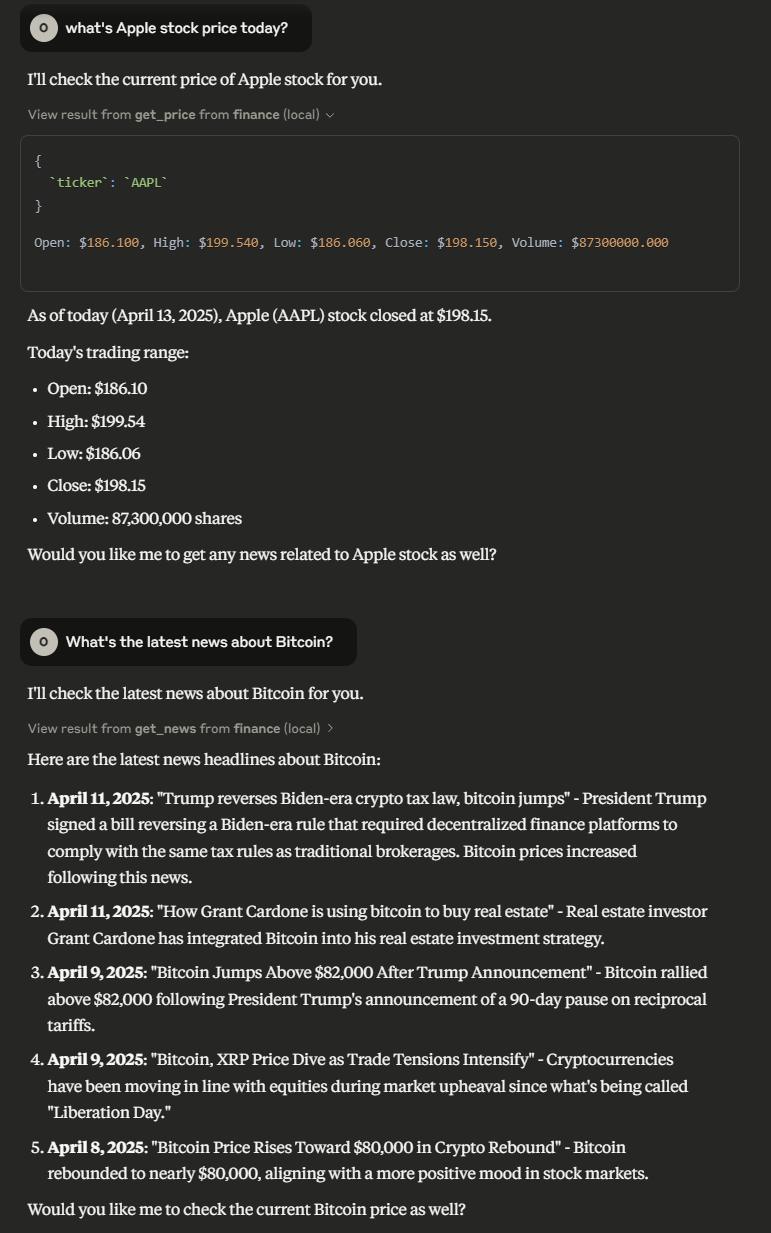
Model Context Protocol server that allows LLMs to get accurate and up-to-date prices and news about stock/cryptocurrencies tickers.
Available Tools
get_price_tool: Get the price of a stock/cryptocurrency ticker- Arguments:
ticker(string): Required - Ticker name or alias (e.g., "BTC-USD", "AAPL")period(string): Optional - Time period (e.g., "1d", "5d", "1mo"). Defaults to "1d"
- Arguments:
get_news_tool: Get the news of a stock/cryptocurrency ticker.- Required arguments:
ticker(string): Requiredcount(string): Optional - Number of articles to retrieve (default: 5)
- Required arguments:
Installation
Installing via Smithery
To install yfinance-mcp-server for Claude Desktop automatically via Smithery:
npx -y @smithery/cli install @Otman404/finance-mcp-server --client claude
Using uv
Install the package locally
uv pip install -e .
Run the server
finance-mcp-server
Using docker
# build the container
docker build -t finance-server .

# run the container
docker run -it finance-server
Configuration
Usage for Claude Desktop
Add the following to claude_desktop_config.json
uvx
"mcpServers": {
  "finance": {
    "command": "uvx",
    "args": ["finance-mcp-server"]
  }
}
docker
{
  "mcpServers": {
    "finance": {
      "command": "docker",
      "args": ["run", "-i", "--rm", "finance-server"]
    }
  }
}
Usage for 5ire
uvx
{
  "key": "finance",
  "command": "uvx",
  "args": ["finance-mcp-server"]
}
docker
{
  "key": "finance-server",
  "command": "docker",
  "args": ["run", "-i", "--rm", "finance-server"]
}
Example Interactions