Questrade MCP Server
Questrade API ile entegre olmak için gayriresmi bir sunucu olup, ticaret hesaplarına, piyasa verilerine ve portföy bilgilerine erişim sağlar.
Dokümantasyon
Questrade MCP Server


An unofficial Model Context Protocol (MCP) server for integrating with the Questrade API, providing access to trading accounts, market data, and portfolio information.
⚠️ Disclaimer: This is an unofficial, community-built integration and is not affiliated with, endorsed by, or supported by Questrade Inc. Use at your own risk.
Features
- 🔐 Authentication: OAuth 2.0 token management with automatic refresh
- 📊 Account Data: Access accounts, positions, balances, and order history
- 📈 Market Data: Real-time quotes, symbol search, and historical candles
- 🛡️ Error Handling: Comprehensive error handling and logging
- 🔧 TypeScript: Full TypeScript support with proper type definitions
Installation
Option 1: Install from npm (Recommended)
npm install -g questrade-mcp-server
Option 2: Clone and Build
-
Clone this repository
-
Install dependencies:
npm install -
Copy the environment template:
cp .env.example .env -
Configure your Questrade API credentials in
.env:QUESTRADE_API_URL=https://api01.iq.questrade.com QUESTRADE_REFRESH_TOKEN=your_refresh_token_here # QUESTRADE_TOKEN_DIR=/path/to/custom/directory
Getting Questrade API Credentials
For detailed information about Questrade's API authorization, see the official API documentation.
Step 1: Generate API Token
-
Log in to your Questrade account or navigate directly to https://apphub.questrade.com/UI/UserApps.aspx
-
In the top right corner, select "API centre" from the drop-down menu under your login name
-
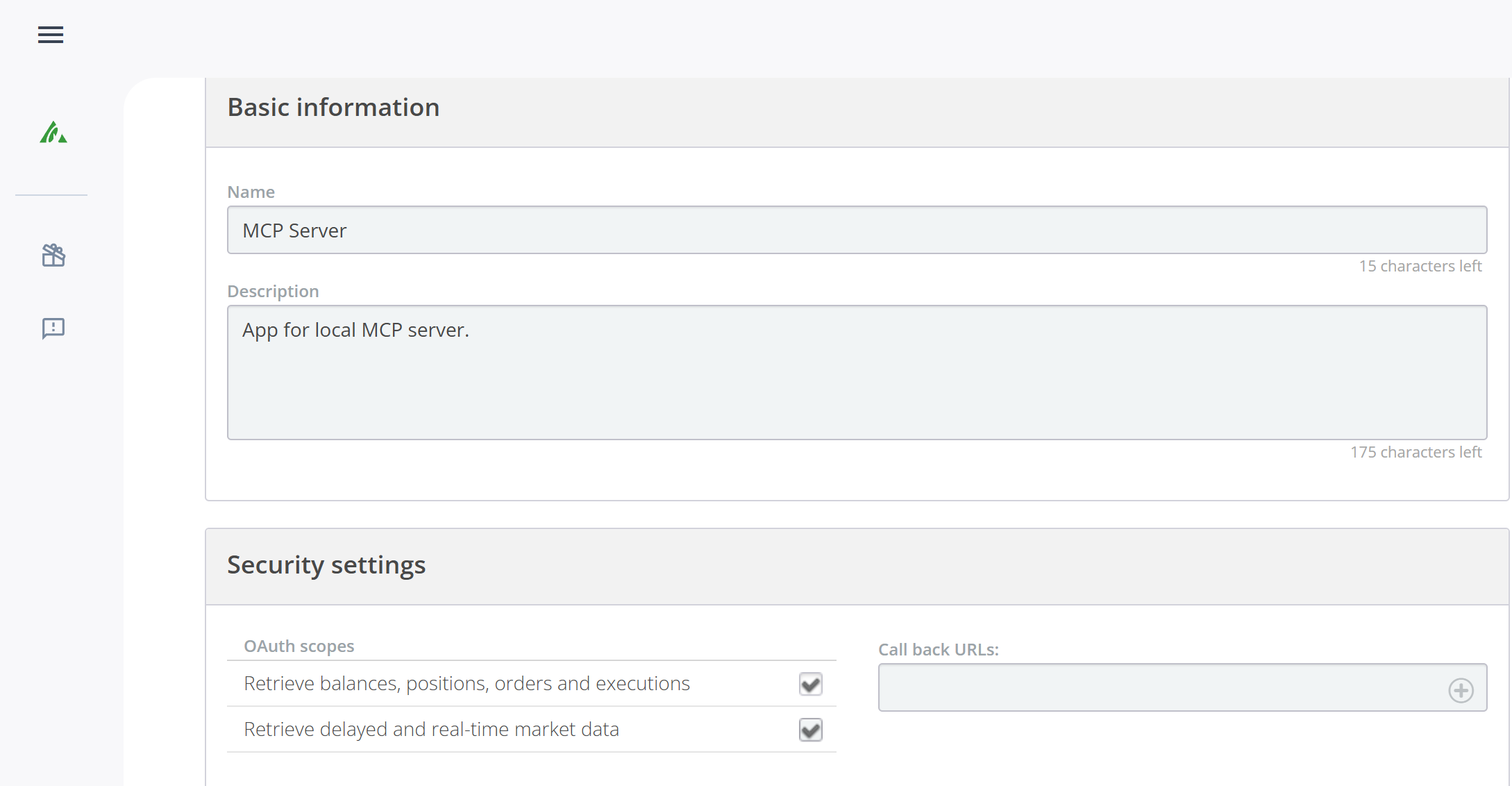
Click "Activate API" and agree to the API access agreement
-
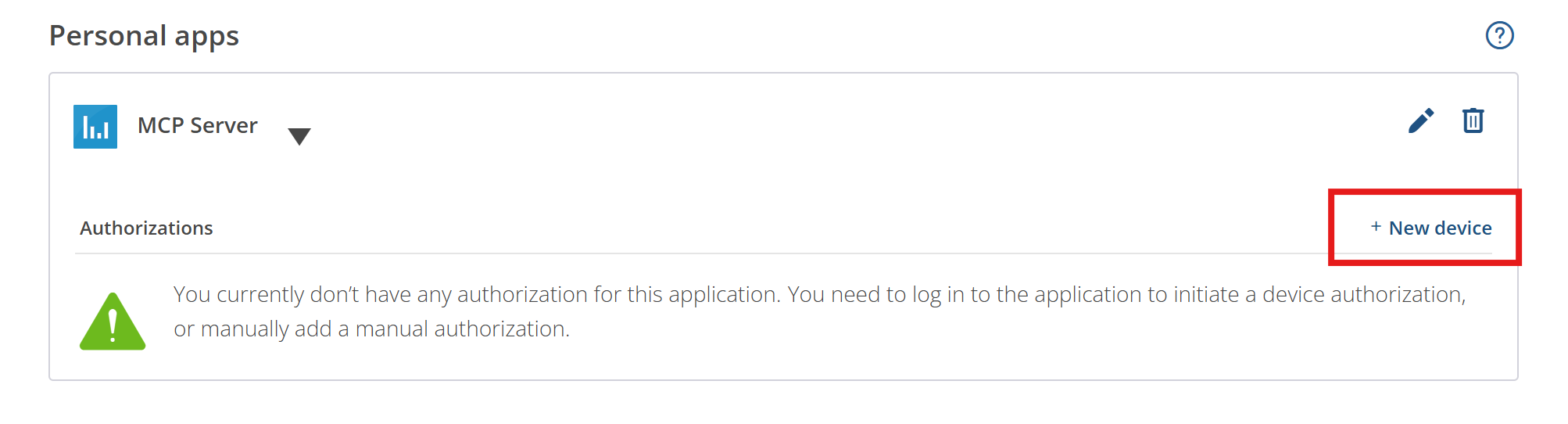
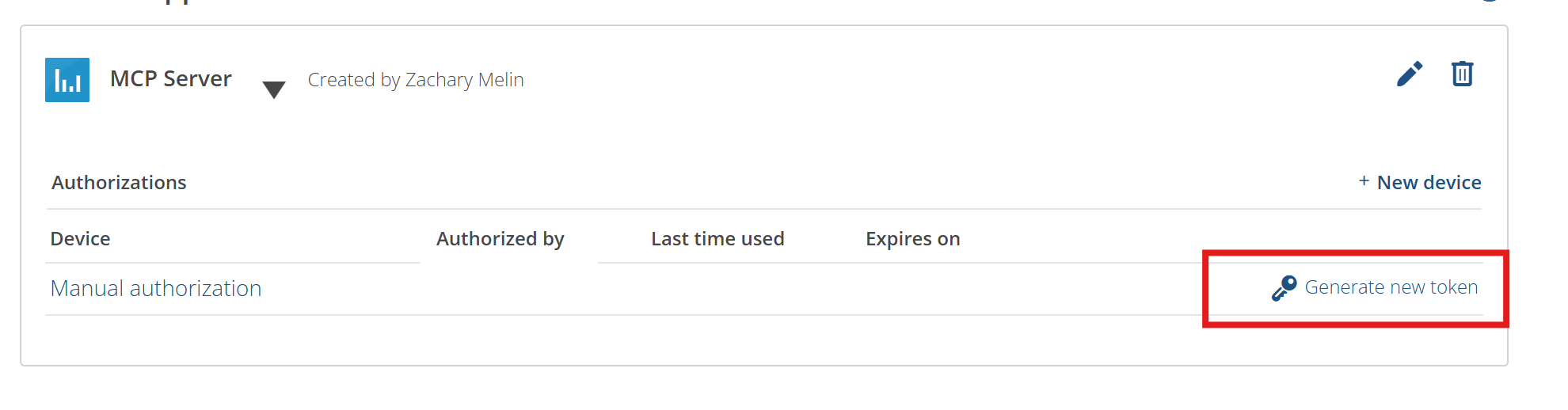
Click "Generate new token" for manual authorization
-
Copy the refresh token provided
Step 2: Configure Environment
-
Copy your refresh token to
.env:QUESTRADE_REFRESH_TOKEN=your_refresh_token_here -
The MCP server will automatically:
- Use your refresh token to get an access token
- Discover the correct API server URL
- Handle token refresh when needed
- Persist new tokens to
~/.questrade-mcp/tokens.json(or system temp directory as fallback)
Important: Refresh tokens are single-use only. The server will attempt to persist new refresh tokens to
~/.questrade-mcp/tokens.json(configurable viaQUESTRADE_TOKEN_DIRenvironment variable), but if a token expires or gets used by another process, you'll need to manually generate a new one following the steps above.
Step 3: Test Your Setup
Verify your token works correctly:
npm run test-connection
Note: If you get a "'tsx' is not recognized" error, the test script will automatically build the project first and use Node.js instead.
Usage
Development
npm run dev
Production
npm run build
npm start
Adding to Claude Desktop
-
Find your Claude Desktop config file:
- Windows:
%APPDATA%\Claude\claude_desktop_config.json - macOS:
~/Library/Application Support/Claude/claude_desktop_config.json - Linux:
~/.config/Claude/claude_desktop_config.json
- Windows:
-
Add the MCP server configuration:
Quick setup (Recommended)
{
  "mcpServers": {
    "questrade": {
      "command": "npx",
      "args": ["questrade-mcp-server"],
      "env": {
        "QUESTRADE_REFRESH_TOKEN": "your_refresh_token_here"
      }
    }
  }
}
Local development build
{ "mcpServers": { "questrade": { "command": "node", "args": ["/path/to/your/project/dist/index.js"], "env": { "QUESTRADE_REFRESH_TOKEN": "your_refresh_token_here" } } } } -
If using local build, update the path to match your actual project location
-
Restart Claude Desktop
-
Test the connection by asking Claude to show your Questrade accounts
For detailed setup instructions, see claude-desktop-config.md.
Available Tools
Account Management
get_accounts- Get all Questrade accountsget_positions- Get positions for a specific accountget_balances- Get balances for a specific accountget_orders- Get order history for an account
Market Data
search_symbols- Search for symbols by prefixget_symbol- Get detailed symbol informationget_quotes- Get real-time quotes for symbolsget_candles- Get historical price data
Authentication
refresh_token- Refresh the API access token
Built-in Prompts
The MCP server includes helpful prompts for common trading analysis tasks:
Portfolio Summary
Prompt: portfolio_summary
- Get a comprehensive portfolio analysis with account balances, positions, and performance
- Optional: Specify
accountNumber(uses first account if not provided)
Stock Analysis
Prompt: stock_analysis
- Analyze a specific stock with current quotes, symbol information, and recent performance
- Required:
symbol(e.g., "AAPL", "TSLA", "MSFT")
Trading Opportunities
Prompt: trading_opportunities
- Identify potential trading opportunities based on current positions and market data
- Optional:
accountNumber(uses first account if not provided) - Optional:
riskLevel("conservative", "moderate", or "aggressive")
Example Usage
Simply ask Claude:
- "Use the portfolio_summary prompt to analyze my trading account"
- "Analyze AAPL stock using the stock_analysis prompt"
- "Show me trading opportunities with conservative risk level"
Tool Examples
Get Accounts
{
  "name": "get_accounts"
}
Get Positions
{
  "name": "get_positions",
  "arguments": {
    "accountNumber": "12345678"
  }
}
Search Symbols
{
  "name": "search_symbols",
  "arguments": {
    "prefix": "AAPL",
    "offset": 0
  }
}
Get Quotes
{
  "name": "get_quotes",
  "arguments": {
    "symbolIds": [8049, 9291]
  }
}
Configuration
The server uses environment variables for configuration:
QUESTRADE_API_URL: Base URL for Questrade API (default: https://api01.iq.questrade.com)QUESTRADE_REFRESH_TOKEN: Your API refresh tokenQUESTRADE_TOKEN_DIR: Custom directory for token storage (default:~/.questrade-mcp)
Error Handling
The server includes comprehensive error handling for:
- Invalid or expired tokens (automatic refresh)
- Missing required parameters
- API rate limits and network errors
- Invalid account numbers or symbol IDs
Security Notes
- Never commit your
.envfile to version control - Access tokens expire after 7 days
- Refresh tokens are automatically used to get new access tokens
- This is an unofficial tool - ensure you comply with Questrade's API terms of service
- Always verify trading decisions independently before executing trades
Development
Project Structure
src/
├── index.ts          # Main MCP server implementation
├── questrade-client.ts # Questrade API client
└── types.ts          # TypeScript type definitions
Building
npm run build
Cleaning
npm run clean
License
MIT