Snowflake Cortex AI
Snowflake için Cortex AI özelliklerine (Search, Analyst ve Complete gibi) yönelik araçlar sağlayan bir MCP sunucusu.
Dokümantasyon
Snowflake Cortex AI Model Context Protocol (MCP) Server
This Snowflake MCP server provides tooling for Snowflake Cortex AI features, bringing these capabilities to the MCP ecosystem. When connected to an MCP Client (e.g. Claude for Desktop, fast-agent, Agentic Orchestration Framework), users can leverage these Cortex AI features.
The MCP server currently supports the below Cortex AI capabilities:
- Cortex Search: Query unstructured data in Snowflake as commonly used in Retrieval Augmented Generation (RAG) applications.
- Cortex Analyst: Query structured data in Snowflake via rich semantic modeling.
- Cortex Complete: Simple chat-completion with optional parameters using a number of available LLMs
- Cortex Agent: (Coming Soon) Agentic orchestrator across structured and unstructured data retrieval
Getting Started
Service Configuration
A simple configuration file is used to create tooling for the various Cortex AI features. An example can be seen at services/service_config.yaml and a template is below. Many Cortex Search and Cortex Analyst services can be added. Ideal descriptions are both highly descriptive and mutually exclusive. The path to this configuration file will be passed to the server and the contents used to create MCP server tools at startup.
cortex_complete: # Set default model if one is not specified by user in Cortex Copmlete tool
  default_model: "snowflake-llama-3.3-70b"
search_services: # List all Cortex Search services
  - service_name: "<service_name>"
    description: > # Should start with "Search service that ..."
      "<Search services that ...>"
    database_name: "<database_name>"
    schema_name: "<schema_name>"
  - service_name: "<service_name>"
    description: > # Should start with "Search service that ..."
      "<Search services that ...>"
    database_name: "<database_name>"
    schema_name: "<schema_name>"
analyst_services: # List all Cortex Analyst semantic models/views
  - service_name: "<service_name>" # Create descriptive name for the service
    semantic_model: "<semantic_yaml_or_view>" # Fully-qualify semantic YAML model or Semantic View
    description: > # Should start with "Analyst service that ..."
      "<Analyst service that ...>"
  - service_name: "<service_name>" # Create descriptive name for the service
    semantic_model: "<semantic_yaml_or_view>" # Fully-qualify semantic YAML model or Semantic View
    description: > # Should start with "Analyst service that ..."
      "<Analyst service that ...>"
Snowflake Account Identifier
A Snowflake username and account identifier will be necessary to connect. From Snowsight, select your user name and Connect a tool to Snowflake to obtain your Snowflake account identifier. This will be passed to the server at startup.
Programmatic Access Token Authentication
The MCP server uses Snowflake Programmatic Access Token (PAT) for authentication. Follow the instructions to generate a new PAT for a given user. Be sure to copy the token - it will be passed to the server at startup.
[!IMPORTANT] PATs do not use secondary roles. Either select a specific role that has access to all desired services and their related objects OR select Any of my roles.
Using with MCP Clients
The MCP server is client-agnostic and will work with most MCP Clients that support basic functionality for MCP tools and (optionally) resources. Below are some examples.
Claude Desktop
To integrate this server with Claude Desktop as the MCP Client, add the following to your app's server configuration. By default, this is located at
- macOS: ~/Library/Application Support/Claude/claude_desktop_config.json
- Windows: %APPDATA%\Claude\claude_desktop_config.json
Set the path to the service configuration file and values for environment variables SNOWFLAKE_PAT, SNOWFLAKE_ACCOUNT, and SNOWFLAKE_USER.
{
  "mcpServers": {
    "mcp-server-snowflake": {
      "command": "uvx",
      "args": [
        "--from",
        "git+https://github.com/Snowflake-Labs/mcp",
        "mcp-server-snowflake",
        "--service-config-file",
        "<path to file>/service_config.yaml"
      ]
      "env": {
        "SNOWFLAKE_PAT": "<programmatic_access_token>",
        "SNOWFLAKE_ACCOUNT": "<account-identifier>",
        "SNOWFLAKE_USER": "<username>"
      }
    }
  }
}
Cursor
Register the MCP server in cursor by opening Cursor and navigating to Settings -> Cursor Settings -> MCP. Add the below.
{
  "mcpServers": {
    "mcp-server-snowflake": {
      "command": "uvx",
      "args": [
        "--from",
        "git+https://github.com/Snowflake-Labs/mcp",
        "mcp-server-snowflake",
        "--service-config-file",
        "<path to file>/service_config.yaml",
        "--account-identifier",
        "<account-identifier>",
        "--username",
        "<username>",
        "--pat",
        "<programmatic_access_token>"
      ]
    }
  }
}
Add the MCP server as context in the chat.
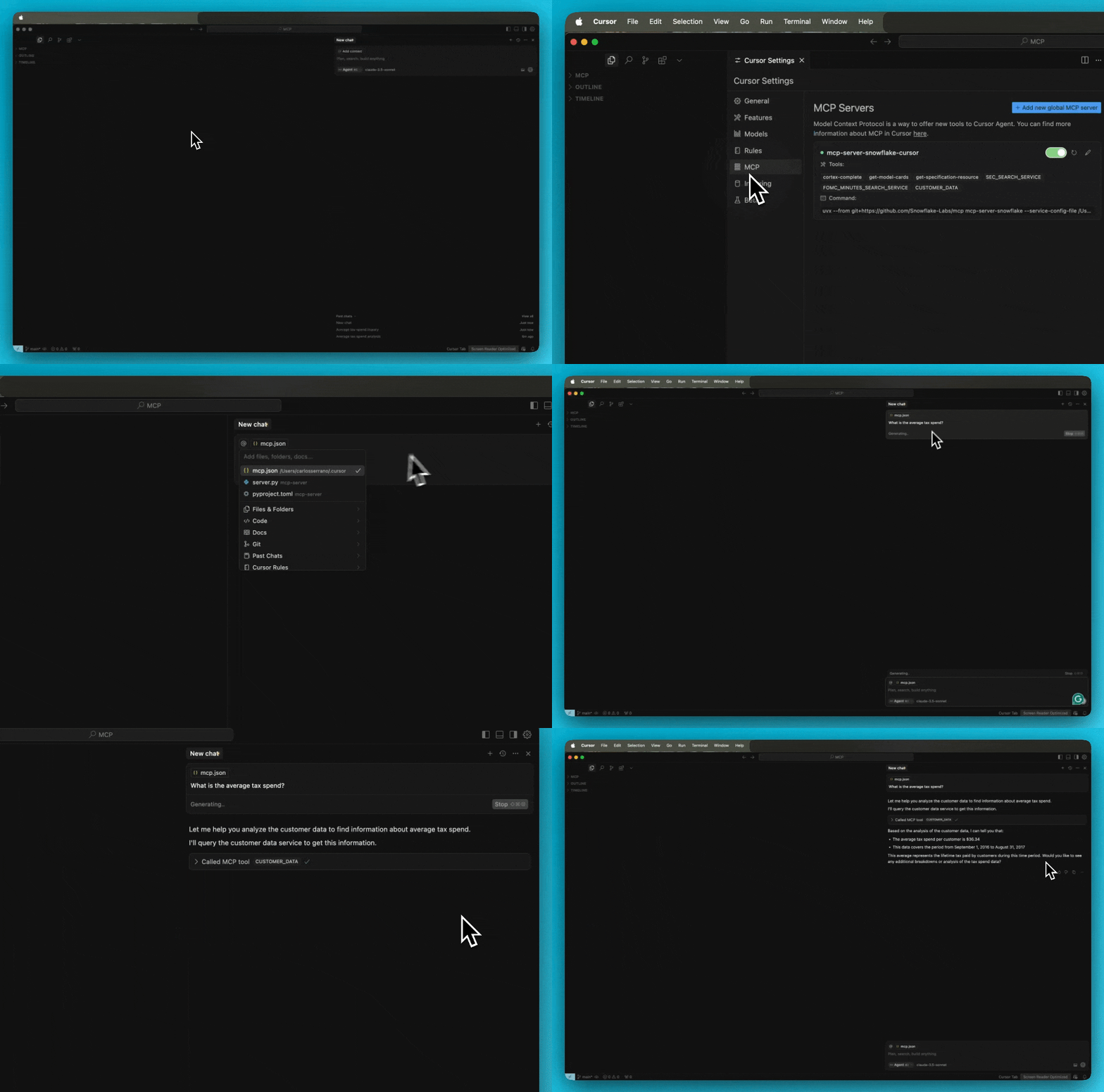
For troubleshooting Cursor server issues, view the logs by opening the Output panel and selecting Cursor MCP from the dropdown menu.
fast-agent
Update the fastagent.config.yaml mcp server section with an updated path to the configuration file.
# MCP Servers
mcp:
    servers:
        mcp-server-snowflake:
            command: "uvx"
            args: ["--from", "git+https://github.com/Snowflake-Labs/mcp", "mcp-server-snowflake", "--service-config-file", "<path to file>/service_config.yaml"]
Update the fastagent.secrets.yaml mcp server section with environment variables.
mcp:
    servers:
        mcp-server-snowflake:
            env:
                SNOWFLAKE_PAT: <add-PAT>
                SNOWFLAKE_ACCOUNT: <add-snowflake-account-identifier>
                SNOWFLAKE_USER: <add-snowflake-username>
Troubleshooting
Running MCP Inspector
MCP Inspector is suggested for troubleshooting the MCP server. Run the below to launch the inspector. Be sure to set values for service config file, SNOWFLAKE_ACCOUNT, SNOWFLAKE_USER, and SNOWFLAKE_PAT are set accordingly.
npx @modelcontextprotocol/inspector uvx --from "git+https://github.com/Snowflake-Labs/mcp" mcp-server-snowflake --service-config-file "<path_to_file>/service_config.yaml" --account-identifier $SNOWFLAKE_ACCOUNT --username $SNOWFLAKE_USER --pat $SNOWFLAKE_PAT
FAQs
How do I try this?
- The MCP server is intended to be used as one part of the MCP ecosystem. Think of it as a collection of tools. You'll need an MCP Client to act as an orchestrator. See the MCP Introduction for more information.
Where is this deployed? Is this in Snowpark Container Services?
- All tools in this MCP server are managed services, accessible via REST API. No separate remote service deployment is necessary. Instead, the current version of the server is intended to be started by the MCP client, such as Claude Desktop, Cursor, fast-agent, etc. By configuring these MCP client with the server, the application will spin up the server service for you. Future versions of the MCP server may be deployed as a remote service in the future.
I'm receiving permission errors from my tool calls.
- Programmatic Access Tokens do not evaluate secondary roles. When creating them, please select a single role that has access to all services and their underlying objects OR select any role. A new PAT will need to be created to alter this property.
How many Cortex Search or Cortex Analysts can I add?
- You may add multiple instances of both services. The MCP Client will determine the appropriate one(s) to use based on the user's prompt.
Bug Reports, Feedback, or Other Questions
Please add issues to the GitHub repository.