Hashnode MCP Server
Hashnode API ile etkileşim için bir MCP sunucusu.
Dokümantasyon

Hashnode MCP Server
A Model Context Protocol (MCP) server for interacting with the Hashnode API. This server provides tools for accessing and searching Hashnode content programmatically.
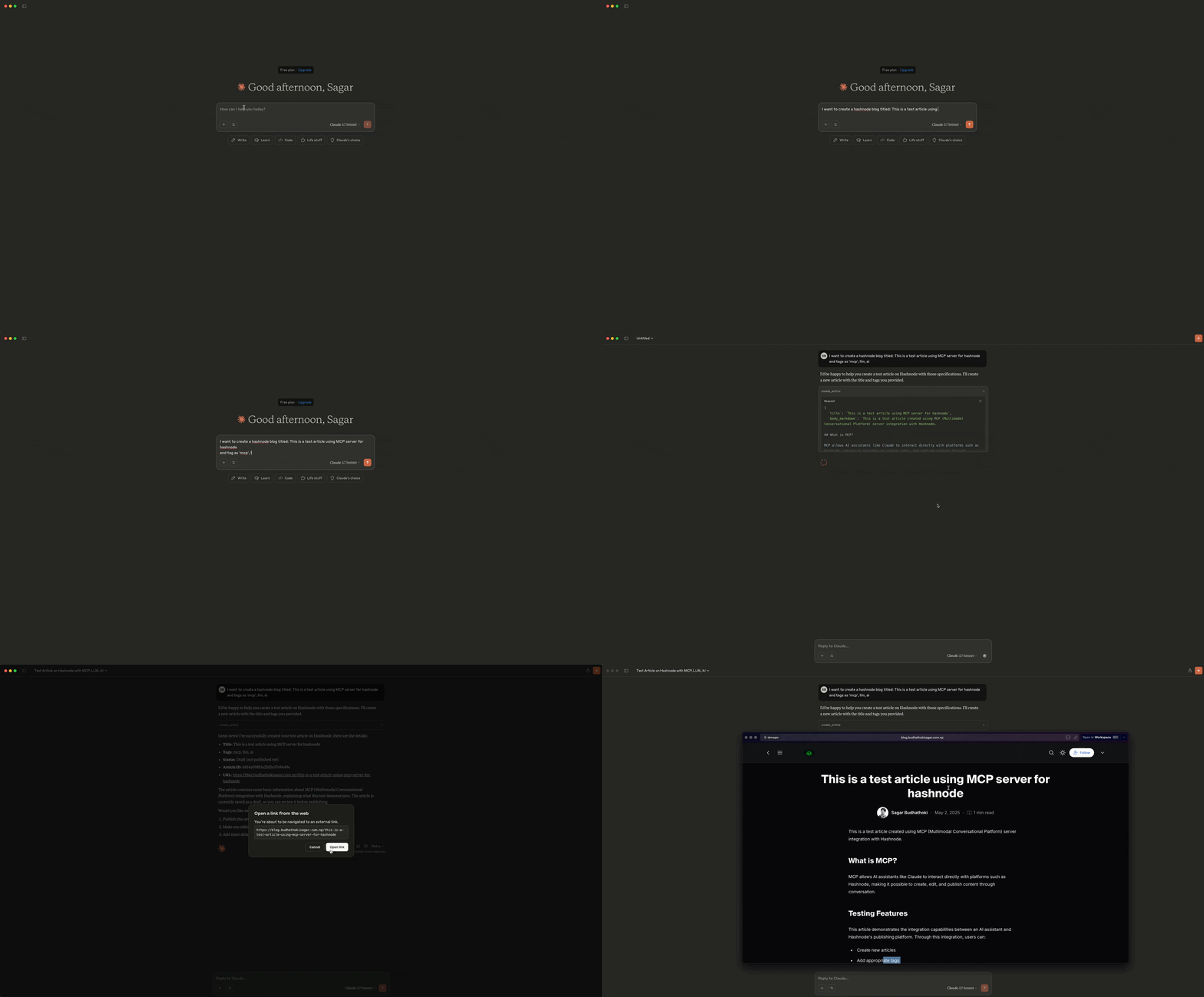
Demo
- Create Article
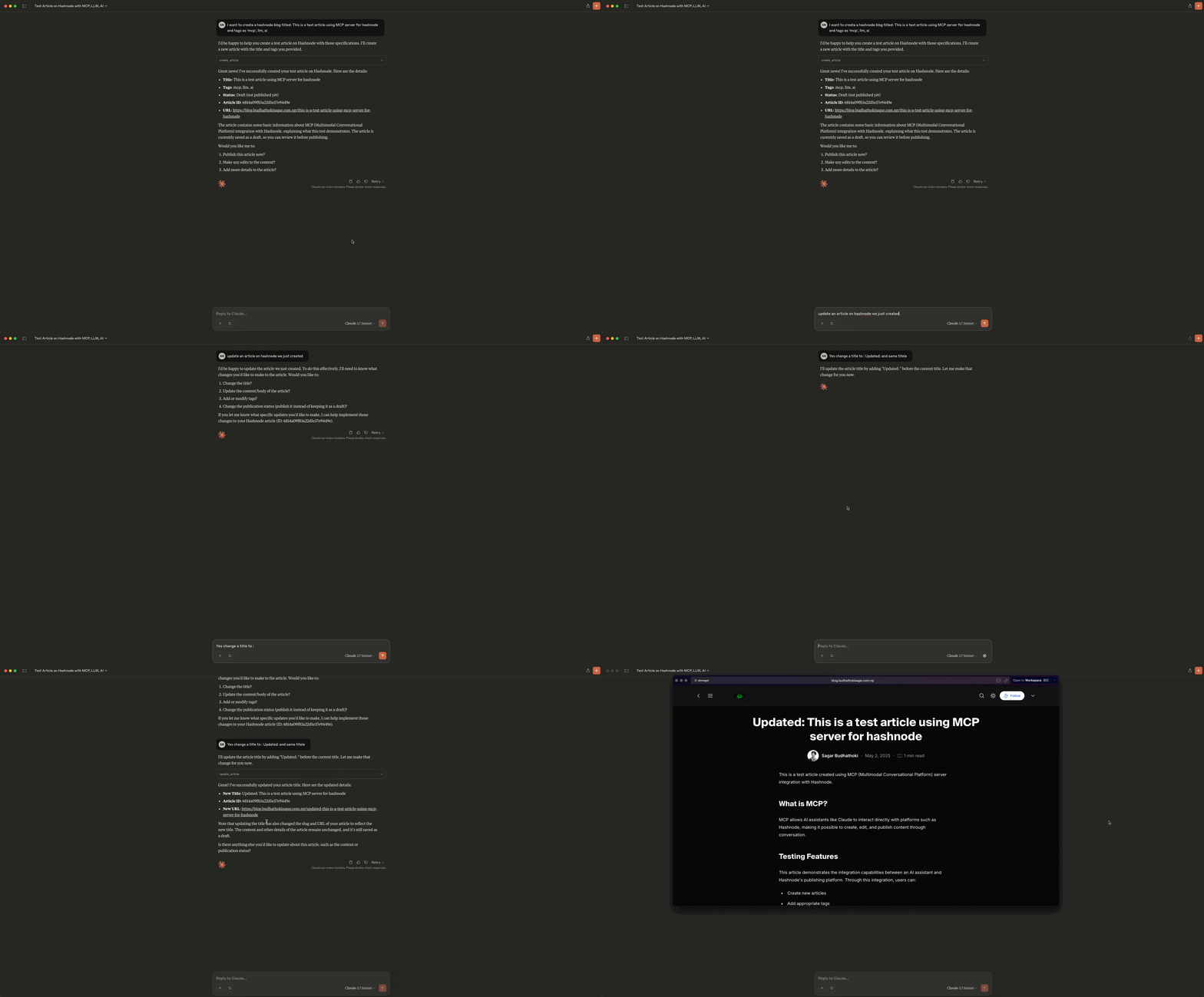
- Update Article
Features
- Creating and publishing new articles
- Updating existing articles
- Searching for articles by keywords
- Retrieving article details
- Getting user information
- Fetching the latest articles from a publication
Installation
-
Clone the repository:
git clone https://github.com/sbmagar13/hashnode-mcp-server.git cd hashnode-mcp-server -
Create a virtual environment and activate it:
python -m venv .venv source .venv/bin/activate # On Windows, use: .venv\Scripts\activate -
Install the dependencies:
pip install -r requirements.txt -
Create a
.envfile in the root directory with your Hashnode API credentials:HASHNODE_PERSONAL_ACCESS_TOKEN=your_personal_access_token HASHNODE_API_URL=https://gql.hashnode.com
Usage
Starting the Server
You have two options for running the server:
Option 1: Run the server manually
python run_server.py
Or directly using the root file:
python mcp_server.py
The server will start and listen for connections from AI assistants. By default, it runs on localhost:8000 using the Server-Sent Events (SSE) transport protocol.
Option 2: Let the MCP integration handle it automatically
When properly configured in Claude Desktop or Cline VSCode extension, the MCP integration will automatically start and manage the server process for you.
Important Note on File Structure
When configuring your MCP server in Claude Desktop or Cline VSCode extension, you should use the root mcp_server.py file directly rather than the files in the hashnode_mcp directory. The hashnode_mcp directory is primarily for packaging purposes.
Available Tools
The server provides the following tools:
test_api_connection(): Test the connection to the Hashnode APIcreate_article(title, body_markdown, tags="", published=False): Create and publish a new article on Hashnodeupdate_article(article_id, title=None, body_markdown=None, tags=None, published=None): Update an existing article on Hashnodeget_latest_articles(hostname, limit=10): Get the latest articles from a Hashnode publication by hostnamesearch_articles(query, page=1): Search for articles on Hashnodeget_article_details(article_id): Get detailed information about a specific articleget_user_info(username): Get information about a Hashnode user
Using the MCP Server
Once the server is running, you can use it with AI assistants that support the Model Context Protocol (MCP), such as Claude. The assistant will be able to use the tools provided by the server to interact with the Hashnode API.
The tools can be used to:
- Test the API connection
- Create and publish new articles
- Update existing articles
- Get the latest articles from a publication
- Search for articles
- Get detailed information about specific articles
- Get information about users
Configuring MCP on Claude Desktop and Cline VSCode Extension
Cline VSCode Extension
-
Navigate to the Cline MCP settings file:
- Windows:
%APPDATA%\Code\User\globalStorage\saoudrizwan.claude-dev\settings\cline_mcp_settings.json - macOS:
~/Library/Application Support/Code/User/globalStorage/saoudrizwan.claude-dev/settings\cline_mcp_settings.json - Linux:
Unfortunately, Claude Desktop is not available for Linux as of now(You can use Cline extension instead)
- Windows:
-
Add your Hashnode MCP server configuration:
{
  "mcpServers": {
    "hashnode": {
      "command": "/path/to/your/venv/bin/python",
      "args": [
        "/path/to/your/hashnode-mcp-server/mcp_server.py"
      ],
      "env": {
        "HASHNODE_PERSONAL_ACCESS_TOKEN": "your-personal-access-token"
      }
    }
  }
}
Claude Desktop
-
Navigate to the configuration file:
- Windows:
%APPDATA%\Claude\claude_desktop_config.json - macOS:
~/Library/Application Support/Claude/claude_desktop_config.json
- Windows:
-
Add your Hashnode MCP server configuration using the same format as above.
Troubleshooting Connection Issues
If you encounter connection issues:
- Verify the server is running
- Check the paths in your configuration
- Ensure your environment variables are properly set
- Check the server logs for any error messages
- Try restarting both the MCP server and the Claude application
Environment Variables
HASHNODE_PERSONAL_ACCESS_TOKEN: Your Hashnode personal access tokenHASHNODE_API_URL: The Hashnode GraphQL API URL (default: https://gql.hashnode.com)
Contributing
Contributions are welcome! Please feel free to submit a Pull Request.
- Fork the repository
- Create your feature branch (
git checkout -b feature/amazing-feature) - Commit your changes (
git commit -m 'Add some amazing feature') - Push to the branch (
git push origin feature/amazing-feature) - Open a Pull Request
License
This project is licensed under the MIT License - see the LICENSE file for details.
GitHub Repository
The source code for this project is available on GitHub: https://github.com/sbmagar13/hashnode-mcp-server
Technical Architecture
The project is organized with a clean, modular structure:
mcp_server.py: Root server implementation that can be run directlyhashnode_mcp/: Core package containing the modular functionalitymcp_server.py: Package version of the server implementationutils.py: Utility functions for formatting responses and GraphQL queries
run_server.py: Entry point for running the server using the package version
The server uses asynchronous programming with Python's asyncio and httpx libraries for efficient API communication. GraphQL queries and mutations are defined as constants, making them easy to maintain and update.
Future Enhancements
Planned future developments include:
- Additional Hashnode features (comments, series, newsletters)
- Analytics integration
- Content optimization
- Multi-user support
- Webhook support
Acknowledgments
- Hashnode for providing the API
- Model Context Protocol (MCP) for the server framework
- This is certified by MCP Review