transcriptor-mcp
Stdio ve HTTP/SSE üzerinden çalışan, yt-dlp ile video transkriptlerini/altyazılarını getiren, büyük yanıtlar için sayfalama desteği sunan bir MCP sunucusu. YouTube, Twitter/X, Instagram, TikTok, Twitch, Vimeo, Facebook, Bilibili, VK, Dailymotion'ı destekler. Whisper yedekleme — altyazı bulunmadığında sesi transkribe eder (yerel veya OpenAI API). Cursor ve diğer MCP ana bilgisayarlarla çalışır.
Dokümantasyon

🎬 Now your AI assistant can watch videos!
Connect one server. Then ask Claude, ChatGPT or etc about a video: the transcript, the chapters, the metadata, or a single frame. It works with 11 platforms, not only YouTube.






Connect · What to ask · Widgets · Platforms · Self-host
⚡ Connect in 30 seconds
The hosted endpoint is:
https://transcriptor.gateway.mcpal.io/mcp
🖱️ One click



⌨️ One command, for Claude Code
claude mcp add --transport http transcriptor https://transcriptor.gateway.mcpal.io/mcp
Then run /mcp and approve the sign-in in the browser. After this, claude mcp list shows ✔ Connected.
🧭 No terminal
| Client | What to do |
|---|---|
| Claude (web and desktop) | Open Settings → Customize → Connectors. Select Add → Add custom connector, paste https://transcriptor.gateway.mcpal.io/mcp, then select Add. |
| ChatGPT | Open Transcriptor in the ChatGPT plugin directory and select Install plugin; sign in when asked. Or in ChatGPT open Plugins, search Transcriptor, select Install plugin. Then mention @Transcriptor in a chat. |
| Codex | Same directory, one install: ChatGPT and Codex share it. In a Codex task open Sources → Use plugins → Transcriptor; in the CLI, /plugins. |
Note: a new directory listing can take up to 6 hours to appear in Codex (Plugins in ChatGPT and Codex).
🧩 Any other MCP client
If your client is not in the list above, add the server with this configuration:
{
  "mcpServers": {
    "transcriptor": {
      "url": "https://transcriptor.gateway.mcpal.io/mcp"
    }
  }
}
If you want to run the server yourself, read Self-host. The tools are the same and you need no account.
🧰 What you can ask
| Ask for this | Tool |
|---|---|
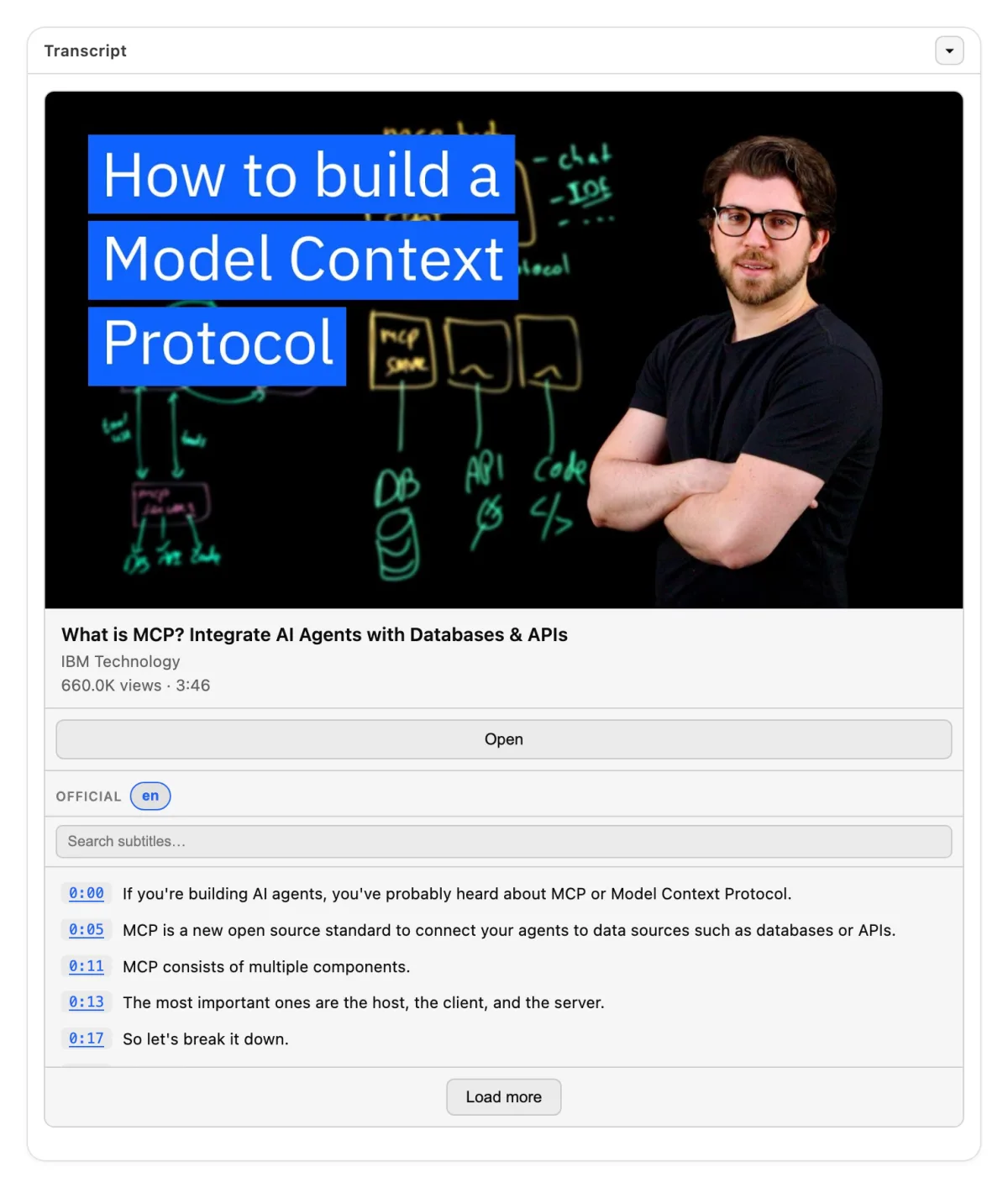
| "Summarize this video for me" | get_transcript |
| "Give me the subtitles as an SRT file" | get_raw_subtitles |
| "Is there a German track for this video?" | get_available_subtitles |
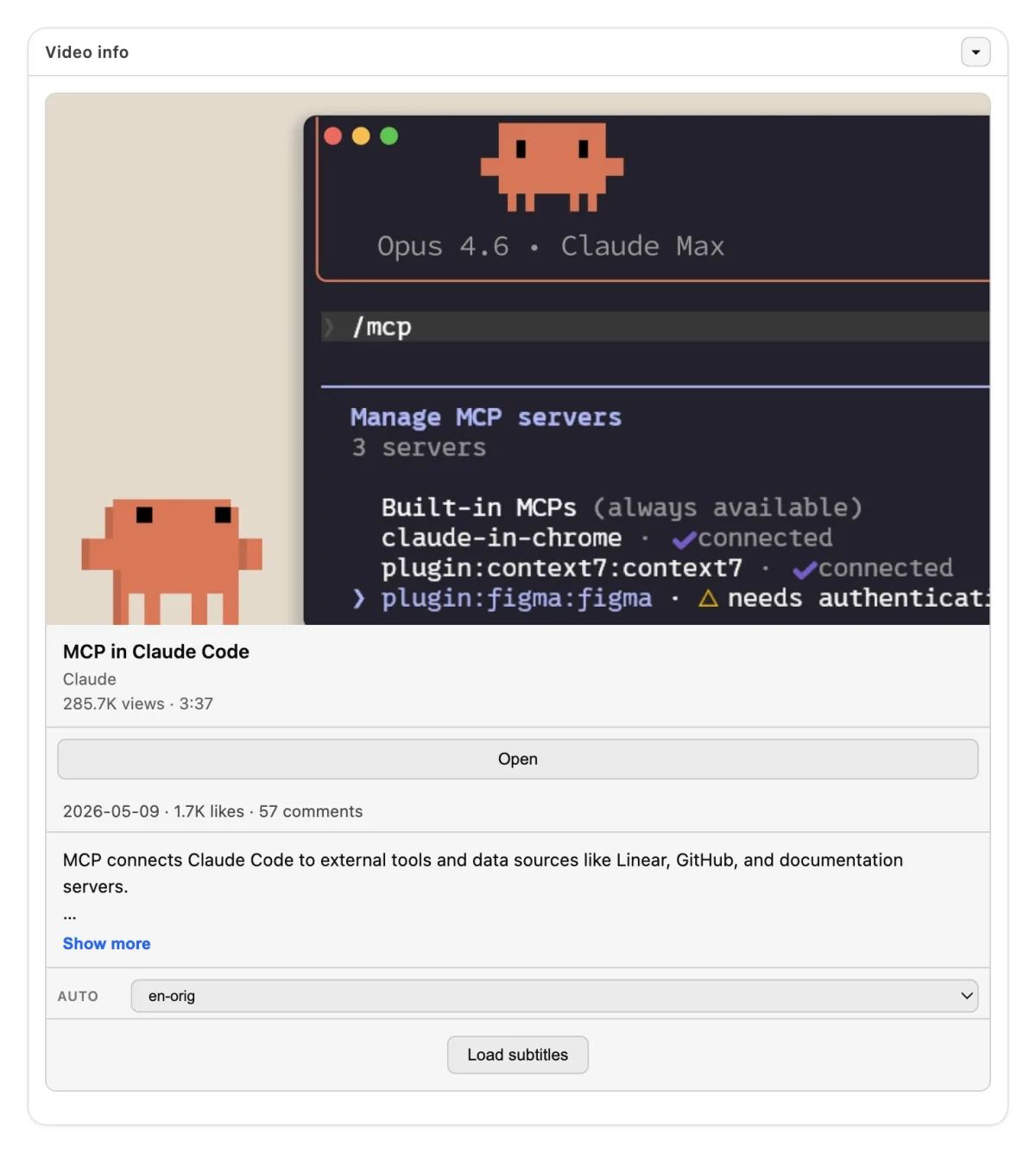
| "Who published this and how many views?" | get_video_info |
| "Go to the part about pricing" | get_video_chapters |
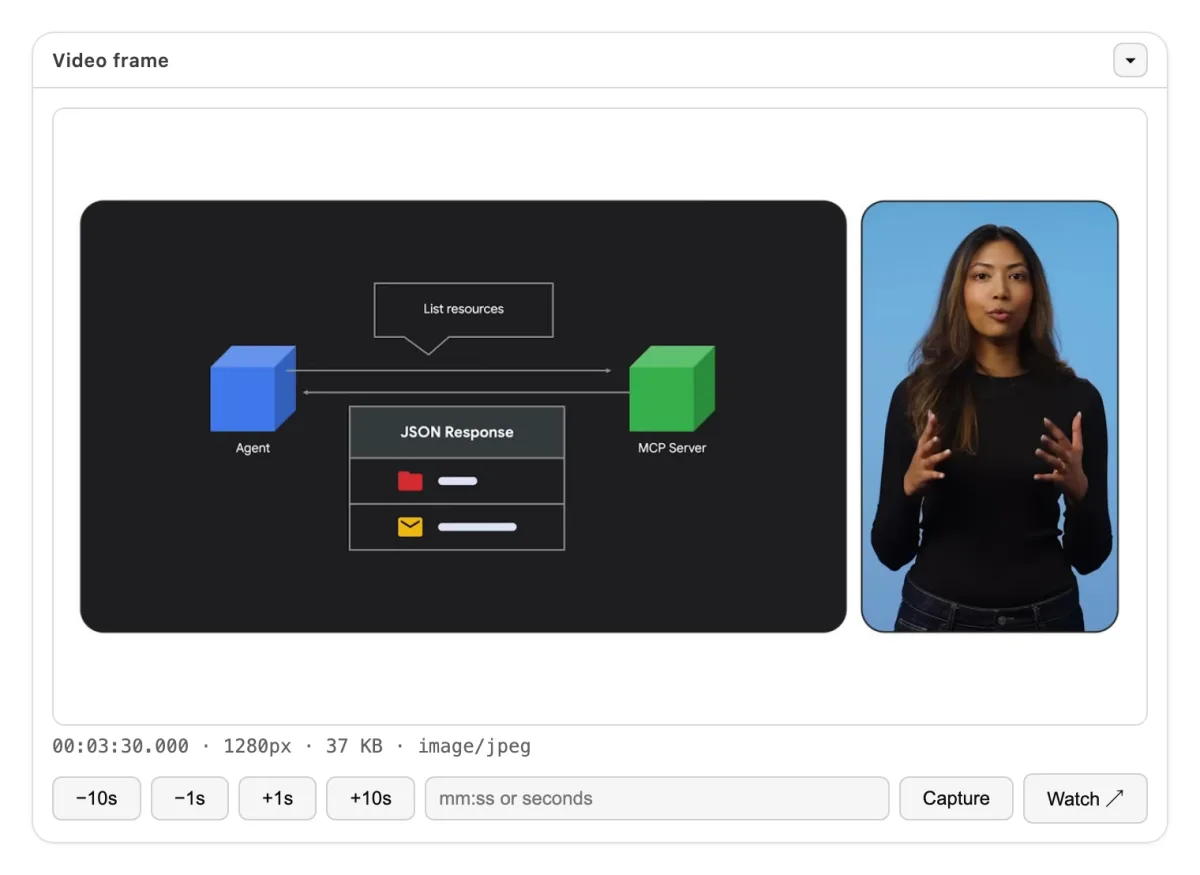
| "Show me the screen at 4:12" | get_video_frame |
| "Get English transcripts for the first 5 videos in this playlist" | get_playlist_transcripts |
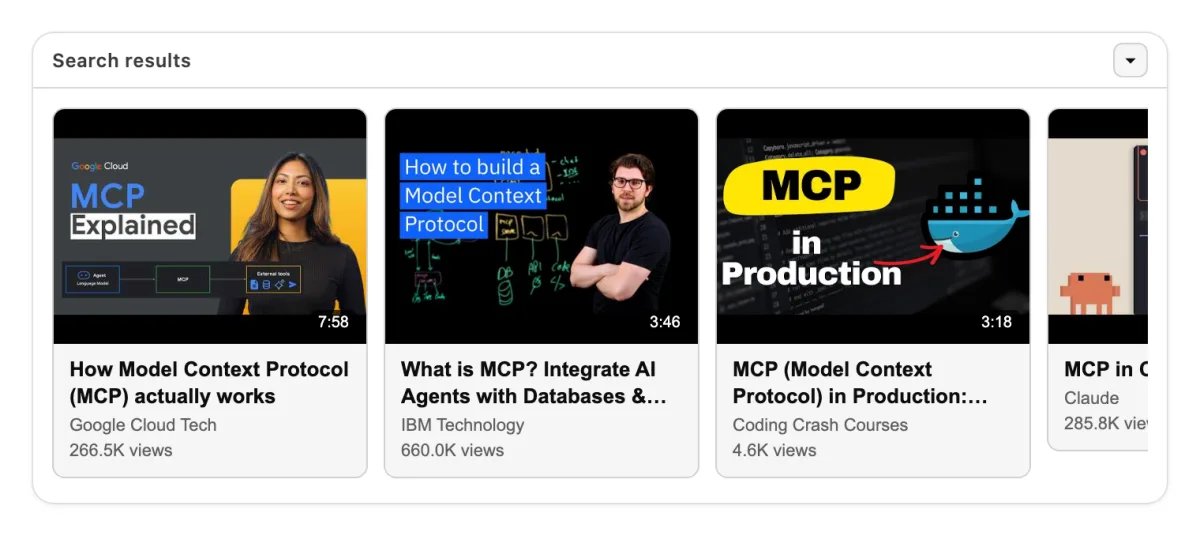
| "Find recent videos about X" | search_videos (YouTube) |
Long transcripts come in parts. Each response gives a cursor for the next part, so no text is lost.
Full tool reference (input and structured response)
Each tool that takes a video accepts url. This is a link from a supported platform or a plain YouTube ID. Each tool returns content (text for the chat) and structuredContent (typed JSON for your code).
get_transcript
Clean plain text, without timestamps, HTML, or speaker names. Without lang, the tool returns the track in the video's original language. Most platforms other than YouTube do not say which language a video is in; when the tool cannot tell which track that is, it answers with the list of tracks, and you call it again with type and lang. The inputs are the same as for get_raw_subtitles.
Response: videoId, url (the video page, as the server resolved it), type, lang, text, is_truncated, total_length, start_offset, end_offset. When more text is available, the response also has next_cursor.
get_raw_subtitles
Raw SRT or VTT content, in parts.
Input:
type—officialorauto. Withoutlang, the tool picks a track of this typelang— a language code or track name, asget_available_subtitleslists it. Without it, the video's original language, as forget_transcriptresponse_limit— default50000, minimum1000, maximum200000next_cursor— the cursor of the previous response
Response: the fields of get_transcript, plus format (srt or vtt) and content.
get_available_subtitles
Response: official and auto. Each field is a sorted list of language codes. Use this tool first, then give type and lang to the tools above.
get_video_info
Extended metadata from yt-dlp:
- identity —
videoId,title,description,webpageUrl - author —
uploader,uploaderId,channel,channelId,channelUrl - numbers —
duration,uploadDate,viewCount,likeCount,commentCount - classification —
tags,categories,liveStatus,isLive,wasLive,availability - images —
thumbnailandthumbnails
get_video_chapters
Response: chapters. Each item has startTime, endTime, and title. When the video has no chapters, the list is empty.
get_video_frame
Input:
timecode—"MM:SS"or"HH:MM:SS.mmm"seconds— an alternative totimecode. Give one of the two, not bothformat—jpeg(default) orpngwidth— default1280, maximum1920, never larger than the sourcequality—2to31, for jpeg only
Response: an image block, plus url, timestampSeconds, timestamp, mimeType, sizeBytes, and width. This tool needs ffmpeg. The Docker image includes it.
get_playlist_transcripts
Input:
url— a playlist URL, or a watch URL withlist=type,lang,format— the same asget_raw_subtitles, except thatlangis required: the original language is picked only for one video at a timeplaylistItems— a yt-dlp-Ivalue such as1:5,1,3,7, or-1maxItems— the maximum number of videos
Response: results. Each item has videoId and text.
search_videos
Input:
query— the search textlimit— default 10, maximum 50offset— the number of results to skipuploadDateFilter—hour,today,week,month, oryearresponse_format—json(default) ormarkdown
Response: results. Each item has videoId, title, url, duration, uploader, viewCount, and thumbnail.
📺 Widgets
Four tools have an interactive interface: get_transcript, get_video_info, get_video_frame, and search_videos. Clients that support MCP Apps and the ChatGPT Apps SDK show this interface in the chat. Other clients get the same data as text and JSON.
|
|
|
|
🌍 Platforms
YouTube · Twitter/X · Instagram · TikTok · Twitch · Vimeo · Facebook · Bilibili · VK · Dailymotion · Reddit
Each tool that takes a video accepts a link from these 11 platforms. The tool search_videos works with YouTube only, through yt-dlp ytsearch.
The server does not download video or audio files for you. It returns text, metadata, and single frames.
🐳 Self-host
The tools are the same as on the hosted endpoint. You need no account.
Run the server with Docker. The image serves Streamable HTTP on port 4200:
docker run --rm -p 4200:4200 artsamsonov/transcriptor-mcp:latest
Then point your client at http://localhost:4200/mcp.
For stdio, give the image an explicit command:
docker run --rm -i artsamsonov/transcriptor-mcp:latest npm run start:mcp
{
  "mcpServers": {
    "transcriptor": {
      "command": "docker",
      "args": ["run", "--rm", "-i", "artsamsonov/transcriptor-mcp:latest", "npm", "run", "start:mcp"]
    }
  }
}
The server starts with no environment variables. Each variable below is optional.
| Variable | Default | Function |
|---|---|---|
MCP_PORT and MCP_HOST | 4200 and 0.0.0.0 | The HTTP listener |
COOKIES_FILE_PATH | — | A Netscape cookies file for videos that need an account. See cookies.example.txt |
WHISPER_MODE | off | Set local or api to transcribe the audio when a video has no subtitles. Then set WHISPER_BASE_URL or WHISPER_API_KEY. WHISPER_MAX_DURATION_SECONDS skips longer videos and live streams; a video whose length the platform does not report is measured with ffprobe after the audio download |
CACHE_MODE | off | Set redis and CACHE_REDIS_URL to cache subtitles and metadata |
YT_DLP_MAX_CONCURRENCY | 4 | How many yt-dlp/ffmpeg processes may run at once. YT_DLP_MAX_QUEUE (8) is how many calls may wait; beyond that a call is refused at once with "server busy". A call peaks at ~40 MiB, so the cap bounds platform throttling and latency, not memory |
SUBTITLES_RATE_LIMIT_HOLD_MS | 600000 | After a platform answers 429 to a subtitle download, the server stops asking that platform for subtitles for this long and answers rate_limited right away. Each repeat doubles the wait, up to an hour; a successful download clears it. Metadata is not held back |
CANARY_INTERVAL_MS | 900000 | How often the HTTP server fetches one transcript to prove the path still works. 0 turns it off; CANARY_URL picks the video |
YT_DLP_* | — | Timeouts, proxy, and JS runtimes. See .env.example |
The same port serves GET /health and GET /metrics. The metrics are in Prometheus format and include the mcp_* counters.
Transport, REST API, and development
Transport. The server accepts POST /mcp only. GET and DELETE return 405. The server is stateless and sends no Mcp-Session-Id.
The Node process does not check bearer tokens. Put a reverse proxy or a gateway in front of it for authentication and TLS. The hosted endpoint works this way.
REST API. A second image gives the same extraction over plain HTTP:
docker run --rm -p 3000:3000 artsamsonov/transcriptor-mcp-api:latest
The Swagger interface is at http://localhost:3000/docs. For a full stack with the API and the MCP server, read docker-compose.example.yml.
Development.
npm ci
npm run build
npm run start:mcp        # stdio
npm run start:mcp:http   # Streamable HTTP on port 4200
npm test
You need Node.js 22 or later (20 still works, but it reached end of life in April 2026), and yt-dlp in your PATH. Frame capture needs ffmpeg, and WHISPER_MAX_DURATION_SECONDS needs ffprobe (both ship in the same package, and in the Docker image). Other scripts: lint, type-check, format, test:coverage, test:e2e:api, and test:e2e:mcp.
Releases. The maintainer cuts them. The steps are in .claude/skills/release/SKILL.md. The version comes from package.json at runtime, through src/version.ts. Pushing a v* tag makes CI build both images and publish the MCP Registry entry from server.json.
Layout. src/mcp.ts (stdio entry), src/mcp-http.ts (Streamable HTTP), src/mcp-core.ts (tools, prompts, widgets), src/youtube.ts (yt-dlp), src/whisper.ts, src/cache.ts, src/index.ts (REST API), load/ (k6), and src/e2e/ (Docker smoke tests).
🤝 Contributing
Pull requests are welcome. Read CONTRIBUTING.md first: it describes the cycle from issue to review, for people and for coding agents.
⚖️ Legal
The hosted endpoint at transcriptor.gateway.mcpal.io is governed by the Terms of Service and the Privacy Policy.
A server you host yourself is not covered by those documents. It is governed by the MIT License only.
📄 License
MIT © 2026 samson-art. Read LICENSE.