flyto-core
Yapay zeka ajanları için deterministik yürütme motoru. 78 kategoride 412 MCP aracı — tarayıcı, dosya, Docker, veri, kripto, zamanlama ve daha fazlası.
Dokümantasyon
Flyto2 Core
AI said it finished. Flyto2 shows the proof.
A Python execution engine for AI agents. It runs browser and API work as explicit steps, records what every step did, and replays from the step that failed — instead of re-running the whole job.
The current public inventory is 481 registry-backed modules across 89 catalog categories, including triggers, queue modules, workflow versioning, metering hooks, browser automation, API calls, data transforms, verification, files, and crypto.



flyto2.com · Cloud Automation · Documentation · MCP Docs · YouTube
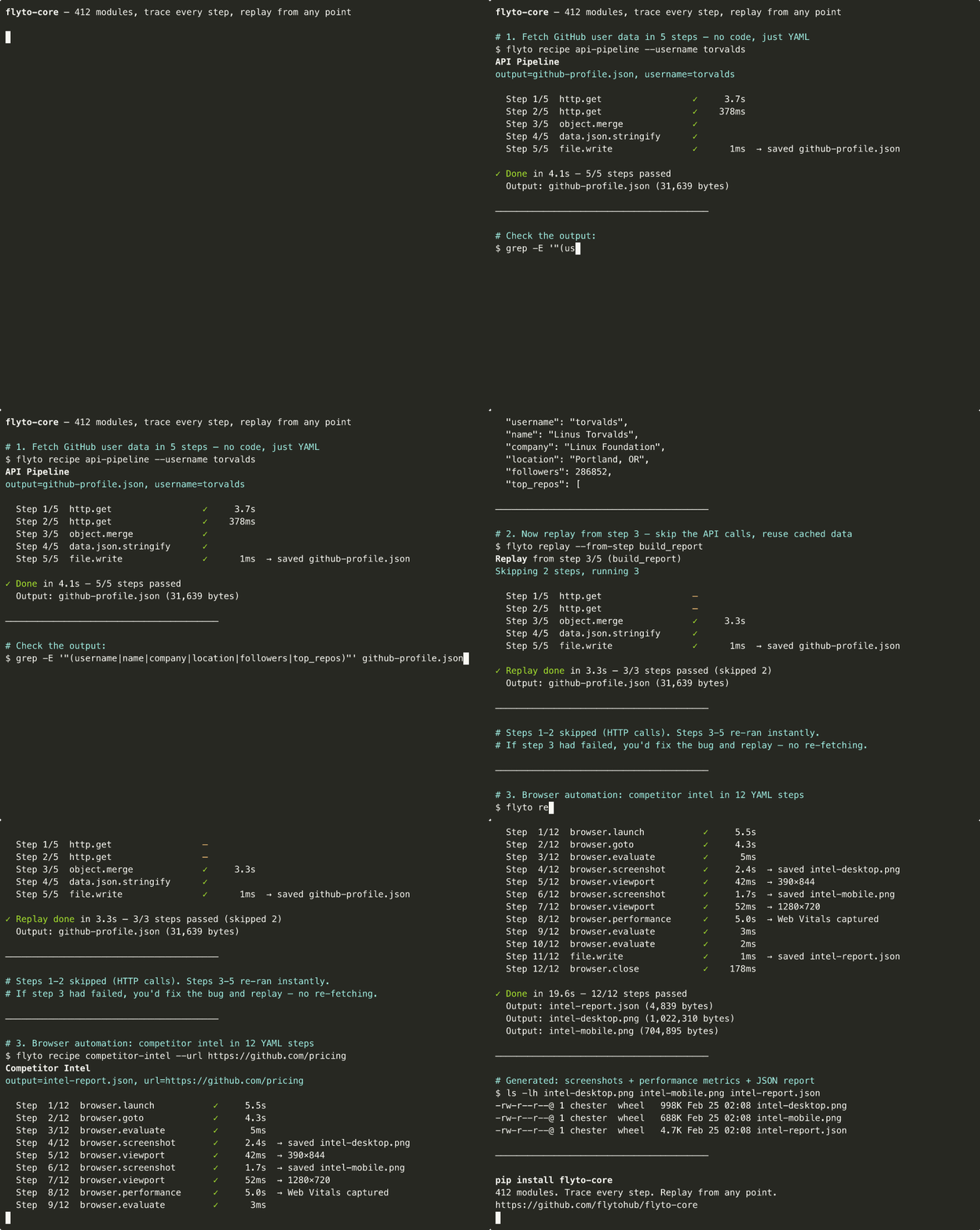
Try it in 30 seconds
pip install flyto-core[browser] && playwright install chromium
flyto recipe competitor-intel --url https://github.com/pricing
  Step  1/12  browser.launch         ✓      420ms
  Step  2/12  browser.goto           ✓    1,203ms
  Step  3/12  browser.evaluate       ✓       89ms
  Step  4/12  browser.screenshot     ✓    1,847ms  → saved intel-desktop.png
  Step  5/12  browser.viewport       ✓       12ms  → 390×844
  Step  6/12  browser.screenshot     ✓    1,621ms  → saved intel-mobile.png
  Step  7/12  browser.viewport       ✓        8ms  → 1280×720
  Step  8/12  browser.performance    ✓    5,012ms  → Web Vitals captured
  Step  9/12  browser.evaluate       ✓       45ms
  Step 10/12  browser.evaluate       ✓       11ms
  Step 11/12  file.write             ✓        3ms  → saved intel-report.json
  Step 12/12  browser.close          ✓       67ms

  ✓ Done in 10.3s — 12/12 steps passed
Screenshots captured. Performance metrics extracted. JSON report saved. Every step traced.
What happens when step 8 fails?
With a shell script you re-run the whole thing. With flyto-core:
flyto replay --from-step 8
Steps 1–7 are instant. Only step 8 re-executes. Full context preserved.
How is this different?
| Playwright / Selenium | Shell scripts | flyto-core | |
|---|---|---|---|
| Step 8 fails | Re-run everything | Re-run everything | flyto replay --from-step 8 |
| What happened at step 3? | Add print(), re-run | Add echo, re-run | Full trace: input, output, timing |
| Browser + API + file I/O | Write glue code | 3 languages | All built-in |
| Share with team | "Clone my repo" | "Clone my repo" | pip install flyto-core |
| Run in CI | Wrap in pytest/bash | Fragile | flyto run workflow.yaml |
3 recipes to try now
# Competitive pricing: screenshots + Web Vitals + JSON report
flyto recipe competitor-intel --url https://competitor.com/pricing

# Full site audit: SEO + accessibility + performance
flyto recipe full-audit --url https://your-site.com

# Web scraping → CSV export
flyto recipe scrape-to-csv --url https://news.ycombinator.com --selector ".titleline a"
Every recipe is traced. Every run is replayable. See all 41 recipes ->
Install
pip install flyto-core            # Core engine + CLI + MCP server
pip install flyto-core[browser]   # + browser automation (Playwright)
playwright install chromium        # one-time browser setup
Write Your Own Workflows
Recipes are just YAML files. Write your own:
name: price-monitor
steps:
  - id: open
    module: browser.launch
    params: { headless: true }

  - id: page
    module: browser.goto
    params: { url: "https://competitor.com/pricing" }

  - id: prices
    module: browser.evaluate
    params:
      script: |
        JSON.stringify([...document.querySelectorAll('.price')].map(e => e.textContent))

  - id: save
    module: file.write
    params: { path: "prices.json", content: "${prices.result}" }

  - id: close
    module: browser.close
flyto run price-monitor.yaml
Every run produces an execution trace and state snapshots. If step 3 fails, replay from step 3 — no re-running the whole thing.
Usage
CLI — run workflows from the terminal
# Run a built-in recipe
flyto recipe site-audit --url https://example.com

# Run your own YAML workflow
flyto run my-workflow.yaml

# List all recipes
flyto recipes
MCP Server — for Claude Code, Cursor, Windsurf
pip install flyto-core
claude mcp add flyto-core -- python -m core.mcp_server
Or add to your MCP config:
{
  "mcpServers": {
    "flyto-core": {
      "command": "python",
      "args": ["-m", "core.mcp_server"]
    }
  }
}
Your AI gets all 481 modules as tools.
HTTP API — for integrations and remote execution
pip install flyto-core[api]
flyto serve
# ✓ flyto-core running on 127.0.0.1:8333
| Endpoint | Purpose |
|---|---|
POST /v1/workflow/run | Execute workflow with evidence + trace |
POST /v1/workflow/{id}/replay/{step} | Replay from any step |
POST /v1/execute | Execute a single module |
GET /v1/modules | Discover all modules |
POST /mcp | MCP Streamable HTTP transport |
Python API — for programmatic use
import asyncio
from core.modules.registry import ModuleRegistry

async def main():
    result = await ModuleRegistry.execute(
        "string.reverse",
        params={"text": "Hello"},
        context={}
    )
    print(result)  # {"ok": True, "data": {"result": "olleH"}}

asyncio.run(main())
API
Flyto2 Core exposes the same deterministic runtime through several supported interfaces rather than separate execution engines:
- Python — import the module registry and workflow engine directly.
- YAML workflows — compose registered modules into replayable procedures.
- Execution API — use the authenticated
/v1/*HTTP routes for local integrations. - MCP — expose the registry through stdio or Streamable HTTP to AI clients.
- Module contract — every executable action is defined by registry metadata and a bounded parameter schema; host-only primitives such as
capability.invokeadditionally require opaque runtime authority and cannot be activated by serialized workflow data alone.
Generated source-linked references are available in Python API Reference, Registered Modules, and the Full Module Catalog.
Configuration
Flyto2 Core runs with safe defaults. Optional providers, browsers, verification services, and connectors are enabled explicitly through package extras and documented environment variables; secrets stay in runtime environment/credential stores rather than workflow YAML. Start from .env.example for supported settings and see Operations for runtime/deployment guidance.
Host-injected runtime capabilities are deliberately different from configuration: a workflow cannot enable capability.invoke by setting an environment variable or serialized parameter. The trusted host must inject the execution-scoped opaque authority for that run.
481 Modules, 89 Catalog Categories
| Category | Count | Examples |
|---|---|---|
browser.* | 54 | launch, goto, click, evaluate, screenshot, performance, challenge |
flow.* | 24 | switch, loop, branch, parallel, retry, circuit breaker, rate limit |
array.* | 15 | filter, sort, map, reduce, unique, chunk, flatten |
api.* | 13 | OpenAI, Anthropic, Gemini, Notion, Slack, Telegram |
data.* | 13 | JSON, YAML, CSV, XML parse/generate/convert |
string.* | 11 | reverse, uppercase, split, replace, trim, slugify, template |
ai.* | 10 | chat, model calls, vision, embeddings, moderation |
object.* | 10 | keys, values, merge, pick, omit, get, set, flatten |
testing.* | 10 | assertions, scenarios, E2E steps, reports |
image.* | 9 | resize, convert, crop, rotate, watermark, OCR, compress |
verify.* | 9 | evidence, visual diff, rulesets, annotations |
file.* | 8 | read, write, copy, move, delete, exists, edit, diff |
stats.* | 8 | mean, median, percentile, correlation, standard deviation |
test.* | 8 | API, browser, and visual checks |
check.* | 7 | validation and guard checks |
crypto.* | 7 | AES encrypt/decrypt, JWT create/verify, hashes |
http.* | 7 | get, request, batch, paginate, session |
validate.* | 7 | email, url, json, phone, credit card |
| 66 more prefixes | 221 | Docker, archive, math, k8s, network, PDF, AWS, cache, git |
See the Full Module Catalog for every module, parameter, and description.
Engine Features
- Execution Trace — structured record of every step: input, output, timing, status
- Replay — re-execute from any step with the original (or modified) context
- Breakpoints — pause execution at any step, inspect state, resume
- Evidence Snapshots — full state before and after each step boundary
- Data Lineage — track data flow across steps, build dependency graphs
- Timeout Guard — configurable workflow-level and per-step timeout protection
Architecture
CLI, MCP, HTTP, Python, and packaged recipes converge on the same workflow engine, module registry, policy, trace, evidence, and replay boundaries. Start with the Technical Whitepaper, then use the Architecture Map and exhaustive source reference for implementation detail.
The shared product contract, flyto.product-contract.v1,
defines the Flyto2 promise: Turn AI work into verified, replayable procedures.
| Package | Responsibility |
|---|---|
flyto-ai | Understand, route, and govern new work and provider use. |
flyto-blueprint | Store, learn from, and score reusable procedures; it never executes them. |
flyto-core | Validate schemas, execute and replay deterministically, and emit evidence. |
flyto-core is a standalone execution package; it does not require the other
packages to execute a workflow or produce evidence.
Where to go next
| You want to | Go to |
|---|---|
| Run one of the other built-in recipes | docs/RECIPES.md |
| Browse every module and parameter | docs/TOOL_CATALOG.md |
| See the module categories at a glance | 481 Modules, 89 Catalog Categories |
| Configure network, filesystem, auth, and permission switches | docs/CONFIGURATION.md |
| Install a module pack or plugin | docs/PLUGIN_SDK.md |
| Write your own module | docs/MODULE_SPECIFICATION.md |
| Understand why the engine is shaped this way | docs/WHY.md |
| Read the product boundary between the three packages | ARCHITECTURE.md |
The canonical PyPI and MCP registry description is: The open-source execution engine for AI agents. 481 modules, MCP-native, triggers, queue, versioning, metering.
Contributing
We welcome contributions! See CONTRIBUTING.md for guidelines.
Testing
python -m pytest
python -m ruff check .
flyto recipe full-audit --url https://example.com
Security
Report security vulnerabilities via security@flyto2.com. See SECURITY.md for the security policy and the environment variables that define the filesystem and outbound-network boundaries.
SECURITY_STATUS.md lists every published advisory with its severity, affected range, fixed-in version, and the regression test that covers it. Two boundaries are enforced registry-wide by tests that fail the build — every module taking a caller-supplied path must reach the filesystem sandbox helper, and every module taking a caller-supplied URL or host must reach an SSRF guard — so coverage is a CI property rather than a convention.


License
Apache License 2.0 — free for personal and commercial use.
Cloud Automation · Pricing · flyto2.com
Hosted deployment
A hosted deployment is available on Frontier AI.
Also known as: open source AI agent framework for production workflows · Python AI workflow automation with Playwright · MCP server automation with trace and replay · browser automation that can resume from a failed step