Armor Crypto MCP
resmiBirden çok blokzincir ile arayüz oluşturma, stake etme, DeFi, takas, köprüleme, cüzdan yönetimi, DCA, Limit Emirleri, Coin Arama, Takip ve daha fazlası için MCP.
Armor Crypto MCP ile neler yapabilirsiniz?
- Solana cüzdanları oluşturma ve yönetme — Cüzdan yönetim araçları aracılığıyla yeni cüzdanlar oluşturun, bunları gruplar halinde düzenleyin ve kullanılmayanları arşivleyin.
- Token takasları gerçekleştirme — Takas aracını kullanarak Solana üzerinde normal takas işlemleri yapın.
- Otomatik alım satım stratejileri kurma — DCA emirleri, limit emirleri ve zamanlanmış işlemler oluşturun, listeleyin ve iptal edin.
- Token stake etme ve stake’ten çekme — Varlıkları stake etmek veya stake edilmiş pozisyonları çekmek için stake araçlarını kullanın.
- Trend olan tokenları keşfetme — Tokenları arayın ve Solana üzerindeki trend token verilerini alın.
- İstatistiksel analiz yapma — Doğru zincir içi veri analizi için istatistiksel hesaplama aracını kullanın.
Dokümantasyon
Armor Crypto MCP
Alpha Test sürümü 0.1.24
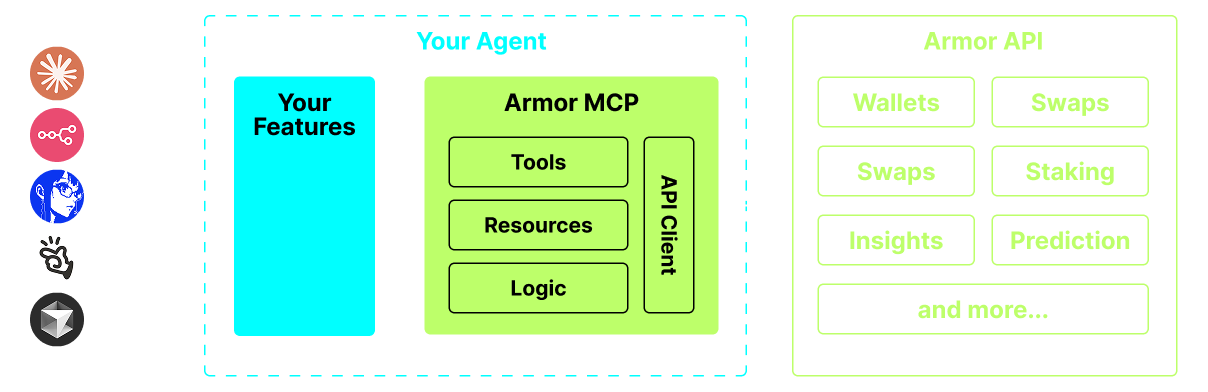
Yapay Zeka Ajanlarını Kripto ekosistemiyle entegre etmek için tek bir kaynak. Buna Cüzdan oluşturma ve yönetimi, takaslar, transferler, DCA, zararı durdur ve kâr al gibi olay tabanlı işlemler ve çok daha fazlası dahildir. Armor MCP, Alpha aşamasında Solana'yı destekler ve beta aşamasında Ethereum, Base, Avalanche, Bitcoin, Sui, Berachain, megaETH, Optimism, Ton, BNB ve Arbitrum dahil olmak üzere bir düzineden fazla blok zincirini destekleyecektir. Armor'un MCP'sini kullanarak, birleşik mantık ve eksiksiz bir araç seti ile tüm kriptoyu Yapay Zeka Ajanınıza getirebilirsiniz.
Özellikler
🧠 Yapay Zeka Odaklı
📙 Cüzdan Yönetimi
🔃 Takaslar
🌈 Özel işlemler (DCA, Zararı Durdur vb.)
⛓️ Çoklu zincir
↔️ Zincirler arası işlemler
🥩 Staking
🤖 Ajan çerçevelerine hızlı entegrasyon
👫 Sosyal Duyarlılık
🔮 Tahmin
Gereksinimler
1. Python'un yüklü olduğundan emin olun
2. uv yükleyin
Linux / Windows
pip install uv
Mac
brew install uv
3. Claude Desktop veya Yapay Zeka Ajanınız MCP'yi çalıştıracak
Ayrıntılar için Kullanım ve Yapılandırma bölümüne bakın.
Alpha Testi
Şu anda pre-alpha aşamasındayız ve Claude Desktop, Cline, Cursor, n8n gibi çeşitli ajanların ve ajan çerçevelerinin yeteneklerini test ediyoruz.
Mevcut Özellikler ve Araçlar
- Cüzdan Yönetimi
- Gruplandırma ve Organizasyon
- Arşivleme
- Takas ve İşlemler
- Normal takas
- DCA (yerleştir / listele / iptal et)
- Zamanlanmış Emirler
- Limit Emirleri (yerleştir / listele / iptal et)
- Staking ve Staking'den Çıkma
- Token Arama ve Trend Token'lar
- Doğru Analiz için İstatistiksel Hesaplayıcı
- Solana blok zincirini destekler
Yakında
- Daha Fazla Blok Zinciri Desteği
- Minting
- Araç Olarak Armor Ajanları (veya A2A)
MCP Kurulumu
Şu anda bir API Anahtarı almak için Armor NFT'sine sahip olmanız gerekmektedir. Buradan alın.
Kullanım ve Yapılandırma
Armor MCP'yi ajanınızla kullanmak için aşağıdaki yapılandırmaya ihtiyacınız var, <PUT-YOUR-KEY-HERE> kısmını API anahtarınızla değiştirin:
{
  "mcpServers": {
    "armor-crypto-mcp": {
      "command": "uvx",
      "args": ["armor-crypto-mcp@latest", "--version"],
      "env": {
        "ARMOR_API_KEY": "<PUT-YOUR-KEY-HERE>"
      }
    }
  }
}
Claude Desktop'ta Kullanım
- Geliştirici Modu etkinleştirilmiş olmalıdır
- Pencerenin sol üst köşesindeki Claude Desktop Dosya Menüsünü açın.
- Dosya > Ayarlar'a gidin
- Geliştirici altında, Yapılandırmayı Düzenle'ye tıklayın
- Yapılandırma dosyasına yukarıdaki
armor-wallet-mcpbölümünü ekleyin - Yer tutucuyu API anahtarınızla değiştirdiğinizden emin olun
- Dosyayı kaydedin ve Claude Desktop'ta yeni bir Sohbet başlatın
Cline'da Kullanım
- VSCode'da sol paneldeki Cline sekmesinde
MCP Serversdüğmesine tıklayın - Sol panelin en altına kaydırın ve
Configure MCP Serversöğesine tıklayın - Yapılandırma dosyasına yukarıdaki
armor-wallet-mcpbölümünü ekleyin - Yer tutucuyu API anahtarınızla değiştirdiğinizden emin olun
- Dosyayı kaydedin,
MCP Serverssekmesi altındakiDoneöğesine tıklayın ve Cline ile sohbet etmeye başlayın
n8n'de Kullanım
- n8n uygulamasını açın
- Ekranın sol alt köşesinde kullanıcı adınızın yanındaki
...öğesine tıklayın veSettingsöğesine tıklayın - Sol panelde
Community nodesöğesine ve ardındanInstall a Community Nodedüğmesine tıklayın npm Package Nameiçin arama alanına mcp yazınMCP Nodesyükleyin- Herhangi bir MCP düğümü ekleyin, örneğin:
List Tools - MCP İstemcisi
ParameterssekmesindeSelect Credentialöğesine tıklayın veCreate new credentialöğesine tıklayın CommandaltınauvxgirinArgumentsaltınaarmor-crypto-mcpgirinEnvironmentsaltınaARMOR_API_KEY=eyJhbGciOiJIUzI1NiIsIn...girin ve=kısmından sonra tam API Anahtarı değerini yapıştırınParameterssekmesine geri dönerek o Düğüm için MCPOperationöğesini seçebilirsiniz
Armor MCP'yi Kullanma
Armor MCP'yi kurduktan sonra başlamak için kullanabileceğiniz bazı istemler burada