Kit.com (formerly ConvertKit) MCP
E-posta listelerinizi, abonelerinizi, yayınlarınızı, sıralamalarınızı ve daha fazlasını doğal dil aracılığıyla yönetin.
Dokümantasyon
MCP Kit Server
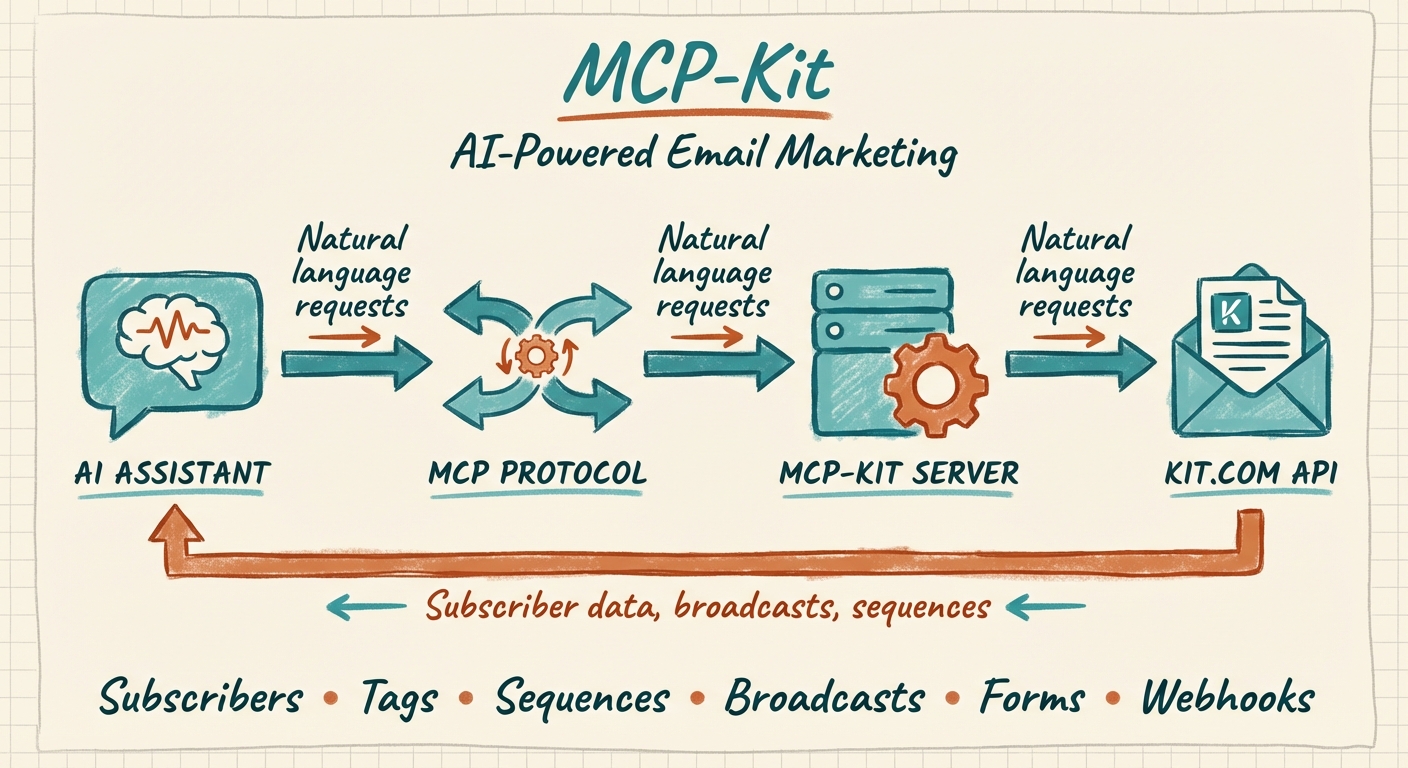




An MCP (Model Context Protocol) server that connects AI assistants like Claude to the Kit.com (formerly ConvertKit) email marketing platform. Manage your email lists, subscribers, broadcasts, sequences, and more through natural language.
[!WARNING] This project is deprecated and no longer maintained. Kit now ships official, first-party MCP servers that supersede it with broader API coverage and managed authentication. Please migrate — see below.
⚠️ Deprecated — use Kit's official MCP servers
This community server was built before Kit offered its own MCP. Kit now maintains official servers that cover far more of the Kit API v4 surface (including analytics, commerce, segments, and bulk operations), handle auth for you, and stay current with API changes. New and existing users should migrate.
| Use case | Official server | URL |
|---|---|---|
| Act on your Kit account — subscribers, tags, sequences, broadcasts, analytics, commerce… | Kit MCP | https://app.kit.com/mcp |
| Give a coding agent live access to Kit's developer docs + API | Kit Developer Docs MCP | https://developers.kit.com/mcp |
Migrate in Claude Code
# Remove this deprecated server (if you added it as "kit")
claude mcp remove kit

# Add the official operational Kit MCP
claude mcp add --transport http kit https://app.kit.com/mcp

# Optional: add Kit's developer-docs MCP for building integrations
claude mcp add --transport http kit-docs https://developers.kit.com/mcp
Official setup guides (Claude Desktop, Cursor, Windsurf, Cline, and more): https://developers.kit.com/mcp/kit-developer-docs-mcp/mcp/overview
📦 Legacy documentation (for historical reference)
Why Use This?
If you run a newsletter or email marketing on Kit.com, this MCP server lets you:
- Manage subscribers - List, create, update, and organize your email subscribers
- Handle tags efficiently - Create tags, add/remove tags from subscribers, list subscribers by tag
- Work with sequences - View email sequences and add subscribers to automated sequences
- Create broadcasts - Draft and manage email campaigns
- Analyze your list - Query subscriber data with filters (status, date ranges, custom fields)
- Automate workflows - Let Claude handle repetitive email marketing tasks
Features
| Category | Tools |
|---|---|
| Account | Get account information |
| Subscribers | List, get, create, update, manage tags |
| Tags | List, create, update, delete, get subscribers by tag |
| Sequences | List, get, add subscribers |
| Broadcasts | List, get, create, update, delete |
| Forms | List, get, add subscribers |
| Custom Fields | List available fields |
| Webhooks | List, create, delete |
Complete Tool Reference
Account
kit_get_account- Get Kit.com account information
Subscribers (7 tools)
kit_list_subscribers- List subscribers with filters (status, date ranges, pagination)kit_get_subscriber- Get a specific subscriber by IDkit_create_subscriber- Create a new subscriberkit_update_subscriber- Update subscriber detailskit_get_subscriber_tags- Get all tags for a subscriberkit_add_tag_to_subscriber- Add a tag to a subscriberkit_remove_tag_from_subscriber- Remove a tag from a subscriber
Tags (6 tools)
kit_list_tags- List all tagskit_get_tag- Get a specific tagkit_create_tag- Create a new tagkit_update_tag- Rename a tagkit_delete_tag- Delete a tagkit_list_tag_subscribers- List all subscribers with a specific tag
Sequences (3 tools)
kit_list_sequences- List all email sequenceskit_get_sequence- Get sequence detailskit_add_subscriber_to_sequence- Add subscriber to a sequence
Broadcasts (5 tools)
kit_list_broadcasts- List all broadcastskit_get_broadcast- Get broadcast detailskit_create_broadcast- Create a new broadcastkit_update_broadcast- Update a broadcastkit_delete_broadcast- Delete a broadcast
Forms (3 tools)
kit_list_forms- List all formskit_get_form- Get form detailskit_add_subscriber_to_form- Add subscriber via form
Custom Fields (1 tool)
kit_list_custom_fields- List all custom fields
Webhooks (3 tools)
kit_list_webhooks- List configured webhookskit_create_webhook- Create a new webhookkit_delete_webhook- Delete a webhook
Prerequisites
- Node.js 18+
- A Kit.com account
- Your Kit.com API key (v4 API)
Installation
Option 1: Install from npm (recommended)
npx kit-mcp-server
Or install globally:
npm install -g kit-mcp-server
Option 2: Clone and Build
git clone https://github.com/aplaceforallmystuff/mcp-kit.git
cd mcp-kit
npm install
npm run build
Configuration
1. Get Your Kit.com API Key
- Log in to Kit.com
- Navigate to Settings > Developer
- Create a new API key or copy an existing v4 API key
2. Configure Your MCP Client
For Claude Desktop
Add to your Claude Desktop config file:
macOS: ~/Library/Application Support/Claude/claude_desktop_config.json
Windows: %APPDATA%\Claude\claude_desktop_config.json
{
  "mcpServers": {
    "kit": {
      "command": "node",
      "args": ["/path/to/mcp-kit/dist/index.js"],
      "env": {
        "KIT_API_KEY": "your-api-key-here"
      }
    }
  }
}
For Claude Code
claude mcp add kit -e KIT_API_KEY=your-api-key-here -- node /path/to/mcp-kit/dist/index.js
Or add to ~/.claude.json:
{
  "mcpServers": {
    "kit": {
      "command": "node",
      "args": ["/path/to/mcp-kit/dist/index.js"],
      "env": {
        "KIT_API_KEY": "your-api-key-here"
      }
    }
  }
}
Usage Examples
Once configured, you can interact with Kit.com through natural language:
Subscriber Management
"Show me all active subscribers from the last 30 days"
"Create a new subscriber with email user@example.com and tag them as 'newsletter'"
"What tags does subscriber@example.com have?"
Tag Operations
"List all my tags and how many subscribers each has"
"Create a tag called 'VIP Customers'"
"Add the 'engaged' tag to all subscribers who signed up this month"
Email Sequences
"Show me all my email sequences"
"Add user@example.com to the welcome sequence"
Broadcasts
"Create a draft broadcast with subject 'Weekly Update' and preview text 'This week in AI...'"
"List all my recent broadcasts and their stats"
Forms
"Show me all active forms"
"Add a subscriber to my main signup form"
Development
# Run in development mode (watches for changes)
npm run dev

# Build for production
npm run build

# Run the built version
npm start
Troubleshooting
"KIT_API_KEY environment variable is required"
Ensure you have set the KIT_API_KEY environment variable in your MCP configuration.
"Kit API error (401)"
Your API key is invalid or expired. Generate a new one from Kit.com Settings > Developer.
"Kit API error (403)"
Your API key doesn't have permission for this operation. Check that you're using a v4 API key with appropriate scopes.
"Kit API error (404)"
The resource (subscriber, tag, broadcast, etc.) was not found. Verify the ID is correct.
"Kit API error (422)"
Invalid request data. Check that email addresses are valid and required fields are provided.
API Reference
This server uses the Kit.com API v4. All tools support pagination where applicable using per_page and after cursor parameters.
Contributing
This project is deprecated and not accepting contributions. Please use Kit's official MCP servers instead.
License
MIT License - see LICENSE for details.