ThreatByte-MCP
ThreatByte-MCP, kasıtlı olarak güvenlik açıkları içeren, MCP tabanlı bir vaka yönetimi web uygulamasıdır. Gerçekçi bir SOC analisti iş akışını, sunucu tarafından oluşturulan bir arayüz ve gerçek bir MCP sunucusu ile yansıtır. MCP araçları, eğitim ve gösterim amacıyla kasıtlı olarak güvenlik açıklarına sahiptir.
Dokümantasyon
ThreatByte-MCP


ThreatByte-MCP is a deliberately vulnerable, MCP-based case management web app. It mirrors a realistic SOC analyst workflow with a server-rendered UI and a real MCP server. The MCP tools are intentionally vulnerable for training and demonstration.
[!NOTE] For educational use in controlled environments only.
Features
- Safe web authentication (signup/login/logout)
- Case management UI (create/list/view cases)
- Notes and attachments tied to cases
- Indicator search and agent workflows via MCP tools
- Agent customization with schema-based tool registry
MCP Server (SDK, JSON-RPC)
ThreatByte-MCP is a split architecture:
- SOC Web App (client/UI) runs on port 5001.
- MCP Server (tools + agent) runs on port 5002 using the official MCP Python SDK (FastMCP).
The MCP server exposes JSON-RPC at POST http://localhost:5002/mcp (Streamable HTTP). The web UI calls the MCP server through a server-side proxy to keep auth consistent with the SOC session; the proxy streams agent responses to the browser via SSE. A sample mcp.json manifest is included at the repo root.
All direct MCP calls must include MCP-Protocol-Version: 2025-11-25 and Accept: application/json, text/event-stream.
Architecture (simplified):
          Browser
             |
             v
    +------------------+        X-TBMCP-Token + X-TBMCP-User        +-------------------+
    |  SOC Web App     |  ---------------------------------------> |     MCP Server     |
    |  (Flask, :5001)  |           /mcp-proxy (server-side)         |  (FastMCP, :5002)  |
    +------------------+                                            +-------------------+
             |                                                                  |
             v                                                                  v
         SQLite DB                                                      Tool registry
                                                                       Agent + tool handlers
Architecture (detailed):
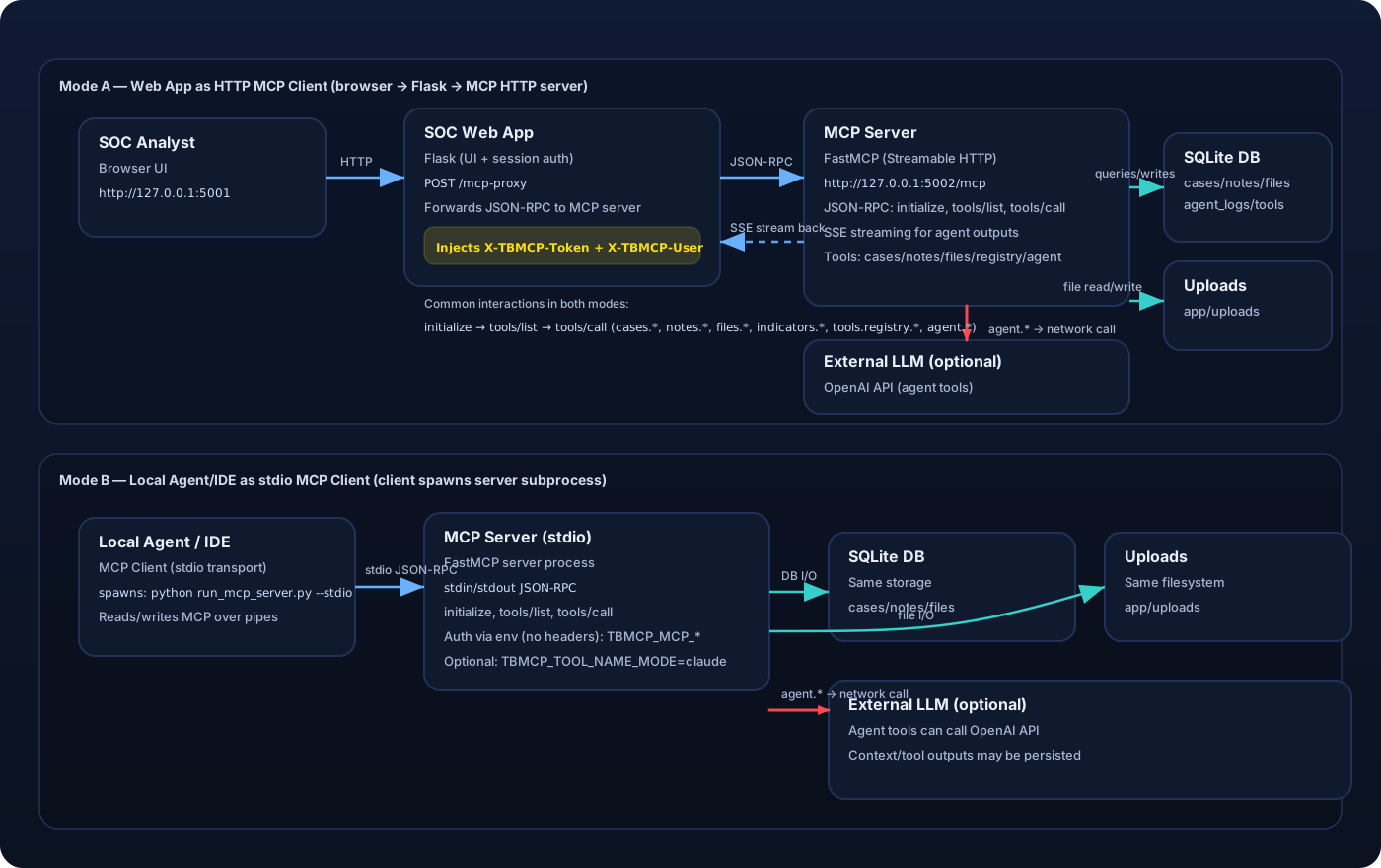
Mode A (Web UI as HTTP MCP client)
  Browser (Analyst)
    |
    v
  SOC Web App (Flask, :5001)
    - Auth session (cookie)
    - Dashboards, cases, notes, files UI
    - POST /mcp-proxy forwards JSON-RPC
    - Injects X-TBMCP-Token + X-TBMCP-User to the MCP server
    |
    +--> SQLite DB (users/cases/notes/files/indicators)
    +--> Uploads (app/uploads)
    |
    v
  MCP Server (FastMCP, :5002)
    - /mcp JSON-RPC (Streamable HTTP)
    - Tool registry (mcp_tools)
    - Agent runtime + tool handlers
    - Persistence: agent_contexts, agent_logs, mcp_audit_logs

Mode B (Local agent/IDE as stdio MCP client)
  Local Agent / IDE (e.g., Claude Desktop) spawns:
    python run_mcp_server.py --stdio
  and communicates via stdin/stdout JSON-RPC (stdio transport).
Diagram: ThreatByte-MCP architecture diagram
MCP Auth Between Web App and MCP Server
The web app proxies MCP calls with these headers:
X-TBMCP-Token: shared secret fromTBMCP_MCP_SERVER_TOKEN(configured on both servers).X-TBMCP-User: current user id from the authenticated SOC session.
Direct MCP calls require the same headers.
Supported tools:
cases.createcases.listcases.list_allcases.getcases.renamecases.set_statuscases.deletenotes.createnotes.listnotes.updatenotes.deletefiles.upload(base64)files.listfiles.get(base64)files.read_pathindicators.searchagent.summarize_caseagent.run_tasktools.registry.listtools.builtin.listtools.registry.registertools.registry.delete
Vulnerability Themes (Training-Focused)
The following weaknesses are intentionally present for teaching:
- Broken object level authorization (cases/notes/files, list_all)
- Stored XSS (notes rendered as trusted HTML)
- SQL injection in indicator search
- Prompt injection in agent task runner
- Token mismanagement & secret exposure (hardcoded tokens in prompts, persisted contexts, full logs)
- Tool poisoning via schema-driven tool registry overrides (MCP03)
- Over-trusting client context (MCP header identity spoofing)
- Arbitrary file read via
files.read_path - Cross-user file overwrite (shared filename namespace)
Running Locally
cd ThreatByte-MCP
python -m venv venv_threatbyte_mcp
source venv_threatbyte_mcp/bin/activate
pip install -r requirements.txt
python db/create_db_tables.py
python run_mcp_server.py --http
python run.py
Open: http://localhost:5001
MCP Server: http://localhost:5002/mcp
HTTP vs stdio
This repository ships two MCP server transports:
- HTTP (Streamable HTTP): what the ThreatByte web app uses. The web app is an HTTP MCP client only, via the server-side
/mcp-proxyforwarder. - stdio: for external MCP clients (e.g., IDE/agent clients) that spawn the MCP server and communicate over stdin/stdout.
Examples:
# HTTP (required for the web app)
python run_mcp_server.py --http --host 127.0.0.1 --port 5002

# stdio (for MCP clients that support stdio transport; the web app will NOT work with this)
# In stdio mode there are no HTTP headers, so the server reads user context from env vars.
# Note: stdio mode runs the MCP server on AnyIO's Trio backend; ensure `trio>=0.28.0` is installed.
export TBMCP_MCP_SERVER_TOKEN=tbmcp-mcp-token
export TBMCP_MCP_USER_ID=1
python run_mcp_server.py --stdio
Claude Desktop compatibility (tool names)
Some MCP clients (e.g., Claude Desktop) enforce strict tool name validation (^[a-zA-Z0-9_-]{1,64}$) and will reject dotted tool names like cases.create.
To run the MCP server in a Claude-compatible mode, set:
TBMCP_TOOL_NAME_MODE=claude
This exposes tools as underscore names (e.g., cases_create, tools_registry_register, files_read_path) instead of dotted names.
For a complete walkthrough (Windows + WSL stdio), see Claude Desktop setup.
Running with Docker or Podman
The repository includes a Dockerfile and startup script that initialize the DB and run both services in one container:
- SOC Web App on
:5001 - MCP Server on
:5002
Build the image:
# Docker
docker build -t threatbyte-mcp .

# Podman
podman build -t threatbyte-mcp .
Run the container:
# Docker
docker run --rm -p 5001:5001 -p 5002:5002 threatbyte-mcp

# Podman
podman run --rm -p 5001:5001 -p 5002:5002 threatbyte-mcp
Run with optional environment variables:
# Docker
docker run --rm -p 5001:5001 -p 5002:5002 \
  -e TBMCP_MCP_SERVER_TOKEN=tbmcp-mcp-token \
  -e OPENAI_API_KEY=your_api_key \
  -e TBMCP_OPENAI_MODEL=gpt-4o-mini \
  threatbyte-mcp

# Podman
podman run --rm -p 5001:5001 -p 5002:5002 \
  -e TBMCP_MCP_SERVER_TOKEN=tbmcp-mcp-token \
  -e OPENAI_API_KEY=your_api_key \
  -e TBMCP_OPENAI_MODEL=gpt-4o-mini \
  threatbyte-mcp
Persist SQLite data between runs (optional):
# Docker
docker run --rm -p 5001:5001 -p 5002:5002 \
  -v "$(pwd)/db:/app/db" \
  -v "$(pwd)/app/uploads:/app/app/uploads" \
  threatbyte-mcp

# Podman
podman run --rm -p 5001:5001 -p 5002:5002 \
  -v "$(pwd)/db:/app/db:Z" \
  -v "$(pwd)/app/uploads:/app/app/uploads:Z" \
  threatbyte-mcp
Populate Sample Data
python db/populate_db.py --users 8 --cases 20 --notes 40 --files 20
This creates random users, cases, notes, and file artifacts. All user passwords are Password123!.
LLM Integration (Required for Agent Responses)
The agent task endpoint requires a real LLM. Without an API key, the agent returns an error indicating it is unavailable.
Environment variables:
TBMCP_OPENAI_API_KEYorOPENAI_API_KEYTBMCP_OPENAI_MODEL(default:gpt-4o-mini)
Keep API keys server-side only and never expose them in the browser.
MCP Server Configuration
The SOC web app proxies MCP calls to the MCP server using a shared token.
Environment variables:
TBMCP_MCP_SERVER_URL(default:http://localhost:5002/mcp)TBMCP_MCP_SERVER_TOKEN(shared secret between the SOC app and MCP server)
Notes
- The UI uses server-rendered templates.
- MCP tools are exposed under
http://localhost:5002/mcp(JSON-RPC). The UI calls them through/mcp-proxy. - Useful UI pages for training:
My Cases(all cases owned by the logged-in user)MCP Audit Logs(server-side audit trail of MCP tool calls from HTTP + stdio clients)Agent Logs(internal agent runner traces; populated byagent.run_task)
- This app is intentionally insecure. Do not deploy it to the public internet.