Core Lightning MCP Server
A Rust-based gRPC server that provides a standardized MCP interface for Core Lightning nodes.
Core Lightning MCP Server
A Rust-based gRPC server that provides a standardized interface to Core Lightning nodes. This server implements the MCP (Model Context Protocol) specification to enable control of the Core Lightning node using LLM.
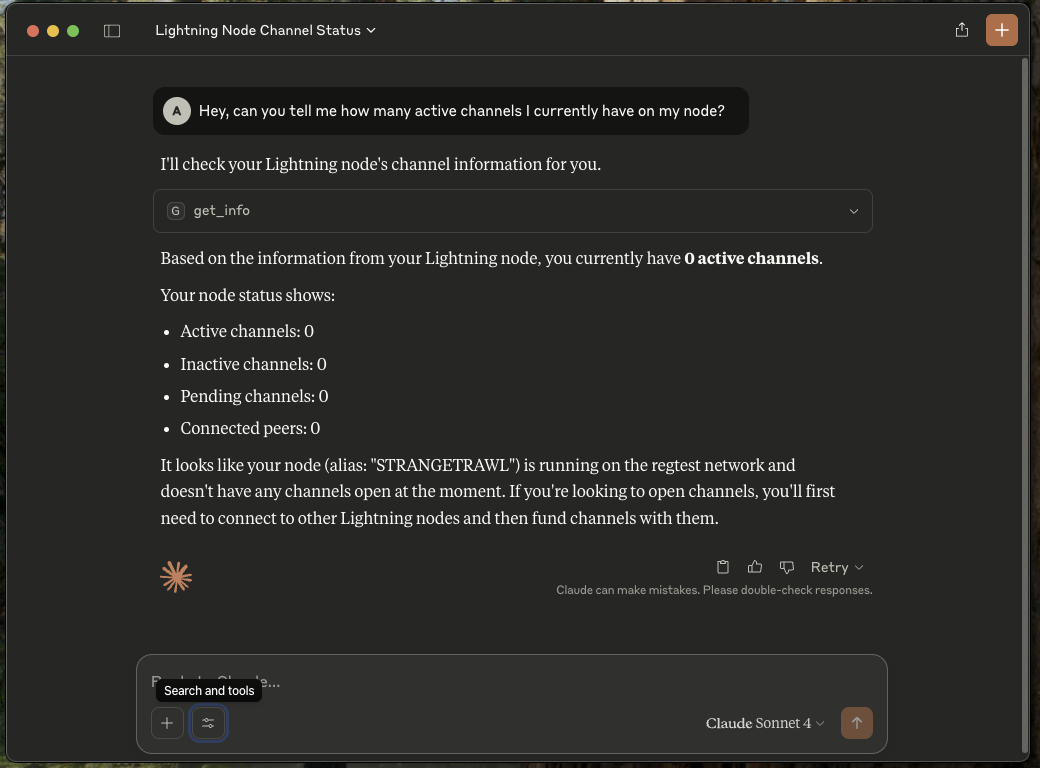
Installation
Option 1: From Release (Recommended)
- Download the appropriate binary for your platform from the latest release
- Extract the archive:
# For Linux/macOS tar -xzf cln-mcp-<platform>.tar.gz # For Windows # Use your preferred zip extractor - Make the binary executable (Linux/macOS only):
chmod +x cln-mcp
Option 2: From Source
Prerequisites
- Rust 1.80 or higher
- Protocol Buffers Compiler (protoc)
- Core Lightning (with gRPC enabled)
- MCP clients (Claude, Goose, etc.)
Protocol Buffers Compiler (protoc)
Ubuntu/Debian:
sudo apt-get update
sudo apt-get install -y protobuf-compiler
macOS:
brew install protobuf
Windows:
choco install protoc
Verify installation:
protoc --version # Should show version 3.0.0 or higher
- Clone the repository:
git clone https://github.com/adi2011/cln-mcp.git
cd cln-mcp
- Build the project:
cargo build --release
Configuration
The server can be configured using command-line arguments:
cln-mcp [OPTIONS]
Options:
--certs-dir <path> Path to certificates directory
--node-address <url> Node address (default: https://localhost:9736)
--help Shows help message
TLS Certificate Setup
Add the --grpc-port(default: 9736) option while running CLN, and it'll automatically generate the appropriate mTLS certificates.
Copy the following PEM files from the Lightning directory to a separate directory:
ca.pem: CA certificateclient.pem: Client certificateclient-key.pem: Client private key
Claude Setup
- Install Claude
- Go to settings -> Developer
- Edit Config
{
"mcpServers" : {
"cln-mcp" : {
"command": "Path/to/cln-mcp" (ex: "/Users/MyPC/cln-mcp/target/release/cln-mcp" or the executable unzipped from the release),
"args": [
"--certs-dir",
"Path/to/certificates" (ex: "/Users/MyPC/cln-mcp/certs")
]
}
}
}
- Restart Claude
Future Goals
[ ] Enable it to derive parameters for the RPC calls
[ ] Choose the most appropriate and useful RPCs for maximum utility
[ ] Extend support for LND
[ ] Host multiple servers to make it more efficient
This is a work in progress. We welcome code reviews, pull requests, and issues based on your usage.
İlgili Sunucular
Alpha Vantage MCP Server
sponsorAccess financial market data: realtime & historical stock, ETF, options, forex, crypto, commodities, fundamentals, technical indicators, & more
Maven Tools
Access real-time Maven Central intelligence for fast and accurate dependency information.
VSCode MCP Server
A VSCode extension that acts as an MCP server, providing access to diagnostic tools and debug session management.
Terry-Form MCP
Execute Terraform commands locally in a secure, containerized environment. Features LSP integration for intelligent Terraform development.
MCP Options Order Flow Server
A high-performance MCP server for comprehensive options order flow analysis.
DeepInfra API
Provides a full suite of AI tools via DeepInfra’s OpenAI-compatible API, including image generation, text processing, embeddings, and speech recognition.
DevStandards
Provides AI agents with access to development best practices, security guidelines, and coding standards.
MapleStory MCP Server
Access NEXON MapleStory open API data for character info, union details, guild data, rankings, and game mechanics.
McpDocServer
An MCP-based server for searching and retrieving development framework documentation, supporting crawling and local file loading.
Cookiecutter MCP UV Container
A Cookiecutter template for creating MCP servers with Apple container support and configurable transport methods.
BCMS MCP
Give me a one - two sentence description of the BCMS MCP # MCP The BCMS Model Context Protocol (MCP) integration enables AI assistants like Claude, Cursor, and other MCP-compatible tools to interact directly with your BCMS content. This allows you to create, read, and update content entries, manage media files, and explore your content structure—all through natural language conversations with AI. ## What is MCP? The [Model Context Protocol (MCP)](https://modelcontextprotocol.io/) is an open standard developed by Anthropic that allows AI applications to securely connect to external data sources and tools. With BCMS MCP support, you can leverage AI assistants to: - Query and explore your content structure - Create new content entries with AI-generated content - Update existing entries - Manage your media library - Get intelligent suggestions based on your content model --- ## Getting Started ### Prerequisites 1. A BCMS account with an active instance 2. An MCP key with appropriate permissions 3. An MCP-compatible client (Claude Desktop, Cursor, or any MCP client) ### Step 1: Create an MCP Key 1. Navigate to your BCMS dashboard 2. Go to Settings → MCP 3. Click Create MCP Key 4. Configure the permissions for templates you want the AI to access:GET: Read entries 5. POST: Create entries 6. PUT: Update entries 7. DELETE: Delete entries Note: Right now, MCP only supports creating, reading and updating content. ### Step 2: Configure Your MCP Client You can find full instructions for integrating BCMS with your AI tools right inside BCMS, on the MCP page. But in general, installing BCMS MCP works in a standard way: ``` { "mcpServers": { "bcms": { "url": "https://app.thebcms.com/api/v3/mcp?mcpKey=YOUR_MCP_KEY" } } } ``` ## Available Tools Once connected, your AI assistant will have access to the following tools based on your MCP key permissions: ### Content Discovery #### list_templates_and_entries Lists all templates and their entries that you have access to. This is typically the first tool to call when exploring your BCMS content. Returns: - Template IDs, names, and slugs - Entry IDs with titles and slugs for each language Example prompt: "Show me all the templates and entries in my BCMS" --- ### Entry Management #### list_entries_for_{templateId} Retrieves all entries for a specific template with full content data. A separate tool is generated for each template you have access to. Returns: - Complete entry data including all meta fields - Content in all configured languages - Entry statuses Example prompt: "List all blog posts from my Blog template" --- #### create_entry_for_{templateId} Creates a new entry for a specific template. The input schema is dynamically generated based on your template's field structure. Input: - statuses: Array of status assignments per language - meta: Array of metadata for each language (title, slug, custom fields) - content: Array of content nodes for each language Example prompt: "Create a new blog post titled 'Getting Started with BCMS' with a brief introduction paragraph" --- #### update_entry_for_{templateId} Updates an existing entry for a specific language. Input: - entryId: The ID of the entry to update - lng: Language code (e.g., "en") - status: Optional status ID - meta: Updated metadata - content: Updated content nodes Example prompt: "Update the introduction paragraph of my 'Getting Started' blog post" --- ### Media Management #### list_all_media Lists all media files in your media library. Returns: - Media IDs, names, and types - File metadata (size, dimensions for images) - Parent directory information Example prompt: "Show me all images in my media library" --- #### list_media_dirs Lists the directory structure of your media library. Returns: - Hierarchical directory structure - Directory IDs and names Example prompt: "Show me the folder structure of my media library" --- #### create-media-directory Creates a new directory in your media library. Input: - name: Name of the directory - parentId: Optional parent directory ID (root if not specified) Example prompt: "Create a new folder called 'Blog Images' in my media library" --- #### request-upload-media-url Returns a URL you use to upload a file (for example via POST with multipart form data), which avoids pushing large binaries through the MCP tool payload. You still need a valid file name and MIME type when uploading, as described in the tool response. Availability: Only when the MCP key has Can mutate media enabled. Example prompt: “Give me an upload URL for a new hero image, then tell me how to upload it.” Input: - fileName: Name of the file with extension - fileData: Base64-encoded file data (with data URI prefix) - parentId: Optional parent directory ID Example prompt: "Upload this image to my Blog Images folder" --- ### Linking Tools #### get_entry_pointer_link Generates an internal BCMS link to an entry for use in content. Input: - entryId: The ID of the entry to link to Returns: - Internal link format: entry:{entryId}@*_{templateId}:entry Example prompt: "Get me the internal link for the 'About Us' page entry" --- #### get_media_pointer_link Generates an internal BCMS link to a media item for use in content. Input: - mediaId: The ID of the media item Returns: - Internal link format: media:{mediaId}@*_@*_:entry Example prompt: "Get the link for the hero image so I can use it in my blog post" --- ## Content Structure ### Entry Content Nodes When creating or updating entries, content is structured as an array of nodes. Supported node types include: Type Description paragraph Standard text paragraph heading Heading (h1-h6) bulletList Unordered list orderedList Numbered list listItem List item codeBlock Code block with syntax highlighting blockquote Quote block image Image node widget Custom widget with props ### Example Content Structure ``` { "content": [ { "lng": "en", "nodes": [ { "type": "heading", "attrs": { "level": 1 }, "content": [ { "type": "text", "text": "Welcome to BCMS" } ] }, { "type": "paragraph", "content": [ { "type": "text", "text": "This is your first paragraph." } ] } ] } ] } ``` ## Security & Permissions ### MCP Key Scopes Your MCP key controls what the AI can access: - Template Access: Only templates explicitly granted in the MCP key are visible - Operation Permissions: Each template can have independent GET/POST/PUT/DELETE permissions - Media Access: Media operations are controlled separately ### Best Practices 1. Principle of Least Privilege: Only grant the permissions needed for your use case 2. Separate Keys: Create different MCP keys for different purposes or team members 3. Regular Rotation: Periodically rotate your MCP keys ## Use Cases ### Content Creation Workflows Blog Post Creation "Create a new blog post about the benefits of headless CMS. Include an introduction, three main benefits with explanations, and a conclusion. Use the Blog template." Product Updates "Update the price field for all products in the Electronics category to apply a 10% discount" ### Content Exploration Content Audit "List all blog posts that don't have a featured image set" Translation Status "Show me which entries are missing German translations" ### Media Organization Library Cleanup "Show me all unused images in the media library" Folder Setup "Create folder structure for: Products > Categories > Electronics, Clothing, Home" ## Troubleshooting ### Common Issues #### "MCP key not found" - Verify your MCP key format: keyId.keySecret.instanceId - Ensure the MCP key hasn't been deleted or deactivated - Check that you're using the correct instance #### "MCP key does not have access to template" - Review your MCP key permissions in the dashboard - Ensure the required operation (GET/POST/PUT/DELETE) is enabled for the template #### Session Expired - MCP sessions may timeout after periods of inactivity - Simply start a new conversation to establish a fresh session ### Getting Help - Documentation: [thebcms.com/docs](https://thebcms.com/docs) - Support: [[email protected]](mailto:[email protected]) - Community: [Join BCMS Discord](https://discord.com/invite/SYBY89ccaR) for community support ## Technical Reference ### Endpoint POST https://app.thebcms.com/api/v3/mcp?mcpKey={MCP_KEY} ### Transport BCMS MCP uses the Streamable HTTP transport with session management. Sessions are maintained via the mcp-session-id header. ### Response Format All tools return structured JSON responses conforming to the MCP specification with: - content: Array of content blocks - structuredContent: Typed response data ## Rate Limits MCP requests are subject to the same rate limits as API requests: - Requests are tracked per MCP key - Contact support if you need higher limits for production workloads