Ghost MCP Server
Ghost CMS blogunuzla etkileşime geçin ve yönetin; yazılar, kullanıcılar ve üyeler dahil olmak üzere, bir LLM arayüzü aracılığıyla.
Dokümantasyon
Ghost MCP Server
A Model Context Protocol (MCP) server for interacting with Ghost CMS through LLM interfaces like Claude. This server provides secure and comprehensive access to your Ghost blog, leveraging JWT authentication and a rich set of MCP tools for managing posts, users, members, tiers, offers, and newsletters.
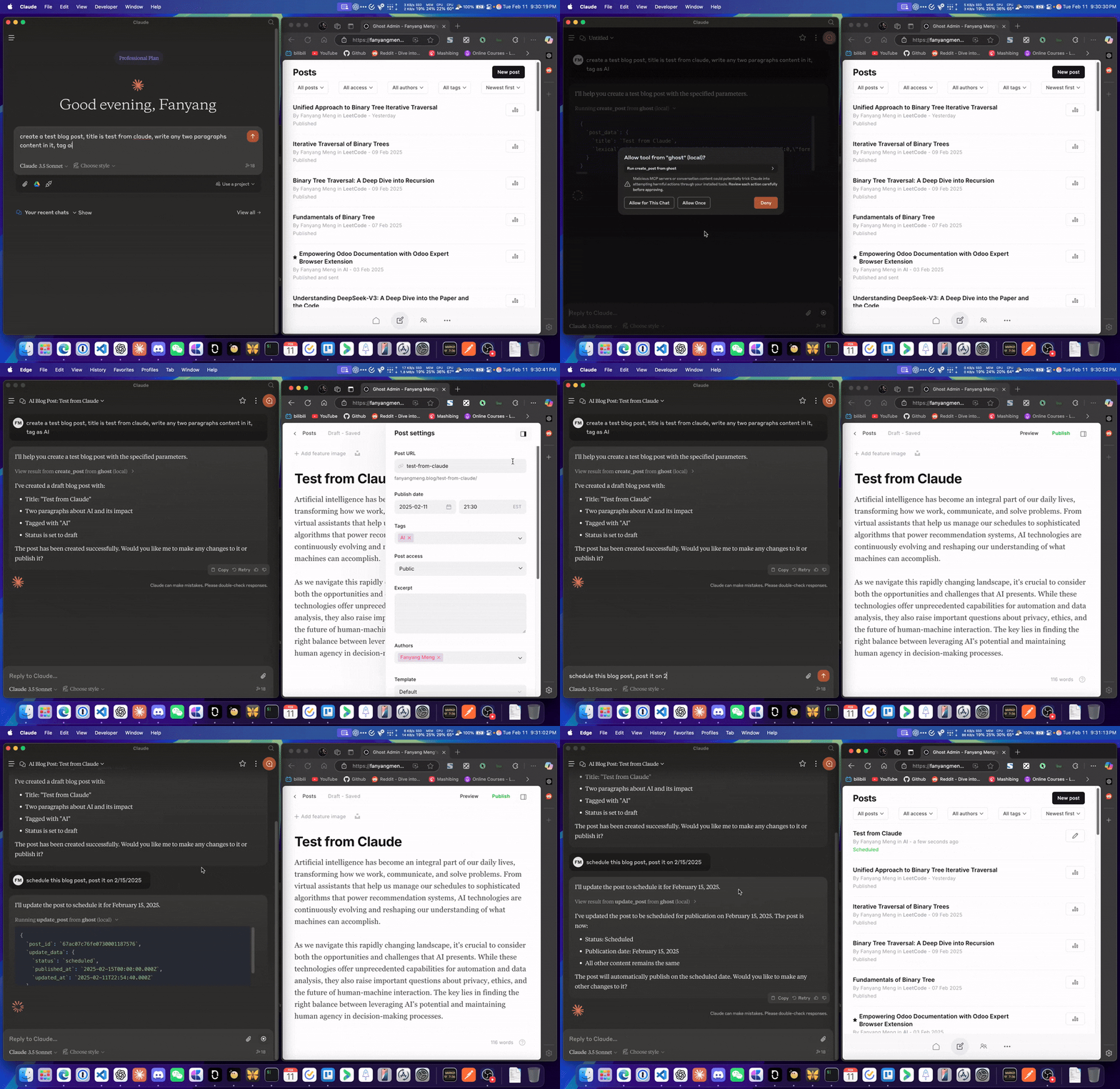
Features
- Secure Ghost Admin API requests with
@tryghost/admin-api - Comprehensive entity access including posts, users, members, tiers, offers, and newsletters
- Advanced search functionality with both fuzzy and exact matching options
- Detailed, human-readable output for Ghost entities
- Robust error handling using custom
GhostErrorexceptions - Integrated logging support via MCP context for enhanced troubleshooting
Usage
To use this with MCP clients, for instance, Claude Desktop, add the following to your claude_desktop_config.json:
{
  "mcpServers": {
      "ghost-mcp": {
        "command": "npx",
        "args": ["-y", "@fanyangmeng/ghost-mcp"],
        "env": {
            "GHOST_API_URL": "https://yourblog.com",
            "GHOST_ADMIN_API_KEY": "your_admin_api_key",
            "GHOST_API_VERSION": "v5.0"
        }
      }
    }
}
Available Resources
The following Ghost CMS resources are available through this MCP server:
- Posts: Articles and content published on your Ghost site.
- Members: Registered users and subscribers of your site.
- Newsletters: Email newsletters managed and sent via Ghost.
- Offers: Promotional offers and discounts for members.
- Invites: Invitations for new users or staff to join your Ghost site.
- Roles: User roles and permissions within the Ghost admin.
- Tags: Organizational tags for posts and content.
- Tiers: Subscription tiers and plans for members.
- Users: Admin users and staff accounts.
- Webhooks: Automated event notifications to external services.
Available Tools
This MCP server exposes a comprehensive set of tools for managing your Ghost CMS via the Model Context Protocol. Each resource provides a set of operations, typically including browsing, reading, creating, editing, and deleting entities. Below is a summary of the available tools:
Posts
- Browse Posts: List posts with optional filters, pagination, and ordering.
- Read Post: Retrieve a post by ID or slug.
- Add Post: Create a new post with title, content, and status.
- Edit Post: Update an existing post by ID.
- Delete Post: Remove a post by ID.
Members
- Browse Members: List members with filters and pagination.
- Read Member: Retrieve a member by ID or email.
- Add Member: Create a new member.
- Edit Member: Update member details.
- Delete Member: Remove a member.
Newsletters
- Browse Newsletters: List newsletters.
- Read Newsletter: Retrieve a newsletter by ID.
- Add Newsletter: Create a new newsletter.
- Edit Newsletter: Update newsletter details.
- Delete Newsletter: Remove a newsletter.
Offers
- Browse Offers: List offers.
- Read Offer: Retrieve an offer by ID.
- Add Offer: Create a new offer.
- Edit Offer: Update offer details.
- Delete Offer: Remove an offer.
Invites
- Browse Invites: List invites.
- Add Invite: Create a new invite.
- Delete Invite: Remove an invite.
Roles
- Browse Roles: List roles.
- Read Role: Retrieve a role by ID.
Tags
- Browse Tags: List tags.
- Read Tag: Retrieve a tag by ID or slug.
- Add Tag: Create a new tag.
- Edit Tag: Update tag details.
- Delete Tag: Remove a tag.
Tiers
- Browse Tiers: List tiers.
- Read Tier: Retrieve a tier by ID.
- Add Tier: Create a new tier.
- Edit Tier: Update tier details.
- Delete Tier: Remove a tier.
Users
- Browse Users: List users.
- Read User: Retrieve a user by ID or slug.
- Edit User: Update user details.
- Delete User: Remove a user.
Webhooks
- Browse Webhooks: List webhooks.
- Add Webhook: Create a new webhook.
- Delete Webhook: Remove a webhook.
Each tool is accessible via the MCP protocol and can be invoked from compatible clients. For detailed parameter schemas and usage, see the source code in
src/tools/.
Error Handling
Ghost MCP Server employs a custom GhostError exception to handle API communication errors and processing issues. This ensures clear and descriptive error messages to assist with troubleshooting.
Contributing
- Fork repository
- Create feature branch
- Commit changes
- Create pull request
License
MIT