Formula 1 MCP Server
FastF1 kütüphanesi ve OpenF1 API'sini kullanarak kapsamlı Formula 1 istatistiklerine ve bilgilerine erişin.
Dokümantasyon
🏁 Formula 1 MCP Server 🏎️
This project defines a MCP server for Formula 1 data, providing fans, analysts, and developers with easy access to a vast range of F1 statistics and information. Built with Python and powered by the Gradio framework, it offers a user-friendly web interface to explore historical and recent F1 data from the FastF1 library and the official OpenF1 API.
Video Demo (Claude Desktop)

Architecture
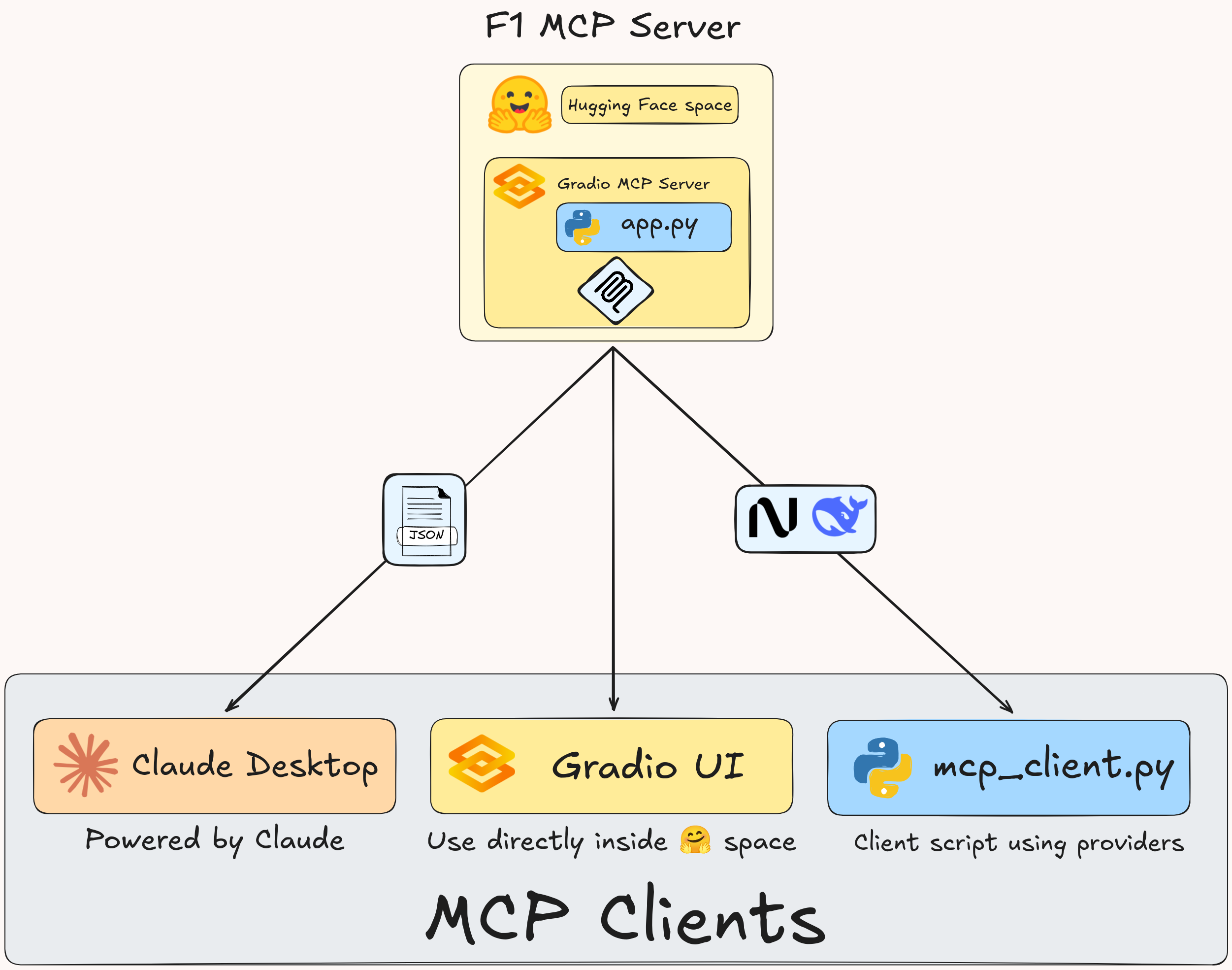
Architectural overview of the MCP server and client. The MCP server is hosted using a Gradio back-end and can be either run locally or on a remote server.
Gradio Key Features
The interface is organized into several Gradio tabs, each dedicated to a specific type of F1 data:
- Championship Standings: View final driver and constructor championship standings for any season from 1950 to the present.
- Event Information: Get detailed information for any Grand Prix, including schedules and circuit details.
- Season Calendar: Display the complete race calendar for a given year.
- Track Visualizations: Generate and view plots of the fastest race lap, visualizing speed, gear changes, and cornering G-forces.
- Session Results: Fetch detailed results for any race session (Practice, Qualifying, or Race).
- Driver & Constructor Info: Look up background information and statistics for drivers and teams.
- OpenF1 API Tools: An advanced toolkit for developers to directly query the OpenF1 API, build custom requests, and view raw JSON responses.
Tech Stack
- Backend: Python
- Web Framework: Gradio
- Data Sources:
fastf1Python library for historical data.openf1for live and recent data via their public API.
- Key Libraries:
pandas,matplotlib
MCP Server
The MCP server is defined inside app.py.
MCP Client
The MCP client and AI agent is defined inside mcp_client.py and allows interaction with the MCP server through server side events (SSE) transport.
MCP configuration file
For MCP clients that support SSE transport (for Claude Desktop, see below), the following configuration can be used:
{
  "mcpServers": {
    "gradio": {
      "url": "https://agents-mcp-hackathon-f1-mcp-server.hf.space/gradio_api/mcp/sse"
    }
  }
}
For Claude Desktop, the following configuration can instead be used, but make sure you have Node.js installed:
{
  "mcpServers": {
    "gradio": {
      "command": "npx",
      "args": [
        "mcp-remote",
        "https://agents-mcp-hackathon-f1-mcp-server.hf.space/gradio_api/mcp/sse",
        "--transport",
        "sse-only"
      ]
    }
  }
}