Canvashand
Figma MCP server and plugin: AI agents read and edit live Figma files, no Figma API token.
เอกสาร
Put your AI agent to work in Figma.
Canvashand is an MCP server and Figma plugin. It connects Claude Code, Cursor, Codex and any MCP client to the Figma files you have open. Your agent gets 102 tools to read, build and fix designs, one agent per file, all at once.
Describe the change in plain words. The agent builds real frames, components, variables and prototypes, and you keep editing them like your own.
Free plan: 2,000 tool calls a month. Pro: unlimited calls for $6.99 a month.
Poster series.figClaude Code connected
- 01Create a 480 × 640 frame, “Poster 01”
- 02Draw the first bar on the grid
- 03Repeat it twice, one column apart
- 04Add a quarter arc
- 05Fill the arc in signal red
- 06Set the title
- 07Make the poster a component
- 08Take a screenshot and check the result
Illustrative sequence. Switch to I build to see each tool call.
102 tools Read and write nodes, pages, styles, variables, components, prototypes and exports.
Several files at once One agent per file, each with its own rollback history.
No Figma API token Works through the plugin, so REST rate limits don't apply.
Stays on your machine Plugin and server talk over 127.0.0.1.
One command sets up
- Claude Code
- Codex
- Cursor
- VS Code
- Gemini CLI
- Windsurf
- Kiro
- Cline
- Zed
- Qwen Code
- OpenCode
- Antigravity
Built for both sides of the handoff.
Designers ask in plain words and keep editing the result. Developers get exact structure to build from. Same live file, same tools.
If you design
Ask in your AI client. Watch it happen in Figma.
- Lay out the checkout flow with our components.Builds the screens from your component instances and draws the flow between them.create_instance · set_auto_layout · create_wireflow
- Rename the layers on this page so developers can read them.Renames every layer in one pass.batch_rename_nodes
- Wire these screens into a clickable prototype.Adds real prototype reactions you can play in Figma.set_reactions
- Try a dark variant of this screen beside it.Clones the frame next to the original and recolors the copy; the first one stays untouched.clone_node · set_fills
- Roll back what a session created.rollback_changes deletes every node, page and variable it made.rollback_changes
If you build
Give your coding agent the real file, not a screenshot.
- Read the structure Pull a frame's nodes, layout, variables and styles straight from the open file.get_design_context · get_variable_defs
- Export tokens Turn Figma variables into tokens your code can use.export_tokens
- Write React you'd keep A repository-native Figma-to-React strategy reuses your components and tokens, then checks the match with a screenshot diff.canvashand skill
- Write back to the canvas When the code moves first, the agent updates frames, auto layout, variables and components to match.create_frame · set_auto_layout · set_variable_value
**$**canvashand setup --all
Run it once in your project. It configures every AI client it finds.
Review the flow before the agent writes code.
Give your agent a link to a Figma board. It maps every screen, sheet and state into flows and opens them in your browser. Comment on any screen or arrow, then approve the plan or send it back.
Board map · Checkout Round 1 · Board map · Checkout Build 4 screens, 2 sheets and 2 states? · Next 16 · Tailwind 4 · shadcn (radix) Send to agent (2) Approve FLOWS All screens Checkout Cart edits SCREENS Search screens Cart Shipping Promo code Empty cart Sign in Payment Address book Order placed Card declined Checkout Add code Remove last item Sign in Continue Change address Pay now Card declined Cart 12:40 3 items, summary Shipping 12:118 Address form Promo code 12:264 +Scrim, +Code field Empty cart 12:301 Empty state Sign in Account flow Payment 12:377 Card form, step 2 Address book 12:452 +Sheet, saved list Order placed 12:519 Confirmation Card declined 12:588 +Error banner NEW 1 Select V Pin P Box B Draw D − 80% + Fit COMMENTS 1. Pin · Payment › Card form 12:402 Use our PaymentForm here;don't build a new one. 2. Arrow · Payment → Card declined Yes. Show it inline, above the Pay now button.COMMENT ON THE WHOLE ROUND Shipping and Payment share one checkout stepper.
Illustrative board on the real review page. It opens in your browser, served by canvashand on your computer.
- The agent maps the board It reads every frame on the board, sorts screens, sheets and states, and draws each transition from your prototype links. Transitions without a link are inferred from your notes and layer names, and drawn dashed.get_design_context · get_reactions
- You mark it up Zoom, pan and focus one flow. Comment on a screen or an arrow, or pin, box and draw on a screen.show_preview
- Approve or send it back Approve, and the agent starts on the code. Send to agent, and it gets your comments tied to the Figma layers they point at, then shows you the next round.get_review
Store screenshots from your real screens.
Ask for an App Store or Google Play set. Canvashand frames your app's own screens, adds the captions, and lays out every frame of the set to match. Pick a look to see it on Starward, a demo stargazing app.
Sweep. One band in the brand color rises across the set.
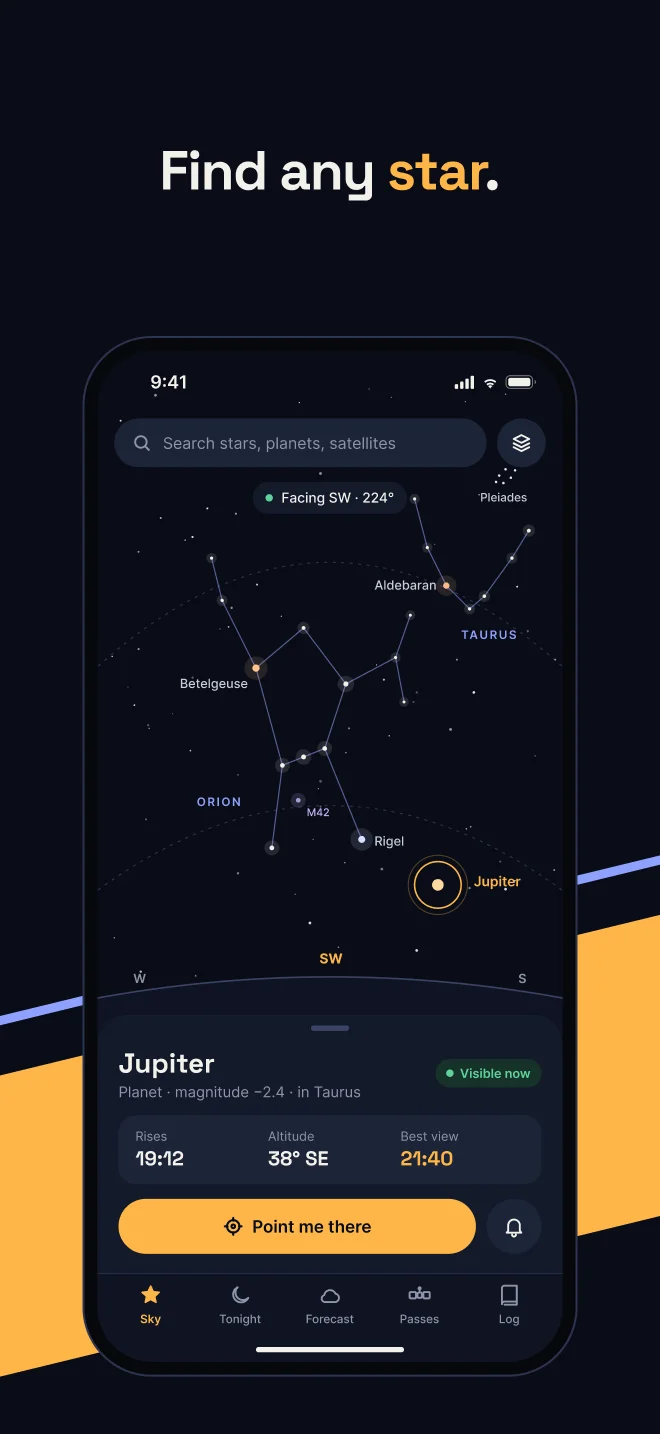
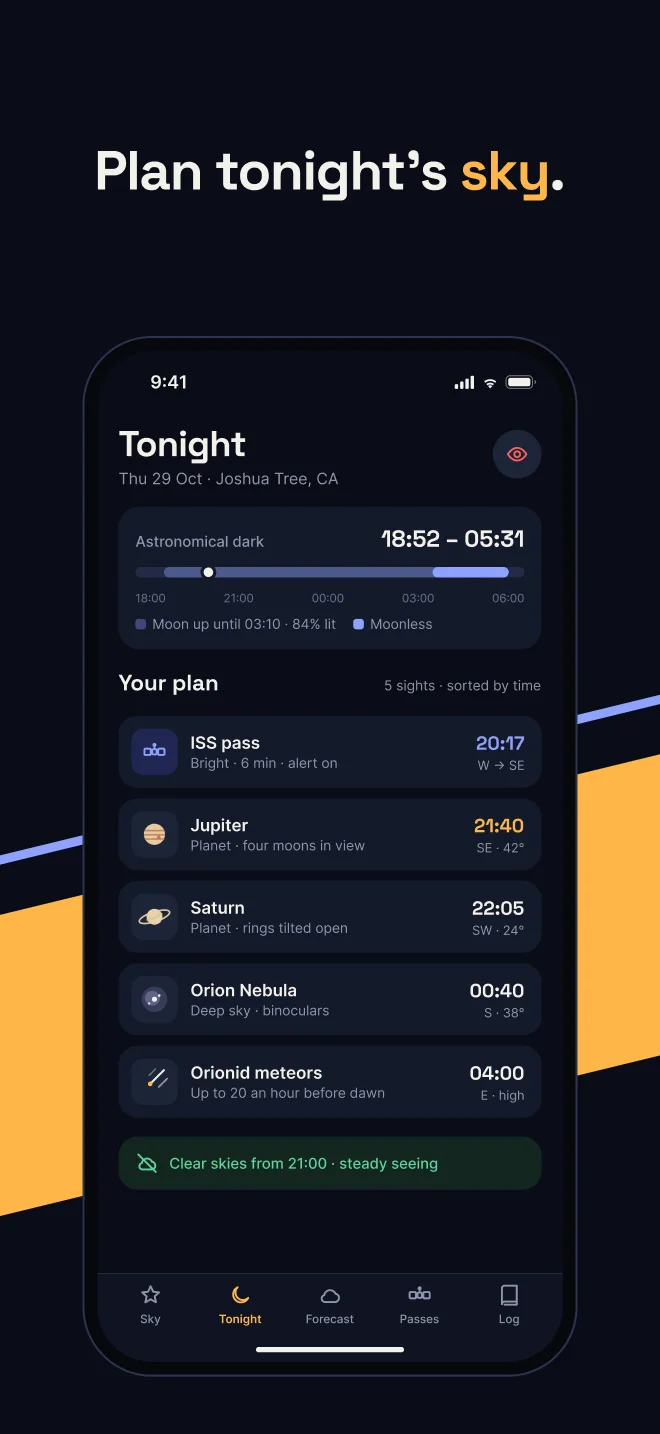
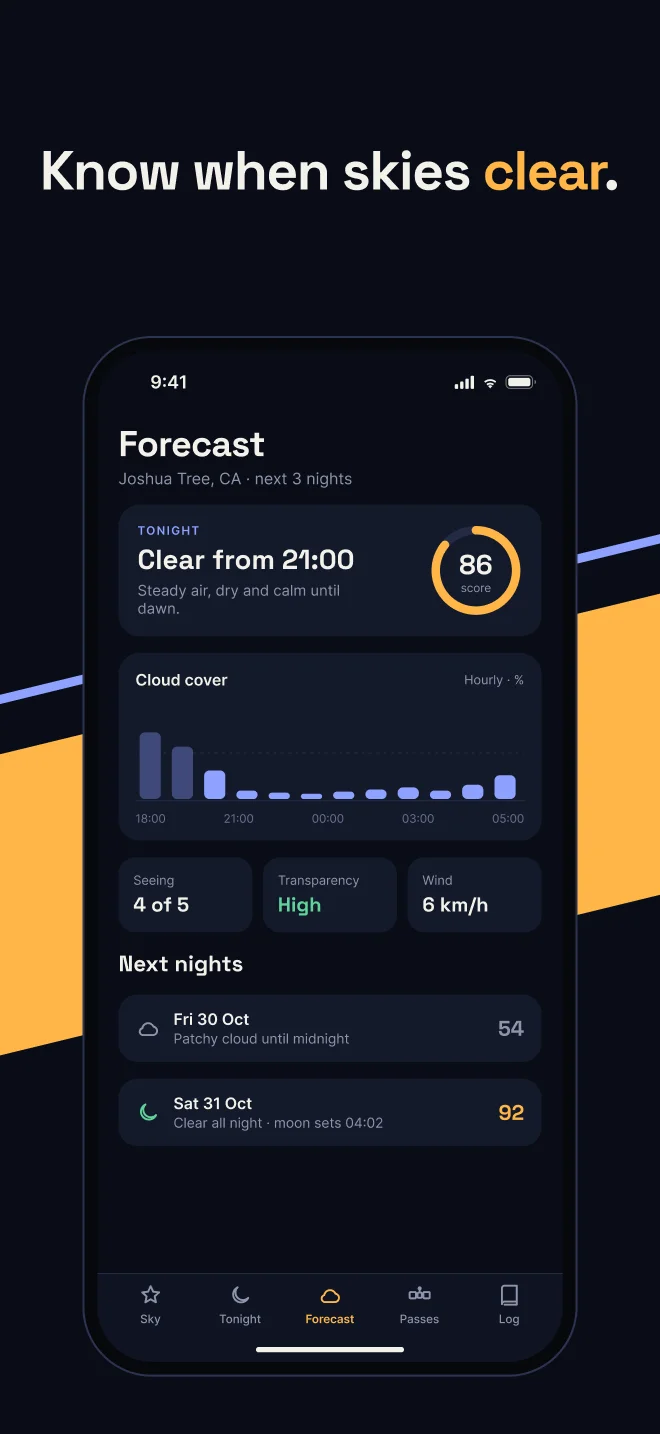
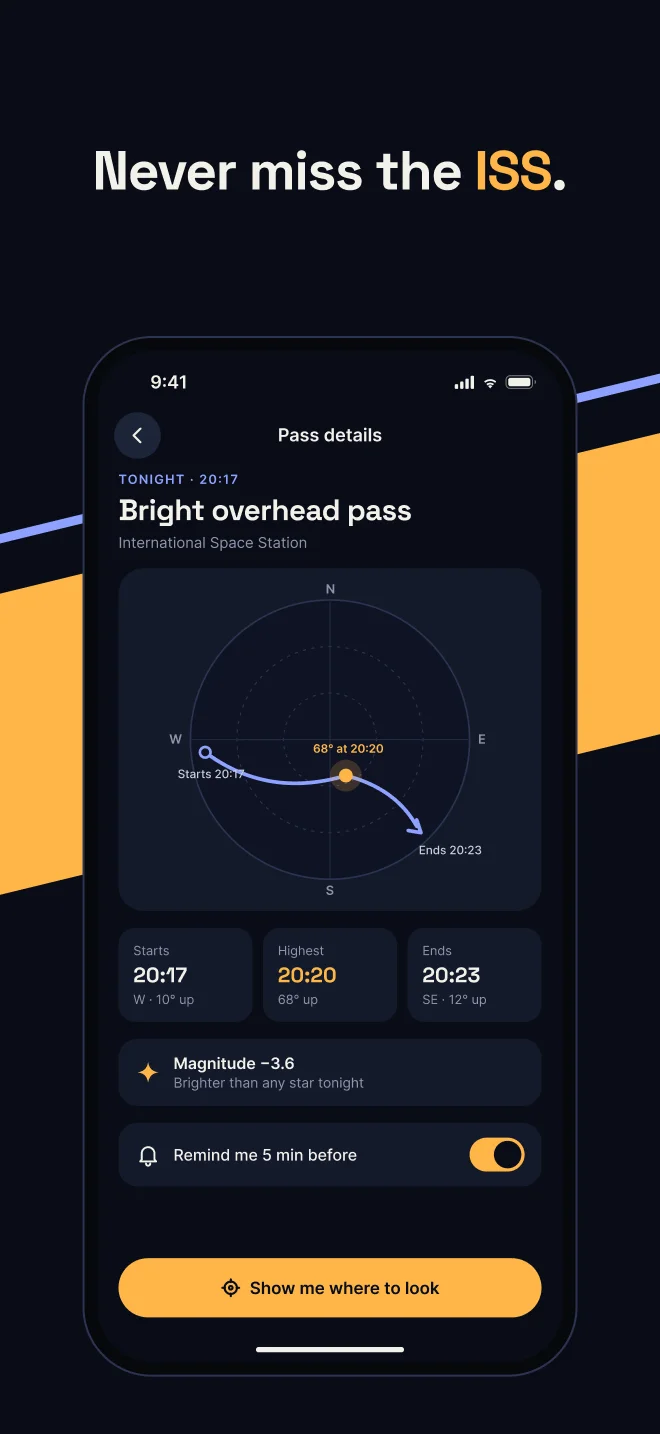
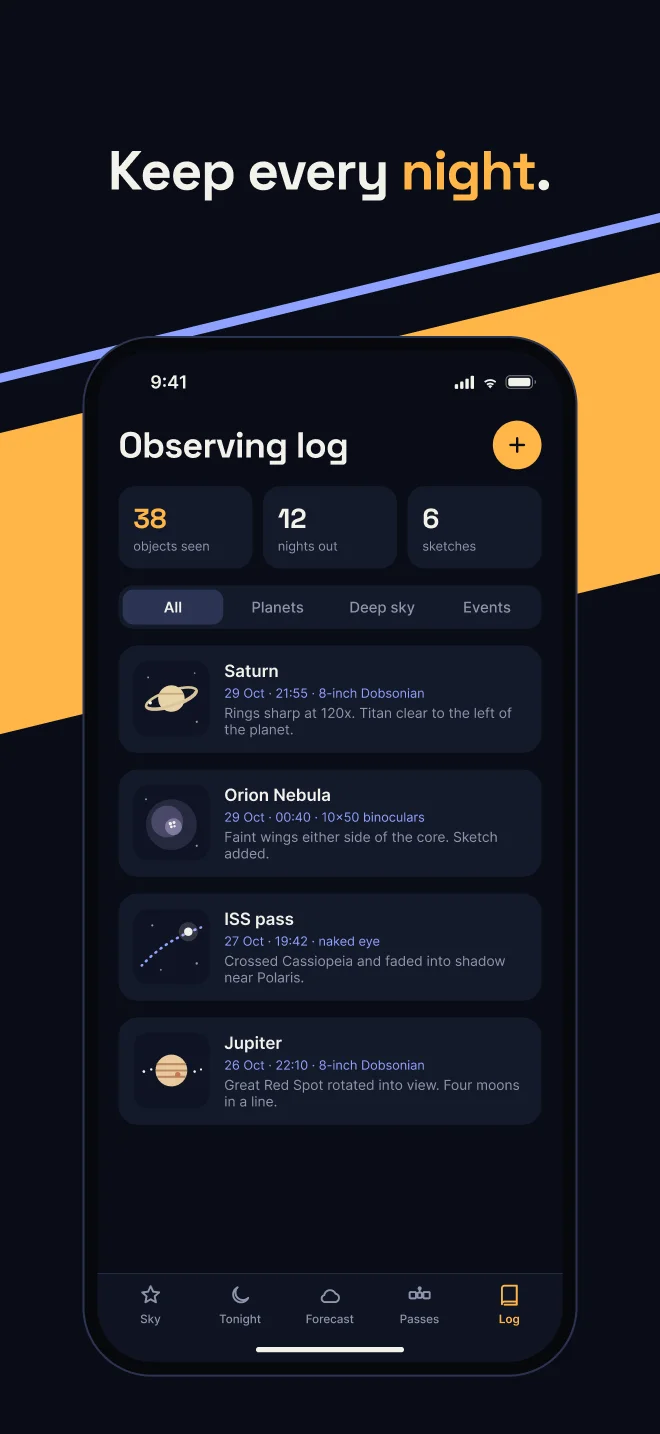
Starward is a demo app. The frames are built in your Figma file, so you can edit every one.
Several files. Several agents. One server.
Open the plugin in every file you're working on. One agent builds the design system while another lays out screens in the next file, none of them waiting on each other.
- Every open file connects They all join one local server, with no extra ports to set. list_files shows each file and its ID.
- One agent per file, in parallel Any tool call can name a fileId, so subagents in one session, or separate sessions, each work in their own file at the same time.
- Separate history per file Each file keeps its own change sessions, rollback journal, and credit lease, so one agent's undo never touches another's work.
canvashand · 127.0.0.1:219943 files connected
> list_files
Design system Claude Code · subagent 1 create_component
Checkout flow Claude Code · subagent 2 create_wireflow
Marketing site Codex set_auto_layout
Illustrative file names. Each agent passes its own file's fileId, so they all write at once without taking turns.
The real plugin, in Figma desktop.
Two files open in tabs, each running Canvashand, both connected to one local server.
Set up once. About five minutes.
There is one Terminal step, and it's copy and paste. Everything after it happens in Figma and your AI client.
New to Terminal? On a Mac, press ⌘ Space, type Terminal, press Return. Paste a line, press Return again.
-
Install Canvashand
**$**curl -fsSL https://www.canvashand.com/install.sh | shDownloads canvashand, checks its checksum and installs it. It also puts the Figma plugin in ~/.canvashand/canvashand-plugin. It may ask for your computer password. canvashand installed -
Connect your AI client
**$**canvashand setup --allRun it in your project folder. It finds Claude Code, Cursor, Codex and the other clients you use, and adds Canvashand to each. AI client connected -
Import the plugin once
In Figma desktop: Plugins → Development → Import plugin from manifest…, then pick ~/.canvashand/canvashand-plugin/manifest.json. The folder is hidden: in the file picker press ⌘⇧G on macOS (Alt+D on Windows, Ctrl+L on Linux) and paste the path. Plugin in Figma -
Sign in and ask
Run Canvashand in your file, sign in with Google, and keep the plugin window open. Then ask your agent: “Use Canvashand to describe my selected frame.” Bridge open
Figma MCP or Canvashand?
Both connect the same AI clients to Figma, and both can write to the canvas. Client support isn't the reason to choose. These five things are.
| Pricing | Included with Figma access. Read allowances vary by plan and seat; Starter, View, and Collab access has up to 20 tool calls per month. Write-to-canvas is currently a free beta, with usage-based pricing planned. | Free includes 2,000 calls per month. Pro is $6.99/month or $69.99/year with unlimited Canvashand calls. |
|---|---|---|
| Call limits | Read tools are metered per seat and plan: up to 20 calls per month on View and Collab seats and on Starter; on Dev and Full seats, 200 per day (10/min) on Professional, 200 per day (15/min) on Organization, and 600 per day (20/min) on Enterprise. Write tools are exempt. | Free includes 2,000 calls per month across every read and write tool. Pro has no cap: unlimited calls, no per-day or per-minute throttle. |
| Figma → React | get_design_context returns structured design context (code-ready by default); your AI client turns it into final code. Code Connect is available for component reuse. | A repository-native Figma-to-React strategy reuses your components and tokens, then checks the match with a screenshot diff. |
| Prompt → design | Write-to-canvas creates and updates native Figma content. Code-to-canvas can also capture a running interface into editable Figma layers. | Creates and edits directly in the file you have open, using prompt strategies plus node-level controls for layouts, components, styles, variables, and prototypes. |
| Tool surface | A focused first-party toolset for design context, metadata, screenshots, Code Connect, libraries, write-to-canvas, and code-to-canvas. | 102 granular read and write tools spanning nodes, pages, exports, styles, variables, components, prototypes, bulk edits, rollback sessions, and several open files at once. |
Read the full Canvashand vs Figma MCP comparison
Your designs never reach our servers.
The plugin talks to canvashand on your own computer, which passes results to your AI client. Your AI client sends what it reads to its own model provider, as it does with any MCP server. No personal Figma API token, and the bridge only runs while the plugin is open.
Figma plugin Runs in each file you open it in.
canvashand 127.0.0.1On your computer. Passes results between Figma and your client.
Your AI client Claude Code, Cursor, Codex and others.
Canvashand cloud Only your account, billing and call counts.
Two plans. No call math.
Start free, or try every Pro tool with unlimited calls for 7 days.
Free
$0
- 2,000 tool calls a month
- Every read and write tool Create free account
Pro
$6.99 a month, or $69.99 a year
- Unlimited tool calls
- No per-day or per-minute throttle
- 7 days free to start Start 7-day free trial
Questions before you connect.
What is a Figma MCP server?
MCP, the Model Context Protocol, is an open standard that lets AI clients such as Claude Code, Cursor and Codex call tools in other apps. A Figma MCP server gives those clients tools for Figma, so an agent can read frames, styles and variables and, with a server that writes, change the canvas. Figma ships an official one; Canvashand is an independent one that runs on your machine and works through a plugin.
What is Canvashand?
Canvashand is an MCP server plus a Figma plugin. Your AI client calls its 102 tools, and the plugin runs them in the Figma files you have open, so agents can read designs, build frames and components, and edit styles, variables, and prototypes.
How is Canvashand different from the official Figma MCP server?
Both connect AI clients to Figma and both can write to the canvas. Canvashand adds a larger set of granular read and write tools, works in several open files at once, and its Pro plan has unlimited calls for $6.99 a month instead of per-seat read limits.
Can several AI agents work in different Figma files at the same time?
Yes. Open the Canvashand plugin in each file. Every file connects to the same local server, list_files lists them, and each agent or subagent passes a fileId to work in its own file. Each file keeps its own change sessions and rollback history.
Which AI clients work with Canvashand?
Any MCP client. The canvashand setup command configures Claude Code, Codex, Cursor, VS Code, Gemini CLI, Windsurf, Kiro, Cline, Zed, Qwen Code, OpenCode, and Antigravity for you. Other clients connect with a standard MCP server entry.
Do I need a Figma API token or a paid Dev seat?
No. Canvashand works through the plugin in a file you can edit. It needs no personal access token and does not use the Figma REST API, so its rate limits do not apply.
Figma MCP rate limits explained
Where does my design data go?
The plugin talks to the Canvashand server on your own machine (127.0.0.1), which passes results to your AI client. The Canvashand cloud handles only your account, billing, and call counts.
How much does Canvashand cost?
Free includes 2,000 tool calls a month. Pro is $6.99 a month or $69.99 a year with unlimited calls, and your first Pro plan starts with a 7-day free trial.
Put a team of agents on your Figma files.
Try every Pro tool with unlimited calls for 7 days. Then $6.99 a month, or $69.99 a year.