OpenOSINT
เฟรมเวิร์ก OSINT ที่เป็น MCP-native สำหรับเอเจนต์ AI เปิดเผยเครื่องมือข่าวกรอง 9 รายการ (การแจงนับอีเมล, การค้นหาชื่อผู้ใช้, การตรวจสอบการรั่วไหล, WHOIS, ข้อมูล IP, การแจงนับโดเมนย่อย, dorks, การค้นหา paste, ข้อมูลโทรศัพท์) ผ่าน Model Context Protocol และยังทำงานเป็น CLI Python แบบสแตนด์อโลนได้อีกด้วย
เอกสาร
mcp-name: io.github.OpenOSINT/openosint
OpenOSINT
OSINT agent for security researchers and analysts: 20 investigation tools behind a natural-language interface.
Use it as a REPL, CLI, MCP server, or browser Web UI.
The AI issues hard-stop tool calls; your code executes the real binary — hallucinated findings are structurally impossible.









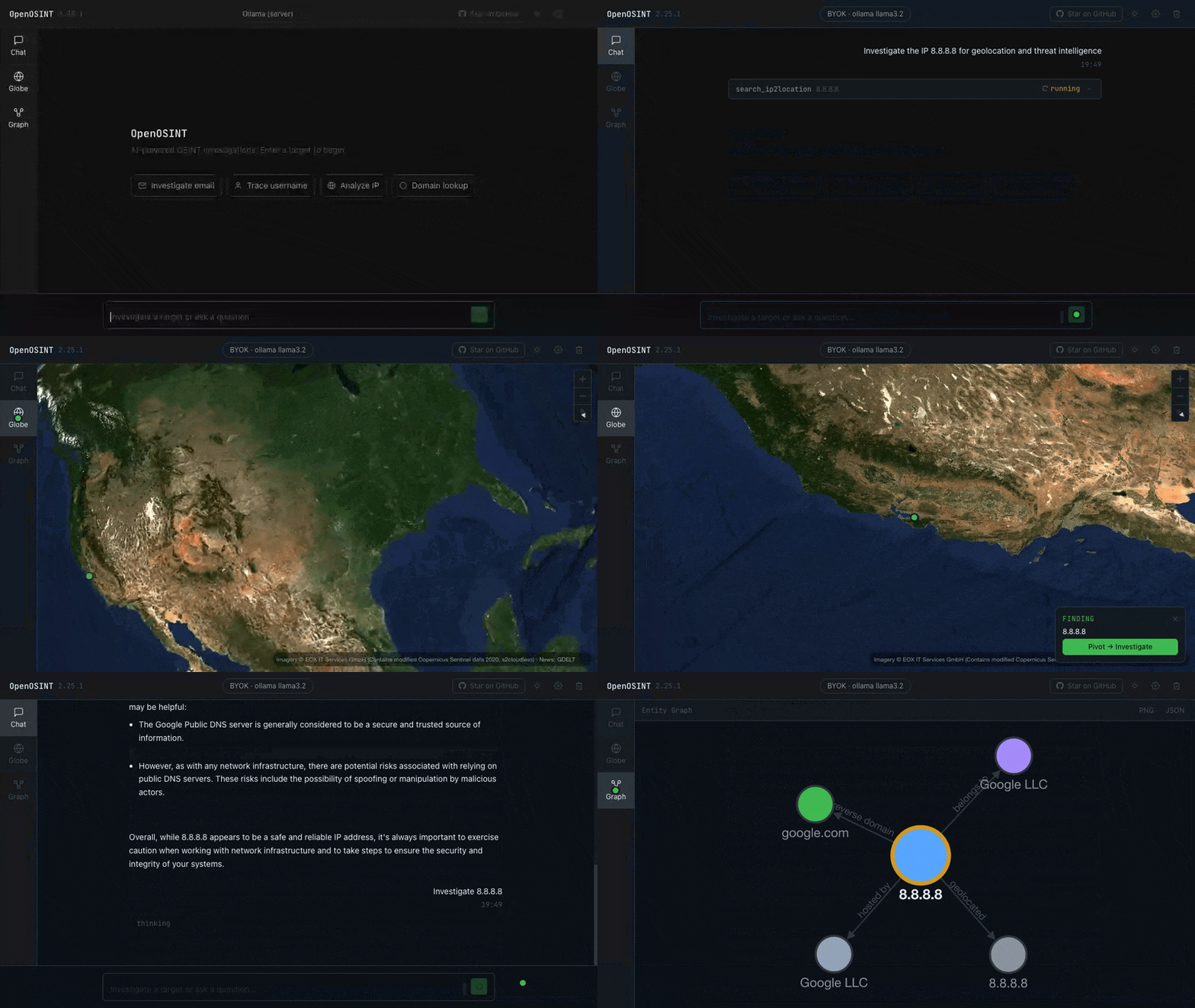 Investigation results land live on the globe — click a point to pivot. Watch the sharper MP4.
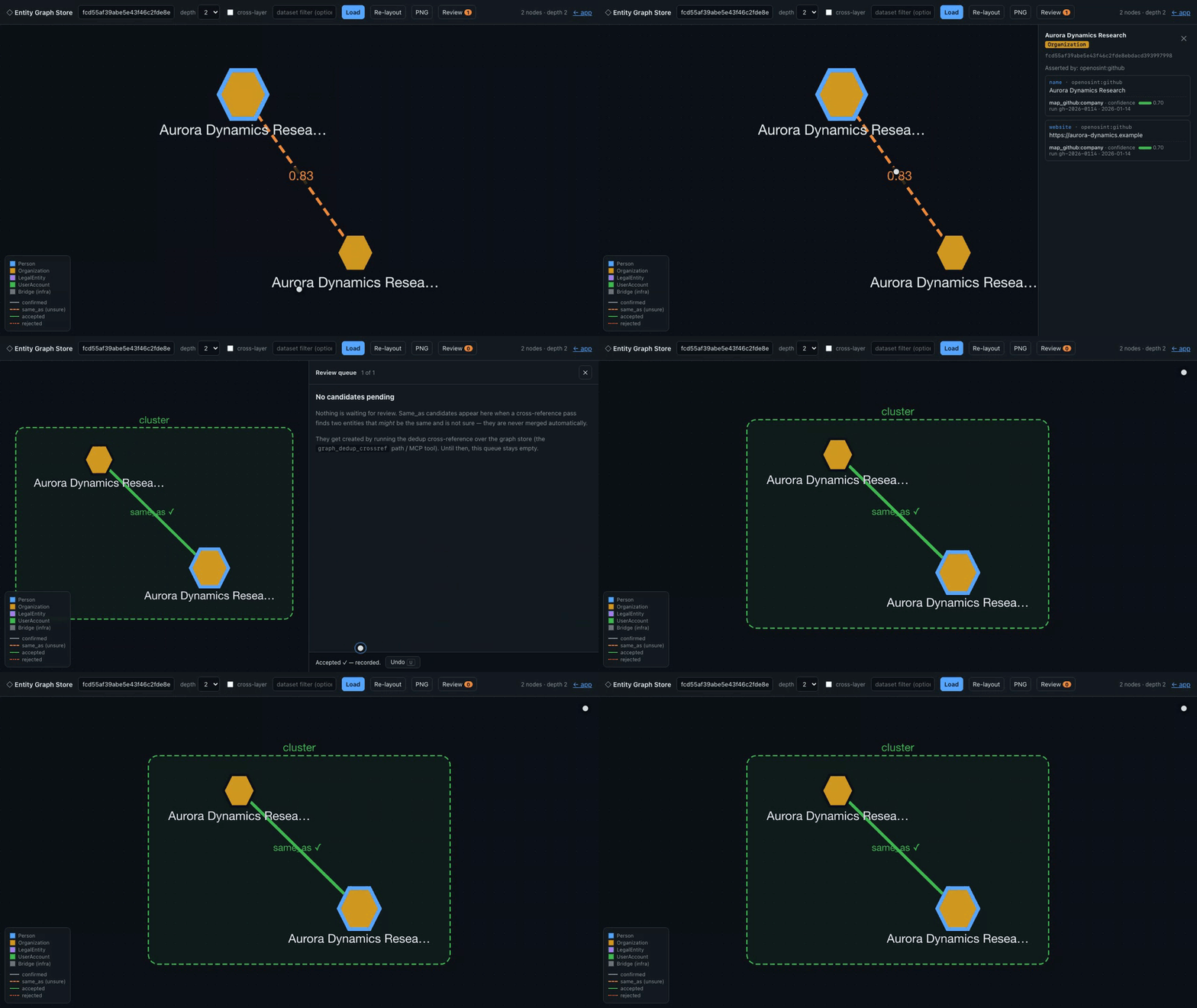
Deterministic, synthetic-data demo — every entity shown is fictional; regenerate with demo/web_demo.py.
The entities are seeded at the statement layer, not produced by today's mappers — see demo/README.md.
Featured Integrations

IP2Location.io — powers search_ip2location · Integration guide
Enhanced IP geolocation, ISP, VPN/Proxy/Tor, and datacenter detection

RapidProxy · Integration guide
Reliable Residential Proxies for Data Collection & Automation — 90M+ IPs across 200+ countries. 10% off: RAPID10.

TestMu AI (formerly LambdaTest) is an AI-native testing cloud platform built for modern engineering teams. It covers everything from autonomous test creation and fast execution to testing AI agents, chatbots and voice assistants.
Open: Breach / Compromised-Credential Data · Email / Identity Lookup — see SPONSORSHIP.md.

pip install openosint
Paid: Complete Kit — $55 (prompts + playbook, bundled) · Setup Sprint — $350 (done-for-you install) · Commercial License — from €300/yr (vendor contract, SLA, indemnification)
Quick Start
# Interactive AI REPL (default)
openosint

# Web interface
openosint web

# Direct tool (no AI)
openosint email target@example.com
New to OSINT methodology? Grab the free 5-prompt starter set or the free Playbook edition before your first run.
📬 Agents & OSINT — the newsletter
One AI-OSINT workflow you can run + a ruthless roundup of what's new, every week. Subscribe →
Run in the cloud (no install)
No Python, no holehe / sherlock / sublist3r / phoneinfoga binaries in PATH, no API keys — run OpenOSINT Email Recon from your browser, or as an MCP tool in Claude, Cursor, and Windsurf via the Apify MCP Server. Try for free.
Try OpenOSINT Email Recon on Apify →
Usage
Start the REPL and investigate any target — the agent decides which tools to run and chains them on findings:
openosint > investigate target@example.com

  -> generate_dorks('target@example.com')
  -> search_email('target@example.com')
  Found: Spotify, WordPress, Gravatar, Office365

  -> search_breach('target@example.com')
  Found in 2 breaches: LinkedIn (2016), Adobe (2013)

  -> search_username('johndoe99')   <- pivoted from email findings
  Found: GitHub, Reddit, Twitter

  Report saved -> reports/2026-05-11_14-32-11_report.md
Features
| Capability | Details |
|---|---|
| AI tool chaining | The agent selects and chains tools based on findings; describe the target in plain language |
| 20 modular tools | Email, username, breach, WHOIS, IP, subdomain, dorks, paste, phone, Shodan, VirusTotal, Censys, IP2Location, AbuseIPDB, GitHub, DNS, live dork search, URL scraping, SERP footprint |
| Three AI backends | Anthropic Claude (default), local Ollama, or any OpenAI-compatible endpoint (LiteLLM, vLLM, LM Studio, ...) |
| Native MCP server | All 20 tools exposed to Claude Code, Claude Desktop, and any MCP-compatible client — no extra config |
| Parallel execution | --parallel runs complementary tools concurrently via asyncio.gather() |
| Reports | PDF + Markdown auto-saved after every investigation (reportlab optional) |
| Session history | All REPL sessions saved to ~/.openosint/history/; browse with openosint history |
| Web UI | Browser-based AI chat with streaming output, tool cards, light/dark theme |
Legal Disclaimer: OpenOSINT is intended for legal and authorized use only. Users are solely responsible for ensuring their use complies with all applicable laws and regulations. The authors accept no liability for misuse. See DISCLAIMER.md.
Custom Integrations
Need OpenOSINT wired into your SOC, fraud, threat-intel, or AI-agent stack? I build bespoke OSINT integrations for teams — you bring the data sources and compliance requirements, I deliver a working integration.
Tools
| Tool | Powered by | What it investigates |
|---|---|---|
search_email | holehe | Social accounts linked to an email address |
search_username | sherlock | Username presence across 300+ platforms |
search_breach | HaveIBeenPwned v3 API | Data breach exposure |
search_whois | python-whois | Domain registrant and DNS info |
search_ip | ipinfo.io | Geolocation, ASN, hostname |
search_domain | sublist3r | Subdomain enumeration |
generate_dorks | built-in | 12 targeted Google dork URLs (no network calls) |
search_paste | psbdmp.ws | Pastebin dump mentions |
search_phone | phoneinfoga | Carrier, country, line type |
search_shodan | Shodan API | Open ports, banners, CVEs |
search_virustotal | VirusTotal API v3 | Verdict from 70+ antivirus engines |
search_ip2location | IP2Location.io API | Enhanced IP intel: VPN/Proxy/Tor/datacenter flags (sponsored) |
search_censys | Censys Search API | Internet-facing infrastructure, certificates |
search_abuseipdb | AbuseIPDB v2 API | IP abuse reputation: confidence score, reports, country, ISP |
search_github | GitHub REST API | Profile, repos, commit-discovered emails, username/keyword search |
search_dns | dnspython (built-in) | A/AAAA/MX/NS/TXT/CNAME/SOA records; SPF, DMARC, DKIM analysis |
search_gdelt_geo | GDELT GEO 2.0 API | Worldwide geolocated news coverage, GeoJSON output |
search_dorks_live | Bright Data SERP API | Live Google search results for dork queries (title, URL, snippet) |
scrape_url | Bright Data Web Unlocker | Fetch any URL bypassing Cloudflare/CAPTCHA — returns clean Markdown |
search_footprint | Bright Data SERP API | Entity-type-aware public search-engine footprint: detects email/username/domain/phone/name and returns structured results + Entity Correlation Graph nodes/edges |
Full per-tool documentation, CLI flags, and output formats: openosint.tech.
search_email
Enumerates online services linked to an email address using holehe.
openosint email target@example.com
[+] Spotify        https://open.spotify.com/user/target
[+] WordPress      https://wordpress.com/target
[+] Gravatar       https://gravatar.com/target
[+] Office365      email used
search_username
Searches for a username across 300+ platforms using sherlock.
openosint username johndoe99
[+] GitHub         https://github.com/johndoe99
[+] Twitter        https://twitter.com/johndoe99
[+] Reddit         https://reddit.com/user/johndoe99
search_breach
Checks data breach exposure via HaveIBeenPwned v3 API. Requires HIBP_API_KEY.
[+] LinkedIn (2016-05-05) — leaked: Email addresses, Passwords
[+] Adobe (2013-10-04) — leaked: Email addresses, Password hints
search_whois
Retrieves WHOIS data using python-whois.
[+] Registrar: ICANN
[+] Created: 1995-08-14
[+] Expires: 2024-08-13
[+] Name Servers: A.IANA-SERVERS.NET
search_ip
Retrieves geolocation and ASN data via ipinfo.io. Free tier: 50k/month.
[+] Hostname: dns.google
[+] Org: AS15169 Google LLC
[+] City: Mountain View, CA, US
search_domain
Enumerates subdomains using sublist3r.
[+] mail.example.com
[+] dev.example.com
[+] api.example.com
generate_dorks
Generates 12 targeted Google dork URLs for any target. No network calls.
[+] "johndoe" site:linkedin.com
    https://www.google.com/search?q=%22johndoe%22+site%3Alinkedin.com
[+] "johndoe" leaked OR breach OR dump
    https://www.google.com/search?q=%22johndoe%22+leaked+OR+breach+OR+dump
search_paste
Searches Pastebin dumps via psbdmp.ws.
[+] https://pastebin.com/aB1cD2eF (2023-04-12)
[+] https://pastebin.com/xY3zA4bC (2022-11-08)
search_phone
Gathers phone intelligence using phoneinfoga. Use E.164 format.
[+] Country: United States
[+] Carrier: AT&T
[+] Line type: Mobile
search_shodan
IPv4 input → host lookup (open ports, org, CVEs). Any other query → banner/keyword search. Requires SHODAN_API_KEY.
openosint shodan 8.8.8.8
openosint shodan "apache port:80 country:DE"
[+] Org: Google LLC | Open ports: 53, 443
search_virustotal
Checks an IP, domain, URL, or file hash against VirusTotal's 70+ engines. Auto-detects input type. Requires VIRUSTOTAL_API_KEY.
openosint virustotal 8.8.8.8
openosint virustotal example.com
openosint virustotal 44d88612fea8a8f36de82e1278abb02f
[VirusTotal] Malicious: 0 / Harmless: 72
search_ip2location
Queries IP2Location.io for enhanced IP intelligence: geolocation, ISP, ASN, and — on the Security Plan — VPN/Proxy/Tor/datacenter detection. Sponsored integration. Requires IP2LOCATION_API_KEY.
openosint ip2location 8.8.8.8
[IP2Location] City: Mountain View, CA, US  |  ISP: Google LLC
[IP2Location] VPN: No  |  Proxy: No  |  TOR: No  |  Datacenter: Yes
search_censys
IPv4 → host view (open ports, services, ASN). Domain → certificate search (SANs, issuer). Requires CENSYS_API_ID and CENSYS_SECRET.
openosint censys 8.8.8.8
openosint censys example.com
[Censys] Open Ports: 53, 443, 853 | ASN: AS15169 Google LLC
search_abuseipdb
Checks an IP against AbuseIPDB v2. Returns abuse confidence score, total reports, country, ISP, and last reported timestamp. Requires ABUSEIPDB_API_KEY.
openosint abuseipdb 198.51.100.1
[AbuseIPDB] Abuse Confidence Score: 87%  |  Total Reports: 143
⚠️  HIGH ABUSE CONFIDENCE — flagged by AbuseIPDB
Warning appears when abuseConfidenceScore exceeds 50%.
search_github
Queries GitHub REST API. Username → profile, repos, commit-discovered emails. Keyword → user/repo search. Optional GITHUB_TOKEN raises rate limit from 60 to 5000 req/h.
openosint github johndoe99
[GitHub] Repos: 42  |  Followers: 128
[GitHub] Commit email: johndoe@example.com
search_dns
Queries A/AAAA/MX/NS/TXT/CNAME/SOA records and analyzes SPF, DMARC, and DKIM configuration using dnspython (no external API).
openosint dns example.com
[DNS] A: 93.184.216.34
[DNS] MX: mail.example.com (priority 10)
[DNS] SPF: v=spf1 include:_spf.google.com ~all
search_dorks_live
Executes live Google dork queries through the Bright Data SERP API¹, returning structured results (title, URL, snippet). Defaults to 5 dorks per run; each is a separate billable API call. Requires BRIGHTDATA_API_KEY and BRIGHTDATA_SERP_ZONE.
openosint search-dorks-live "john doe" --max-dorks 3
[+] Dork: "john doe" site:linkedin.com
    Title:   John Doe | LinkedIn
    URL:     https://www.linkedin.com/in/john-doe-12345
scrape_url
Fetches any public URL through Bright Data Web Unlocker¹, bypassing Cloudflare/CAPTCHA. Returns clean Markdown. Requires BRIGHTDATA_API_KEY and BRIGHTDATA_UNLOCKER_ZONE.
openosint scrape https://example.com
[Web Unlocker] Remote status: 200
# Example Domain
This domain is for use in illustrative examples in documents.
search_footprint
Collects a target's public search-engine footprint via Bright Data SERP API¹. Detects entity type (email, username, domain, phone, or full name) and runs entity-type-aware Google queries, returning structured results plus Entity Correlation Graph nodes/edges for discovered domains and profiles. Requires BRIGHTDATA_API_KEY and BRIGHTDATA_SERP_ZONE.
openosint footprint johndoe99
Graph module (optional)
An additive FollowTheMoney entity graph —
statement-level provenance, an append-only store, non-destructive same_as
deduplication, and a human review queue — sits alongside the tools above
without changing anything about them. Opt in with pip install "openosint[graph]" (Python 3.10+) or "openosint[graph-dedup]" (adds
same_as scoring, needs Python 3.11+), then use it via three MCP tools:
graph_export, graph_neighbors, graph_review_candidates. See
docs/graph.md for the full guide and a worked example.
The same workflow is shown end to end — including the .ftm export that
passes ftm validate — in the terminal demo in
docs/graph.md; the web UI walkthrough is the demo at the top
of this README.
Interfaces
Web UI
pip install "openosint[web]"
openosint web
# Opens http://localhost:8080 automatically
Browser-based AI chat with streaming tool output, inline result cards, light/dark theme toggle. Supports local inference via Ollama or any OpenAI-compatible endpoint — no Anthropic API key required.

Try the live demo → — bring your own Anthropic / OpenRouter / Ollama key, no signup.
# Fully local (no API key) — requires Ollama runtime: https://ollama.com
ollama pull llama3.2
openosint web
# Settings -> Ollama (local) -> model: llama3.2

# OpenAI-compatible endpoint (LiteLLM, vLLM, LM Studio, ...)
export OPENAI_BASE_URL="http://localhost:4000/v1"
openosint web
# Settings -> OpenAI API
Breaking change (v2.28+): key usage now follows bind address, not an env var. Bound to
127.0.0.1/localhost(the default) — no change: keys in your.envwork as before. Bound to any other interface (--host 0.0.0.0, which already requires--allow-remote) — the web UI never uses a key from your environment to serve a request; every caller must supply their own, and breach lookups (search_breach) are disabled outright. This applies regardless of any env var, includingOPENOSINT_DEMO_MODE, which can only add restriction, never remove it. If you were exposing the web UI on a LAN with your own keys and no per-caller auth in front of it, that access pattern no longer works.Running behind a reverse proxy? A loopback bind (
127.0.0.1) only means the OS accepted the connection from this machine — it says nothing about who can reach it if something in front (nginx, Caddy, a Docker/K8s sidecar, a tunnel) forwards requests to it from elsewhere. By default, a request that carries proxy-forwarding headers (X-Forwarded-For,X-Forwarded-Proto,X-Forwarded-Host,Forwarded,CF-Connecting-IP) is treated exactly like a non-loopback bind: your local keys are never used, breach lookups are blocked, and the caller is told why. If you deliberately serve this through a reverse proxy and want it to behave like a normal local instance for requests relayed by that proxy, setOPENOSINT_TRUSTED_PROXY=true. This is a separate variable from the existingTRUSTED_PROXY(which only affects which IP a rate-limit bucket is attributed to — a low-stakes, already-loosely-scoped setting some self-hosters already have on). Reusing that flag here would have silently upgraded an existing rate-limit-only configuration into one that also permits credentialed access, without asking.OPENOSINT_TRUSTED_PROXYgets its own explicit opt-in for that reason. Setting it does not blindly trust the forwarded headers' content — internally inconsistent values (e.g. two disagreeingX-Forwarded-Protovalues on one request) are still treated as public regardless. SettingOPENOSINT_TRUSTED_PROXY=truemeans you are choosing to serve credentialed lookups to whoever your reverse proxy relays to this instance — you are the controller for their queries, the same way OpenOSINT Cloud is for its customers. Put real authentication in front of it if "whoever the proxy relays" is broader than you intend.
Interactive REPL
Run openosint with no arguments to start the AI-powered REPL:

REPL commands:
| Command | Description |
|---|---|
<target> | Investigate any target — email, username, domain, IP, name |
clear | Reset conversation memory |
save | Save last report to reports/ |
tools | List available tools and their status |
config | Show current configuration |
history | Browse saved sessions |
help | Show all commands |
exit / Ctrl-D | Exit |
All sessions are auto-saved to ~/.openosint/history/. Browse with openosint history.
For the REPL/CLI with an OpenAI-compatible backend:
pip install "openosint[openai]"
openosint --provider openai \
  --openai-base-url http://localhost:4000/v1 \
  --openai-model gpt-4o-mini
Live Documentation
Full per-tool reference, CLI flags, and configuration options at openosint.tech.

MCP Server
Expose all 20 OpenOSINT tools to any MCP-compatible AI client. Once connected, Claude can natively invoke all 20 tools during conversations.
Claude Code:
claude mcp add openosint python /absolute/path/to/OpenOSINT/openosint/mcp_server.py
claude mcp list
Claude Desktop — add to ~/Library/Application Support/Claude/claude_desktop_config.json:
{
  "mcpServers": {
    "openosint": {
      "command": "python",
      "args": ["/absolute/path/to/OpenOSINT/openosint/mcp_server.py"],
      "env": { "OPENOSINT_ENV_FILE": "/absolute/path/to/your/.env" }
    }
  }
}
MCP hosts launch this server with a cwd that has nothing to do with your
.env (often your home directory, or wherever the host itself runs from).
The server falls back to a repo-root .env for a source checkout, then an
upward search from that arbitrary cwd — but for a pip installed
openosint, neither is reliable. Setting OPENOSINT_ENV_FILE in the
client's own env block above, as shown, is the one option guaranteed to
work regardless of how the host launches the process.
Prefer zero setup? The OpenOSINT Email Recon Actor is also available as a hosted MCP tool via the Apify MCP Server — no server to run, no config file to edit. Try for free.
Agentic use via Claude Code:
$ claude
> Investigate target@example.com. Trace any username found
  across other platforms and compile a full report.
Installation
# From PyPI (recommended)
pip install openosint

# Updating
pip install --upgrade openosint

# From source
git clone https://github.com/OpenOSINT/OpenOSINT.git
cd OpenOSINT
pip install -e .
External binaries (must be in PATH):
| Binary | Purpose | Install |
|---|---|---|
holehe | Email account enumeration | pip install holehe |
sherlock | Username enumeration (300+ platforms) | pip install sherlock-project |
sublist3r | Subdomain enumeration | pip install sublist3r |
phoneinfoga | Phone number intelligence | Download binary |
If a binary is absent, the corresponding tool returns a descriptive error. All other tools remain operational.
Don't want to install these locally? The OpenOSINT Email Recon Actor runs email recon in Apify's cloud — zero dependencies, zero local setup.
Optional Python packages:
| Package | Purpose | Install |
|---|---|---|
ollama | Local LLM backend (no API key) | pip install ollama (also requires Ollama runtime) |
openai | OpenAI-compatible backend | pip install "openosint[openai]" |
shodan | Shodan API client | pip install shodan |
reportlab | PDF report export | pip install reportlab |
censys | Censys API client | pip install censys |
Configuration
Copy .env.example to .env and fill in your keys. .env is read from the
directory you run openosint from (searched upward, like git finds
.git) — it does not need to be at any particular "project root", and a
regular pip install works the same way as running from a source checkout.
Set OPENOSINT_ENV_FILE=/path/to/.env to point at an explicit file instead
(useful for the MCP server, which is launched by its host with an arbitrary
working directory). A real environment variable always takes priority over
a value in .env.
| Variable | Tool | Required | Purpose |
|---|---|---|---|
ANTHROPIC_API_KEY | AI agent | Yes (or Ollama / OpenAI) | Anthropic API key |
ANTHROPIC_MODEL | AI agent | Optional | Model name to request (default: claude-sonnet-5). Replaces the deprecated OPENOSINT_MODEL. |
OPENAI_BASE_URL | AI agent | Optional | Base URL of an OpenAI-compatible endpoint (e.g. http://localhost:4000/v1) |
OPENAI_API_KEY | AI agent | Optional | API key for the endpoint (local servers may ignore it) |
OPENAI_MODEL | AI agent | Optional | Model name to request (default: gpt-4o-mini) |
OPENOSINT_ENV_FILE | All | Optional | Explicit path to a .env file, overriding the directory search above |
HIBP_API_KEY | search_breach | Optional | HaveIBeenPwned v3 — get one |
IPINFO_TOKEN | search_ip | Optional | ipinfo.io higher rate limits |
SHODAN_API_KEY | search_shodan | Optional | Shodan API — get one |
VIRUSTOTAL_API_KEY | search_virustotal | Optional | VirusTotal API v3 — get one |
IP2LOCATION_API_KEY | search_ip2location | Optional | IP2Location.io — get one (sponsored) |
CENSYS_API_ID + CENSYS_SECRET | search_censys | Optional | Censys — get one |
ABUSEIPDB_API_KEY | search_abuseipdb | Optional | AbuseIPDB v2 — get one |
GITHUB_TOKEN | search_github | Optional | GitHub API — raises rate limit 60 → 5000 req/h — get one |
BRIGHTDATA_API_KEY | search_dorks_live, scrape_url, search_footprint | Optional | Bright Data — get one¹ (free tier: 5,000 req/month) |
BRIGHTDATA_SERP_ZONE | search_dorks_live, search_footprint | Optional | Your Bright Data SERP zone name (e.g. serp_api1) |
BRIGHTDATA_UNLOCKER_ZONE | scrape_url | Optional | Your Bright Data Web Unlocker zone name (e.g. web_unlocker1) |
CLI Reference
| Flag / Subcommand | Description |
|---|---|
openosint | Interactive AI REPL (default) |
openosint web [--port N] [--no-browser] | Launch browser UI |
openosint email ADDRESS [-t N] | Direct email scan |
openosint username HANDLE [-t N] | Direct username scan |
openosint shodan QUERY [-t N] | Shodan lookup |
openosint virustotal TARGET [-t N] | VirusTotal lookup |
openosint censys TARGET [-t N] | Censys lookup |
openosint ip2location IP [-t N] | IP2Location lookup |
openosint abuseipdb IP [-t N] | AbuseIPDB reputation check |
openosint github QUERY [-t N] | GitHub profile/repo/email discovery |
openosint dns DOMAIN [-t N] | DNS records + email security analysis |
openosint multi TARGETS | Parallel multi-target investigation (max 10) |
openosint history [--all] [open N] [clear] | View/manage REPL session history |
-v, --verbose | Enable debug logging to stderr |
-t, --timeout N | Override subprocess timeout (seconds) |
--api-key KEY | Anthropic API key (overrides env var) |
--parallel | Run complementary tools concurrently |
--json | Output results as structured JSON |
--provider {anthropic,ollama,openai} | AI provider (default: anthropic) |
--ollama-model MODEL | Ollama model name (default: llama3.2) |
--ollama-host URL | Ollama server URL (default: http://localhost:11434) |
--openai-base-url URL | OpenAI-compatible endpoint base URL (env: OPENAI_BASE_URL) |
--openai-model MODEL | Model to request from the endpoint (default: gpt-4o-mini; env: OPENAI_MODEL) |
--openai-api-key KEY | API key for the endpoint (env: OPENAI_API_KEY) |
--no-pdf | Disable automatic PDF generation |
Docker
# Build and run
docker compose up --build

# One-off command
docker compose run --rm openosint email target@example.com --json
Set ANTHROPIC_API_KEY (and optionally HIBP_API_KEY, IPINFO_TOKEN) in a .env file or export them before running docker compose. Reports are persisted to ./reports/ via a volume mount.
DigitalOcean App Platform: see .do/app.yaml for App Platform configuration.
Integrations
| Service | URL | Tool | Tier | Auth |
|---|---|---|---|---|
| IP2Location.io | https://www.ip2location.io | search_ip2location | Featured (sponsored) | API key — free tier |
| RapidProxy | https://www.rapidproxy.io/?ref=openosint | — | Featured (sponsored) | — |
| AbuseIPDB | https://www.abuseipdb.com | search_abuseipdb | Community | API key — free tier |
| Censys | https://censys.io | search_censys | Community | API key — free tier |
| GitHub | https://github.com | search_github | Community | Token optional |
| HaveIBeenPwned | https://haveibeenpwned.com | search_breach | Community | API key — paid |
| holehe | https://github.com/megadose/holehe | search_email | Community | None — local binary |
| ipinfo.io | https://ipinfo.io | search_ip | Community | Token optional |
| phoneinfoga | https://github.com/sundowndev/phoneinfoga | search_phone | Community | None — local binary |
| psbdmp.ws | https://psbdmp.ws | search_paste | Community | None |
| sherlock | https://github.com/sherlock-project/sherlock | search_username | Community | None — local binary |
| Shodan | https://shodan.io | search_shodan | Community | API key — free tier |
| sublist3r | https://github.com/aboul3la/Sublist3r | search_domain | Community | None — local binary |
| VirusTotal | https://www.virustotal.com | search_virustotal | Community | API key — free tier |
| WHOIS (IANA) | https://www.iana.org/whois | search_whois | Community | None |
| DNS (system resolver) | — | search_dns | Community | None |
| Google Search | https://www.google.com | generate_dorks | Community | None |
Get the Method
OpenOSINT is the tool. The AI OSINT Complete Kit ($55) is the method: the Prompt Pack and the Operator's Playbook, bundled.
AI OSINT Prompt Pack
OpenOSINT gives you the tooling. The AI OSINT Prompt Pack gives you the method: 30+ tested prompts across 8 target types, with one repeatable collect → pivot → verify → document flow for running OpenOSINT investigations.
- Email, username, domain, IP, phone, company due-diligence, image & reporting prompts
- One repeatable investigation flow + an ethics & legal primer
- Instant download · pairs directly with OpenOSINT
AI OSINT Operator's Playbook
Step-by-step workflows for running investigations with ChatGPT, Claude, and OpenOSINT.
Buying directly funds OpenOSINT's development.
AI OSINT Prompts — Free Starter Set
New to AI-assisted OSINT? The free starter set gives you 5 structured prompts — one per stage of a real investigation — that make ChatGPT and Claude collect real public data instead of hallucinating it.
- Scope → Collect → Pivot → Verify → Document
- Works with any AI assistant (Claude, ChatGPT, Gemini)
- Instant PDF, no card required
AI OSINT Operator's Playbook — Free Edition
The free edition walks the 5-phase method once, end to end, on a single worked case: scope → collect → pivot → verify → document. Includes one sample prompt and the confidence rubric used to grade findings.
- Free edition: the method + one worked investigation
- Full edition ($39): 12 complete workflows, per-tool playbooks, reporting templates, and the legal/ethics primer
→ Get the free edition · Full Playbook ($39) →
Sponsor this project
OpenOSINT is used by OSINT practitioners, security researchers, and developers actively evaluating intelligence APIs. Every time a user configures an integration, the docs route them to that provider's sign-up page — high-intent exposure at the moment of adoption.
Featured Integration ($2,000/year or $220/month): recommended/default provider for one tool category, exclusive. Logo + badge across README, docs, CLI banner, and Web UI. One vendor per category.
Current sponsors and open categories are listed in the sponsor block at the top of this README. Full media kit, pricing, and the referral funnel: SPONSORSHIP.md.
Open Collective · commercial@openosint.tech · SPONSORSHIP.md
Affiliate program
Earn 30–45% commission promoting the AI OSINT Prompt Pack, Operator's Playbook, and Complete Kit. Good fit for OSINT/infosec newsletter authors, security YouTube channels, and tool-directory maintainers.
→ Affiliate program details & terms
SERVICES
The framework is free and MIT-licensed. This is an optional paid setup service offered by the maintainer.
OSINT-MCP Setup Sprint — done-for-you installation and configuration of an autonomous OSINT-MCP pipeline on your environment. Fully async, no calls required.
Includes:
- Pre-configured OpenOSINT setup tailored to your stack (Claude Code, Claude Desktop, or any MCP client)
- API keys wired in (Shodan, VirusTotal, IP2Location, HaveIBeenPwned, and others as needed)
- One investigation workflow built around your use case
- Written step-by-step setup guide + screen-recorded walkthrough
Delivery: 3–5 days, fully async.
For: SOC analysts · threat-intel teams · fraud/AML · pentesters · OSINT investigators
Need it set up for you?
Get OpenOSINT wired into your stack in 3–5 days — done-for-you, fully async, no calls.
Book the Setup Sprint → $350 (founding price, first 5 teams)
→ Or email commercial@openosint.tech · LinkedIn
For authorized use only. See DISCLAIMER.md.
Commercial License & Support
OpenOSINT is free and MIT-licensed for everyone — personal projects, commercial products, SaaS, and closed-source are all covered with no purchase required. Organizations that additionally need a vendor contract, written warranty, indemnification, SLA, or priority support for procurement and compliance can purchase a commercial plan. Three tiers available from €300/year — see COMMERCIAL.md for full details and pricing. Contact: commercial@openosint.tech.
Contributing
Issues and pull requests are welcome. See CONTRIBUTING.md for the development workflow, integration registration checklist, and coding conventions. Please read DISCLAIMER.md before contributing.
Regenerating the demo GIF/MP4
export OPENOSINT_DEMO_KEY=sk-ant-...   # your Anthropic key — never committed
openosint web &                        # start the web server on :8080
make demo                              # record -> encode -> write docs/assets/demo-web-graph.*
git add docs/assets/demo-web-graph.*
See scripts/record-demo/README.md for full prerequisites and pipeline details.
Maintainer
Tommaso Bertocchi
- X (personal): https://x.com/SonoTommy_
- X (OpenOSINT): https://x.com/openosint_oss
- LinkedIn: https://www.linkedin.com/company/openosintoss
- Email: commercial@openosint.tech
Contributors
| Contributor | Contribution |
|---|---|
| @consocio | venv/uv-tool binary resolution fix — co-installed tools are now found without a separate activation step (#6) |
License
OpenOSINT is open source under the MIT License — free for any use, including personal, commercial, academic, and closed-source.
¹ Bright Data links in this README are affiliate/referral links — OpenOSINT earns a commission if you sign up through them, at no extra cost to you.
For authorized security research only. See DISCLAIMER.md.
OpenOSINT v2.27.0 — August 2026