Alertmanager
เซิร์ฟเวอร์ Model Context Protocol (MCP) ที่ช่วยให้ผู้ช่วย AI สามารถทำงานร่วมกับ Prometheus Alertmanager ได้
เอกสาร
Prometheus Alertmanager MCP


Table of Contents
1. Introduction
Prometheus Alertmanager MCP is a Model Context Protocol (MCP) server for Prometheus Alertmanager. It enables AI assistants and tools to query and manage Alertmanager resources programmatically and securely.
2. Features
- Query Alertmanager status, alerts, silences, receivers, and alert groups
- Smart pagination support to prevent LLM context window overflow when handling large numbers of alerts
- Create, update, and delete silences
- Create new alerts
- Authentication support (Basic auth via environment variables)
- Multi-tenant support (via
ALERTMANAGER_TENANTfor Mimir/Cortex) - Docker containerization support
3. Quickstart
3.1. Prerequisites
- Python 3.12+
- uv (for fast dependency management).
- Docker (optional, for containerized deployment).
- Ensure your Prometheus Alertmanager server is accessible from the environment where you'll run this MCP server.
3.2. Installing via Smithery
To install Prometheus Alertmanager MCP Server for Claude Desktop automatically via Smithery:
npx -y @smithery/cli install @ntk148v/alertmanager-mcp-server --client claude
3.3. Local Run
- Clone the repository:
# Clone the repository
$ git clone https://github.com/ntk148v/alertmanager-mcp-server.git
- Configure the environment variables for your Prometheus server, either through a .env file or system environment variables:
# Set environment variables (see .env.sample)
ALERTMANAGER_URL=http://your-alertmanager:9093
ALERTMANAGER_USERNAME=your_username  # optional
ALERTMANAGER_PASSWORD=your_password  # optional
ALERTMANAGER_TENANT=your_tenant_id   # optional, for multi-tenant setups
Multi-tenant Support
For multi-tenant Alertmanager deployments (e.g., Grafana Mimir, Cortex), set the tenant ID via the ALERTMANAGER_TENANT environment variable. The tenant is fixed at startup and is never taken from a request header — caller-supplied X-Scope-OrgId values are ignored to prevent a client from selecting an arbitrary tenant.
Transport configuration
You can control how the MCP server communicates with clients using the transport options and host/port settings. These can be set either with command-line flags (which take precedence) or with environment variables.
- MCP_TRANSPORT: Transport mode. One of
stdio,http, orsse. Default:stdio. - MCP_HOST: Host/interface to bind when running
httporssetransports (used by the embedded uvicorn server). Default:127.0.0.1. - MCP_PORT: Port to listen on when running
httporssetransports. Default:8000. - MCP_API_KEY: Optional bearer/API key. When set, every
http/sserequest must sendAuthorization: Bearer <key>or it is rejected with401. When unset, the server logs a startup warning that the web transports are unauthenticated. Strongly recommended for any deployment reachable over a network.
Security: For network-accessible deployments, always set
MCP_API_KEY. By default the server binds to loopback only (127.0.0.1); expose it on0.0.0.0only behind a trusted proxy or firewall when you require external access.
Examples:
Use environment variables to set defaults (CLI flags still override):
MCP_TRANSPORT=sse MCP_API_KEY=change-me MCP_HOST=0.0.0.0 MCP_PORT=8080 python3 -m src.alertmanager_mcp_server.server
Or pass flags directly to override env vars:
python3 -m src.alertmanager_mcp_server.server --transport http --host 127.0.0.1 --port 9000
Notes:
-
The
stdiotransport communicates over standard input/output and ignores host/port. -
The
http(streamable HTTP) andssetransports are served via an ASGI app (uvicorn) so host/port are respected when using those transports. -
Add the server configuration to your client configuration file. For example, for Claude Desktop:
{
  "mcpServers": {
    "alertmanager": {
      "command": "uv",
      "args": [
        "--directory",
        "<full path to alertmanager-mcp-server directory>",
        "run",
        "src/alertmanager_mcp_server/server.py"
      ],
      "env": {
        "ALERTMANAGER_URL": "http://your-alertmanager:9093s",
        "ALERTMANAGER_USERNAME": "your_username",
        "ALERTMANAGER_PASSWORD": "your_password"
      }
    }
  }
}
- Or install it using make command:
$ make install
- Restart Claude Desktop to load new configuration.
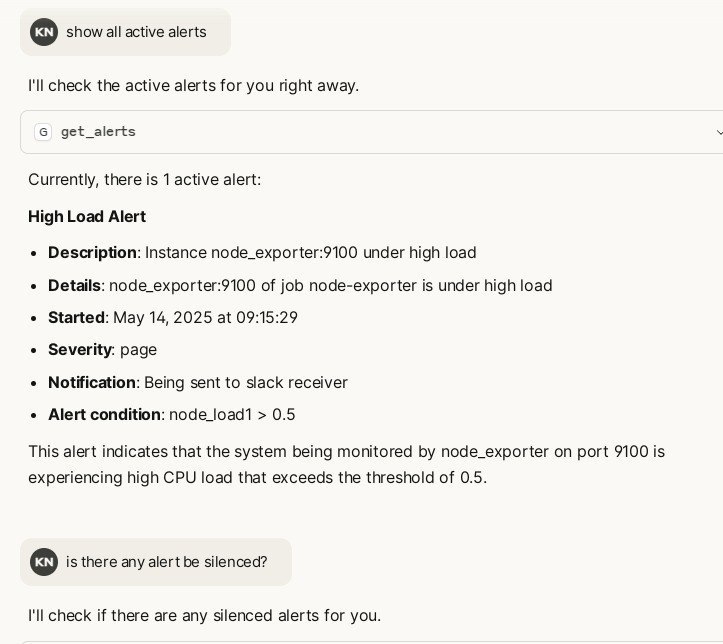
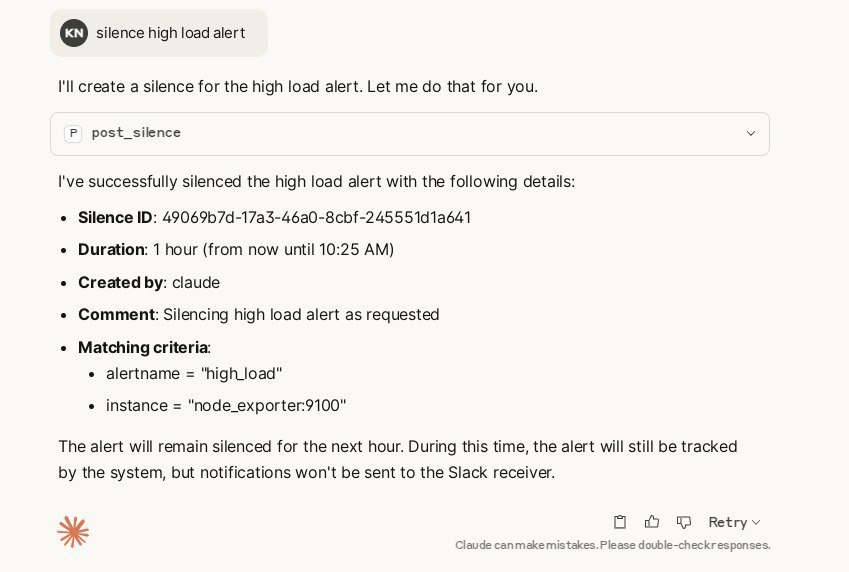
- You can now ask Claude to interact with Alertmanager using natual language:
- "Show me current alerts"
- "Filter alerts related to CPU issues"
- "Get details for this alert"
- "Create a silence for this alert for the next 2 hours"
3.4. Docker Run
- Run it with pre-built image (or you can build it yourself):
$ docker run -e ALERTMANAGER_URL=http://your-alertmanager:9093 \
    -e ALERTMANAGER_USERNAME=your_username \
    -e ALERTMANAGER_PASSWORD=your_password \
    -e ALERTMANAGER_TENANT=your_tenant_id \
    -p 8000:8000 ghcr.io/ntk148v/alertmanager-mcp-server
- Running with Docker in Claude Desktop:
{
  "mcpServers": {
    "alertmanager": {
      "command": "docker",
      "args": [
        "run",
        "--rm",
        "-i",
        "-e",
        "ALERTMANAGER_URL",
        "-e",
        "ALERTMANAGER_USERNAME",
        "-e",
        "ALERTMANAGER_PASSWORD",
        "ghcr.io/ntk148v/alertmanager-mcp-server:latest"
      ],
      "env": {
        "ALERTMANAGER_URL": "http://your-alertmanager:9093s",
        "ALERTMANAGER_USERNAME": "your_username",
        "ALERTMANAGER_PASSWORD": "your_password"
      }
    }
  }
}
This configuration passes the environment variables from Claude Desktop to the Docker container by using the -e flag with just the variable name, and providing the actual values in the env object.
4. Tools
The MCP server exposes tools for querying and managing Alertmanager, following its API v2:
- Get status:
get_status() - List alerts:
get_alerts(filter, silenced, inhibited, active, count, offset)- Pagination support: Returns paginated results to avoid overwhelming LLM context
count: Number of alerts per page (default: 10, max: 25)offset: Number of alerts to skip (default: 0)- Returns:
{ "data": [...], "pagination": { "total": N, "offset": M, "count": K, "has_more": bool } }
- List silences:
get_silences(filter, count, offset)- Pagination support: Returns paginated results to avoid overwhelming LLM context
count: Number of silences per page (default: 10, max: 50)offset: Number of silences to skip (default: 0)- Returns:
{ "data": [...], "pagination": { "total": N, "offset": M, "count": K, "has_more": bool } }
- Create silence:
post_silence(silence_dict) - Delete silence:
delete_silence(silence_id) - List receivers:
get_receivers() - List alert groups:
get_alert_groups(silenced, inhibited, active, count, offset)- Pagination support: Returns paginated results to avoid overwhelming LLM context
count: Number of alert groups per page (default: 3, max: 5)offset: Number of alert groups to skip (default: 0)- Returns:
{ "data": [...], "pagination": { "total": N, "offset": M, "count": K, "has_more": bool } } - Note: Alert groups have lower limits because they contain all alerts within each group
Pagination Benefits
When working with environments that have many alerts, silences, or alert groups, the pagination feature helps:
- Prevent context overflow: By default, only 10 items are returned per request
- Efficient browsing: LLMs can iterate through results using
offsetandcountparameters - Smart limits: Maximum of 50 items per page prevents excessive context usage
- Clear navigation:
has_moreflag indicates when additional pages are available
Example: If you have 100 alerts, the LLM can fetch them in manageable chunks (e.g., 10 at a time) and only load what's needed for analysis.
See src/alertmanager_mcp_server/server.py for full API details.
5. Development
Contributions are welcome! Please open an issue or submit a pull request if you have any suggestions or improvements.
This project uses uv to manage dependencies. Install uv following the instructions for your platform.
# Clone the repository
$ git clone https://github.com/ntk148v/alertmanager-mcp-server.git
$ cd alertmanager-mcp-server
$ make setup
# Run test
$ make test
# Run in development mode
$ mcp dev src/alertmanager_mcp_server/server.py

# Install in Claude Desktop
$ make install