Lokalise MCP Tool
เพิ่มคีย์การแปลไปยังโปรเจกต์ Lokalise ต้องใช้คีย์ API ของ Lokalise
เอกสาร
Lokalise MCP Tool
A Minimal Command-line Program (MCP) server for adding translation keys to your Lokalise projects, designed for integration with Cursor or standalone use.
📦 Installation
# For MCP usage (global installation)
npm install -g lokalise-mcp-server

# For library usage (project dependency)
npm install lokalise-mcp-server
NPM Package: https://www.npmjs.com/package/lokalise-mcp-server
🖼️ MCP Flow Diagram
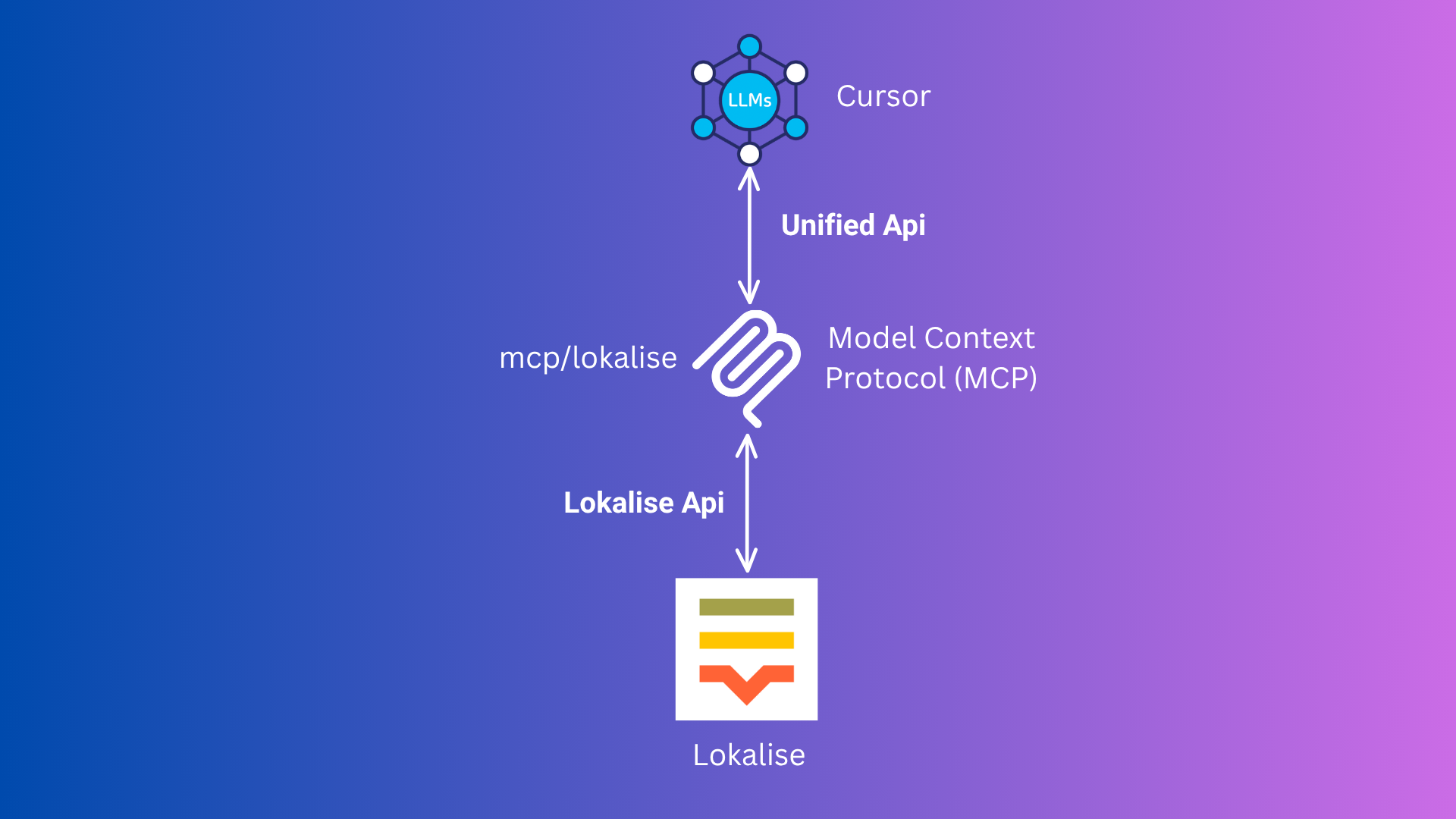
This diagram illustrates the Model Context Protocol (MCP) flow between Cursor, your MCP server, and Lokalise.
⚡️ Usage (Quick Start with Cursor MCP)
Option 1: NPM Package (Recommended)
🛠️ Add this to your mcp.json (or configure via Cursor UI):
{
  "mcpServers": {
    "lokalise": {
      "command": "npx",
      "args": ["-y", "lokalise-mcp-server"],
      "env": {
        "LOKALISE_API_KEY": "your_actual_api_key"
      }
    }
  }
}
- 🔄 Reload Window. It will automatically use the npm package.
Option 2: Docker (Alternative)
No need to run Docker or Podman manually!
-
🐳 Make sure Docker or Podman is installed and running.
-
🛠️ Add this to your
mcp.json(or configure via Cursor UI):{ "mcpServers": { "lokalise": { "command": "docker", // podman "args": [ "run", "--rm", "-i", "-e", "LOKALISE_API_KEY", "rafee03/mcp-lokalise:latest" ], "env": { "LOKALISE_API_KEY": "your_actual_api_key" } } } }- You can use
podmaninstead ofdockerif you prefer. - Cursor will automatically pull and run the image as needed.
- You can use
-
🔄 Restart Cursor. It will handle everything for you.
📝 How to Use in Cursor
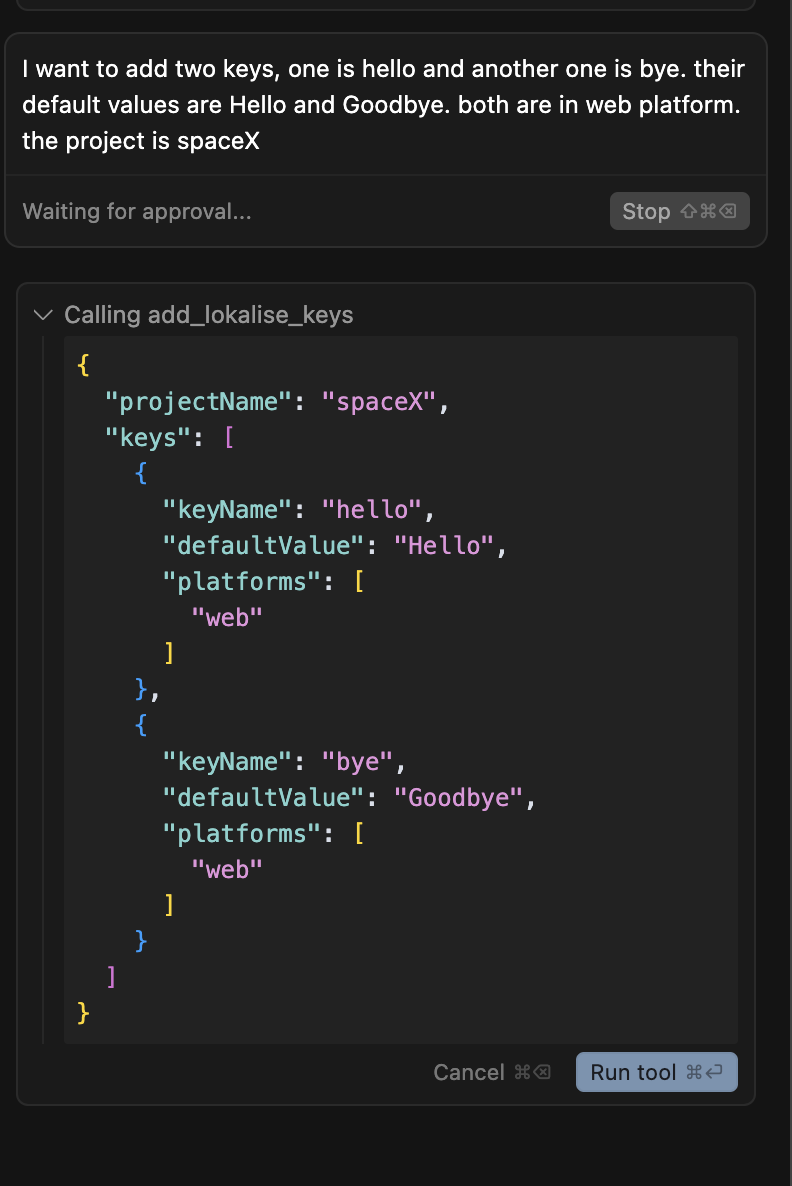
This tool takes these inputs:
- projectName (required): The name of your Lokalise project (e.g.,
SpaceX). - keys (required): An array of objects, each with:
- keyName (required): The translation key (e.g.,
hello) - defaultValue (optional): The default translation value (e.g.,
Hello) - platforms (optional): The platforms this key applies to (e.g.,
web,ios)
- keyName (required): The translation key (e.g.,
Example:
I want to add two keys, one is hello and another one is bye. their default values are Hello and Goodbye. both are in web platform. the project is spaceX
Cursor will automatically convert this to the correct input for the MCP tool.
📁 Project Files
TypeScript Source Files (src/):
- src/mcp-server.ts: The main MCP server entry point for Cursor integration.
- src/mcp.ts: Shared logic for interacting with the Lokalise API (used by the server).
- src/server.ts: (Optional) HTTP server version (not required for Cursor).
- src/add-key.ts: (Optional) CLI tool for adding a key interactively (not required for Cursor).
Compiled JavaScript Files (dist/):
- dist/mcp-server.js: Compiled MCP server.
- dist/mcp.js: Compiled API logic.
- dist/server.js: Compiled HTTP server.
- dist/add-key.js: Compiled CLI tool.
Other Files:
- tsconfig.json: TypeScript configuration.
- Dockerfile: For building the Docker image of the MCP server.
- package.json: Project dependencies and scripts.
- README.md: This documentation file.
🛠️ Setup (For Local Development or Customization)
1. 📥 Clone the Repository
git clone https://github.com/mdrafee03/mcp-lokalise.git
cd mcp-lokalise
2. 📦 Install Dependencies
npm install
3. 🔨 Build the Project
npm run build
4. 🔑 Set Your Lokalise API Key
In your MCP config (recommended for Cursor)
{
  "mcpServers": {
    "lokalise": {
      "command": "node",
      "args": ["{directory-of-the-project}/dist/mcp-server.js"],
      "env": {
        "LOKALISE_API_KEY": "your_actual_api_key"
      }
    }
  }
}
Available Scripts
npm run build- Compile TypeScript to JavaScriptnpm run dev- Run the MCP server in development mode with tsxnpm run server- Run the HTTP server in development mode with tsxnpm run add-key- Run the CLI tool in development mode with tsxnpm start- Run the compiled MCP server from dist/
Requirements
- Node.js 22+ recommended
- TypeScript 5.8+
- MCP protocol via @modelcontextprotocol/sdk
License
MIT