SharpDeps.Mcp
A read-only MCP server that lets AI agents explore .NET solution dependencies — projects, namespaces, and types — with source reference evidence. Installable from NuGet via dnx; requires the .NET 10 runtime.
เอกสาร
SharpDeps — .NET Dependency Map
English · 日本語 · VS Code guide · CLI and MCP
SharpDeps shows .NET project, namespace and type dependencies in VS Code, with source locations for the relationships it collected. The separate CLI saves an index for repeatable queries; the optional MCP server lets an AI client explore that index.
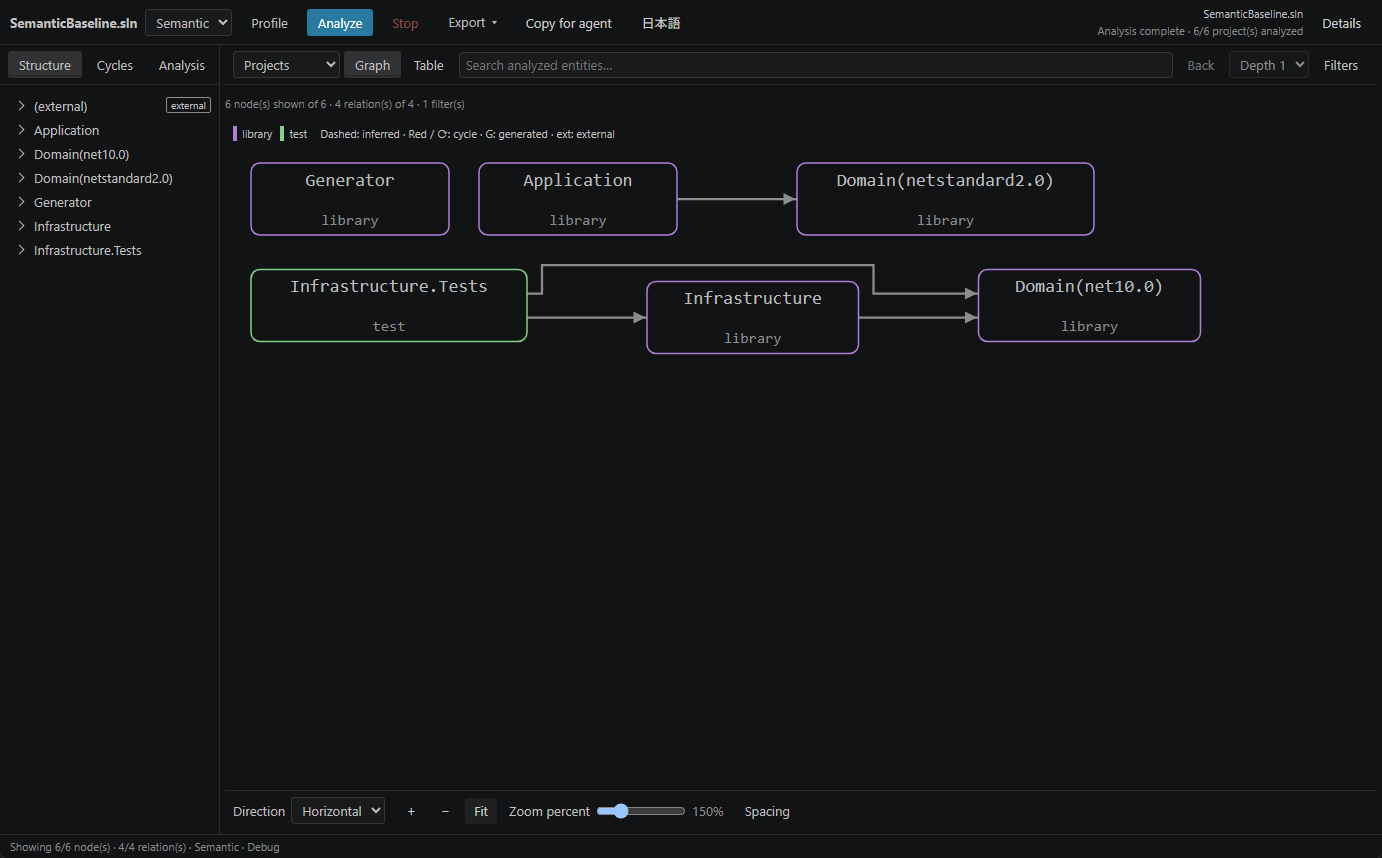
The images show the 0.1.0 workbench. See the guides for current controls and saved-index compatibility.
Install
Install SharpDeps — .NET Dependency Map from the Visual Studio Marketplace, or download the VSIX from GitHub Releases and choose Extensions: Install from VSIX… in VS Code. Version 0.4.0 is the latest released version.
VS Code 1.90 or later is required. Trust the workspace before running analysis.
| Mode | Use it for | Requirements |
|---|---|---|
| Quick | Project references, C# declarations and syntax-based relationships. | .NET 10 runtime; no SDK, MSBuild evaluation or package restore. |
| Semantic | Evaluated C# references, symbol-resolved relationships and source evidence. | .NET 10 runtime, a target-compatible SDK and restored target dependencies. |
The .NET Install Tool supplies the extension's runtime when needed. SharpDeps does not install an SDK or restore your project's packages.
The extension bundles its own analysis and saved-index reader hosts. Installing a newer CLI does not update those hosts. The 0.4.0 reader supports index schemas 1/2/3; see saved-index setup before using an index from another tool version.
Open a map
- Open your solution folder in VS Code.
- Right-click a
.sln,.slnxor supported project file and choose SharpDeps: Show Dependency Map. - Select a node or connection to inspect Details. Use Dependencies or Dependents to narrow the view.
Quick accepts .csproj, .fsproj, .vbproj and .vcxproj; Semantic targets SDK-style C# projects. A project target includes its transitive project references. Choose Semantic and Analyze for symbol-resolved results.
Search, filters, the graph and the table share the current scope. Display limits restrict the picture, not the analyzed data or cycle detection. Quick/Semantic views export Mermaid, JSON, SVG or PNG; the saved-index view exports JSON. Copy for agent writes context to the clipboard and does not send it to an AI service.
Analysis and rendering run locally. A failed or cancelled analysis retains the last successful view. Read coverage, certainty and limitations before interpreting a missing or inferred relationship. See the VS Code guide for settings, source navigation and troubleshooting.
CLI and MCP
Install the separate .NET CLI tool and, when needed, the MCP server:
dotnet tool install --global SharpDeps.Cli --version 0.4.0
dotnet tool install --global SharpDeps.Mcp --version 0.4.0
Tool installation requires an SDK; running an installed tool requires the .NET 10 runtime. Indexing additionally requires the target's SDK and restored dependencies. The CLI/MCP tools use Syntamark 1.2.0 for Markdown; that parser is not bundled in the VSIX.
The CLI/MCP guide covers indexing, source queries, normal MCP connection, scope selection, trust, finite time budgets and recovery. It marks unreleased additions separately from published 0.4.0 behavior. For the released implementation, use the 0.4.0 guide.
For AI clients, follow agent setup and opt-out. Use indexed tools for structural questions and ordinary search for simple text or unindexed work. A connection does not grant source access or permission to update an index. Partial coverage and unverified freshness remain visible; fewer reads, lower token use and universal one-second completion are not guaranteed.
License
MIT. See third-party notices for bundled components.