Brightspace MCP Server
เซิร์ฟเวอร์ MCP สำหรับ Brightspace (D2L): ตรวจสอบเกรด วันครบกำหนด ประกาศ รายชื่อนักเรียน และอื่นๆ โดยใช้ Claude, ChatGPT, Cursor หรือไคลเอนต์ MCP ใดๆ
เอกสาร
Brightspace MCP Server
By Rohan Muppa, ECE @ Purdue
Talk to your Brightspace courses with AI. Ask about grades, due dates, quizzes, announcements, and more. Works with Claude Desktop, Claude Code, Cursor, ChatGPT Desktop, Windsurf, and any MCP client.
This is an MCP (Model Context Protocol) server that connects your AI to D2L Brightspace so it can pull your grades, assignments, syllabus, and course content on demand.
Connects to D2L Brightspace. Automatic login supports Purdue's Microsoft Entra flow and SUNY campus selection. Other schools need a compatible automated sign-in flow; unsupported login pages return an actionable error.
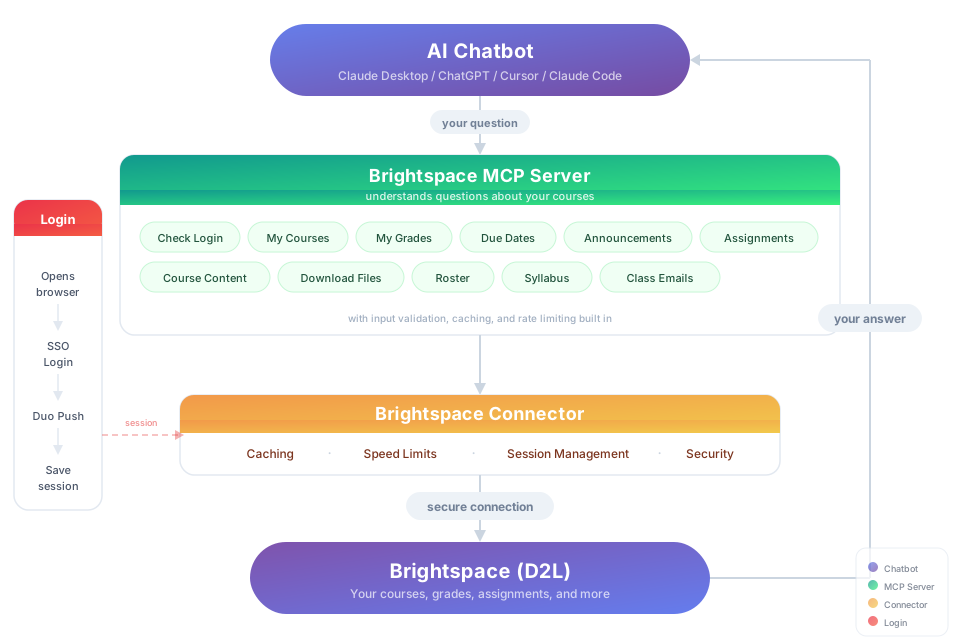
Try It
"Download my lecture slides and turn them into interactive flashcards" "Grab every assignment rubric and build me a visual dashboard of what I need to hit for an A"
Install
You need: Node.js 20+ and an available native credential store: macOS Keychain, Windows Credential Manager, or Linux Secret Service. Linux requires secret-tool and an unlocked desktop keyring. Install libsecret-tools on Debian/Ubuntu, or the package providing secret-tool on your distribution. A container or SSH session without Secret Service cannot persist authentication in v2.
Option 1: Let your AI do it
Paste this into Claude Code, Cursor, Windsurf, Copilot, Codex, or any AI coding assistant:
Install brightspace-mcp-server for me by following
https://github.com/RohanMuppa/brightspace-mcp-server/blob/main/LLMs.md
(use --purdue if I'm at Purdue, or --suny if I'm at a SUNY campus).
Option 2: Run it yourself
npx -y brightspace-mcp-server@latest setup
Purdue students can add --purdue to skip entering the school URL:
npx -y brightspace-mcp-server@latest setup --purdue
SUNY campuses share one Brightspace site, so --suny also asks which campus you're at and skips SUNY's campus picker when you sign in:
npx -y brightspace-mcp-server@latest setup --suny
The wizard saves your password in the native credential store and asks how you complete MFA. Authentication can wait for approval or number matching, prompt in the terminal for a code from Google Authenticator or another app, or open a visible browser for other interactive methods. The wizard can configure Claude Desktop, Cursor, Codex Desktop and CLI, and Claude Code when they are installed. Restart your AI client when it finishes.
Any other D2L school: run setup without a flag and paste your Brightspace URL (for example https://yourschool.brightspace.com).
Using a different client? Configure it manually.
Search your client's docs for how to add an MCP server. The server command to register is:
npx -y brightspace-mcp-server@latest
On Windows, npx must be wrapped: cmd /c npx -y brightspace-mcp-server@latest
You still need to run npx -y brightspace-mcp-server@latest setup first to save your credentials.
For Codex Desktop and Codex CLI, run:
codex mcp add brightspace -- npx -y brightspace-mcp-server@latest
Codex Desktop and CLI use the same user configuration on a computer. Restart the desktop app or start a new CLI session after registration.
For Claude Code, run:
claude mcp add --scope user brightspace -- npx -y brightspace-mcp-server@latest
Claude Desktop uses a separate configuration, which the setup wizard can update automatically.
Session Expired?
There is nothing to log into first. Ask for your grades and the sign-in happens as part of that request, so the assistant never has to check whether you are authenticated before it can answer. Starting your AI client touches Brightspace not at all: a restart on its own will never set off an MFA prompt.
Returning the next day normally requires no action. The server renews short-lived API tokens over HTTPS using the saved Brightspace session. If that session ends, a browser restores your saved Microsoft session and tries silent SSO. Approval and code-based modes stay headless; when an automatic run needs a code, run the auth command below to enter it securely in the terminal.
If visible-browser mode is configured, the window stays open for up to five minutes so you can finish credentials and MFA manually when automatic sign-in cannot continue. Rerunning setup preserves your previous hidden or visible choice as the prompt default.
Your school's policy controls when MFA is required. There is no local 24-hour cutoff, and the server no longer discards browser state after one hour. A network outage preserves the saved session and returns a temporary error.
If you miss an MFA request, automatic browser authentication pauses for five minutes before trying again. Existing tokens and HTTP token renewal still work. Browser-based SSO also pauses because Microsoft can send another phone prompt during a redirect, even without a password submission. Run this command in a terminal to retry immediately, see a number match, or enter an authenticator code:
npx -y brightspace-mcp-server@latest auth
Run it from your home folder. On macOS, a terminal that lacks Files and Folders permission (the terminal panel inside Claude Desktop, or a fresh editor terminal) cannot start npx from inside Documents, Desktop, or Downloads — it fails with EPERM: process.cwd failed … uv_cwd before the server runs. The same applies if your AI client launches the server with one of those folders as its working directory; grant the app access under System Settings → Privacy & Security → Files and Folders, or start the server elsewhere.
MFA at Purdue commonly uses Microsoft Authenticator number matching (some schools use Duo instead). When a sign-in needs it, the tool call itself returns quickly with the number to enter, rather than sitting silent for up to five minutes — approve it on your phone, then call the tool again; sign-in finishes in the background in the meantime. Google Authenticator and other one-time-code apps work too, with no setting to change: run the auth command above in a terminal and it prompts for the code when your provider asks for one. Pick the visible-browser option during setup only if your identity provider needs interaction the server cannot drive. The MCP also sends authentication progress as logging notifications to clients that display them, useful if you don't see the number in the tool response for some reason.
The number in that response can go stale if the request times out or you tap Deny before approving it: the server asks Microsoft for another one and the next tool call reports the new number, so always enter whatever number the most recent response shows. If a background sign-in gets stuck, running the auth command above in a terminal takes it over immediately instead of waiting for it to finish or time out.
On a Duo tenant, if Duo asks "Is this your device?" before it will send a push, automatic sign-in answers yes so the push can go out at all — a headless run has nobody to click it otherwise. That also makes Duo remember the device, which skips its own device check on later logins from this machine. Don't run automatic sign-in on a shared or public computer if you'd rather Duo keep asking. Setting D2L_DUO_PASSCODE to any value switches from waiting for a push to typing a code from Duo Mobile's passcode option instead.
What You Can Ask About
| Topic | Examples |
|---|---|
| Grades | "Am I passing all my classes?" · "Compare my grades across all courses" |
| Assignments | "What's due in the next 48 hours?" · "Summarize every assignment I haven't turned in yet" · "Give me the link to submit HW 4" |
| Quizzes | "Which quizzes close this week?" · "Is Quiz 3 timed, and does it have a grace period?" |
| Assignment files | "What does the lab 4 spec actually ask for?" · "Summarize the rubric attached to the project" |
| Exams | "Is there a midterm in the gradebook that isn't on my assignments list?" |
| Announcements | "Did any professor post something important today?" · "What did my CS prof announce this week?" · "Any announcements since last Monday?" · "Read the file attached to today's announcement" · "Save the rubric my prof attached to that announcement" |
| Course content | "Find the midterm review slides" · "Download every PDF from Module 5" · "What's new in this course since I last checked?" |
| Roster | "Who are the TAs for ECE 264?" · "Get me my instructor's email" |
| Discussions | "What are people saying in the final project thread?" · "Summarize the latest discussion posts" |
| Video transcripts | "What did the professor say about pinch-off in Tuesday's lecture recording?" · "Summarize last week's BoilerCast video" — works for Kaltura and YouTube embeds; other platforms report that they aren't supported yet |
| Troubleshooting | "Which version of the Brightspace server am I running?" · "Where is my Brightspace config file?" — get_server_info reports the version, Node runtime, platform, config and session paths, school URL, and whether a credential is stored, without contacting Brightspace or revealing secrets |
| Calendar | "When is my midterm?" · "What's on my calendar this week?" · "Is lab cancelled on Thursday?" — reads exams, labs, review sessions, and deadlines instructors put only on the course calendar |
| Planning | "Build me a study schedule based on my upcoming due dates" · "Which class needs the most attention right now?" — pulls from assignments, quizzes, graded discussion topics (any topic with a due date), and course calendar events such as exams and labs |
Licensed under the MIT License.