Perfetto
เปลี่ยนภาษาธรรมชาติให้เป็นการวิเคราะห์ร่องรอย Perfetto ที่ทรงพลัง อธิบายอาการกระตุก วินิจฉัย ANR ระบุเธรดที่ใช้ CPU สูง ค้นหาการแย่งชิงล็อก และหา memory leak ได้อย่างรวดเร็ว
เอกสาร

Perfetto MCP
Turn natural language into powerful Perfetto trace analysis
A Model Context Protocol (MCP) server that transforms natural-language prompts into focused Perfetto analyses. Quickly explain jank, diagnose ANRs, spot CPU hot threads, uncover lock contention, and find memory leaks – all without writing SQL.
✨ Features
- Natural Language → SQL: Ask questions in plain English, get precise Perfetto queries
- ANR Detection: Automatically identify and analyze Application Not Responding events
- Performance Analysis: CPU profiling, frame jank detection, memory leak detection
- Thread Contention: Find synchronization bottlenecks and lock contention
- Binder Profiling: Analyze IPC performance and slow system interactions
📋 Prerequisites
- Python 3.13+ (macOS/Homebrew):
brew install python@3.13 - uv (recommended):
brew install uv
🚀 Getting Started
Cursor

Or add to ~/.cursor/mcp.json (global) or .cursor/mcp.json (project):
{
  "mcpServers": {
    "perfetto-mcp": {
      "command": "uvx",
      "args": ["perfetto-mcp"]
    }
  }
}
Claude Code
Run this command. See Claude Code MCP docs for more info.
# Add to user scope
claude mcp add perfetto-mcp --scope user -- uvx perfetto-mcp
Or edit ~/claude.json (macOS) or %APPDATA%\Claude\claude.json (Windows):
{
  "mcpServers": {
    "perfetto-mcp": {
      "command": "uvx",
      "args": ["perfetto-mcp"]
    }
  }
}
VS Code

or add to .vscode/mcp.json (project) or run "MCP: Add Server" command:
{
  "mcpServers": {
    "perfetto-mcp": {
      "command": "uvx",
      "args": ["perfetto-mcp"]
    }
  }
}
Enable in GitHub Copilot Chat's Agent mode.
Codex
Edit ~/.codex/config.toml:
[mcp_servers.perfetto-mcp]
command = "uvx"
args = ["perfetto-mcp"]
Optional: Use a Local trace_processor_shell Binary
If your network environment blocks downloads, set
PERFETTO_MCP_TRACE_PROCESSOR_BIN_PATH to an absolute path of a local
trace_processor_shell binary.
When this env var is set, perfetto-mcp uses that binary directly.
When it is not set, default perfetto Python behavior is unchanged.
Example (mcp.json):
{
  "mcpServers": {
    "perfetto-mcp": {
      "command": "uvx",
      "args": ["perfetto-mcp"],
      "env": {
        "PERFETTO_MCP_TRACE_PROCESSOR_BIN_PATH": "D:/tools/perfetto/trace_processor_shell.exe"
      }
    }
  }
}
Example (~/.codex/config.toml):
[mcp_servers.perfetto-mcp]
command = "uvx"
args = ["perfetto-mcp"]
[mcp_servers.perfetto-mcp.env]
PERFETTO_MCP_TRACE_PROCESSOR_BIN_PATH = "D:/tools/perfetto/trace_processor_shell.exe"
Local Install (development server)
cd perfetto-mcp-server
uv sync
uv run mcp dev src/perfetto_mcp/dev.py
Local MCP
{
  "mcpServers": {
    "perfetto-mcp-local": {
      "command": "uv",
      "args": [
        "--directory",
        "/path/to/git/repo/perfetto-mcp",
        "run",
        "-m",
        "perfetto_mcp"
      ],
      "env": { "PYTHONPATH": "src" }
    }
  }
}
Using pip
pip3 install perfetto-mcp
python3 -m perfetto_mcp
📖 How to Use
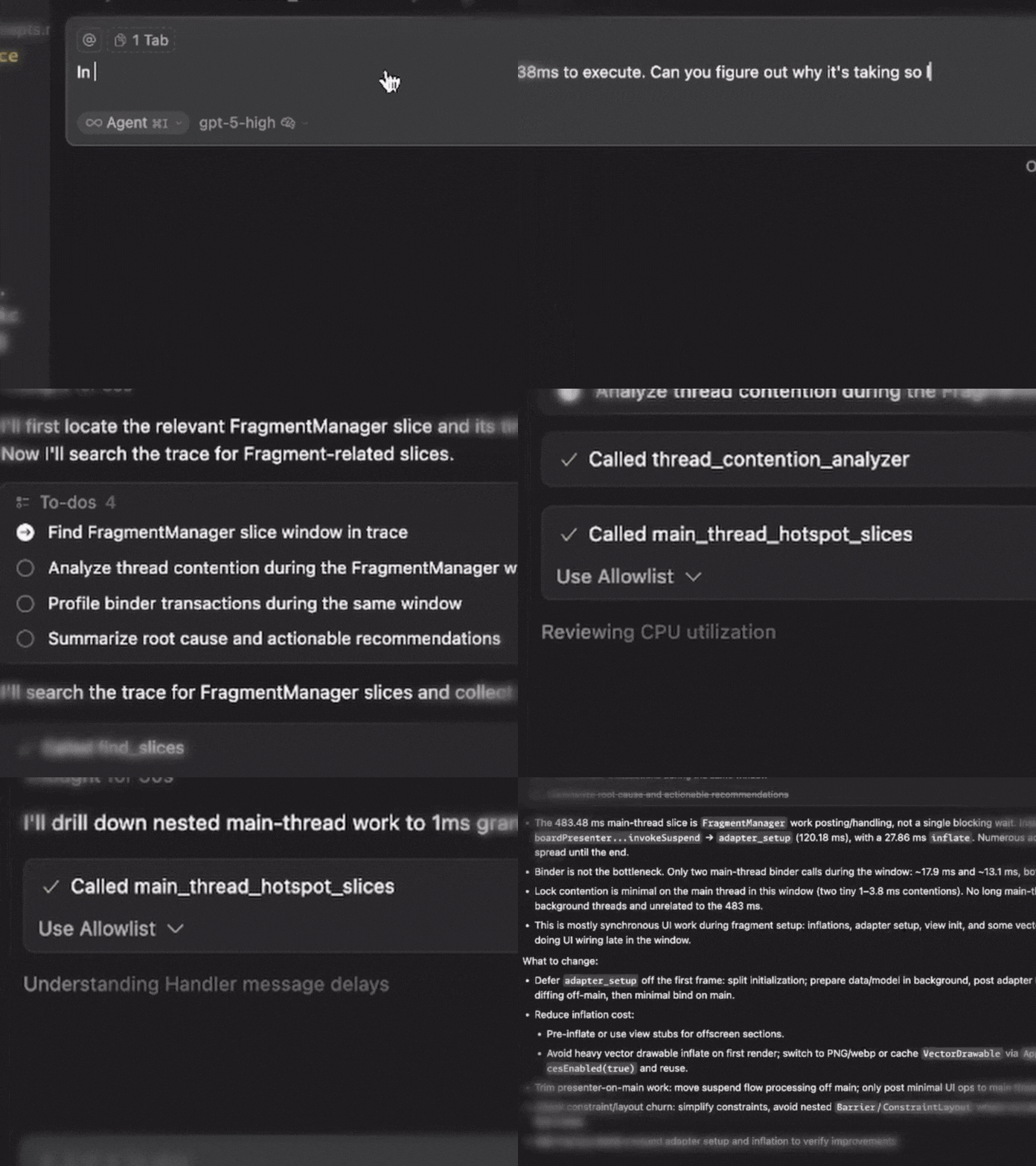
Example starting prompt:
In the perfetto trace, I see that the FragmentManager is taking 438ms to execute. Can you figure out why it's taking so long?
Required Parameters
Every tool needs these two inputs:
| Parameter | Description | Example |
|---|---|---|
| trace_path | Absolute path to your Perfetto trace | /path/to/trace.perfetto-trace |
| process_name | Target process/app name | com.example.app |
In Your Prompts
Be explicit about the trace and process, prefix your prompt with:
"Use perfetto trace /absolute/path/to/trace.perfetto-trace for process com.example.app"
Optional Filters
Many tools support additional filtering (but let your LLM handle that):
- time_range:
{start_ms: 10000, end_ms: 25000} - Tool-specific thresholds:
min_block_ms,jank_threshold_ms,limit
🛠️ Available Tools
🔎 Exploration & Discovery
| Tool | Purpose | Example Prompt |
|---|---|---|
find_slices | Survey slice names and locate hot paths | "Find slice names containing 'Choreographer' and show top examples" |
execute_sql_query | Run custom PerfettoSQL for advanced analysis | "Run custom SQL to correlate threads and frames in the first 30s" |
🚨 ANR Analysis
Note: Helpful if the recorded trace contains ANR
| Tool | Purpose | Example Prompt |
|---|---|---|
detect_anrs | Find ANR events with severity classification | "Detect ANRs in the first 10s and summarize severity" |
anr_root_cause_analyzer | Deep-dive ANR causes with ranked likelihood | "Analyze ANR root cause around 20,000 ms and rank likely causes" |
🎯 Performance Profiling
| Tool | Purpose | Example Prompt |
|---|---|---|
cpu_utilization_profiler | Thread-level CPU usage and scheduling | "Profile CPU usage by thread and flag the hottest threads" |
main_thread_hotspot_slices | Find longest-running main thread operations | "List main-thread hotspots >50 ms during 10s–25s" |
📱 UI Performance
| Tool | Purpose | Example Prompt |
|---|---|---|
detect_jank_frames | Identify frames missing deadlines | "Find janky frames above 16.67 ms and list the worst 20" |
frame_performance_summary | Overall frame health metrics | "Summarize frame performance and report jank rate and P99 CPU time" |
🔒 Concurrency & IPC
| Tool | Purpose | Example Prompt |
|---|---|---|
thread_contention_analyzer | Find synchronization bottlenecks | "Find lock contention between 15s–30s and show worst waits" |
binder_transaction_profiler | Analyze Binder IPC performance | "Profile slow Binder transactions and group by server process" |
💾 Memory Analysis
| Tool | Purpose | Example Prompt |
|---|---|---|
memory_leak_detector | Find sustained memory growth patterns | "Detect memory-leak signals over the last 60s" |
heap_dominator_tree_analyzer | Identify memory-hogging classes | "Analyze heap dominator classes and list top offenders" |
Output Format
All tools return structured JSON with:
- Summary: High-level findings
- Details: Tool-specific results
- Metadata: Execution context and any fallbacks used
📚 Resources
- Trace Processor Python API - Perfetto's Python interface
- Perfetto SQL Syntax - SQL reference for custom queries
📄 License
Apache 2.0 License. See LICENSE for details.