Armor Crypto MCP
ทางการMCP สำหรับเชื่อมต่อกับบล็อกเชนหลายแห่ง การ Stake, DeFi, Swap, Bridging, การจัดการกระเป๋าเงิน, DCA, คำสั่งจำกัด, การค้นหาเหรียญ, การติดตาม และอื่นๆ
คุณทำอะไรได้บ้างด้วย Armor Crypto MCP?
- สร้างและจัดการกระเป๋าเงิน Solana — สร้างกระเป๋าเงินใหม่ จัดระเบียบเป็นกลุ่ม และเก็บถาวรกระเป๋าที่ไม่ได้ใช้งานผ่านเครื่องมือจัดการกระเป๋าเงิน
- ดำเนินการสวอปโทเคน — ทำการสวอปปกติบน Solana โดยใช้เครื่องมือสวอป
- ตั้งค่ากลยุทธ์การซื้อขายอัตโนมัติ — วาง แสดงรายการ และยกเลิกคำสั่ง DCA คำสั่งจำกัดราคา และการซื้อขายตามกำหนดเวลา
- Stake และ unstake โทเคน — ใช้เครื่องมือ Stake เพื่อ Stake สินทรัพย์หรือถอนสถานะที่ Stake ไว้
- ค้นหาโทเคนที่กำลังมาแรง — ค้นหาโทเคนและดึงข้อมูลโทเคนที่กำลังมาแรงบน Solana
- รันการวิเคราะห์ทางสถิติ — ใช้เครื่องมือคำนวณทางสถิติเพื่อการวิเคราะห์ข้อมูลบนเชนที่แม่นยำ
เอกสาร
Armor Crypto MCP
เวอร์ชันทดสอบ Alpha 0.1.24
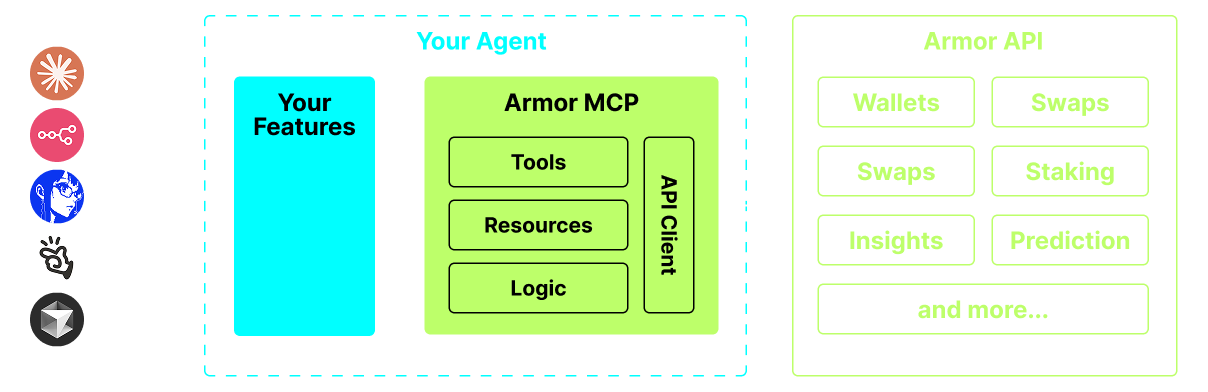
แหล่งรวมเดียวสำหรับการผสาน AI Agent เข้ากับระบบนิเวศคริปโต ซึ่งรวมถึงการสร้างและจัดการกระเป๋าเงิน การสลับเหรียญ การโอน การเทรดตามเหตุการณ์ เช่น DCA, Stop Loss และ Take Profit และอื่นๆ อีกมากมาย Armor MCP รองรับ Solana ในช่วง Alpha และเมื่อเข้าสู่ช่วง Beta จะรองรับบล็อกเชนมากกว่าสิบเครือข่าย รวมถึง Ethereum, Base, Avalanche, Bitcoin, Sui, Berachain, megaETH, Optimism, Ton, BNB และ Arbitrum เป็นต้น ด้วย Armor MCP คุณสามารถนำทุกสิ่งในโลกคริปโตเข้าสู่ AI Agent ของคุณด้วยตรรกะที่เป็นหนึ่งเดียวและชุดเครื่องมือที่ครบถ้วน
คุณสมบัติ
🧠 เป็น AI โดยกำเนิด
📙 การจัดการกระเป๋าเงิน
🔃 การสลับเหรียญ
🌈 การเทรดเฉพาะทาง (DCA, Stop Loss ฯลฯ)
⛓️ หลายเชน
↔️ ธุรกรรมข้ามเชน
🥩 การ Staking
🤖 การผสานรวมกับเฟรมเวิร์ก Agentic อย่างรวดเร็ว
👫 ความรู้สึกทางสังคม
🔮 การคาดการณ์
ข้อกำหนด
1. ตรวจสอบให้แน่ใจว่าคุณได้ติดตั้ง Python แล้ว
2. ติดตั้ง uv
Linux / Windows
pip install uv
Mac
brew install uv
3. Claude Desktop หรือ AI Agent ของคุณจะรัน MCP
ดูรายละเอียดเพิ่มเติมที่ การใช้งานและการกำหนดค่า
การทดสอบ Alpha
ขณะนี้เราอยู่ในช่วงก่อน Alpha และเรากำลังทดสอบความสามารถของเอเจนต์และเฟรมเวิร์ก Agentic ต่างๆ เช่น Claude Desktop, Cline, Cursor, n8n เป็นต้น
ฟีเจอร์และเครื่องมือปัจจุบัน
- การจัดการกระเป๋าเงิน
- การจัดกลุ่มและการจัดการ
- การเก็บถาวร
- การสลับและการเทรด
- การสลับแบบปกติ
- DCA (วาง / แสดงรายการ / ยกเลิก)
- คำสั่งตามกำหนดเวลา
- คำสั่งจำกัดราคา (วาง / แสดงรายการ / ยกเลิก)
- การ Staking และ Unstaking
- การค้นหาโทเค็นและโทเค็นที่กำลังมาแรง
- เครื่องคำนวณทางสถิติเพื่อการวิเคราะห์ที่แม่นยำ
- รองรับบล็อกเชน Solana
เร็วๆ นี้
- การรองรับบล็อกเชนเพิ่มเติม
- การ Mint
- Armor Agents ในรูปแบบเครื่องมือ (หรือ A2A)
การตั้งค่า MCP
ปัจจุบันคุณต้องมี Armor NFT เพื่อรับ API Key รับได้ ที่นี่
การใช้งานและการกำหนดค่า
ในการใช้ Armor MCP กับเอเจนต์ของคุณ คุณต้องมีการกำหนดค่าดังต่อไปนี้ โดยแทนที่ <PUT-YOUR-KEY-HERE> ด้วย API key ของคุณ:
{
  "mcpServers": {
    "armor-crypto-mcp": {
      "command": "uvx",
      "args": ["armor-crypto-mcp@latest", "--version"],
      "env": {
        "ARMOR_API_KEY": "<PUT-YOUR-KEY-HERE>"
      }
    }
  }
}
การใช้งานใน Claude Desktop
- ต้องเปิดใช้งานโหมดนักพัฒนา
- เปิดเมนูไฟล์ของ Claude Desktop ที่มุมซ้ายบนของหน้าต่าง
- ไปที่ ไฟล์ > การตั้งค่า
- ภายใต้ นักพัฒนา คลิก แก้ไขการกำหนดค่า
- ในไฟล์กำหนดค่า ให้แทรกส่วน
armor-wallet-mcpจากด้านบน - ตรวจสอบให้แน่ใจว่าได้แทนที่ตัวยึดตำแหน่งด้วย API key ของคุณ
- บันทึกไฟล์และเริ่มแชทใหม่ใน Claude Desktop
การใช้งานใน Cline
- คลิกที่ปุ่ม
MCP Serversในแท็บ Cline ใน VSCode ที่แผงด้านซ้าย - เลื่อนไปที่ด้านล่างของแผงด้านซ้ายแล้วคลิกที่
Configure MCP Servers - ในไฟล์กำหนดค่า ให้แทรกส่วน
armor-wallet-mcpจากด้านบน - ตรวจสอบให้แน่ใจว่าได้แทนที่ตัวยึดตำแหน่งด้วย API key ของคุณ
- บันทึกไฟล์ คลิก
Doneใต้แท็บMCP Serversและเริ่มแชทกับ Cline
การใช้งานใน n8n
- เปิดแอป n8n
- ที่มุมล่างซ้ายของหน้าจอ คลิก
...ถัดจากชื่อผู้ใช้ของคุณ แล้วคลิกSettings - ที่แผงด้านซ้าย คลิก
Community nodesแล้วคลิกปุ่มInstall a Community Node - ในช่องค้นหาสำหรับ
npm Package Nameพิมพ์ mcp - ติดตั้ง
MCP Nodes - เพิ่มโหนด MCP ใดๆ เช่น:
List Tools - ในแท็บ
Parametersของ MCP Client คลิกSelect Credentialแล้วคลิกCreate new credential - ภายใต้
Commandป้อนuvx - ภายใต้
Argumentsป้อนarmor-crypto-mcp - ภายใต้
Environmentsป้อนARMOR_API_KEY=eyJhbGciOiJIUzI1NiIsIn...วางค่า API Key แบบเต็มหลัง= - กลับไปที่แท็บ
Parametersคุณสามารถเลือก MCPOperationสำหรับโหนดนั้น
การใช้ Armor MCP
เมื่อคุณตั้งค่า Armor MCP แล้ว นี่คือตัวอย่างพร้อมท์ที่คุณสามารถใช้เพื่อเริ่มต้น