ThreatByte-MCP
ThreatByte-MCP เป็นเว็บแอปพลิเคชันจัดการเคสที่ใช้ MCP ซึ่งถูกทำให้มีช่องโหว่โดยเจตนา โดยจำลองขั้นตอนการทำงานของนักวิเคราะห์ SOC ที่สมจริง พร้อมอินเทอร์เฟซที่เรนเดอร์จากเซิร์ฟเวอร์และเซิร์ฟเวอร์ MCP จริง เครื่องมือ MCP ถูกทำให้มีช่องโหว่โดยตั้งใจเพื่อการฝึกอบรมและการสาธิต
เอกสาร
ThreatByte-MCP


ThreatByte-MCP is a deliberately vulnerable, MCP-based case management web app. It mirrors a realistic SOC analyst workflow with a server-rendered UI and a real MCP server. The MCP tools are intentionally vulnerable for training and demonstration.
[!NOTE] For educational use in controlled environments only.
Features
- Safe web authentication (signup/login/logout)
- Case management UI (create/list/view cases)
- Notes and attachments tied to cases
- Indicator search and agent workflows via MCP tools
- Agent customization with schema-based tool registry
MCP Server (SDK, JSON-RPC)
ThreatByte-MCP is a split architecture:
- SOC Web App (client/UI) runs on port 5001.
- MCP Server (tools + agent) runs on port 5002 using the official MCP Python SDK (FastMCP).
The MCP server exposes JSON-RPC at POST http://localhost:5002/mcp (Streamable HTTP). The web UI calls the MCP server through a server-side proxy to keep auth consistent with the SOC session; the proxy streams agent responses to the browser via SSE. A sample mcp.json manifest is included at the repo root.
All direct MCP calls must include MCP-Protocol-Version: 2025-11-25 and Accept: application/json, text/event-stream.
Architecture (simplified):
          Browser
             |
             v
    +------------------+        X-TBMCP-Token + X-TBMCP-User        +-------------------+
    |  SOC Web App     |  ---------------------------------------> |     MCP Server     |
    |  (Flask, :5001)  |           /mcp-proxy (server-side)         |  (FastMCP, :5002)  |
    +------------------+                                            +-------------------+
             |                                                                  |
             v                                                                  v
         SQLite DB                                                      Tool registry
                                                                       Agent + tool handlers
Architecture (detailed):
Mode A (Web UI as HTTP MCP client)
  Browser (Analyst)
    |
    v
  SOC Web App (Flask, :5001)
    - Auth session (cookie)
    - Dashboards, cases, notes, files UI
    - POST /mcp-proxy forwards JSON-RPC
    - Injects X-TBMCP-Token + X-TBMCP-User to the MCP server
    |
    +--> SQLite DB (users/cases/notes/files/indicators)
    +--> Uploads (app/uploads)
    |
    v
  MCP Server (FastMCP, :5002)
    - /mcp JSON-RPC (Streamable HTTP)
    - Tool registry (mcp_tools)
    - Agent runtime + tool handlers
    - Persistence: agent_contexts, agent_logs, mcp_audit_logs

Mode B (Local agent/IDE as stdio MCP client)
  Local Agent / IDE (e.g., Claude Desktop) spawns:
    python run_mcp_server.py --stdio
  and communicates via stdin/stdout JSON-RPC (stdio transport).
Diagram: ThreatByte-MCP architecture diagram
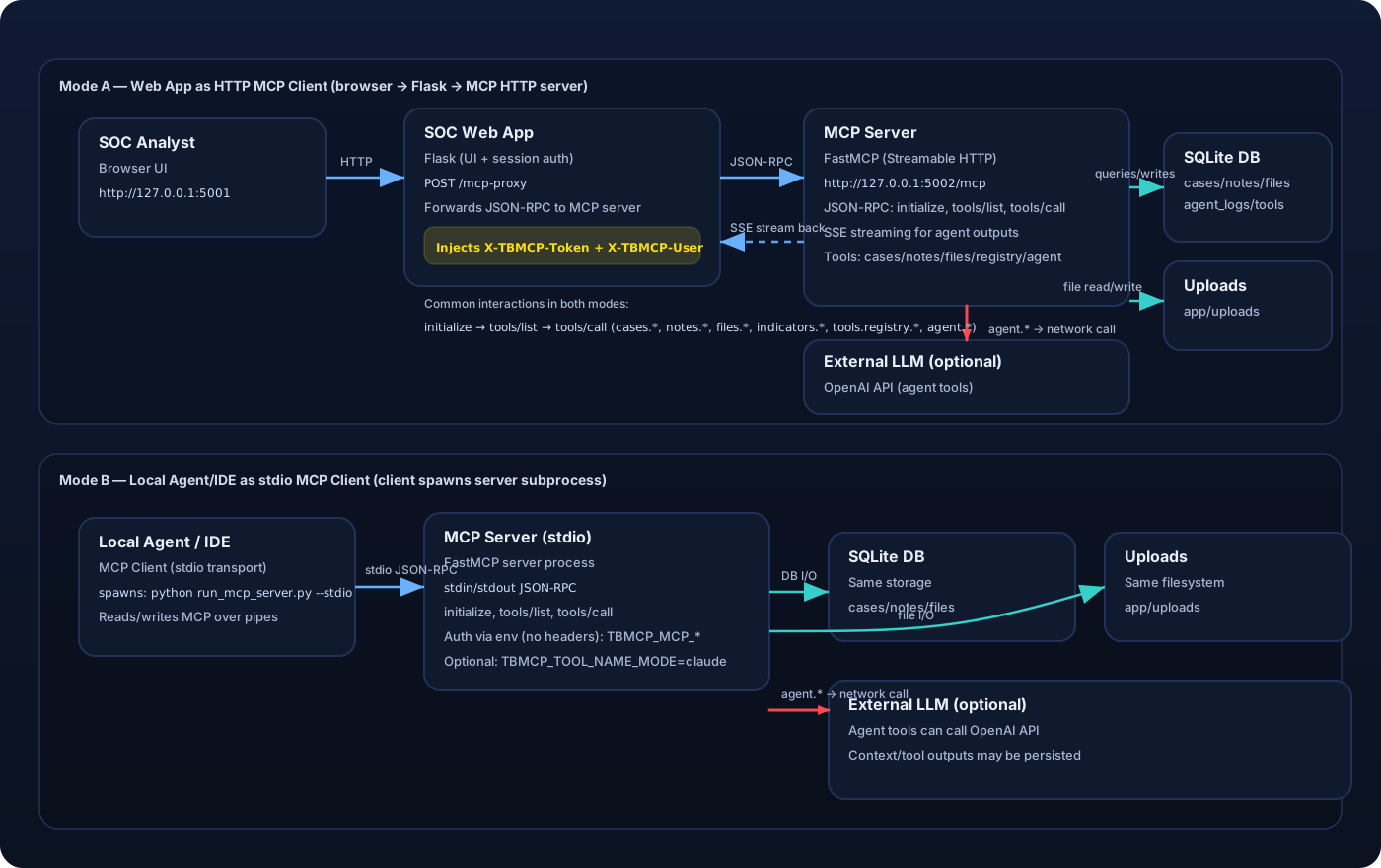
MCP Auth Between Web App and MCP Server
The web app proxies MCP calls with these headers:
X-TBMCP-Token: shared secret fromTBMCP_MCP_SERVER_TOKEN(configured on both servers).X-TBMCP-User: current user id from the authenticated SOC session.
Direct MCP calls require the same headers.
Supported tools:
cases.createcases.listcases.list_allcases.getcases.renamecases.set_statuscases.deletenotes.createnotes.listnotes.updatenotes.deletefiles.upload(base64)files.listfiles.get(base64)files.read_pathindicators.searchagent.summarize_caseagent.run_tasktools.registry.listtools.builtin.listtools.registry.registertools.registry.delete
Vulnerability Themes (Training-Focused)
The following weaknesses are intentionally present for teaching:
- Broken object level authorization (cases/notes/files, list_all)
- Stored XSS (notes rendered as trusted HTML)
- SQL injection in indicator search
- Prompt injection in agent task runner
- Token mismanagement & secret exposure (hardcoded tokens in prompts, persisted contexts, full logs)
- Tool poisoning via schema-driven tool registry overrides (MCP03)
- Over-trusting client context (MCP header identity spoofing)
- Arbitrary file read via
files.read_path - Cross-user file overwrite (shared filename namespace)
Running Locally
cd ThreatByte-MCP
python -m venv venv_threatbyte_mcp
source venv_threatbyte_mcp/bin/activate
pip install -r requirements.txt
python db/create_db_tables.py
python run_mcp_server.py --http
python run.py
Open: http://localhost:5001
MCP Server: http://localhost:5002/mcp
HTTP vs stdio
This repository ships two MCP server transports:
- HTTP (Streamable HTTP): what the ThreatByte web app uses. The web app is an HTTP MCP client only, via the server-side
/mcp-proxyforwarder. - stdio: for external MCP clients (e.g., IDE/agent clients) that spawn the MCP server and communicate over stdin/stdout.
Examples:
# HTTP (required for the web app)
python run_mcp_server.py --http --host 127.0.0.1 --port 5002

# stdio (for MCP clients that support stdio transport; the web app will NOT work with this)
# In stdio mode there are no HTTP headers, so the server reads user context from env vars.
# Note: stdio mode runs the MCP server on AnyIO's Trio backend; ensure `trio>=0.28.0` is installed.
export TBMCP_MCP_SERVER_TOKEN=tbmcp-mcp-token
export TBMCP_MCP_USER_ID=1
python run_mcp_server.py --stdio
Claude Desktop compatibility (tool names)
Some MCP clients (e.g., Claude Desktop) enforce strict tool name validation (^[a-zA-Z0-9_-]{1,64}$) and will reject dotted tool names like cases.create.
To run the MCP server in a Claude-compatible mode, set:
TBMCP_TOOL_NAME_MODE=claude
This exposes tools as underscore names (e.g., cases_create, tools_registry_register, files_read_path) instead of dotted names.
For a complete walkthrough (Windows + WSL stdio), see Claude Desktop setup.
Running with Docker or Podman
The repository includes a Dockerfile and startup script that initialize the DB and run both services in one container:
- SOC Web App on
:5001 - MCP Server on
:5002
Build the image:
# Docker
docker build -t threatbyte-mcp .

# Podman
podman build -t threatbyte-mcp .
Run the container:
# Docker
docker run --rm -p 5001:5001 -p 5002:5002 threatbyte-mcp

# Podman
podman run --rm -p 5001:5001 -p 5002:5002 threatbyte-mcp
Run with optional environment variables:
# Docker
docker run --rm -p 5001:5001 -p 5002:5002 \
  -e TBMCP_MCP_SERVER_TOKEN=tbmcp-mcp-token \
  -e OPENAI_API_KEY=your_api_key \
  -e TBMCP_OPENAI_MODEL=gpt-4o-mini \
  threatbyte-mcp

# Podman
podman run --rm -p 5001:5001 -p 5002:5002 \
  -e TBMCP_MCP_SERVER_TOKEN=tbmcp-mcp-token \
  -e OPENAI_API_KEY=your_api_key \
  -e TBMCP_OPENAI_MODEL=gpt-4o-mini \
  threatbyte-mcp
Persist SQLite data between runs (optional):
# Docker
docker run --rm -p 5001:5001 -p 5002:5002 \
  -v "$(pwd)/db:/app/db" \
  -v "$(pwd)/app/uploads:/app/app/uploads" \
  threatbyte-mcp

# Podman
podman run --rm -p 5001:5001 -p 5002:5002 \
  -v "$(pwd)/db:/app/db:Z" \
  -v "$(pwd)/app/uploads:/app/app/uploads:Z" \
  threatbyte-mcp
Populate Sample Data
python db/populate_db.py --users 8 --cases 20 --notes 40 --files 20
This creates random users, cases, notes, and file artifacts. All user passwords are Password123!.
LLM Integration (Required for Agent Responses)
The agent task endpoint requires a real LLM. Without an API key, the agent returns an error indicating it is unavailable.
Environment variables:
TBMCP_OPENAI_API_KEYorOPENAI_API_KEYTBMCP_OPENAI_MODEL(default:gpt-4o-mini)
Keep API keys server-side only and never expose them in the browser.
MCP Server Configuration
The SOC web app proxies MCP calls to the MCP server using a shared token.
Environment variables:
TBMCP_MCP_SERVER_URL(default:http://localhost:5002/mcp)TBMCP_MCP_SERVER_TOKEN(shared secret between the SOC app and MCP server)
Notes
- The UI uses server-rendered templates.
- MCP tools are exposed under
http://localhost:5002/mcp(JSON-RPC). The UI calls them through/mcp-proxy. - Useful UI pages for training:
My Cases(all cases owned by the logged-in user)MCP Audit Logs(server-side audit trail of MCP tool calls from HTTP + stdio clients)Agent Logs(internal agent runner traces; populated byagent.run_task)
- This app is intentionally insecure. Do not deploy it to the public internet.