RavensPort
แอป Windows ที่อยู่ในถาดระบบซึ่งรัน reverse proxy ในเครื่องบน 127.0.0.1 โดยจัดการ OAuth2 flow และวงจรชีวิตของโทเค็นสำหรับ upstream APIs และ MCP servers จากนั้นให้คุณประกอบเซิร์ฟเวอร์เหล่านั้นเป็น MCP endpoints แบบกรองและจัดช่องต่อ agent ได้ และยังให้คุณอัปโหลด openAPI manifest เลือกเครื่องมือ แล้วแปลงเป็น local MCP server ที่สามารถรวมกลุ่มได้
เอกสาร

RavensPort
Give each AI agent its own MCP endpoint — pooling the servers you choose, exposing only the tools you allow, with OAuth handled for you.


winget install RavensPort
Documentation · Microsoft Store · Releases
winget and the installer give you the full app. The Store build has no Proton Pass and no mTLS — why.
A tray-resident Windows app that runs a local reverse proxy on 127.0.0.1. It owns the OAuth2
flow and token lifecycle for upstream APIs and MCP servers, then lets you compose those servers
into filtered, per-agent MCP endpoints.
What it does
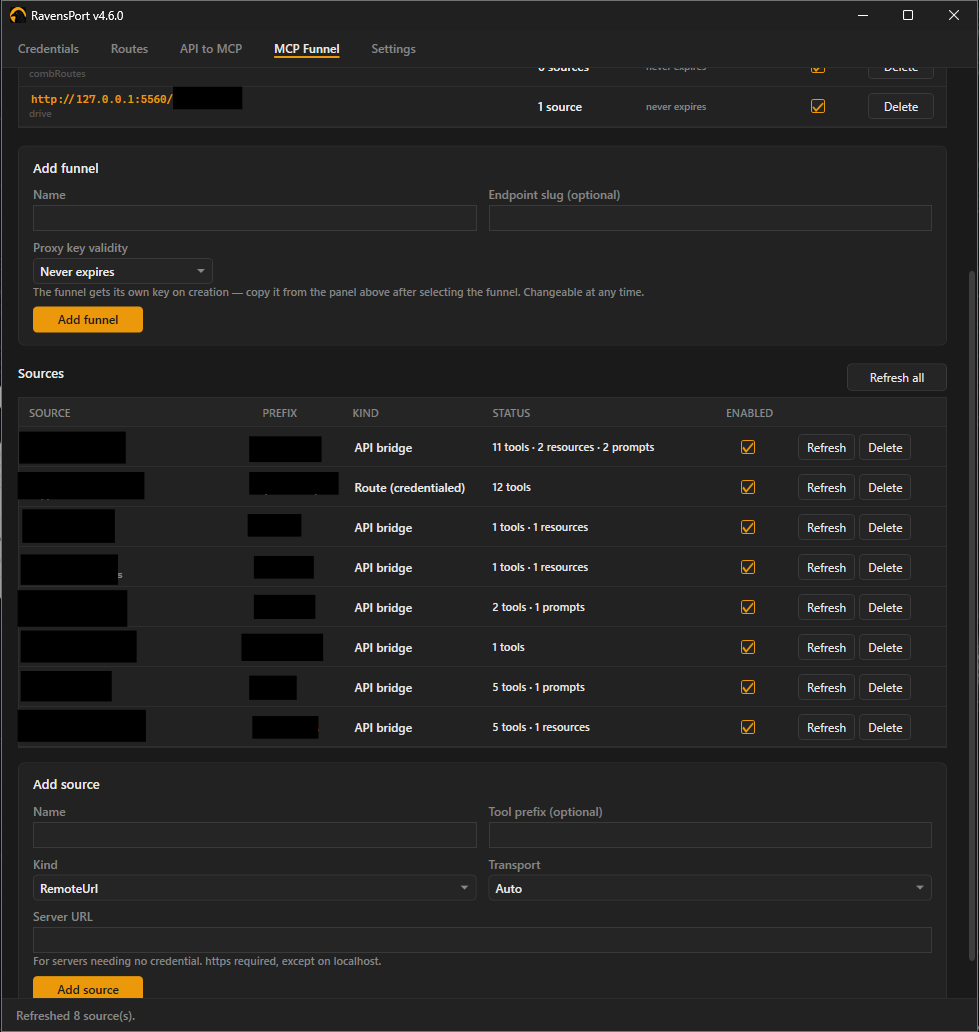
- MCP Funnel — per-agent endpoints pooling several MCP servers, with per-tool filtering
- API to MCP — turn an API you already proxy into an MCP endpoint from a JSON manifest, or import an OpenAPI document and pick which of its operations become tools
- OAuth2, handled — Google, GitHub, Nextcloud or any custom provider; device-code sign-in; client-credentials and Google service accounts for logins with nobody at the keyboard; static API keys for the services that never offered OAuth. Tokens refresh in the background
- Secrets stay in your password manager — 1Password or Proton Pass holds every credential, and nothing is written to this PC
- A proxy key per endpoint — every route, funnel and bridge has its own, so a key leaked from one client cannot reach the rest. Optionally require a client certificate as well
Install
winget install RavensPort
Or take the installer from Releases, or the Microsoft Store. Windows 10/11. Full instructions, including building from source, are in Installation.
Documentation
Everything lives in the wiki.
| Page | |
|---|---|
| Concepts | How credentials, routes, funnels and bridges fit together |
| Setting up a credential | Every sign-in method, and how to test one |
| Setting up a route | Proxying an upstream, and choosing how the credential is sent |
| API to MCP | Manifests, variants, and importing an OpenAPI document |
| MCP Funnel | Pooling sources into one endpoint and filtering what it exposes |
| Calling the proxy | Proxy keys, how long they last, and why there is one per endpoint |
| Client certificates (mTLS) | Requiring a certificate as well as a key |
| Where your configuration lives | What is in the vault, what is on disk, and what syncs |
| Logs | What is recorded, what is redacted, and where it goes |
| Troubleshooting | When something does not work |
| Building | Building, testing and packaging from source |
Manifests ready to use are in templates/api-mcp/, and the format is
documented in AUTHORING.md.
License
MIT — see LICENSE. Third-party dependencies (all MIT or Apache-2.0) are listed in THIRD-PARTY-NOTICES.md, which also covers what redistributing the published exe requires.