mcp-gen
Turn your typed TypeScript functions into an MCP server; tool, resource, and prompt schemas are inferred from your types and JSDoc. No schema library, no decorators, no boilerplate.
Documentation
mcp-gen
Turn your typed TypeScript functions into an MCP server. No schema library, no decorators, no boilerplate — the schema is inferred from your types.
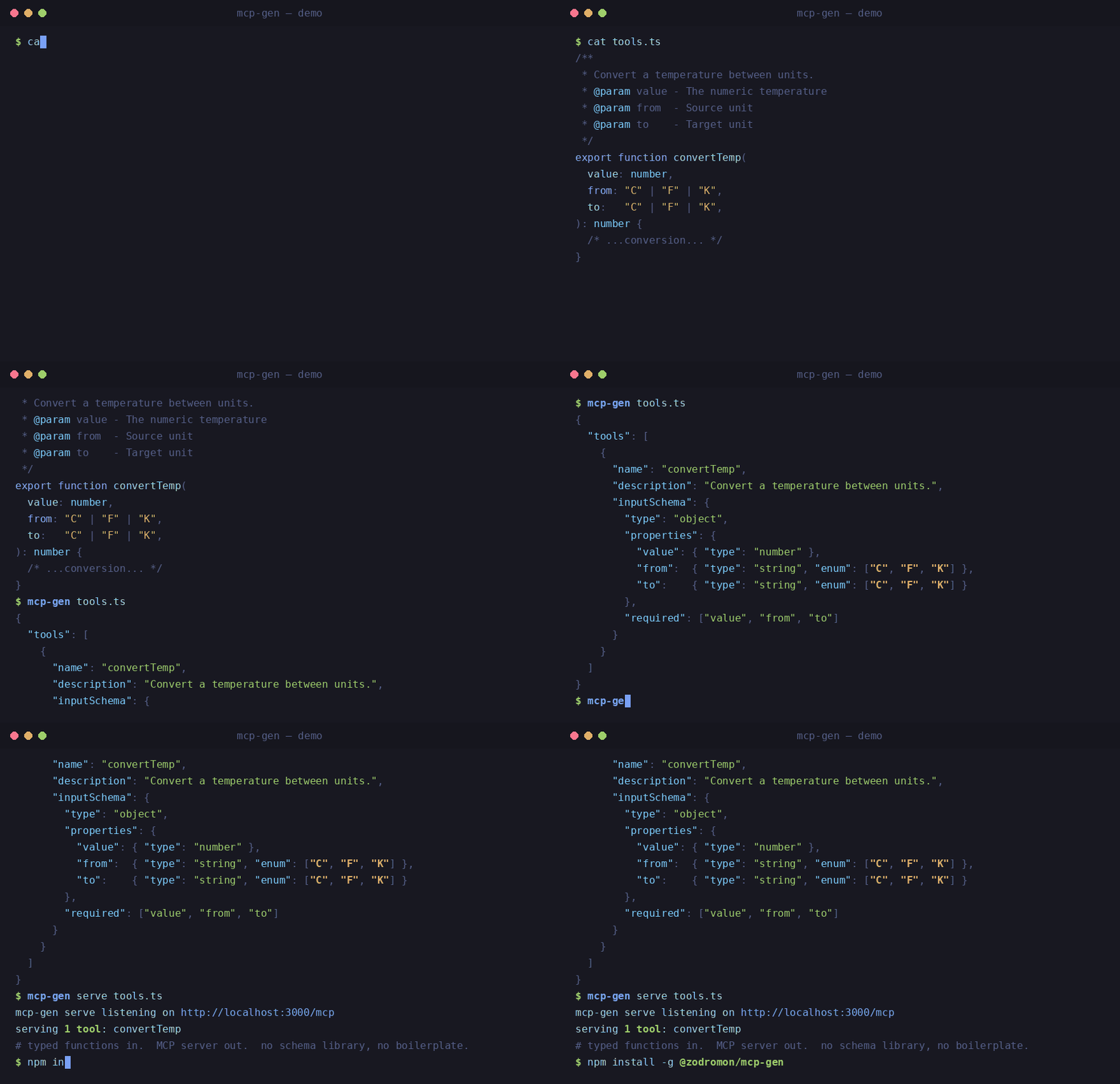
mcp-gen reads exported TypeScript functions and generates Model Context Protocol tool, resource, and prompt definitions from them — using the TypeScript type checker (via ts-morph) to turn each parameter type into a JSON Schema and each JSDoc comment into a description. It can emit the schemas as JSON, serve a live MCP server, or open a live playground where you call your tools in a browser while you edit.
If your functions are typed, they're already MCP tools.
Quick start
Write plain, typed functions with ordinary JSDoc:
// tools.ts

/**
 * Greets a person by name and age.
 * @param name - The person's name
 * @param age - The person's age in years
 */
export function greet(name: string, age: number): string {
  return `Hello ${name}, age ${age}`;
}

/**
 * Echoes a message back after a tick.
 * @param msg - The message to echo back
 */
export async function slowEcho(msg: string): Promise<string> {
  return `echo: ${msg}`;
}
Generate the tool schemas:
mcp-gen tools.ts
{
  "tools": [
    {
      "name": "greet",
      "description": "Greets a person by name and age.",
      "inputSchema": {
        "type": "object",
        "properties": {
          "name": { "type": "string", "description": "The person's name" },
          "age":  { "type": "number", "description": "The person's age in years" }
        },
        "required": ["name", "age"]
      }
    }
    // ... slowEcho
  ]
}
The fastest way to actually try them — the live playground. It watches your file, renders an input form for each tool from the inferred schema, and runs it right in your browser while you edit:
mcp-gen dev tools.ts # then open the printed http://127.0.0.1:4000/ URL
Or run it as a real MCP server:
mcp-gen serve tools.ts --port 3000
serve binds 127.0.0.1 (loopback) by default — it executes your local code when its tools are called, so it isn't reachable off-machine unless you ask. To expose it on the network, opt in explicitly with --host (e.g. mcp-gen serve tools.ts --host 0.0.0.0); doing so prints a warning, since the endpoint is then reachable by other machines.
Before exposing it, turn on bearer-token authentication. Configure one or more keys with --api-key <key> (repeatable) or the comma-separated MCP_GEN_API_KEYS environment variable — if any key is set, auth is on and every request to /mcp must carry Authorization: Bearer <key> (a missing, malformed, or wrong key is rejected with 401 before any tool runs). With no keys set, auth is off and behavior is unchanged. When auth is on, the off-machine "no authentication" warning is replaced by a one-line confirmation that a token is required. See Deploying to production.
That's it. The parameter names, types, required-ness, and descriptions all come from the code you already wrote.
How it works
- Types become schemas. Each exported function's parameters are converted to a JSON Schema
inputSchemaby the TypeScript type checker. Optional params (age?: number) are omitted fromrequired; return types are captured (andPromise<T>is unwrapped). - JSDoc becomes documentation. The function's summary becomes the tool
description; each@parambecomes that property'sdescription. - Fail-loud, never fail-silent. A function that can't be converted to a valid schema — for example an unbound generic in input position (
identity<T>(value: T)) — is excluded and reported, never emitted as something broken. Clean functions are still generated; the exit code tells you if any failed (see below).
What it handles
It's built to work on real codebases, not just single-file toys:
- generics (constrained and unbound), and a clear error on the ones that can't be represented
- types imported from other modules and re-exported under aliases
- multiple export styles (named, default, aliased)
tsconfig.jsondiscovery and path-alias resolution- detection of non-serializable types (instead of emitting invalid schema)
asyncfunctions (awaited return types); a throwing tool returnsisErrorrather than taking the server down
Resources & prompts
MCP servers can expose three kinds of things — tools (actions), resources (data), and prompts (reusable templates). mcp-gen infers all three from the same typed exports; a single JSDoc tag picks which one. An untagged function is a tool, exactly as before — nothing changes for existing code.
Resources — @resource <uri>
Tag a function with @resource and a URI. If the URI has {placeholders} that match parameter names, it becomes a resource template (the params validate the URL); with no placeholders it's a static resource. The return value is the content — a string is served as text/plain, anything else as application/json. Add @mime <type> to override.
/**
 * Read a user record by id.
 * @resource users://{id}      — templated: {id} matches the `id` param
 * @param id - The user id
 */
export function getUser(id: string): { id: string; name: string } {
  return { id, name: `User ${id}` };
}

/**
 * The current app configuration.
 * @resource config://app       — static: no placeholders
 */
export function appConfig() {
  return { theme: "dark", version: "1.1.0" };
}

/**
 * @resource info://build
 * @mime text/plain             — override the content type
 */
export function buildInfo(): string {
  return "mcp-gen build 1.1.0";
}
Prompts — @prompt
Tag a function with @prompt. Its parameters become the prompt's arguments (names and descriptions from @param). Return a string for a single user message, or an array of { role, content } messages to pass them through as-is.
/**
 * A code-review prompt.
 * @prompt
 * @param language - The programming language
 * @param code - The code to review
 */
export function reviewPrompt(language: string, code: string): string {
  return `Please review this ${language} code:\n\n${code}`;
}
Run mcp-gen serve and a connected MCP client can list and read your resources and get your prompts, alongside calling tools. Resources and prompts go through the exact same path as tools — same type inference, same validation, same execution — and the same fail-loud rule applies: e.g. a @resource template whose {var} doesn't match a parameter is excluded and reported, never half-registered.
CLI
mcp-gen <file.ts> [--debug] [--tsconfig <path>]                                        Generate tool schemas as JSON (stdout)
mcp-gen serve <file.ts> [--port N] [--host <addr>] [--api-key <key>]... [--tsconfig <path>]   Start a live MCP server (default port 3000; binds 127.0.0.1; PORT/HOST env honored)
mcp-gen dev <file.ts> [--port N] [--tsconfig <path>]                                   Live playground UI, watches + reloads (default port 4000)
mcp-gen check <file.ts> [--update] [--snapshot <path>] [--tsconfig <path>]             Guard the tool surface against breaking changes (CI)
Generation writes machine-readable JSON to stdout (always includes tools; includes errors/warnings when present); human-readable messages go to stderr. Exit codes:
| Code | Meaning |
|---|---|
0 | every exported function converted cleanly |
1 | one or more functions failed — clean ones are still emitted, failures listed in errors |
2 | file-level failure (not found / unparseable / nothing servable) |
Deploying to production
To run serve as a network-reachable MCP server, bind a public interface and require a bearer token. Pass the keys through the environment (not --api-key) so the secret never lands in shell history or a process listing:
# one or more comma-separated keys; every caller must send `Authorization: Bearer <key>`
MCP_GEN_API_KEYS="$(openssl rand -hex 32)" mcp-gen serve tools.ts --host 0.0.0.0
- Keys via env in prod, not the CLI.
--api-keyis convenient for local testing, but a flag is visible to anyone who can list processes (ps);MCP_GEN_API_KEYSkeeps the secret out ofargv. Both sources are unioned, comma-split, and trimmed, and any non-empty key turns auth on. PORT/HOSTare honored. When you omit--port/--host,servefalls back to thePORTandHOSTenvironment variables before its defaults (3000/127.0.0.1) — so it drops straight into a platform that injectsPORT. An explicit--port/--hostflag always overrides the env var.- Auth is fail-closed. With keys configured, a request to
/mcpcarrying a missing, malformed, or non-matching token is rejected with401 {"error":"unauthorized"}before the MCP transport — so no tool, resource, or prompt code runs. Keys are compared in constant time. - No keys = exposed and unauthenticated. Bind a non-loopback
--host(orHOST) without any key configured andservekeeps printing the loud exposure warning. Configure a key to gate the endpoint (and silence the warning).
On a platform that injects PORT (and optionally HOST), you supply only the keys:
MCP_GEN_API_KEYS="key-a,key-b" mcp-gen serve tools.ts --host 0.0.0.0 # PORT taken from the environment
Guarding the contract — check
check is tsc for your tool surface: it snapshots the generated tools to a committed file and, on later runs, fails the build on breaking changes — so an agent-facing tool can't silently change shape under its callers.
mcp-gen check tools.ts --update      # write the baseline (the `jest -u` of tool contracts) — commit it
mcp-gen check tools.ts               # in CI: fail if the surface broke
Breaking changes (exit 1) are judged from the perspective of an existing caller: a tool removed or renamed, a property removed, a new required parameter, an optional param made required, a type change, an enum value removed, or any other narrowing of a nested sub-schema. Purely additive or loosening changes — a new tool, a new optional param, a relaxed requirement, a new enum value — are safe and never fail. Description and return-type changes are reported as notices.
| Code | Meaning |
|---|---|
0 | no breaking changes (or a successful --update) |
1 | at least one breaking change — named on stderr, full change list as JSON on stdout |
2 | file-level failure, bad usage, or a missing snapshot (never silently created — prints how to create a baseline) |
The snapshot is deterministically normalized (tools and keys sorted, stable formatting), so it stays byte-stable and reviews cleanly in a PR. Defaults to <file>.mcp-snapshot.json; override with --snapshot.
Live playground — dev
dev is a type-aware playground for the server a file defines. It watches the file, regenerates the tool surface on every save, and serves a tiny localhost web UI:
mcp-gen dev tools.ts # then open the printed URL, e.g. http://127.0.0.1:4000/
Open the printed URL in a browser. For each tool it renders an input form from the inferred schema (string → text, number → number, boolean → checkbox, enum → dropdown, arrays/objects → a raw-JSON box), runs the tool on demand, and shows the result, the generated inputSchema, and the raw JSON-RPC request/response — the inspector view. Fail-loud excluded functions are listed greyed out with their reasons. Save the file and the page reloads itself, preserving what you'd typed.
Crucially, the playground runs each tool through the exact same path as mcp-gen serve — the same module loader and the same named→positional dispatch — so what you see in the browser is what the served server does. It binds 127.0.0.1 only (it executes your local code on request, so it is never exposed off-machine), defaults to port 4000, and follows the same exit-code discipline as serve.
Commit the
*.mcp-snapshot.jsonfile — it's the baseline every latercheckcompares against, not build output. Don't add it to.gitignore; check it in alongside your code so a PR's diff shows exactly how the tool surface changed.
Install
npm install -g @zodromon/mcp-gen
The package is scoped (@zodromon/mcp-gen), but the command you run is just mcp-gen:
mcp-gen tools.ts
Or run it without installing, via npx:
npx @zodromon/mcp-gen tools.ts
From source (to develop or contribute):
git clone https://github.com/zodromon/mcp-gen && cd mcp-gen
npm install
npm run build          # → dist/
node dist/generate-mcp-schemas.js tools.ts
During development you can run it directly without building:
npm run generate -- tools.ts # via tsx
Requires Node.js. Dependencies: @modelcontextprotocol/sdk, ts-morph, typescript, jiti.
Scope, honestly
Good for: quickly exposing existing typed functions as MCP tools — internal tools, prototypes, anything where you'd rather not hand-write tool schemas.
Not trying to be the biggest MCP framework. It does one thing. If you want decorators, a plugin system, or a managed platform, other good tools fit better:
- FastMCP — mature and popular; you declare params via a schema library (Zod/ArkType/Valibot).
- simply-mcp-ts — decorator / functional / programmatic APIs.
- The official MCP SDK — maximal control, more boilerplate.
mcp-gen's only real difference is taste: nothing is added to your functions — no schema library, no annotations beyond the JSDoc you'd write anyway. If that appeals, use it. If not, the others are great.
License
MIT. Free to use, fork, or ignore.