MGC Blackbox
A local execution vault for AI Agents: providing encrypted key authorization, encrypted task‑chain execution, and controlled external execution permissions. It preserves the high‑efficiency execution capability of AI while protecting user data and cognitive assets — putting a real harness on AI (AI Harness).
Documentation
MirginCipher Blackbox (MGC) — Multi-Agent Cross-Node Privacy Execution Base
A local encrypted execution base for multi-agent, cross-node, privacy-preserving task execution — sensitive operations never leave the device in plaintext; scripts, files, and skill / workflow folders can be sealed and dispatched across trusted nodes without exposing source code.




📌 Roadmap: MGC Blackbox — 2026 Development Plan
What is MGC Blackbox?
MirginCipher Blackbox (MGC) is a Multi-Agent Cross-Node Privacy Execution Base. It is not an agent itself — it is the encrypted execution layer underneath your agents.
MGC provides:
- A local encrypted execution base for AI agents, system scripts, and human users
- Cross-node task delegation via sealed, node-bound script capsules
- Zero plaintext leakage: secrets stay inside the encrypted boundary
- A trusted device-level boundary shared by Copilot / Claude / Trae / IDE Agents
Why MGC?
-
🔐 End‑to‑End Encrypted Storage
AES‑256 encrypted vault for API keys, credentials, configs — never exposed to AI agents or external systems. -
🧱 Local‑First Security Boundary
All execution and decryption happen on‑device. No cloud dependency, no plaintext leakage, no telemetry. -
🧩 Sealed Script & Folder Execution (Unique)
Convert scripts, files, and skill / workflow folders into unreadable, node-bound execution capsules.
Only the target node can decrypt & run them — neither sender nor third parties can read the source. -
⚡ Deterministic Local Execution
Stable, reproducible behavior across macOS / Linux / Windows with a Cython‑compiled secure core. -
🛠️ Native MCP / Skill Integration
Exposes mgc_save / mgc_get / mgc_list / mgc_run / mgc_find / mgc_package / mgc_seal_package / mgc_open_webui as standard MCP tools.
Works out‑of‑the‑box with Copilot, Claude, Trae, IDE Agents. -
🔄 Zero Integration Cost
Any MCP‑compatible agent can immediately use MGC as its secure execution backend — no SDK, no custom code. -
🛡️ Designed for AI Agent Security
Protects human intent, prevents agent overreach, and enforces strict execution boundaries.
Use Cases
1. Protect API Keys & Credentials from AI Agents
Store secrets encrypted. Agents can use them, but never see plaintext.
2. Secure Local Automation
Run Python / Shell / Node scripts locally without exposing sensitive data to AI logs or cloud systems.
3. Sealed Script Distribution
Share scripts with collaborators or devices without exposing source code — they can execute but cannot read.
4. Cross‑Node Execution
Send sealed scripts to trusted remote nodes:
- Sender cannot read the sealed content
- Recipient cannot read the sealed content
- Only the target node can decrypt and execute
5. Local‑First AI Agent Security Boundary
Provides a local security layer for Copilot / Claude / Trae / IDE Agents.
6. Privacy‑Preserving AI Workflows
Enables financial automation, personal data processing, and enterprise internal workflows with privacy protection.
7. Skill / Workflow Folder Sealing
Bulk-import a skill / workflow folder via mgc_save(info_type='file', content=<local folder path>), then ship it as a sealed .mgc_file via mgc_seal_package — the recipient node decrypts and runs each script in its own encrypted boundary, with no source code exposure.
📘 Value Scenarios
MGC Blackbox provides a trusted, encrypted execution boundary for different roles and environments.
Detailed scenario documents:
-
🔐 Sensitive Credentials Authorization
docs/Sensitive_Credentials_Authorization.md -
🧠 Encrypted Cognitive Script Execution
docs/Encrypted_Cognitive_Script_Execution.md -
🌐 Cross‑Node Execution Grant (Encrypted Capability Sharing)
docs/Cross‑Node_Execution_Grant%20(Encrypted_Capability_Sharing).md
Architecture
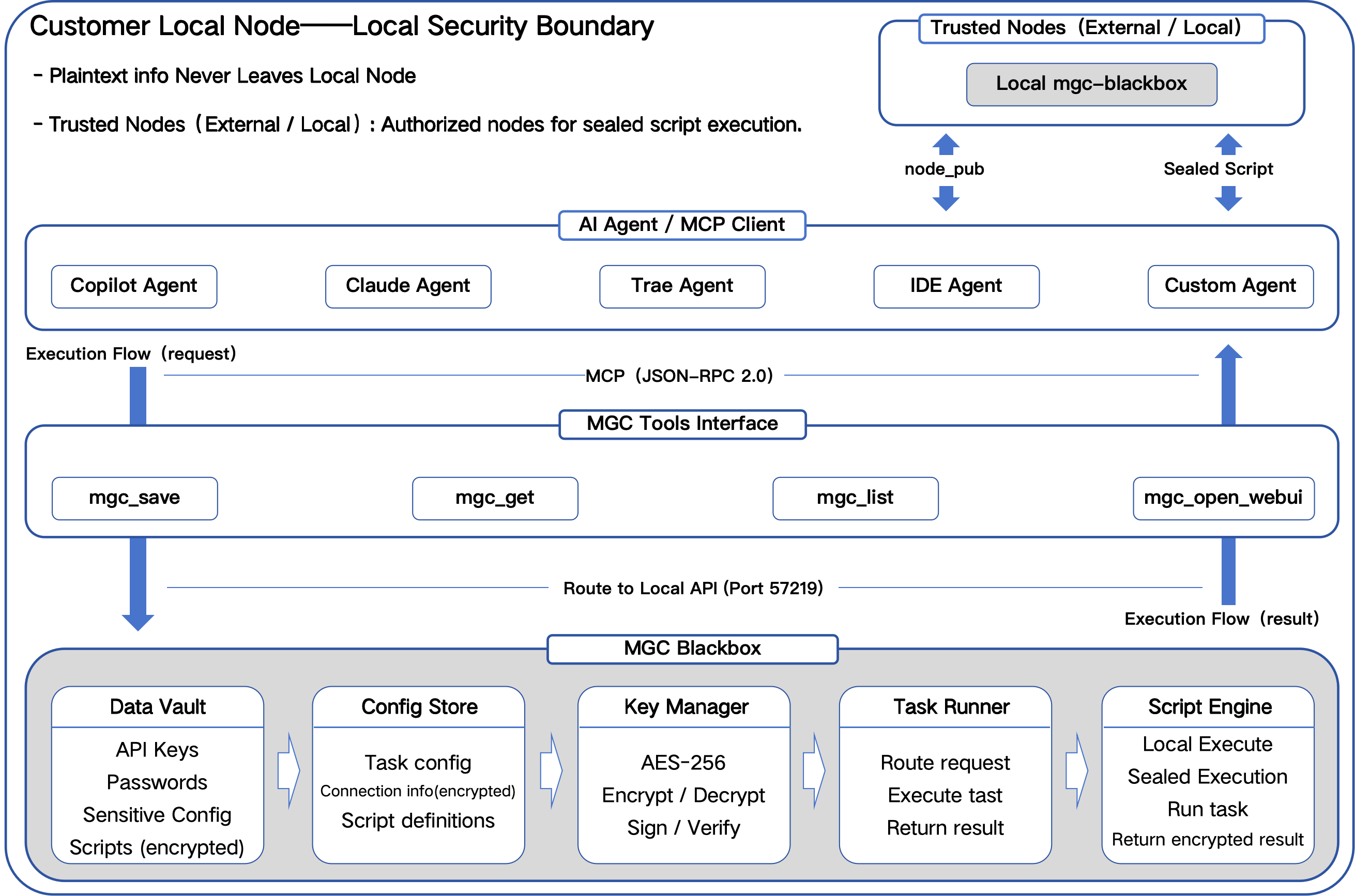
Crypto Layer & Performance
MGC uses a hybrid cryptographic design:
- AES‑256‑GCM — bulk data encryption
- RSA‑2048/4096 — key encapsulation & node authorization
The crypto layer is Cython‑compiled to:
- Improve AES & RSA performance
- Reduce Python overhead
- Provide a sealed, tamper‑resistant execution boundary
- Maintain deterministic behavior across nodes
Features
- Local encrypted storage
- Encrypted execution
- Store‑once authorization
- Environment migration
- Cross‑agent availability
- Cross‑platform support
- No delete function (manual DB deletion only)
- Script sealing for cross‑node execution
Quick Start
1. Install
pip install mgc-blackbox
2. Start Service
mgc
3. Open WebUI
http://127.0.0.1:57218
4. Store a Secret
from mgc import save
save("openai_key", "sk-xxxx")
5. Execute Scripts Securely
Scripts run inside MGC's encrypted boundary.
Example: Save & Retrieve Secrets
from mgc import save, get

save("openai_key", "sk-xxxx")
print(get("openai_key"))
MCP Integration
MGC exposes a local MCP tools interface:
mgc_save— store secrets, scripts, files, or folder snapshotsmgc_get— retrieve encrypted contentmgc_list— browse stored entriesmgc_run— execute a stored script in the encrypted boundarymgc_find— fuzzy-search entries byinfo_type/info_owner/diff_1..3mgc_package— bundle a folder into a sealed.mgc_filemgc_seal_package— ship a sealed package to a trusted nodemgc_open_webui— open the local WebUI
Compatible with Copilot, Claude, Trae, IDE Agents.
Usage Overview
1. Through AI agents (Skills / MCP)
Agents can store secrets, retrieve encrypted items, execute scripts, and seal scripts.
2. Through system scripts (REST API)
External scripts can fetch encrypted items at runtime.
Security Model
- All data remains local
- No cloud upload
- No plaintext logging
- Deterministic execution
- User‑controlled authorization
- Sandbox mode support (fallback hardware fingerprint for restricted environments)
AI Skill Specification
See: docs/skill_spec.md
Authorization
Integration into any third‑party products or AI agents is free,
but requires official authorization to ensure ecosystem integrity.
Contact: mirgincipher@outlook.com
License
See the LICENSE file for full terms.
© 2026 MirginCipher Team. All rights reserved.
---