NotiBuddy
End-to-end encrypted MCP server, CLI, and Claude Code PermissionRequest hook for rendering custom native screens, syntax-highlighted diffs, forms, Live Activities, file handoff, and device-signed approval gates on iPhone and Apple Watch.
Documentation

NotiBuddy
Not just push alerts: an end-to-end encrypted native UI on iPhone and Apple Watch for coding agents, CLIs, and CI.
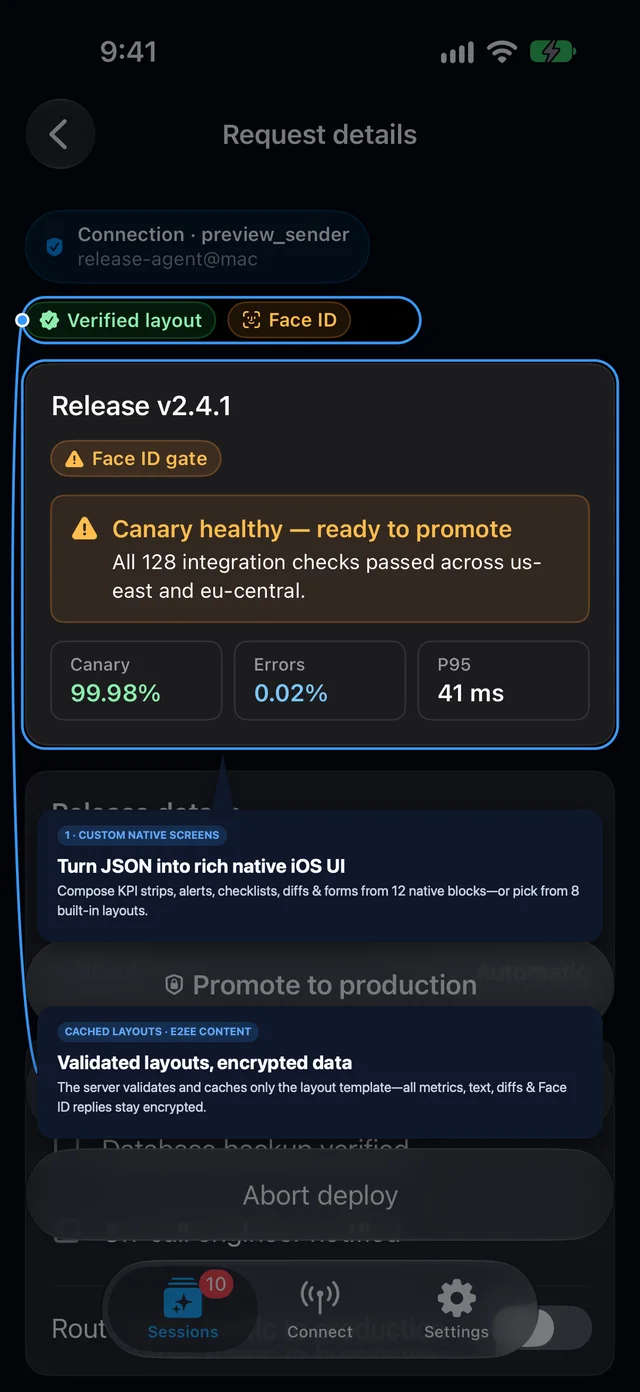
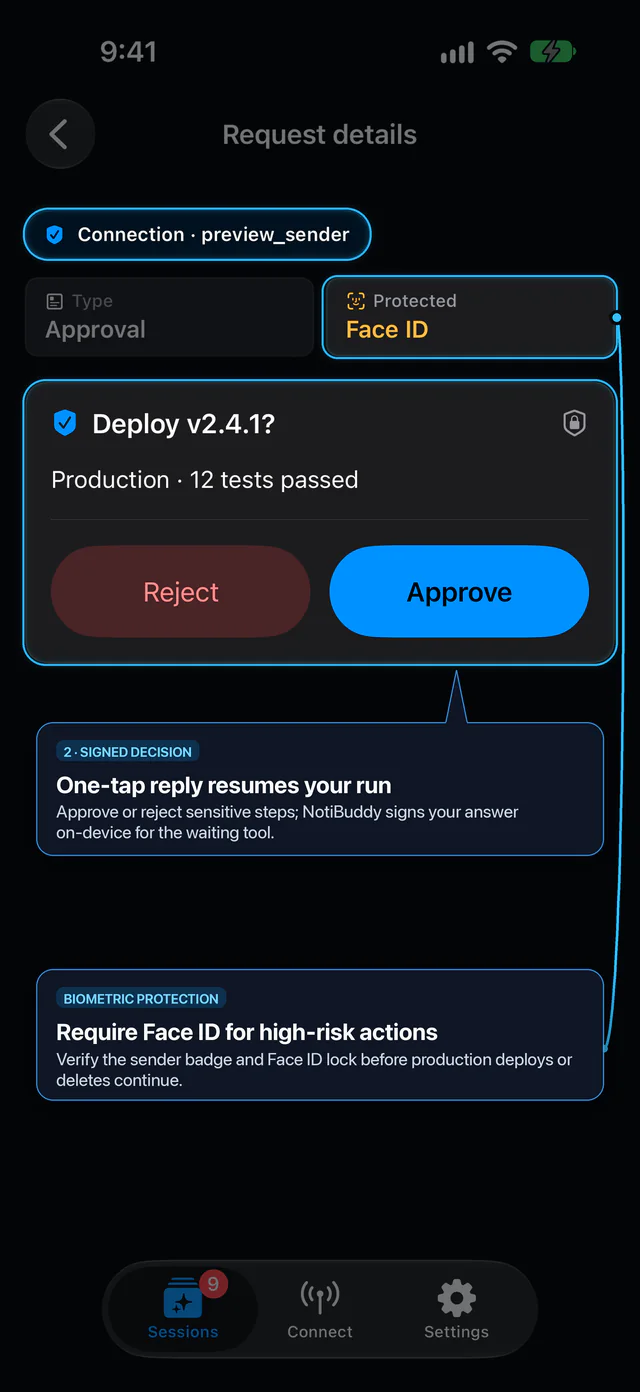
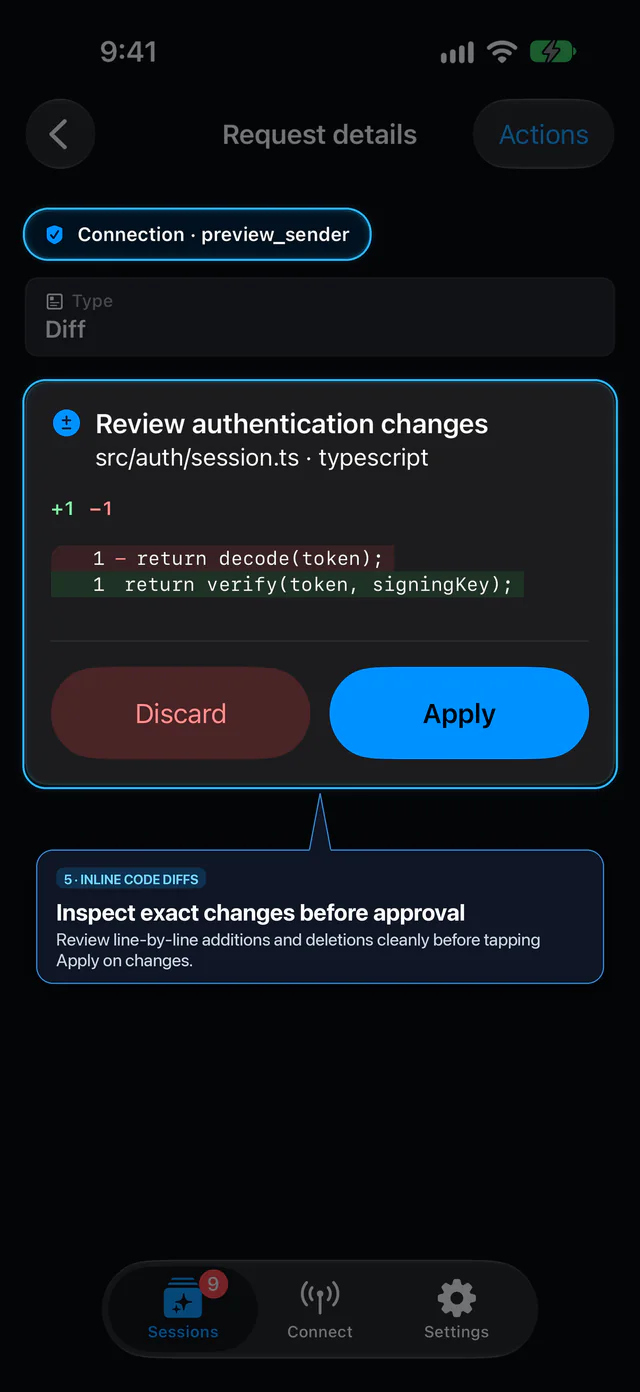
Render custom screens from JSON, review syntax-highlighted diffs, collect forms and replies, run Dynamic Island timers, send files from your phone to your computer, and gate deploys with device-signed approvals.



Website · Setup & QR · Claude Code · Cursor · Codex · Antigravity · GitHub Actions · Protocol · Security
This repository contains the open-source MIT computer client (notibuddy, nb, and notibuddy-mcp on npm), official coding-agent plugins, and Protocol v1 specification from Yourbit, LLC.
How it works
Agent / CLI / CI                      iPhone / iPad / Watch
+---------------+  HPKE (RFC 9180) +  +-------------------+
| nb / MCP      |  Sender P-256 sig   | NotiBuddy app     |
| ~/.notibuddy  |---> Hosted Relay -->| Keychain HPKE key |
| verifies sig  |          \--APNs--->| P-256 sig + opt.  |
| & fail-closed |<--- Hosted Relay <--| device-owner auth |
+---------------+  HPKE (ephemeral) + +-------------------+
                   Device P-256 sig
- Your agent, CLI, or CI runner seals a request with HPKE (RFC 9180), signs it with its P-256 sender key, and sends ciphertext through the hosted relay.
- Your paired iPhone, iPad, or Apple Watch decrypts and renders it natively (custom screen, diff, form, timer, or approval prompt) and signs your reply with its P-256 device key.
- The local client verifies the phone's signature and fails closed: only a verified
resolvedreply matching the approving action (plusauthenticated: truewhen requested) counts as approval.
Content-blind relay: Neither the relay nor APNs can read prompts, choices, diffs, files, or replies. The relay does observe routing metadata (device and sender key IDs, primitive types, timestamps, sizes, delivery status, APNs tokens, and IP addresses) and validates/caches stripped structural skeletons (
tpl_<sha256>) for custom screens.
Quick start
1. Get the Apple companion app
Install NotiBuddy on the App Store for iPhone and iPad (iOS 17+) and Apple Watch (watchOS 10+). On desktop, you can scan the QR code at notibuddy.app/setup.
2. Install the CLI and pair your computer
Install nb, notibuddy, and notibuddy-mcp via Homebrew (recommended if you use agent hooks or shell gates), or run directly with npx -y:
# Homebrew (macOS & Linux):
brew install yourbit-network/tap/notibuddy

# Or global npm install:
npm install -g notibuddy@0.4.1
In the remaining examples, nb is shorthand for the installed nb binary (or npx -y notibuddy@0.4.1).
In the NotiBuddy iOS app, open Connect -> Add a connection -> Share Setup, copy the setup string, and pipe it into pair so the secret never enters shell history:
pbpaste | npx -y notibuddy@0.4.1 pair --to personal
# Verify relay connectivity and phone approval:
npx -y notibuddy@0.4.1 doctor --to personal
Keep setup strings private: Anyone holding an unused
nbpair1.…setup code can race to connect first within its 10-minute automatic window. Never paste pairing strings into an AI chat, terminal history, or repository.
3. Send your first alert and approval gate
When only one destination is paired, everyday CLI commands (notify, gate, activity, files, doctor) select it automatically if --to is omitted.
# One-way alert:
nb notify "Build finished" --sender "Build monitor" --message "All checks passed."

# Fail-closed gate (exits 0 only on verified Approve + device-owner auth):
nb gate "Deploy v1.2 to production?" --requires-auth && ./deploy.sh
Connect your agent
| Client | Setup | Guide |
|---|---|---|
| Claude Code | /plugin install notibuddy --marketplace yourbit-network/notibuddyOptional PermissionRequest hook: /plugin install notibuddy-hooks --marketplace yourbit-network/notibuddy | notibuddy.app/claude-code |
| Codex CLI | codex plugin marketplace add yourbit-network/notibuddy then codex plugin add notibuddy@notibuddy | notibuddy.app/codex |
| Cursor | Load plugin directory plugins/cursor/notibuddy or add stdio MCP JSON below | notibuddy.app/cursor |
| Antigravity | Load plugin directory plugins/antigravity/notibuddy or add stdio MCP JSON below | notibuddy.app/antigravity |
| Claude Desktop & other MCP hosts | Add the local stdio MCP server config below | notibuddy.app/setup |
| GitHub Actions & scripts | Use nb gate --requires-auth with fail-closed exit codes | github-actions · scripts |
Manual local stdio MCP configuration
Using --client <id> starts cleanly before pairing, routes automatically when one phone is paired, and refuses ambiguity if you add a second phone until you bind it with nb bind --client <id> --to <alias>:
{
  "mcpServers": {
    "notibuddy": {
      "command": "npx",
      "args": ["-y", "notibuddy@0.4.1", "mcp", "--client", "claude-desktop"]
    }
  }
}
Static destination pinning (--to / --allow-to) and Homebrew binary config
Pin an MCP server to one fixed destination (tools cannot choose another phone) or an explicit allowlist:
{
  "mcpServers": {
    "notibuddy": {
      "command": "npx",
      "args": ["-y", "notibuddy@0.4.1", "mcp", "--to", "personal", "--sender", "Coding assistant"]
    }
  }
}
If you installed via Homebrew (brew install yourbit-network/tap/notibuddy), you can invoke "command": "notibuddy-mcp" directly with "args": ["--to", "personal", "--sender", "Coding assistant"]. Updating the package version in MCP config does not require re-pairing or new keys.
What you can send
Custom Native Screens (0.4.0+)
Render native iOS screens directly from JSON using 12 composable blocks (vstack, card, divider, heading, text, badge, alert, kpiStrip, keyValueList, checklist, diffViewer, formField) and 8 built-in layouts (db_migration_approval, incident_triage, code_review_form, kpi_status_card, action_checklist, parameter_tuning_form, deployment_gate, multi_choice_audit), or register a custom template:
nb screen register template.json --to personal
nb notify "Promote v2.4.1 to production" --to personal --screen deploy-screen.json --wait 55
The relay validates and caches only the stripped structural template (tpl_<sha256>), while your text, metrics, diffs, and replies stay end-to-end encrypted. Do not combine --screen / screen with message, options, fields, input_placeholder, diff, or resume_id.
Fail-closed approval gates (nb gate)
Use nb gate in shell scripts, deploy wrappers, and GitHub Actions instead of parsing JSON from nb notify. It loops across 55-second relay wait windows on one signed request ID up to --timeout (default 600s):
nb gate "Deploy v2.4.1 to production?" --requires-auth --timeout 600 && ./deploy.sh
| Exit code | Meaning |
|---|---|
0 | Approved (verified resolved reply matching --approve, or lowercase approve for --diff, plus authenticated: true when --requires-auth is set) |
1 | Operational or configuration error (no human decision: pairing, network, quota 402, device error) |
2 | Rejected (human decline, missing required device-owner authentication, or unexpected action) |
3 | Expired or deadline reached without a reply |
130 / 143 | Interrupted (SIGINT / SIGTERM) |
Approval contract: Continue only after a verified
resolvedresponse whoseanswer.actionmatches the expected approving choice (lowercaseapprovefor diffs, not the displayed "Apply" button label) and whoseanswer.authenticated === truewheneverrequires_authwas requested. Never treatpending,expired, timeout, error, or silence as approval.--requires-auth/requires_auth: truerequests device-owner authentication (Face ID, Touch ID, passcode, or unlocked Apple Watch); device signatures prove key possession, not biometric or hardware attestation.
Claude Code PermissionRequest hook (nb hook)
Forward Claude Code permission prompts (including encrypted diffs for Edit calls) to your iPhone or Watch when you step away:
nb hook claude PermissionRequest --client claude-code
By default, nb hook waits --grace 10 seconds before sending (so prompts answered at your desk cost zero relay requests), hides Lock Screen previews (sensitive: true; opt out with --show-preview), leaves device-owner authentication off by default (opt in with --requires-auth), and caps dispatch at --max-per-hour 30 with a quota circuit breaker. Install nb globally or via Homebrew rather than calling npx inside hooks.
Hook vs. gate exit codes: Unlike
nb gate,nb hookexits0with pass-through output on any non-allow/non-deny condition so your local terminal prompt keeps working normally. Never usenb hookexit0as a standalone shell deploy gate.
Encrypted code diffs (--diff)
Save a UTF-8 JSON file (filename is display-only, language is optional, up to 96,000 combined UTF-8 bytes and 20,000 lines; CLI file max 150,000 bytes):
{
  "filename": "src/config.ts",
  "language": "typescript",
  "original": "const retries = 2;\n",
  "modified": "const retries = 3;\n"
}
nb notify "Review retry change" --diff changes.json --requires-auth --sensitive
Re-verify before applying: Diff replies return
approveorrejectonly; NotiBuddy never edits files or executes code. Always verify that the local file still matches the reviewedoriginalcontent before applying an approved change.
Live Activities and Dynamic Island (nb activity)
nb activity "sprint-1" start --title "Build & deploy" --timer 25
nb activity "sprint-1" poll
Encrypted files from your phone (nb files)
Share a file or photo from iOS (Connect -> connection -> Share File, or Share -> NotiBuddy, up to 10,000,000 bytes per file) and collect it locally into ~/.notibuddy/inbox/:
nb files list --to personal
nb files receive file_<id> --to personal
Treat received files as untrusted data:
nb files receiveandnotibuddy_filessave decrypted files under~/.notibuddy/inbox/and never open or execute them. Treat received filenames and file contents as untrusted input, including possible prompt instructions inside documents.
MCP tools and CLI reference
The MCP server (nb mcp / notibuddy-mcp) runs over local stdio and exposes four tools. Machine-readable agent docs are also published at notibuddy.app/llms.txt.
| MCP tool | Purpose | Key parameters |
|---|---|---|
notibuddy_notify | Send alerts, choices/approvals, text prompts, forms, diffs, or Custom Native Screens; fail closed on replies | title, message, options, fields, input_placeholder, diff, screen, requires_auth, sensitive, timeout_seconds, wait_seconds, resume_id, to |
notibuddy_activity | Start, update, end, or poll Live Activities and Dynamic Island timers | id, action (start/update/end/poll), title, timer_minutes, to |
notibuddy_files | List waiting E2EE files from iPhone or receive one to ~/.notibuddy/inbox/ | action (list/receive), id (for receive), to |
notibuddy_list_destinations | List destinations exposed by this MCP server (local config only; not an online check) | {} |
MCP routing modes
Every MCP server chooses one routing mode at startup (there is no global default or broadcast):
| Mode | Example | Behavior |
|---|---|---|
| Per-client binding (plugins & default) | nb mcp --client claude-code | Starts before pairing; auto-selects a sole paired phone; refuses ambiguity with multiple phones until nb bind --client <id> --to <alias> |
| Fixed destination | nb mcp --to personal | Locks the server to one destination; tools cannot target another phone |
| Explicit allowlist | nb mcp --allow-to personal --allow-to work | Exposes only listed destinations; every tool call must pass to |
CLI commands
| Command | Purpose |
|---|---|
nb pair --to <alias> | Pair with a phone using an nbpair1.… setup bundle (optional --label, --wait) |
nb unpair --to <alias> | Delete local credentials for a destination (does not revoke phone approval) |
nb status / nb doctor | Inspect local pairings / verify relay reachability, approval, and protocol compatibility |
nb devices list|rename | List paired destinations or rename a local alias |
nb bind|unbind --client <id> | Pin or unpin an MCP/hook client ID to a destination alias |
nb notify / nb screen register | Send alerts, prompts, diffs, forms, or Custom Native Screens; pre-register custom templates |
nb gate | Fail-closed approval loop returning deterministic CI/shell exit codes (0/1/2/3/130/143) |
nb hook | Agent hook bridge (e.g., nb hook claude PermissionRequest) |
nb activity | Manage Live Activities (start, update, end, poll) |
nb files list|receive | List or decrypt files shared from your phone (--to or --pairing) |
nb mcp | Start the local stdio MCP server |
Security model
NotiBuddy encrypts payloads end-to-end between your computer and your paired Apple device, while stating its exact boundaries plainly:
- HPKE (RFC 9180): Requests use
DHKEM(P-256, HKDF-SHA256)+AES-256-GCMfor the addressed device. The Apple app stores its separate HPKE decryption private key in Keychain (a software key, not Secure Enclave). - Device ECDSA P-256 signatures: Replies are signed with P-256 device keys (Secure Enclave when available, Keychain-protected software key otherwise). A valid signature proves possession of the paired key; it does not attest hardware storage or user authentication. Protected requests enforce
authenticated: true. - Out-of-band pairing: Public keys and device fingerprints are exchanged via HMAC-SHA256-verified
nbpair1.…setup bundles. - Metadata and screen skeletons: The hosted relay and APNs never see plaintext prompts, choices, diffs, files, or replies, but observe routing identities, primitive types, timestamps, sizes, delivery status, usage metadata, APNs tokens, IP addresses, and stripped custom-screen structural templates (
tpl_<sha256>). - Local credentials, revocation, and sender labels: The CLI stores software keys under
~/.notibuddy(mode0700/0600on Unix; private-directory ACLs on Windows) without a hardware keystore.nb unpairremoves local credentials only; disconnect the sender on your phone to revoke its approval.--senderis descriptive text inside the encrypted payload (defaulting to hostname), never an access boundary, private inbox, or return address.
Read the normative specification in PROTOCOL.md and vulnerability reporting instructions in SECURITY.md.
Operational details
Pairing approvals, multiple phones, and Apple Watch delivery
- Automatic vs. manual approval: A one-use setup code can automatically approve the first eligible sender within 10 minutes (
nb pairwaits up to 45s by default;--wait 0returns immediately, max 60s). If Terminal prints Phone approval required, open Connect on your phone, compare the full Sender Key ID, and approve there. Pending manual approvals expire after 15 minutes; a newer request replaces the previous one. Canceling a code does not disconnect an already-approved sender. - Multiple phones & device migration: Pair each phone under a separate
--toalias (1–48 lowercase letters, digits, hyphens, or underscores starting with a letter). Each destination targets one verified phone with an independent sender key; messages are never broadcast. Disconnected identities cannot be reused. On a new phone, create a fresh connection, use Restore Purchases if applicable, and pair again (manage paid slots under Settings -> Phones using your purchase). - Apple Watch & previews: Group delivery to a paired Watch is negotiated explicitly on compatible app/relay versions (configure Watch through the iPhone app). Set
sensitive: trueonnotifyoractivityto keep content off the Lock Screen; authentication-required requests are private automatically. The relay and phone reject legacy plaintext dispatch.
Timeouts, wait budgets, resume, activities, env vars, and JS/TS SDK
- Timeouts vs.
--wait: Interactive requests stay answerable for 3 hours by default (--timeout/timeout_secondsaccepts 1–10,800 whole seconds).--wait/wait_seconds(max 55s) bounds only a single blocking poll before returningpending. - Resuming pending requests: Save the returned request ID and resume with
nb notify --resume <request-id> --to <alias>(do not pass--diffor--screenwhen resuming). Reply private keys remain in owner-only files under~/.notibuddy/pendinguntil completion or expiry. Interrupting an active CLInotifyprints its resume ID if saved. - Activity controls: Activity updates preserve session and timer state (
1 hourlifetime).nb activity <id> pollcollects user controls (pause,resume,extend,cancel), which remain individually encrypted and device-signed. Background delivery is controlled by iOS; the app fetches missed updates on foreground. - Environment variables:
NOTIBUDDY_HOMErelocates the entire local store for testing or custom installs (it does not select a destination profile). The CLI checksregistry.npmjs.organonymously at most once per day and prints a one-line notice to stderr (or once per MCP session); setNOTIBUDDY_NO_UPDATE_CHECK=1to disable. - JS/TS SDK (
NotiBuddyClient): Library callers constructingNotiBuddyClientdirectly should includesenderPub(public P-256 signing point) inNotiBuddyConfigwhen callingdoctor(a successfulregisterSendersupplies it on the same instance). Without verified public identity, diagnostics reportunverified(15s timeout). Diffs can be passed viaclient.ask({ diff, ... }).
Encrypted file transfer limits, --pairing selector, and receipt retries
- Enabling files on existing pairings: New pairings include a separate receiving key. For older pairings, re-run
nb pair --to <alias>with a fresh setup code using the same alias and label, approve on the phone, and restart MCP (finish outstanding requests first, as changing a pairing proof cancels pending relay items). - Quotas and retention: Max 10,000,000 bytes per file, up to 10 waiting files / 100 MB per account, and up to 100 transfers per rolling day. The relay deletes ciphertext after delivery, cancellation, revocation, or 24 hours. There is no background auto-polling receiver daemon; collect files within the 24-hour window. A connection inbox is shared by all programs using that connection key.
- Identity-pinned
--pairingselector: How to receive -> Copy receive command in the iOS app copies a command with--pairing <device_id>:<sender_key_id>(public IDs only; local signing and receiving keys are still required). It continues working across local alias renames, refuses missing or ambiguous matches, and is limited to CLIfilescommands (cannot combine with--to). - Crash-safe receipts and disk-full recovery: Before sending a signed receipt, the receiver verifies the phone signature, size, digest, recipient, and deadline, writes the decrypted file with private permissions, and flushes the file and parent directories (macOS/Linux). If saving or flushing fails (e.g., disk full), delivery is not acknowledged so you can free space and retry before expiry. A lost receipt returns
saved_pending_receipt: repeatnb files receive <id>to retry acknowledgement without re-downloading. Canceling mid-transfer preserves already-saved files and cleans up abandoned staging directories on the next receive.
Development and contributing
Node.js 20 or newer is required. Tests use isolated local fixtures and synthetic test vectors in test-vectors/v1.json (no phone or relay credentials needed):
npm ci
npm run build
npm test
Contributions require the NotiBuddy Contributor Assignment Agreement. See CONTRIBUTING.md for local Gitleaks pre-push hook setup, CI checks, and maintainer OIDC publishing, and CHANGELOG.md for release history.
License
MIT © NotiBuddy Authors · Published by Yourbit, LLC · Support: contact@notibuddy.app