XMemo
User-owned memory for AI agents over remote MCP. Save, search, recall, update, and manage scoped memories across Copilot, Claude, ChatGPT, IDEs, and CLIs.
Documentation

XMemo CLI
One private memory layer for every AI agent.
Install, authenticate, diagnose, and connect XMemo across editors, CLIs, and autonomous agents from one production-ready command line.









Quick start · Integrations · Connection modes · Commands · Security
@xmemo/client is the official control plane for connecting AI tools to
XMemo. It makes setup repeatable, keeps credentials out of
project files, and gives every supported client a consistent path to durable,
user-owned memory.
The package is deliberately small: the CLI runtime, safe client configuration, behavior profiles, XMemo skills, and marketplace metadata. Server code, databases, deployment files, logs, and internal operations remain outside the npm distribution.
Architecture
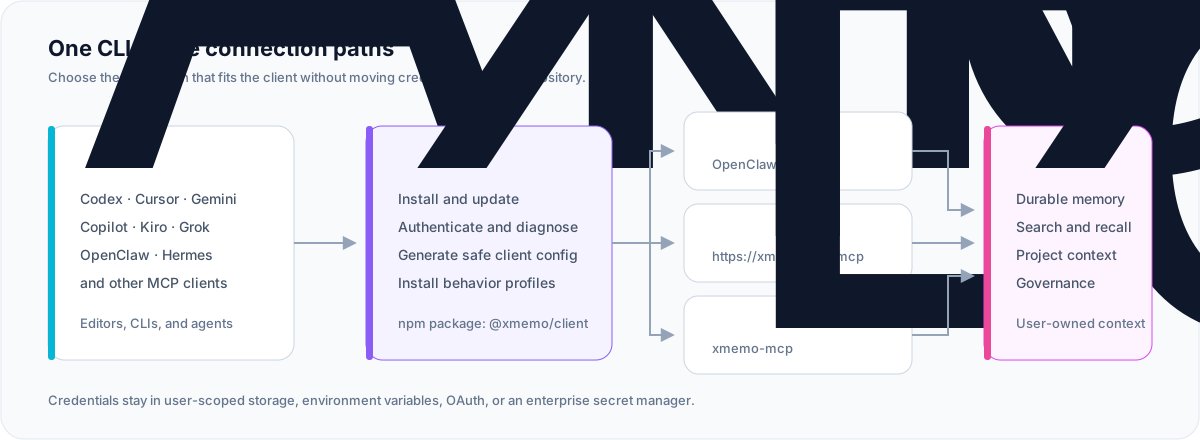
| Package | @xmemo/client |
| Primary command | xmemo |
| Local MCP command | xmemo-mcp |
| Hosted MCP | https://xmemo.dev/mcp |
| Runtime | Node.js 20 or later |
| License | MIT |
Why XMemo CLI
- One control plane — login, diagnostics, configuration, profiles, updates, and smoke checks share one predictable interface.
- Private by design — generated project configuration references a credential; it never embeds the credential value.
- Native where it matters — OpenClaw and Hermes use dedicated memory integrations instead of duplicating the same capability through MCP.
- Portable everywhere else — hosted Streamable HTTP MCP and local stdio cover modern editors, terminals, and agent runtimes.
- Safe automation — supported setup and removal paths offer preview, dry-run, or explicit confirmation before making changes.
- Small supply-chain surface — the npm package is governed by an explicit file allowlist and release provenance.
Quick start
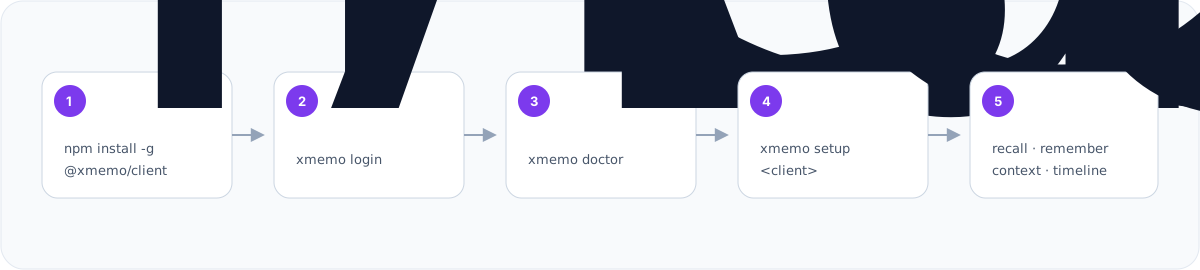
npm install -g @xmemo/client
xmemo login
xmemo doctor
xmemo setup codex
xmemo status
Replace codex with your client. Preview a configuration before writing it:
xmemo setup cursor --dry-run
[!TIP] Start with
xmemo login,xmemo doctor, andxmemo setup <client>. Hand-edit MCP configuration only when a client has no verified setup path.
Supported integrations
| Client | Recommended command | Connection |
|---|---|---|
| Codex | xmemo setup codex | Hosted MCP + behavior profile |
| Cursor | xmemo setup cursor | Hosted MCP + Bearer Token + behavior profile |
| Copilot CLI | xmemo setup copilot | Local authenticated proxy |
| Gemini CLI | xmemo setup gemini | Hosted MCP + OAuth |
| Antigravity | xmemo setup antigravity | Hosted MCP + OAuth |
| OpenClaw | xmemo setup openclaw | Native memory plugin + Skill |
| Hermes | xmemo setup hermes | Native memory provider |
| Kiro | xmemo setup kiro | Hosted MCP + Bearer Token |
| Grok | xmemo setup grok | Hosted MCP |
| Other MCP clients | xmemo mcp config --client generic | Generated template |
The client registry also covers Windsurf, Cline, Continue, Claude Desktop,
Claude Code, Kimi Code, Zed, JetBrains, OpenCode, Qwen, Trae, and compatible
MCP hosts. Run xmemo mcp list for the current machine-readable catalog.
Connection modes
Hosted MCP
The recommended universal path is the XMemo Streamable HTTP endpoint:
https://xmemo.dev/mcp
OAuth-capable clients complete authentication in the browser. Other clients
reference XMEMO_KEY without copying its value into repository files.
Generic configuration shape:
{
  "mcpServers": {
    "XMemo": {
      "type": "streamable-http",
      "url": "https://xmemo.dev/mcp",
      "headers": {
        "Authorization": "Bearer ${XMEMO_KEY}"
      }
    }
  }
}
Client configuration keys differ; prefer xmemo setup <client> over copying
this generic example directly.
Local stdio MCP
xmemo-mcp is the dedicated stdio entry point for marketplaces and clients
that launch a local process. Safe discovery exposes 20 tools, three prompts,
and two documentation resources without a token. Tool execution still requires
authentication.
After a global installation:
xmemo-mcp
Install-free MCP configuration:
{
  "mcpServers": {
    "XMemo": {
      "command": "npx",
      "args": [
        "-y",
        "--package",
        "@xmemo/client@latest",
        "xmemo-mcp"
      ]
    }
  }
}
xmemo mcp serve is equivalent when the CLI is already installed.
Native integrations
OpenClaw and Hermes have dedicated memory providers. Their default setup avoids installing a second, duplicate XMemo tool surface.
# Native OpenClaw plugin + XMemo Skill
xmemo setup openclaw

# Native Hermes memory provider
xmemo setup hermes
Add hosted MCP only when an explicit fallback is desired:
xmemo setup openclaw --with-mcp
xmemo setup hermes --with-mcp
Use --mcp-only to skip the native integration and install only the hosted MCP
fallback.
Authentication
Browser login
Recommended for personal accounts:
xmemo login
xmemo auth status
The CLI uses the hosted device-login flow, waits for browser approval, and
asks once before storing the issued credential unencrypted in the current
user's XMemo config directory. The exact path is shown before approval, file
permissions are restricted where the operating system supports it, and the
credential value is never printed. Prefer XMEMO_KEY or a managed secret store
on shared systems.
For non-interactive automation, record the same decision explicitly:
xmemo login --allow-plaintext
Existing token
Pipe an existing token through stdin so it does not appear in command history:
printf '%s\n' 'your-token' | xmemo token add --from-stdin --allow-plaintext
xmemo token status --verify
PowerShell:
$xmemoToken = Read-Host "XMemo token"
$xmemoToken | xmemo token add --from-stdin --allow-plaintext
Remove-Variable xmemoToken
For CI and managed workstations, expose XMEMO_KEY through the platform's
secret manager. Do not commit it to .env, MCP configuration, logs, issue
reports, or chat transcripts.
Command reference
Lifecycle and diagnostics
xmemo --version
xmemo update
xmemo update --dry-run
xmemo doctor
xmemo discovery show
xmemo status
xmemo privacy
Authentication
xmemo login
xmemo auth status
xmemo auth-status --verify
xmemo token status --verify
xmemo token add --from-stdin --allow-plaintext
xmemo env example --shell bash
Client setup
xmemo setup <client>
xmemo setup <client> --dry-run
xmemo setup --all
xmemo setup openclaw [--with-mcp|--mcp-only]
xmemo setup hermes [--with-mcp|--mcp-only]
Direct XMemo service client
xmemo memory add --content "Remember this" --path notes/example --json
xmemo memory search "example" --json
xmemo context recall "resume this task" --include-knowledge --json
xmemo state save --current-task "ship the client" --next-action "run tests" --json
xmemo state restore --json
xmemo restart snapshot --json
xmemo restart restore --snapshot-id <snapshot-id> --json

xmemo knowledge add --base <base-id> --file ./guide.pdf --title "Guide" --json
xmemo knowledge search "setup" --base <base-id> --json
xmemo knowledge read <item-id> --json > knowledge-view.json
xmemo knowledge update <item-id> --text "Updated" --from knowledge-view.json --publish --yes --json

xmemo dream preview --wait --json
xmemo dream show <run-id> --json > dream-view.json
xmemo dream apply <run-id> --item <candidate-id> --from dream-view.json --yes --json

xmemo cloud-skill list --json
xmemo cloud-skill add --file ./SKILL.md --json
xmemo cloud-skill show <skill-id> --json > skill-view.json
xmemo cloud-skill update <skill-id> --from skill-view.json --file ./SKILL.md --json
xmemo cloud-skill run <skill-id> --input ./args.json --from skill-view.json --yes --json
All direct service commands support a single machine-readable JSON envelope.
Knowledge update, Dream apply, and Cloud Skill run use the readReceipt from a
saved read/show result so the CLI never silently substitutes a newer revision.
Set XMEMO_KNOWLEDGE_BASE_ID for a non-interactive default knowledge base.
For a long knowledge item, continue the same fixed revision with
xmemo knowledge read <item-id> --from knowledge-view.json --offset <n>.
Run xmemo doctor --services --json for read-only Knowledge, Dream, and Cloud
Skill diagnostics; it deliberately does not claim write or production readiness.
Cloud Skill add/update already target the safe create-only and content-CAS
contracts. They fail with SERVER_CONTRACT_REQUIRED on older services and do
not fall back to legacy upsert routes. Binary Knowledge item updates similarly
require a new version of the same server Document; use --document and
--document-version after that version has been uploaded.
The normal login scopes remain unchanged. Request additional service scopes explicitly when needed, for example:
xmemo login --scopes memory:read,memory:write,memory:restore,knowledge:read,knowledge:write
MCP and behavior profiles
xmemo mcp serve
xmemo mcp list
xmemo mcp config --client generic
xmemo mcp add <client> --write
xmemo mcp proxy
xmemo profile install <client>
xmemo profile status <client>
xmemo profile uninstall <client>
xmemo smoke --client codex
Safe removal
xmemo uninstall <client> --dry-run
xmemo uninstall <client> --yes
xmemo uninstall --all --dry-run
xmemo uninstall --all --yes --profiles
Only XMemo-owned entries and marker-scoped behavior profiles are removed. Unrelated MCP servers, credentials, and device identity remain intact.
Run xmemo help or xmemo <command> --help for complete, version-matched
options.
Client notes
Codex and Cursor
xmemo setup codex
xmemo smoke --client codex

xmemo setup cursor
Both setup paths write a user-scoped MCP entry and can install a marker-scoped
memory behavior profile. Use --no-profile to configure MCP only. Cursor's
public marketplace plugin remains OAuth-first and contains no bearer-token
configuration.
Gemini CLI and Antigravity
xmemo setup gemini
xmemo setup antigravity
These clients use hosted MCP OAuth. Their generated configuration carries no token value; restart the client and complete the browser login on first use.
OpenClaw
xmemo login
xmemo setup openclaw
openclaw xmemo status
The setup command installs or updates @xmemo/openclaw-memory, installs the
XMemo Skill, reuses the shared XMemo credential, and checks plugin status.
Hermes
xmemo login
xmemo setup hermes
The setup command installs or updates hermes-xmemo, configures the native
provider, and synchronizes the user-scoped XMemo credential with Hermes.
Copilot CLI
xmemo login
xmemo setup copilot
xmemo mcp proxy
Copilot CLI receives a local proxy entry. The proxy reads the credential from user-scoped storage, adds identity metadata, and forwards requests to hosted MCP without writing secrets into Copilot configuration.
Security by default
| Control | Default behavior |
|---|---|
| Telemetry | No CLI analytics or usage telemetry |
| Credential output | Token values are never printed |
| Project files | Generated configuration references secrets; it does not embed them |
| Discovery | doctor, discovery show, and public capability discovery send no token |
| Identity | One stable, non-secret agent-instance ID is stored outside git |
| Writes | Setup supports preview/dry-run; broad removal requires confirmation |
| Local credential storage | Interactive login asks first; non-interactive writes require --allow-plaintext; stored tokens are unencrypted |
| Package contents | An npm files allowlist excludes tests, operations, logs, and server code |
Credential precedence and compatibility aliases are documented by:
xmemo env example --shell bash
xmemo privacy
For private or self-hosted deployments, set XMEMO_URL or pass
--url <service-url>. MEMORY_OS_URL remains a compatibility alias.
Package boundary
Published to npm:
bin/
docs/assets/
src/
skills/
plugins/kiro/
plugins/xmemo/
README.md
LICENSE
Not published:
.github/
docs/analysis/
docs/architecture/
test/
coverage/
server code
database migrations
deployment files
logs and local state
Development
npm install
npm run release:check
npm run lint
npm test
npm run pack:dry-run
Before proposing a release, run the complete package gate:
npm run prepublishOnly
The local stdio server can be inspected directly:
node bin/mcp-stdio.js
Release model
Normal releases are produced by GitHub Actions from the exact tagged commit, not from a mutable branch checkout or a developer workstation:
develop → CLI version sync → test → cli-v tag → GitHub Actions → npm publish --provenance
The CLI package and hosted MCP service intentionally have separate version streams:
- CLI/npm version:
package.json,package-lock.json, and the npm package entry inserver.json. - Hosted MCP/Registry version: the top-level
server.json.versionandlhm.plugin.json. This version follows the deployed XMemo service.
node scripts/check-release-version.mjs verifies both contracts. A
cli-vX.Y.Z tag must equal the CLI/npm version and publishes only npm. The
MCP Registry is published separately with the Publish MCP Registry metadata
workflow using mcp-vX.Y.Z, which must equal the hosted MCP/Registry version.
The separate npm publish workflow is manual recovery only, so creating a
GitHub Release cannot publish twice.
Documentation and support
Canonical service documentation lives at xmemo.dev/docs. This repository documents the client; the pages below document the hosted service it connects to.
| Quickstart | xmemo.dev/docs/quickstart |
| MCP overview and per-client setup | xmemo.dev/docs/mcp/overview |
Tool reference (remember, recall, search, …) | xmemo.dev/docs/tools/remember |
| REST API | xmemo.dev/docs/api/authentication |
| Troubleshooting | xmemo.dev/docs/troubleshooting |
| Machine-readable index | xmemo.dev/llms.txt |
License
MIT © 2025–2026 Yonro