wtf-wave
Debug VCD, FST and GHW waveforms: decode AXI, SPI and UART, search cycles, show evidence in the user's viewer.
Documentation




Waveform Terminal Frontend: a Vim-like terminal viewer for VCD, FST and GHW waveforms that
decodes AXI, SPI and UART into transactions you can filter, count and measure. It runs where your
simulations run, over ssh and in tmux, and opens no network connections. Also what you say when
the bus goes X.
The site has a quick start, recipes and every key.
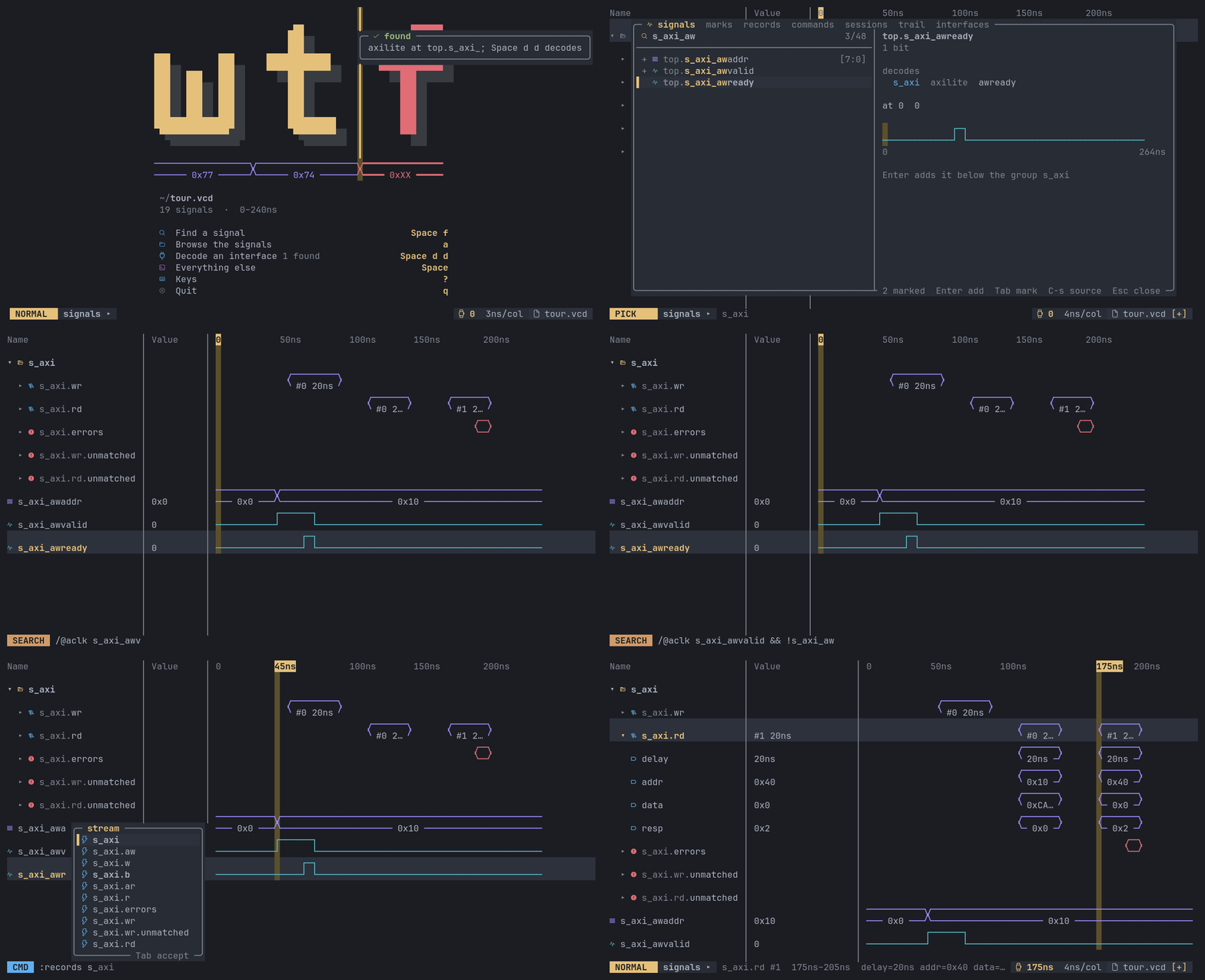
Signals added from the tree, an AXI4-Lite bus decoded into its writes and reads with their
latency, a search for the cycles where the address waits for ready (mark 2), and a jump from the
list of reads to the one answered with SLVERR, unfolded into its fields. To try it, clone this
repository and run cp docs/demo.vcd tour.vcd and wtf tour.vcd.
Features
- Decoding. AXI-Stream, AXI4-Lite, AXI4, SPI and UART into records (transfers, frames,
transactions with their latency, protocol errors), and your own protocols defined in a few
lines. The records browser filters, sorts and counts them, and
Enterjumps to one. - Search.
/0x40finds a value;/valid && ready && data == 0x40an expression;/@clk fell(valid) && !past(ready)a protocol violation, cycle by cycle. - Vim-like. Time is the line axis:
h/lmove the cursor,w/bjump between transitions,gg/Ggo to the start / end,:2000nsgoes to a time,z/xzoom.dd,J/K,rchange the rows, andutakes any change back.Spaceopens a menu of the rest, every entry with its key. The mouse works too: click to place the cursor, Ctrl+wheel to zoom. - Signals. A finder with a preview, a signal tree, groups, buses expanded into bits, structs,
records and arrays as one row, radixes (hex, binary, decimal, signed, octal, ASCII, float,
fixed point, and enum names from FST files), computed signals (
data[7:4],{a, b}). - Cursors. The cursor and up to eight marks, with the time between them on a ruler.
- Sessions. What you look at is saved in a TOML file next to the trace and comes back the next time. After you rerun the simulation, the window reloads it by itself, decodes included.
- Display. Dark and light themes or your own colours, X and Z told apart by shape as
well as colour,
NO_COLOR, and plain box drawing or ASCII for fonts and terminals that need it (--glyphs).--snapshotprints a screen as text, for CI logs and bug reports.
Install
On Linux or macOS (x86_64 or arm64):
curl -fsSL https://raw.githubusercontent.com/xtrollyj00/wtf/main/install.sh | sh
This puts the wtf command in ~/.local/bin, checked against the release's checksum. The
archives are on the releases page too. Or build it
from source:
cargo install --locked --git https://github.com/xtrollyj00/wtf wtf-wave
Windows is not supported.
Use
wtf trace.fst              # or .vcd or .ghw; the format is read from the content
wtf                        # the start screen: recent traces
wtf -S my.session.toml trace.fst
wtf --snapshot 120 trace.fst   # one screen as text, for CI logs and bug reports
wtf --snapshot 120x30 --ansi --keys '?' trace.fst   # in colour, after pressing keys
wtf shows what the file holds. A VCD keeps less than an FST: no enum names and no scope types, so a struct or union is a plain scope.
The first start asks which glyphs your terminal draws well and whether you want dark or light
(wtf --setup asks again). Then wtf shows what to do first: Space f finds a signal by name,
a browses the signal tree, and Space d d decodes an interface wtf found in the trace. ?
shows the keys, : takes commands, :w saves the session, q quits. The
quick start walks through it on docs/demo.vcd (in a clone of this repository).
For agent users
If you use an AI coding agent, wtf can give it your traces: the same decoders and records, and it shows you what it found. The agents page has the full story.
Register the MCP server once, for example with Claude Code:
claude mcp add wtf -- wtf --mcp
A VCD is text, and an agent left to itself reads it with cat and grep. Claude Code defers an
MCP server's tools until the agent searches for them, which makes that likelier: on NVIDIA's CVDP
debug problems, agents given the failing run's VCD with wtf's tools deferred called wtf in none
of 10 runs. Keep wtf's tools loaded (ENABLE_TOOL_SEARCH=false in the environment), and tell the
agent in your project's CLAUDE.md or AGENTS.md: "Read waveforms (VCD, FST, GHW) with the wtf
MCP server's tools."
Then ask the agent about a trace. It opens it in a workspace of its own and answers
from the decoded values. Asked for failed reads in docs/demo.vcd, an agent calls the command
tool with decode bus axilite clock=aclk prefix=s_axi_, then records on bus.rd with
where: "resp != 0", and gets:
1 of 1 matching, of 2
start	end	delay	addr	data	resp
175ns	205ns	20ns	0x40	0x0	0x2
When it has found something, it prepares the rows and puts marks on the events, then presents
them in your open wtf window (:undo gives you your own view back). With no window open, it writes
a session file for you to open. While it works, your window on the trace shows each step it takes,
and :follow shows its workspace as it builds it.
https://github.com/user-attachments/assets/19ea36cd-b8ff-4986-a786-f335e6e31a12
wtf-bench agent measures how much it helps: it gives an agent failing RTL testbenches to debug
and fix, with wtf and without it. Every run fixed its bug either way; 17 of 20 runs with wtf also
had every answer right (when and where it went wrong), against 11 of 20 without. The numbers and
how they were taken are in bench/RESULTS.md.

Before 1.0.0
wtf is young and changes fast. Until 1.0.0 nothing is kept backward compatible: session files,
the MCP tools' arguments, keys and commands change whenever a better design turns up, and the
old form stops working. A commit that breaks something says so (feat(core)!: ..., with a
BREAKING CHANGE: note on what to do instead).
Documentation
The site has a quick start on docs/demo.vcd, how wtf works,
recipes, every key and command, configuration, the agent setup and its reference, and
troubleshooting.
The design is in spec/, one file per topic: the keys, commands, search,
sessions, the MCP server and the decoders. ROADMAP.md says what comes next;
the shortcuts taken so far are the known-limit issues.
Contributing
Bug reports, ideas for the screen, agent benchmark tasks and speedups are all welcome:
CONTRIBUTING.md says how.
License
Licensed under either of Apache License, Version 2.0 or MIT license at your option.
Unless you explicitly state otherwise, any contribution intentionally submitted for inclusion in wtf by you, as defined in the Apache-2.0 license, shall be dual licensed as above, without any additional terms or conditions.