BugHerd
officialOfficial BugHerd MCP server. Website feedback for coding agents: screenshots, console logs, replay.
What can you do with BugHerd MCP?
- Read full task context — Pull a task's screenshot, URL, CSS selector, browser/OS, severity, and client comment via
get_task_details. - List and triage tasks — Retrieve tasks by project, by assignee, or across all projects with
list_project_tasks,list_my_tasks, andlist_all_tasks. - Update tasks — Mark tasks done, reassign, reprioritize, or change severity and due date using
update_task. - Post task comments — Add fix summaries, analysis, or client updates to a task thread with
add_comment. - Create tasks and projects — Log new tasks or spin up projects via
create_taskandcreate_project, and adjust settings withupdate_project.
Hosted MCP Server
npx add-mcp 'https://mcp.bugherd.com/mcp'Installs into Claude Code, Codex, Cursor and more
Documentation
Your Agency Workflow Before and After BugHerd MCP
Without BugHerd MCP
Monday morning.
15 tasks came in over the weekend.
- Open BugHerd, read through each task manually
- Switch to the codebase, hunt for the relevant file
- Download screenshots separately
- Make the fix
- Switch back to BugHerd, update the status
- Write a comment so the client knows
- Repeat 14 more times

With BugHerd MCP
"Work through the open tasks on the Henderson project."
Your AI coding agent:
- Lists all open tasks
- Reads each task (screenshot/recording, URL, CSS selector, client comment, attachments):
- Triages and acts on each task
- Marks each task done
- Posts a summary to each task thread
- You review what's done – on the board or in the task thread
✓ 15 tasks. One prompt.
TRIAGE. RESOLVE. PREVIEW.
Your AI triages and resolves. You review. Less sorting. Less fixing. More time on what actually needs you.
Your AI agent triages the feedback queue and resolves the tasks. You review what it's done. That's the new agency workflow – less sorting, less switching, more time on the work that actually needs you.
Clients leave feedback on your website
They simply point, click and comment – BugHerd grabs a screenshot, saves technical details and creates a task for your team to track.


“A click and comment tool that has immensely helped our agency's workflow!”
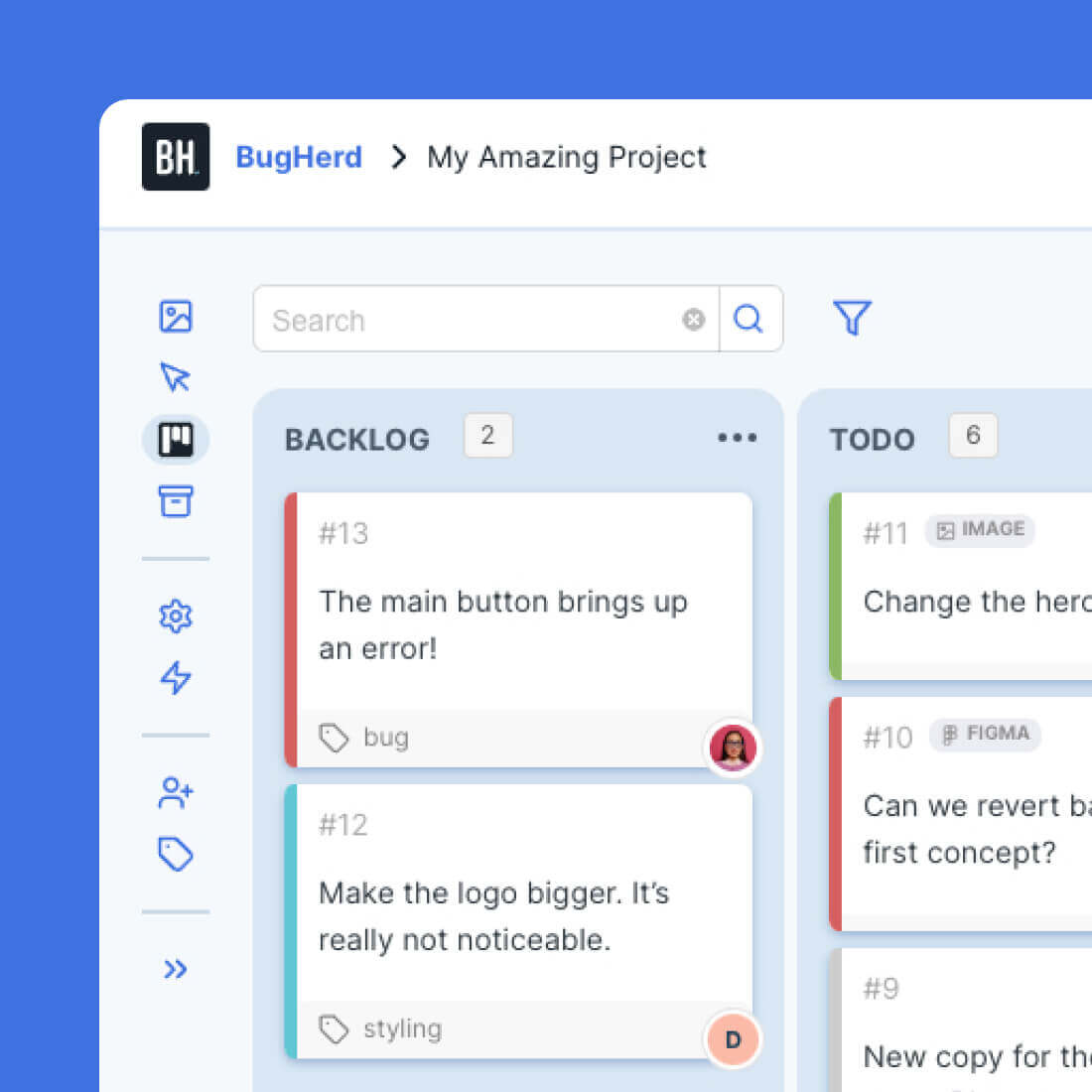
Every comment flows into a Kanban task board
All feedback automatically becomes a trackable task on a Kanban board, along with a screenshot and user technical details (URL, OS, browser, etc), ready for your AI to action.
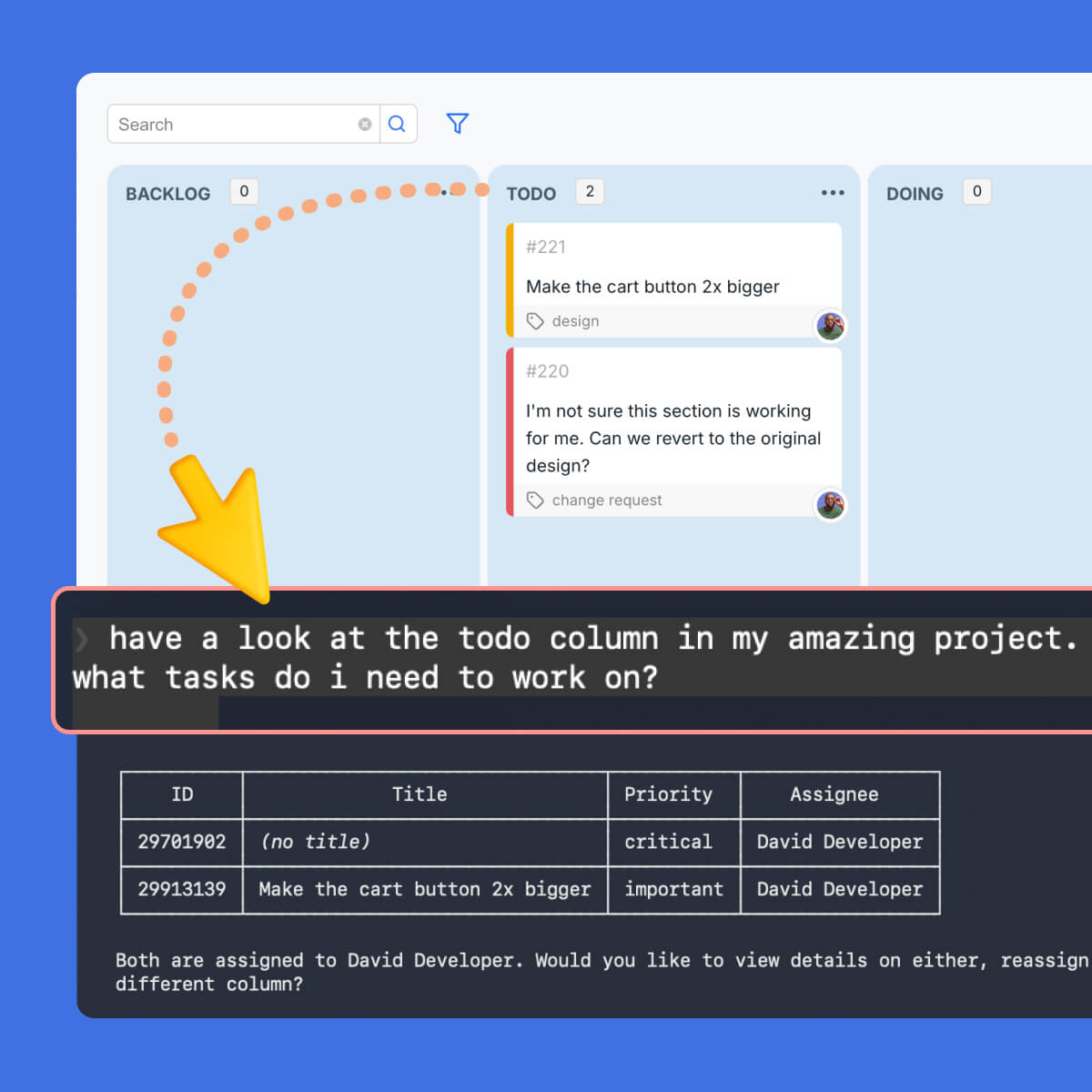
Your AI reads every task, triages and acts on it
Your AI reads every client comment, screenshot, recording, URL, and full context – making any changes right in your codebase, CMS or design tool.
- Read task context: get_task_details
- List tasks by project, assignee, or across all projects: list_project_tasks · list_my_tasks · list_all_tasks
- Mark done, reassign, reprioritize, update severity or due date: update_task\
- Post fix summaries, analysis, or client updates into the task thread: add_comment
- Create new tasks, projects, or update project settings: create_task · create_project · update_project
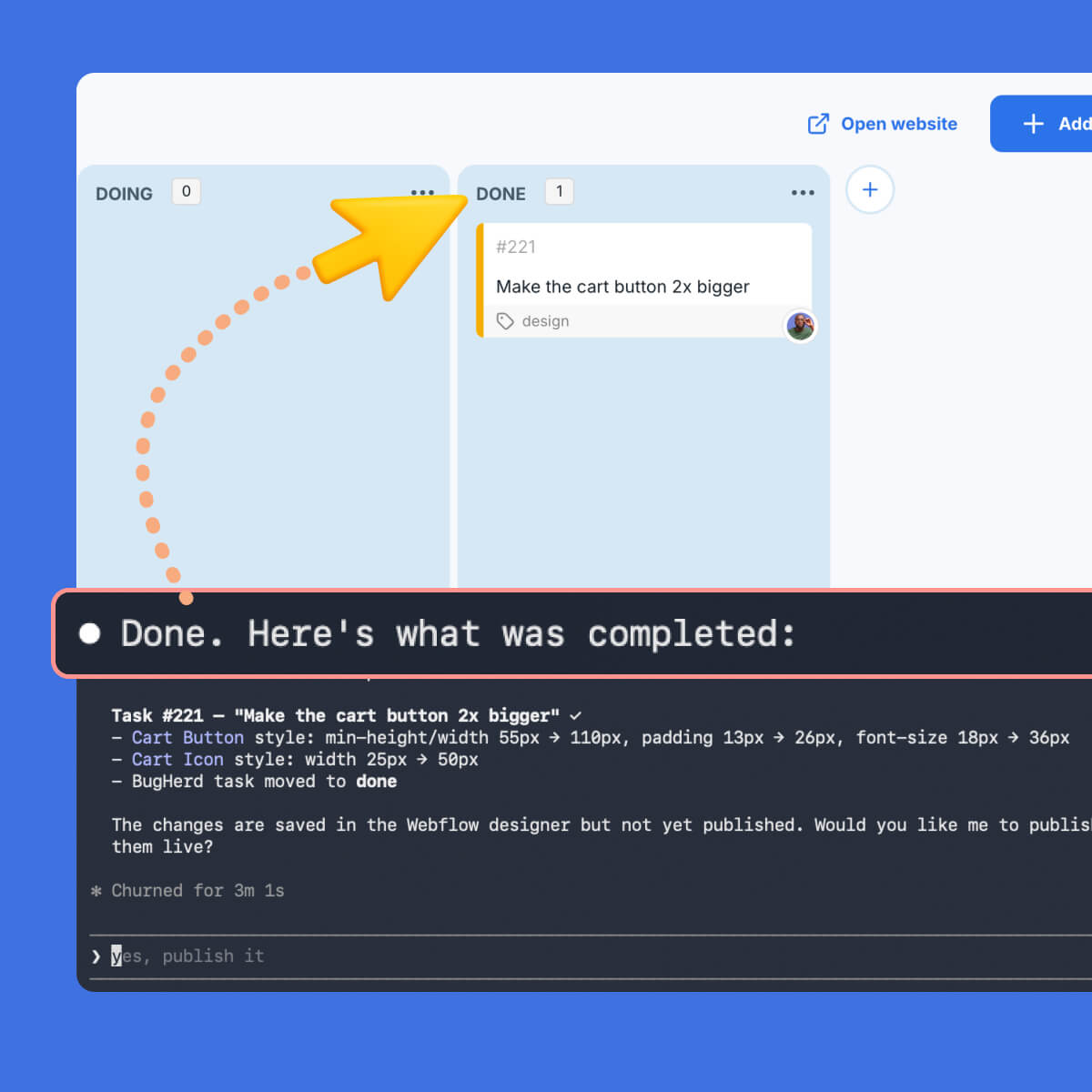
You review what the AI has done
You review what the AI has done on the Kanban task board, in the task thread, or in the client update. Nothing ships without your eyes on it.
You don't have to do the sorting, reading, fixing, and updating yourself.
BUILT FOR WEBSITE DEV AGENCIES
Every role in your agency. One integration.
BugHerd MCP plugs into how your whole team already works. From the developer clearing the revision queue to the agency owner getting visibility across every active project.
Developers
Clear the revision queue
"Work through the open tasks on the Henderson project."
That's the whole prompt. The AI lists open tasks, reads each client comment, pulls the screenshot or recording, triages each task, marks it done, and posts a summary comment; keeping the board clean and nothing gets missed. You review what it's done.
The revision round that used to eat Monday morning is handled before the first coffee.
Designers
Visual feedback without
back-and-forth
Account Managers
Client update in two minutes
"Summarize what we completed for Acme this week, what's still open, and what we need from the client."
The AI reads completed and open tasks, summarizes progress, drafts the client update, and posts it back into BugHerd as a comment.
What used to take thirty minutes of digging now takes two. And because it uses the client visibility flag, internal notes stay internal.
Agency Owners
Visibility across every client project
Project Kickoff
Brief to BugHerd before the call ends
WHAT YOUR AI AGENT RECEIVES
Everything it needs. Already captured.
The moment a client leaves feedback in BugHerd, your AI agent has everything it needs to act. No briefing, no copy-pasting, no explaining the context. It's all already there.

The client's comment
Verbatim, in plain language, plus any attachments.

A screenshot
Exactly what the client saw on the page.

The page URL
No guessing which route, template, or environment.

Browser & OS
Version, resolution, window size, user agent.
Your AI doesn't need to ask questions. It already knows what to do.
How to connect BugHerd MCP
Note: You need to be subscribed to BugHerd before following the steps below.
1
Head to the Integrations screen inside your BugHerd project and follow the setup guide for your AI tool.
2
Connect BugHerd to the tools your team already uses. BugHerd MCP works with every major AI coding tool and agent: Claude Code, Claude AI, Cursor, ChatGPT, VS Code + Copilot, Windsurf, Codex CLI, Gemini CLI, Zed, Onyx AI and more. Setup takes under five minutes.
3
Prompt your AI in plain language. For example: " Work through the open tasks on the Henderson project." It handles the rest - you review what's done.
11 Tools/Functions. Read and Act.
Once connected, your AI agent can read feedback, act on tasks, post updates, and build new projects - all using natural language.
Tool (function)
What it does
READ
get_task_details
Full context — screenshot/recording, URL, CSS selector, browser & OS, severity, client comment, attachments
list_project_tasks
All tasks for a specific project
list_my_tasks
Tasks assigned to or created by you
list_all_tasks
Tasks across all your projects
list_projects
All projects you have access to
get_project_details
Project metadata, settings, and progress
ACT
update_task
Mark done, reassign, reprioritise, update severity or due date
add_comment
Post fix summaries, analysis, or client updates into the task thread
create_task
Log new tasks from a client review or discovery session
create_project
Spin up a new BugHerd project
update_project
Modify project settings and configuration
Your AI agent just joined the team.
BugHerd MCP is live in beta and free for all users. Connect your AI tool in under five minutes and let it start working through your feedback queue today.
Get Started with BugHerd.
BugHerd offers a free 7-day trial where you can test every feature on your own site. No credit card is required to get started.
You can also book a 1:1 demo with a BugHerd product specialist to see exactly how BugHerd works, and how it fits into your agency's specific workflow.
Already a BugHerd customer?
Read the Setup Guide for help connecting BugHerd MCP.
And remember that you can always message our stellar Support team at support@bugherd.com
Frequently asked questions
Here’s the answer to some commonly asked questions to help you discover if BugHerd is the right tool for you.
What does MCP mean?
MCP stands for Model Context Protocol. It's an open standard that lets AI tools connect to external apps and read or act on real data. BugHerd MCP uses this standard to give your AI agent direct access to your client feedback, task board, and project settings.
What is BugHerd MCP?
BugHerd MCP is a Model Context Protocol server that connects your AI tool (Claude, Cursor, ChatGPT, VS Code, Windsurf, etc) directly to your BugHerd projects, tasks, and client feedback. Your AI can read the BugHerd tasks, action the feedback, update statuses, post comments, and create new work, all from a plain language prompt.
What can BugHerd MCP do?
The BugHerd MCP enables your AI agent to read client feedback with full context, triage and prioritize tasks, action feedback tasks, mark tasks as done, reassign work, post comments and client updates, create new tasks and projects, and pull cross-project status reports - all from a single prompt.
Which AI tools work with BugHerd MCP?
BugHerd MCP works with the following AI tools: Claude Code, Claude AI, Cursor, ChatGPT, VS Code with Copilot, Windsurf, Codex CLI, Gemini CLI, Zed, and Onyx AI. Setup takes under five minutes for each.
How do I connect BugHerd to Claude Code?
To connect BugHerd to Claude Code go to the Integrations screen inside your BugHerd project and select Claude Code. Follow the setup guide — it takes under five minutes. Full install guides are available for every supported AI tool. Access the BugHerd & Claude Code integration guide.
How do I connect BugHerd to Cursor?
To connect BugHerd to Cursor go to the Integrations screen inside your BugHerd project and select Cursor. A step-by-step setup guide walks you through the connection. Once connected, Cursor can read your tasks, act on feedback, and update your board directly. Access the BugHerd & Cursor integration guide.
Does BugHerd MCP work with ChatGPT?
Yes. BugHerd MCP connects to ChatGPT via the MCP standard. Once connected, ChatGPT can read your BugHerd tasks with full context and act on them; triaging feedback, drafting client updates, and pulling cross-project status reports. Access the BugHerd & ChatGPT integration guide.
Is BugHerd MCP free?
Yes. BugHerd MCP is currently in beta and free for all BugHerd users.
What information does BugHerd send to my AI agent?
When your AI reads a BugHerd task, it receives the client's comment, a screenshot of what they saw, the page URL, browser and OS details, task status, severity, assignees, due date, tags, the client visibility flag, and the full comment history. Everything your AI needs to act, already captured automatically the moment the client leaves feedback.
Can BugHerd MCP update task statuses automatically?
Yes, BugHerd MCP can update task statuses automatically. Your AI agent can mark tasks as done, reassign them, change severity, update due dates, and move tasks between board columns, all from a natural language prompt.
Yes, your AI agent can post comments directly back into BugHerd, specifically into any task thread. This includes fix summaries, progress notes, client-facing updates, or internal notes. The client visibility flag controls what the client sees, so internal notes stay internal.
Does BugHerd MCP work with Webflow?
Yes, BugHerd MCP works with Figma. Pair BugHerd MCP with Webflow MCP and your AI can read visual feedback tasks from BugHerd and action them directly in Webflow (eg. spacing changes, copy swaps, layout adjustments) without switching tools manually.
Does BugHerd MCP work with Figma?
Yes, BugHerd MCP works with Figma. Pair BugHerd MCP with Figma MCP and your AI can read design feedback from BugHerd and push changes in Figma. Each task gets marked done and commented with what changed.
We already use BugHerd with Jira - will BugHerd MCP still work for us?
Yes. If you have BugHerd integrated with Jira, BugHerd MCP works exactly the same way. Your AI actions tasks through the BugHerd Kanban board, and because BugHerd has two-way sync with Jira, any tasks marked as done in BugHerd automatically update as completed in Jira.
Your existing Jira workflow stays intact; your team just doesn't have to do the manual work anymore. The same applies to other PM tools that BugHerd integrates with.
What other tools does BugHerd integrate with?
BugHerd has deep two-way integrations with all project management tools such as Jira, ClickUp, monday.com, Asana, Trello, and more; as well as supporting integrations with collaboration tools like Slack & Microsoft Teams, and developer tools like GitHub.
BugHerd also has a fully featured API and Webhook support enabling custom integrations with any application. See all BugHerd integrations.
Will clients notice any difference if a team is using BugHerd MCP?
No, clients will not notice if a team updates their feedback via BugHerd MCP. Clients keep using BugHerd exactly as they always have; pinning feedback directly on the page. The AI-powered workflow runs entirely behind the scenes for your team.
How is BugHerd MCP different from other MCP tools?
BugHerd MCP is different to other MCP tools because it is built for the full agency workflow, whereas most MCP tools for feedback are built for developers fixing bugs.
BugHerd MCP covers every role in a web agency: developers, designers, project managers, account managers, and agency owners.
What is an AI agent?
An AI agent is an AI tool (like Claude, ChatGPT, or Cursor) that can take actions on your behalf, not just answer questions. With BugHerd MCP connected, your AI agent can read your task board, act on feedback, update statuses, and post comments - working through real tasks in your BugHerd projects.