Tisty
Local memory and context for your AI agent: tasks, documents and notes in Markdown on your own disk. Reads an outline first, then only the section it needs.
Documentation
Tisty Local memory and context for you and your AI agent: Markdown notes, tasks and documents
The working memory for you and your AI agent.
An ordinary task list forgets the moment you tick the box, and your AI agent forgets the moment the session ends: six months later the same problem comes back and all you have is knowing you solved it once. In Tisty, what you solved stays, with its steps and its why, for you and for your agent.
Windows 10 (1809) or later
Microsoft Store · winget
or the installer.exe · 21.4 MB
macOS 13.3 or later
Apple Silicon ·.dmg · 28.8 MB
Intel: .dmg · 31.1 MB · Homebrew
Every way to install it Documentation
What sets Tisty apart from others?
- Windows
- macOS
- No Tisty account
- No telemetry
- AGPL-3.0-only
- Free and open source
- Source code on GitHub 9
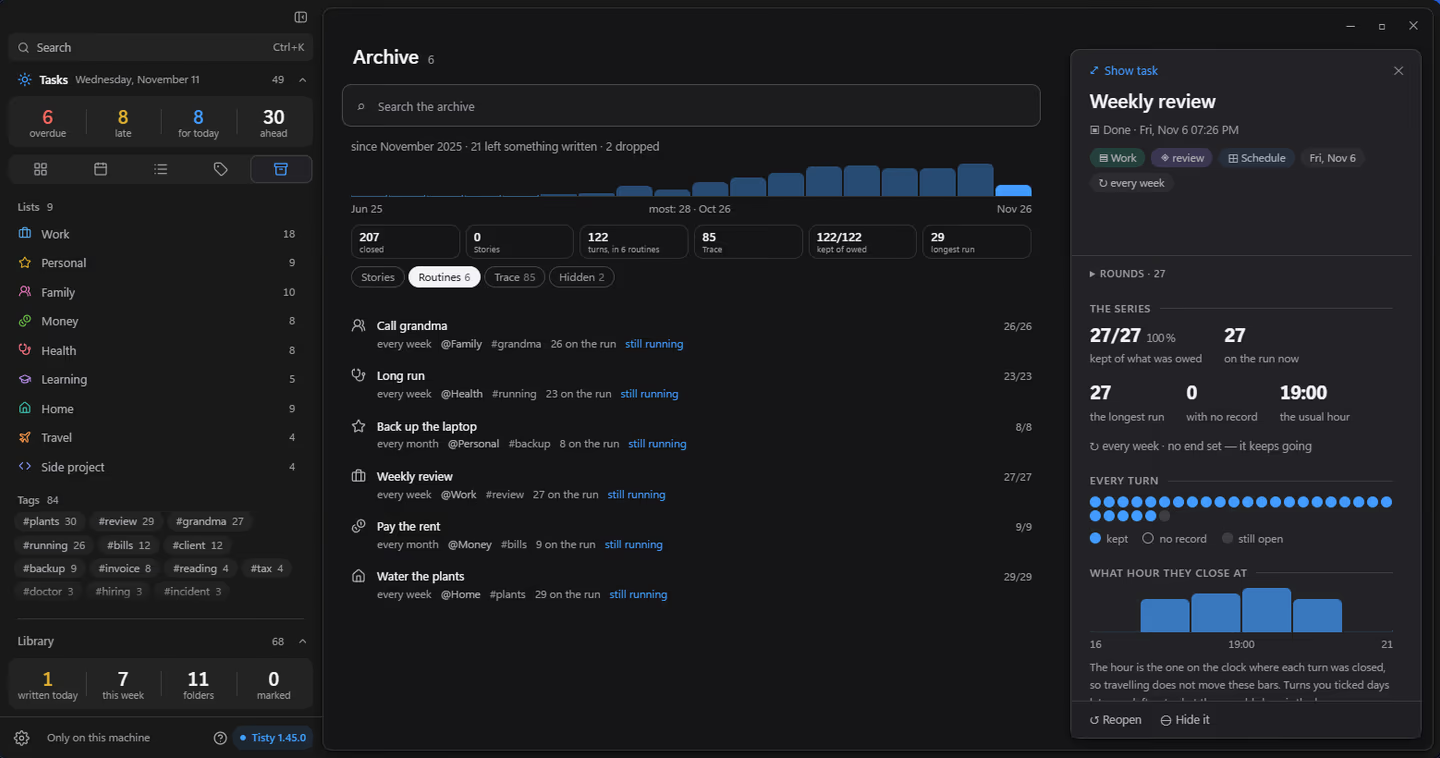
Months later, as it was left A finished task goes to the Archive with its steps and its journal, and a search by you or your AI agent brings it back whole.
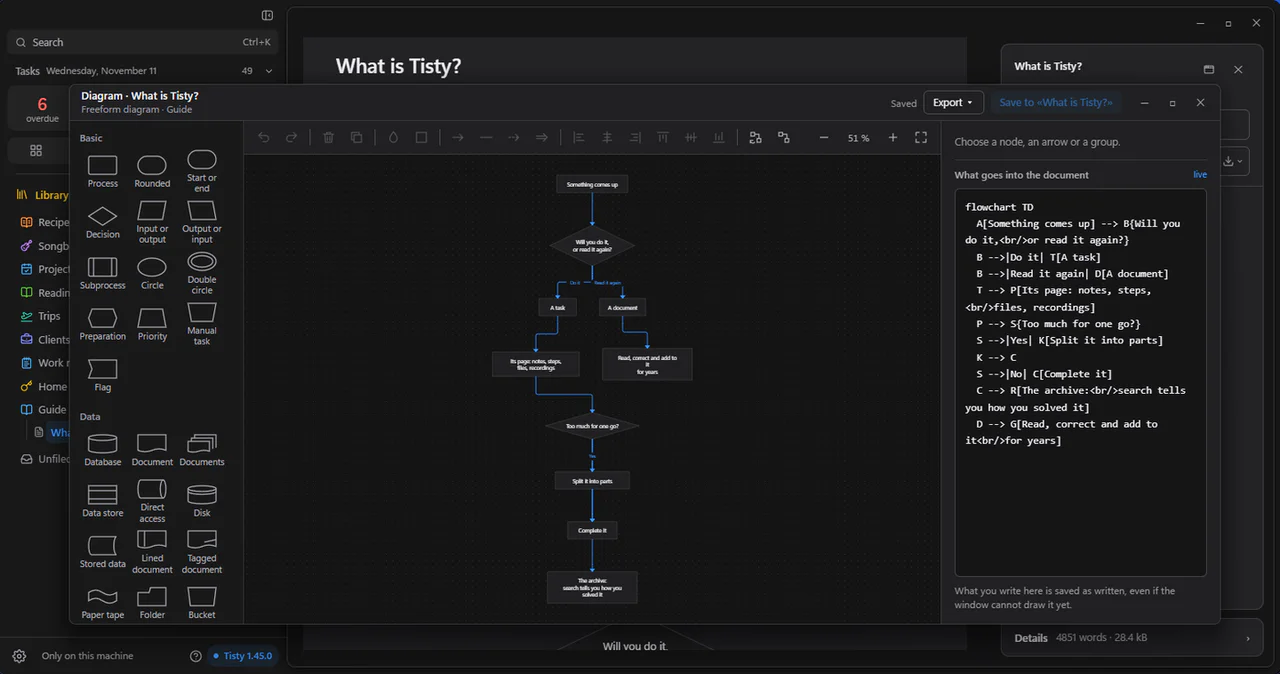
Diagrams that stay text You draw the diagram and Tisty keeps it as Mermaid, inside Markdown that any editor opens and any agent reads, offline.
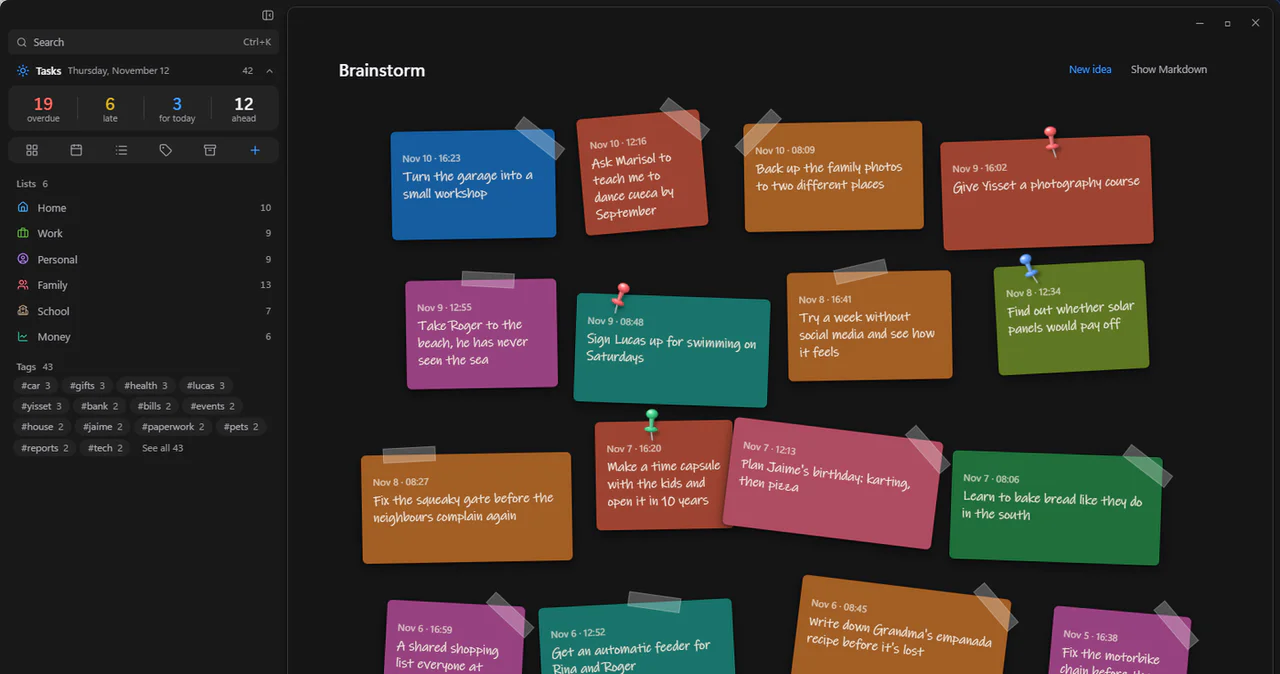
Ideas, before they become tasks Press Tab in the quick capture and it is an idea: a sticky note of up to 140 characters that you later turn into a task or file in a document.
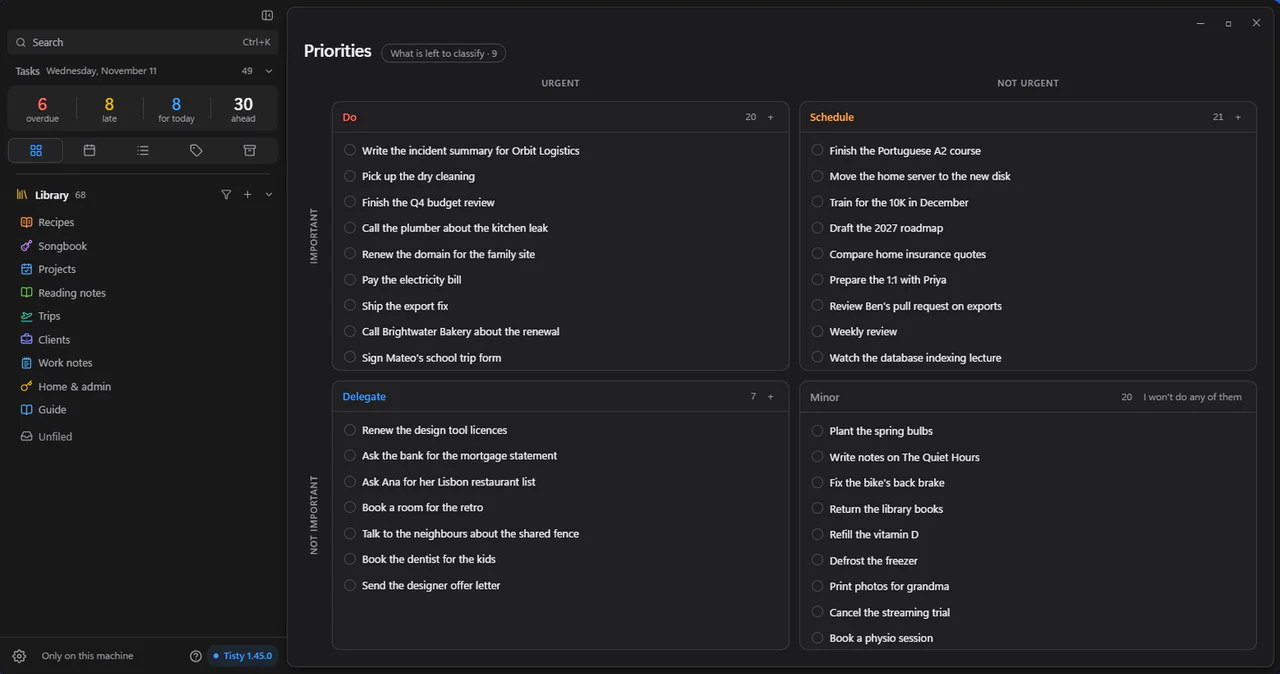
Urgent is not always important Each task in its quadrant of the Eisenhower matrix: do, schedule, delegate or minor, and what is left to classify waiting on the side.
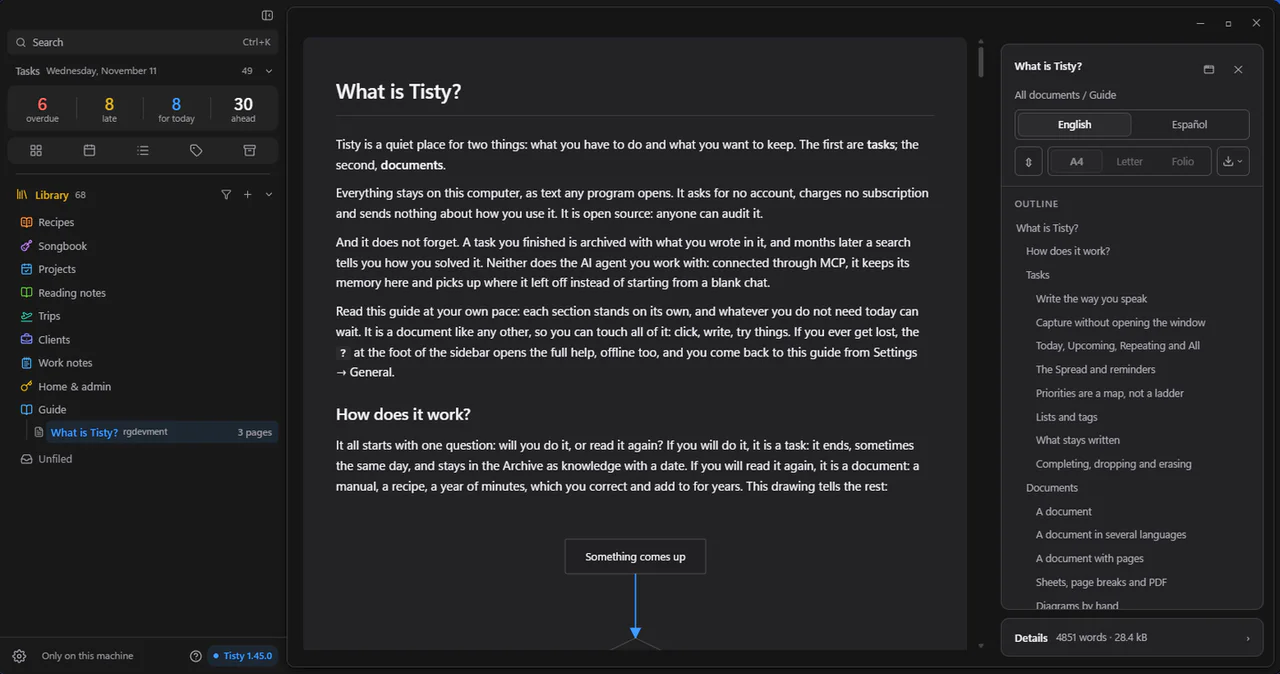
What you know, one document per subject A document you correct in place, with its outline beside it, so your AI agent reads the outline first and then only the section it needs.
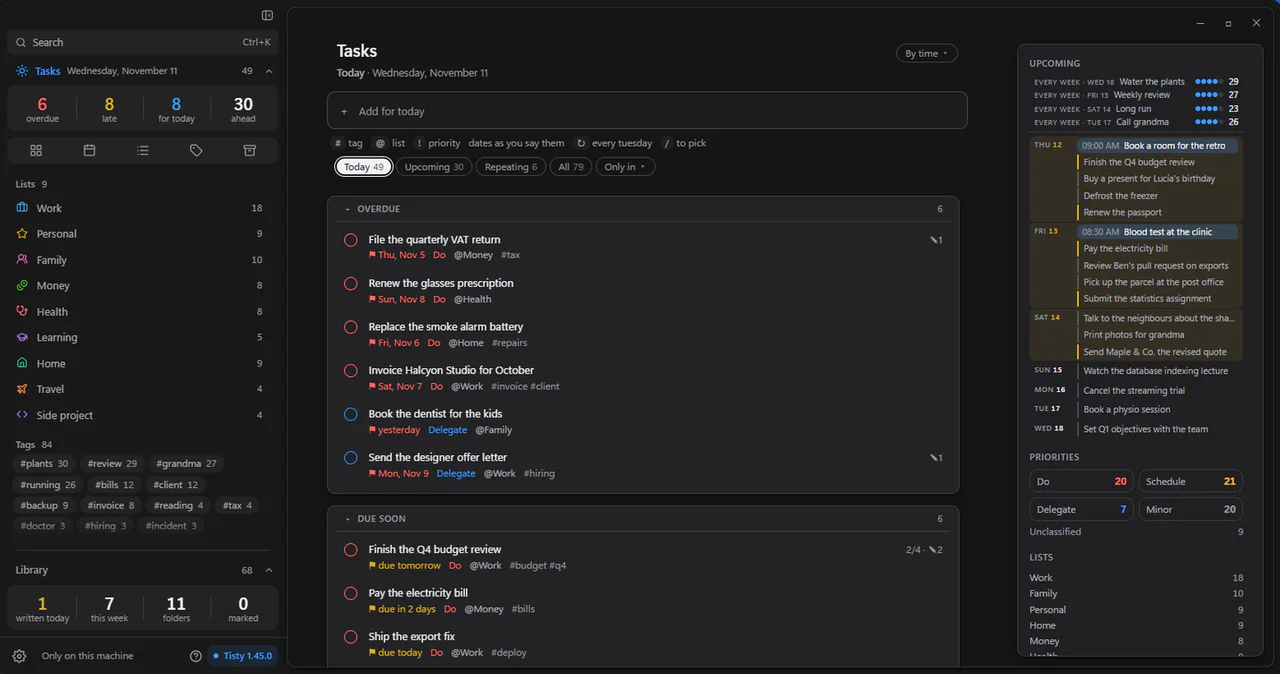
Late is not overdue You type a task the way you would say it and Tisty picks out the date. Today puts the overdue ones first and, beside them, what the coming days bring.
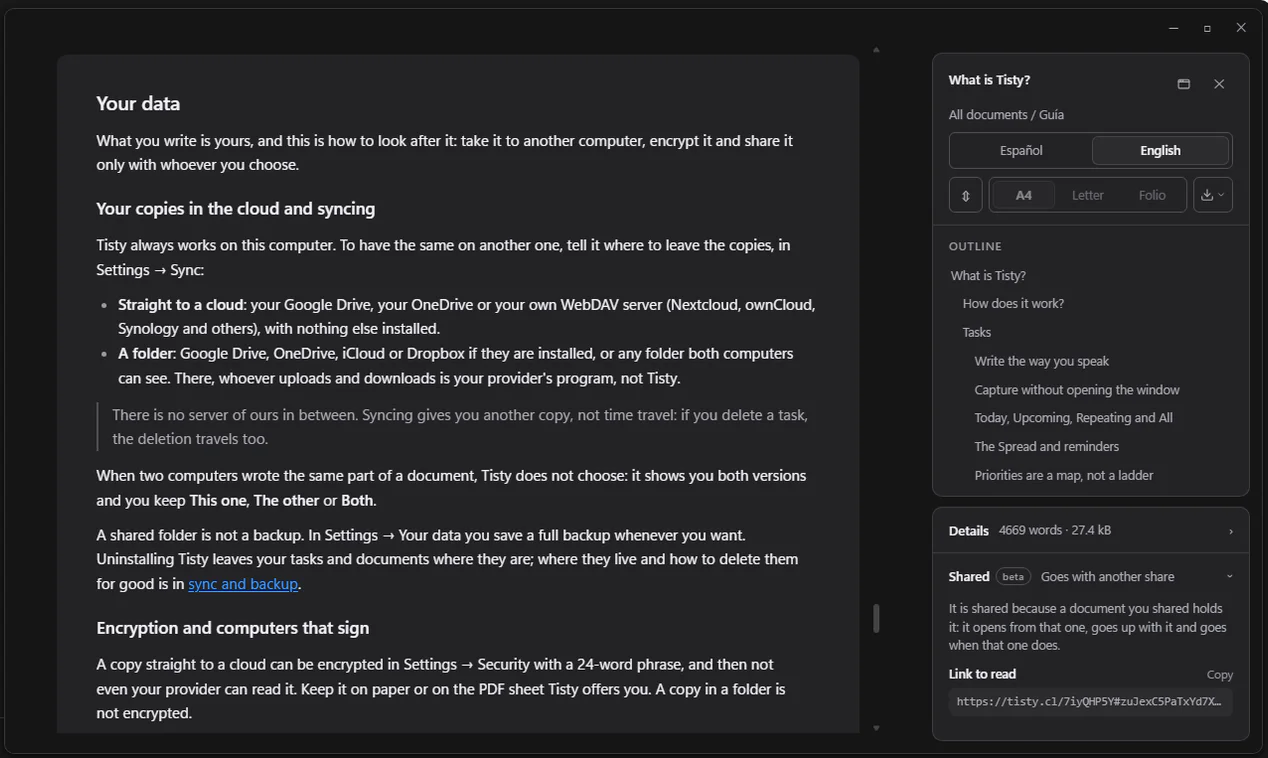
Share what you know, encrypted Folio hands over a document as a link to read, encrypted on your computer and signed by you. Whoever gets it opens it in any browser, with no account.
Real problems, real fixes
What people actually run into after months of working with an AI assistant, and what happens instead when the memory lives in Tisty.
Developer
Every new session, you explain the project to your agent again.
With Tisty
It asks what moved since last time, opens the task «Move payments to v2» with its ticked steps and reads what it noted yesterday: the webhook fails on old signatures, retrying ruled out. It carries on from there.
Developer
Your NOTES.md grew to 256 KB and the agent rereads it every time.
With Tisty
It lives as documents split by subject, in pages. The agent reads the outline and the one section it needs, about 94% less than the whole file.
Anyone
You solved this eight months ago and cannot remember how.
With Tisty
A search for «timeouts on save» brings back the archived task as it was left: its steps, its journal and the line saying the cause was a missing index.
PM
A month later somebody asks why it was decided that way.
With Tisty
One living document per subject, «Checkout decisions», each decision dated with its why. The agent finds it and quotes it instead of reopening the debate.
QA
The same screen breaks again and nobody remembers last time's cases.
With Tisty
The archived regression task keeps its cases as steps, with what was seen in each.
Handover
Context passed from PM to PO, or from developer to QA, pasted into a chat.
With Tisty
You hand over the document through Folio: encrypted on your machine before it leaves, signed by you, gone on its own after the days without use you choose.
Business rules
What must not end up in somebody else's database.
With Tisty
Tisty keeps it on your disk and sends it nowhere. What your agent reads goes where that agent goes, so pair it with one your company allows.
At home
The bank paperwork that comes back every year.
With Tisty
Next year, the archived task tells you how you did it last time.
What Tisty does
Capture and plan
- Type «call the bank at 3» in the quick capture, open from anywhere, and it is a task with its hour.
- Today puts the urgent first: overdue only past its deadline, late when the day you planned slipped by.
- Press Tab in the quick capture and it is an idea: a sticky note in Brainstorm, up to 140 characters, that you turn into a task or a document later.
- Steps, parts and the Eisenhower matrix by its name: do, schedule, delegate, minor.
Remember
- A finished task goes to the archive whole: its page, steps, dated journal and files.
- One search across open tasks, the archive and every document, even what you closed two years ago.
- One living document per subject, with tables, diagrams, formulas, pages and its own PDF.
Your agent
- GitHub Copilot, Claude Code, Codex or Cursor connect over MCP and pick up where they left off.
- An outline first, then one section: a fraction of what rereading your Markdown files costs.
- It works your tasks as it works a document and sorts your ideas with you; ticking your steps, closing and the day stay yours.
Your data is yours
- Documents in Markdown and tasks in a log you can read, on your own disk.
- Synced through your Google Drive, OneDrive or WebDAV server, encrypted with a phrase only you know if you want, or through a folder you already sync.
- No account, no subscription, no telemetry. Free and open source.
How Tisty differs from Notion, Craft, Todoist, Logseq, Obsidian and Joplin
What it costs your agent
Tisty knows what each answer costs, and keeps cutting it. Measured on a 256 KB Markdown work log, against an agent that rereads the whole file every session:
- 99% Picks up the work, with nothing new spends about 1%
- 97% Looks for something solved months ago spends about 3%
- 88–94% Looks up one subject: the outline and one section spends about 6%, 12% at worst
Where the saving comes from
- No document holds more than 64,000 characters, so a log that size is kept as subjects in pages.
- No read brings more than about 12,000 characters; past that, a document comes back as its outline.
- A task's page comes whole only while it is short, about 4,000 characters; past that come its sections and the agent's latest note, and its journal is counted by size, not by number of notes.
- The outline says what each section weighs before anything is opened.
- Picking up again brings only what moved, and what is finished costs nothing until it is searched.
Connecting costs something too: the description of Tisty's tools weighs about a sixth of that log, a third less than it did, and a test keeps it from growing. An assistant that loads tools only as it uses them does not pay it whole; one that loads every tool each session saves 72–83%, and below some 50 KB of notes a plain file is cheaper. Counted in characters, with the JSON each answer carries included.
A task or a document?
Tisty keeps two kinds of things, and telling them apart is most of using it well. Something you will do is a task. Something you will come back to is a document. Before either, there is often an idea: a thought caught on the fly, a few words in Brainstorm, waiting to become a task, go into a document or be set aside.
A task
Something to do. It ends, often soon, and goes to the archive, but it does not go away: its page, its steps and its notes stay, and months later a search tells you how you solved it. Knowledge with a date.
A document
Something to keep. A manual, a recipe, the notes on a client or a machine, a year of minutes: read again and again, corrected and added to, and growing for years.
A task is also a document, one with an end
That is why a task has a page of its own. Take a spike, finding out how something can be done before doing it:
- 1
A task
- Find out how to sync with OneDrive It starts like any other task: something to do, filed in its list.
- 2
Steps and journal
Its page gathers what you read, tried and ruled out, with the vendor's PDF attached. When the way is clear it splits into parts, each with its steps. - 3
The archive
- Find out how to sync with OneDrive
- Closed 14 Mar · 3 parts · journal kept The parts are completed one by one, then the task itself, and it goes to the archive whole: page, parts, steps and journal.
- 4
A year later
- onedrive uploads
- Find out how to sync with OneDrive
- in the archive · 3 parts · 9 steps The same question comes back, and a search finds the task as it was left, with everything you worked out.
A day with your agent
What an agent connected to Tisty does with your tasks and documents, on a real piece of work.
- 01
It asks what moved
since its last session, and who moved it, instead of rereading everything, with the tasks that press, overdue first. - 02
It opens the task it was on
which Tisty names for it. «Done when» says when it is finished, and the unticked steps say what is left. - 03
It searches the archive first
before proposing anything. If it was solved before, it starts from there. - 04
It reads by the outline
then only the section it needs, and keeps to the decisions and to what is out of scope. - 05
It ticks each step and notes what it ruled out
so the next session, or another agent, does not repeat the failed attempt. - 06
It compacts the assistants' notes
into one dated digest when a task's page grows long. The journal stays whole, and asking it to put the notes back brings them as they were, even after later ticks. - 07
It says what it did and how it knows
when the work is done. You review it and close it. - 08
It leaves a summary
after reading a long document, for the next agent to choose by. A change to the document marks it stale.
Your tasks tell your agent what is left and how far it may go; your documents tell it what was already decided. What it learns stays written down for next time.
What stays on your disk
No database to export from and no format to decode. This is what Tisty keeps in its folder, as it looks after a few months of use.
docs/2hq2p1ax-0003.md Markdown
# Rina's vet visits

#rina #vet

> [!TIP]
> Bring her record book: the vet stamps it every time.

## 12 March 2026

- [x] Weigh her before the appointment
- [ ] Ask about the tick tablet

Weight: ==11.4 kg=={green} ::heart red::
The folder, on Windows
.tisty/
├─ data/
│  ├─ docs/            your documents, one .md each
│  │  ├─ 2hq2p1ax-0003.md
│  │  └─ …
│  ├─ store/           your tasks, one folder per computer
│  │  └─ dev_2hq2p1ax/
│  │     ├─ 000001.tisty
│  │     └─ active.tisty
│  └─ attachments/     the files you attached
├─ config/
└─ cache/
In your user folder on Windows; on a Mac, in Library/Application Support/tisty. Settings › Your data opens it.
store/dev_2hq2p1ax/000001.tisty JSONL
{"v":18,"ts":"2026-03-02T14:05:11Z","op":"task.add","id":"01KJ…","d":{"title":"Find out how to sync with OneDrive",…}}
{"v":18,"ts":"2026-03-12T09:40:27Z","op":"task.log","id":"01KJ…","d":{"body":"Large files go up in pieces",…}}
{"v":18,"ts":"2026-03-14T18:02:55Z","op":"task.done","id":"01KJ…"}
Abridged. Every change to a task is one more line that only adds: cat, grep and jq read it.
Any editor opens them, and they stay where they are even if you uninstall Tisty.
And when someone else needs to read one, Folio shares a document through an encrypted link that expires on its own. Folio

A beaver that keeps what you build.
A beaver gathers every branch it finds and builds with it, and what it builds stays. Tisty keeps what you work out the same way: the steps, the journal and the documents, there to find again months later.
Connect your assistant
Tisty has no AI inside: it keeps your memory, and the assistant you already use reads and adds to it. GitHub Copilot, Claude Code, Codex, Cursor or Gemini CLI connect over MCP, on this machine only, with no port, no account and no key. Your assistant picks up where it left off, files its work as tasks with steps, ticks them as it goes and keeps what it learns in documents, all where you can follow and audit it.
- Claude Code
/plugin install tisty --marketplace rgdevment/mcp-plugins - Gemini CLI
gemini extensions install https://github.com/rgdevment/mcp-plugins - Any other client, such as VS Code or Cursor
npx -y tisty-mcp
Or open Settings › Assistants: it finds the assistants installed on this computer and connects them with one click.
It can
- Pick up where it left off: what moved since last time, who moved it, and the task it was on
- Start, wrap up or brainstorm with one command in Claude Code or GitHub Copilot in VS Code, and mention a document with @
- Work any task the way it works a document, yours too: its description, page, title, list and open steps
- Jot ideas on Brainstorm and sort them with you, marking old ones with a ◆ for you to delete or keep
- Read a long document by its outline and one section
- Compact a long document, which you undo or keep with one click
- Mark a document that had its day, for you to delete, put away or keep
- File a task with its steps, date and list
- Add to a task's journal
- Write documents, correct a passage and file them in folders
- Read and search everything, the archive included
- Say a task is done, or should not be done, yours too, for you to confirm
It never
- Closes or deletes a task
- Ticks a step of yours or finishes a task of yours
- Moves a day you set
- Deletes a document, or renames or empties a folder
- Takes an idea off Brainstorm except by filing it or turning it into a task
The door is open when you install Tisty, and Settings › Assistants closes it with one click. While it is closed, everything an assistant tries is refused.
Listed in MCP Registry · io.github.rgdevment/tisty GitHub MCP Registry npm Glama MCP Market M8ven
What an assistant may do, in the docs
Share what you know with Folio
When somebody else needs what you know — your PO, the QA joining the project, another team — Folio by Tisty hands them one of your documents as a link, whether they use Tisty or not. It is a service apart from the app, with a server of its own, and it keeps what you share without the key to read it.
The key travels in the link
Tisty encrypts the document before it leaves. The key goes in the link, after the #, which browsers never send, so Folio stores only bytes it cannot read.
Read in a browser, with no account
Whoever receives the link opens it in any browser. Nothing to install and nothing to sign up for.
Gone on its own
After the time without use you choose, 15 days at most, the link stops working and the copy is deleted. Your document stays in your Tisty, and you can stop sharing whenever you want.
It says who signed it
The page shows which key signed the document. Tisty's official documents are signed by rgdevment, shown as verified: that says who signed, not that the content is safe.
What should not be there gets reported
Anyone with the link can report what should not be there, from the same page where they read it.
The app has no server and collects nothing; Folio does run one. It keeps the encrypted copy until it expires and counts reads without keeping who read. After a serious report or an order, a document stops being served and may be kept for up to 180 days, or as long as the order asks.
To learn about Folio, visit its home: tisty.cl
How to install it
Pick whichever route you prefer. None of them asks for an account.
[
Microsoft Store
Windows
](https://apps.microsoft.com/detail/9pgvwxd8x93n)
Homebrew
macOS
$ brew tap rgdevment/tap $ brew trust rgdevment/tap $ brew install --cask tisty
winget
Windows
$ winget install rgdevment.Tisty
[
GitHub Releases
Direct download
](https://github.com/rgdevment/Tisty/releases)
The first time you open Tisty
It asks two things: your language, and where your copies should go, a folder to sync through or nowhere beyond this computer. Then it sets up your starting lists and writes you a guide, an ordinary document of yours to read, edit or throw away, that shows from the inside what a document can hold.
Documentation
Everything Tisty does, step by step.
Frequently asked questions
What happens to my notes if Tisty disappears?
Nothing. Your documents are Markdown files any editor opens, and your tasks a log of JSON lines that cat, grep or jq read. Both stay on your disk.
How is it different from Obsidian, Notion or Todoist?
Tisty keeps tasks and documents in one store and one search on your own disk, and finishing a task keeps everything it gathered instead of hiding it. Each of the others is stronger at something, and the comparison says where. See how it differs
How do I give my AI agent a memory between sessions?
Connect Tisty over MCP: GitHub Copilot in VS Code, Claude Code, Codex, Cursor and Gemini CLI take one line. The agent then starts each session by asking what moved since its last one and which tasks press, then opening the task it was on, files its work as tasks with steps and a journal, and keeps what it learns in documents, on your machine, behind a door you close with one click.
Does it replace CLAUDE.md, AGENTS.md or a memory-bank folder?
It sits beside them. Instructions that rarely move, such as how to build and the conventions, stay in the files your repository hands the assistant. Progress, decisions, what was ruled out and what is left go in Tisty, dated, searchable and read a section at a time.
Can I draw diagrams?
Yes. A mermaid block draws it, and mind maps, database schemas, freeform diagrams with every Mermaid shape and class diagrams are also drawn by hand in a window of their own, saved as the same text, shown on the page as you drew them and exported as PNG, JPG or SVG.
Guides
To get more out of it, or to solve the problem without installing anything.
- Markdown notes you can read even if the app disappears Most note applications keep your writing in a format only they understand. How to find out what you would actually keep, and how to stop depending on it.
- Let an AI assistant read your notes without uploading them The usual way to let a model work with your notes is to hand them over. There is another: leave them where they are and open a door.
- Give your AI coding agent memory that lasts between sessions GitHub Copilot, Claude Code, Codex and Cursor forget everything when a session ends. Why Markdown files fall short, and a memory your agent reads by section.
- Share a document with someone who does not use Tisty Sending a copy is easy; getting it back is not. How to hand someone a document to read, encrypted, with no account and an end of its own.