Grades.com: Review Management
Review management in your AI assistant: monitor Google, Facebook and Trustpilot reviews, draft replies you approve, send review requests, check AI Reputation.
Hosted MCP Server
npx add-mcp 'https://mcp.grades.com/mcp'Installs into Claude Code, Codex, Cursor and more
Documentation
Your reviews, in the AI you already use
Add one address to Claude, ChatGPT or Cursor, sign in, and ask about every location and every review site you track. Your AI answers from your Grades.com data and posts only what you confirm.
https://mcp.grades.com/mcp
How it works
From one address to answers from your own reviews
The first two steps happen once. After that you just ask.
Paste one address into your AI client
Add Grades.com as a custom connector. Claude Code and Cursor take one line; steps for each client are below.
Name
Grades.com
Remote MCP server URL
CancelAdd
What your AI can do
Every permission you grant unlocks real tools, and only those
Your AI sees only the tools its sign-in allows. A selection of each, by their real names:
At sign-in: "See your reviews, your ratings and the replies to them"
AskHow did our reviews do last month?
reviews_summary_periodA month's count, average and replies, per site Readsreview_listFiltered by site, rating or reply; Yelp as rating and link Readsreview_insightsA period against the one before, from stored data Readsagent_actionsThe Review Agent drafts waiting for you Readsai_perceptionWhat AI assistants say about you Reads
Reading tools change nothing.
Safe by design
Your AI gets your access, never more, and asks before it acts
It acts as you: your role, your businesses and your plan, checked on every call.
It only reads
- The businesses you chose
- The sites your plan covers
- What your role allows
It never gets
- Your password
- The words of a Yelp review
- Another account's reviews
- A business you left out
It asks you first
- Posting a reply
- Approving a draft
- Messaging a customer
- Changing your plan
Limits
- 240 tool calls per 10 minutes per connection
- New keys read-only by default
- Keys shown once, revoked at once
Grades.com tells your AI to ask before each of these, and your client shows every tool it uses. Disconnect the connector to remove access.
Set up
Pick your client and follow its steps
The same steps as in your dashboard. Or copy one block and let your AI set itself up.
Paste it into Claude, ChatGPT or Cursor. It connects grades.com for you. What it copies
Set up grades.com in this assistant.
1. Add the grades.com MCP server: https://mcp.grades.com/mcp (Streamable HTTP, OAuth 2.1). Sign in to grades.com when prompted and approve the scopes it asks for.
2. If this client cannot do OAuth, use an API key from https://my.grades.com/connect as a Bearer token instead.
3. Once it is connected, call plan_overview, then reviews_summary_period for the last 30 days, then agent_actions and recovery_cases.
4. Show me what needs my attention: pending approvals, new negative reviews and open Review Disputes cases.
Docs: https://www.grades.com/developers
- Open Settings, then Connectors, and click Add custom connector.
- Name it Grades.com, paste the server URL and click Add.
- Click Connect, sign in to Grades.com and approve access.
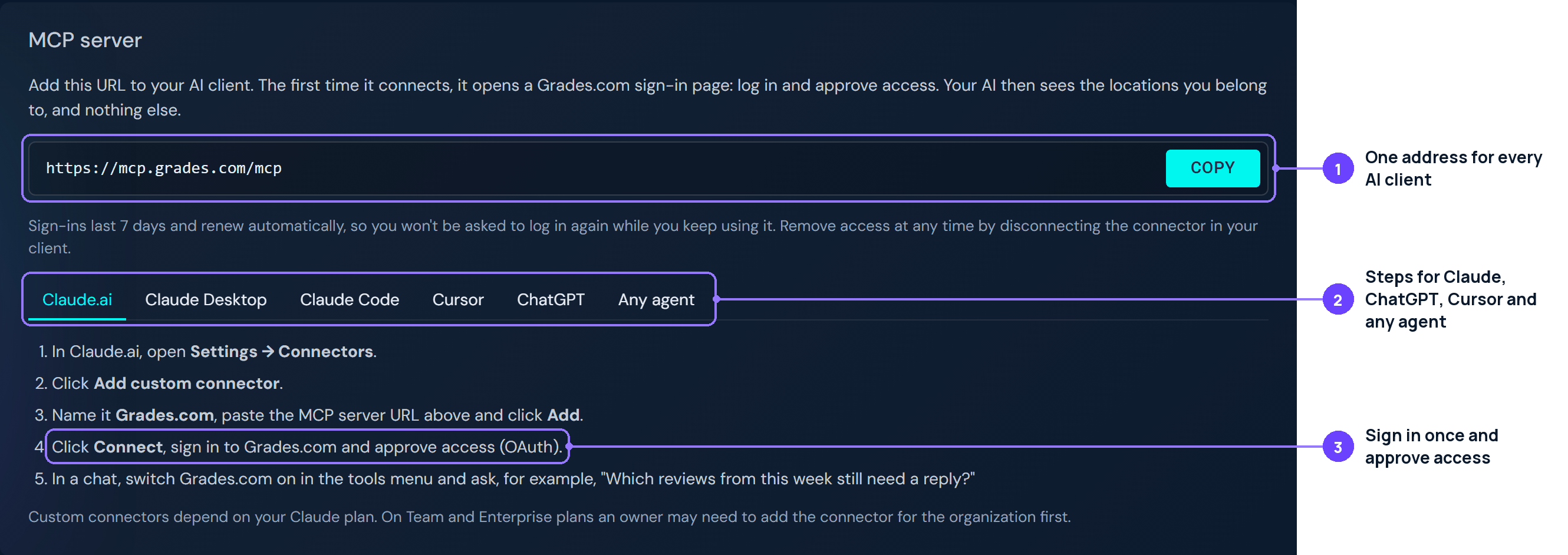
One address for every AI client Steps for Claude, ChatGPT, Cursor and any agent Sign in once and approve access Connect your AI in the dashboard, sample business. October 27, 2026.
Ask Grades
No AI client? Ask Grades in your dashboard
The assistant in your dashboard, with the same tools and no setup. It reads at once; anything that changes your account waits for your Confirm.
- 50, 300 or 2,000 questions per location a month, by plan
- For healthcare, conditions and treatments are replaced before the AI reads a review
- In the dashboard Live
- Slack
- Google Chat Coming soon
- Microsoft Teams Coming soon
Reply to the 2-star Google review at Eastside. Apologize for the wait.
Draft a review reply · Done
"Thanks for telling us, and sorry for the 40-minute wait. That is longer than it should be, and we would like your next visit to be quicker."
Confirm: Reply to a review
CancelConfirm
212 of 300 questions left this month
Three jobs owners hand to their AI first
With Claude: "last month's report"
and Grades.com month and insights
Then Your AI agent writes it
Result Report for 3 locations Ready
A monthly review report in one sentence
Counts, ratings, replies and themes per location, quoted from Grades.com.
Then Your AI agent adds the embed
Result Showcase on your site Saved
Your best reviews on your website, kept current
The agent in your editor saves a showcase and places its snippet.
With ChatGPT: "which location?"
and Grades.com locations
Then Your AI agent ranks them
Result Eastside first "4 bad reviews, no reply"
Know which location needs you today
Locations ranked by unanswered bad reviews, response rate or rating.
Tools used: reviews_summary_period, review_insights, review_showcase_save, locations_compare.
Why connect it
Pasting an export into a chat works, once
| Pasting reviews into a chat | With Connect your AI | |
|---|---|---|
| Fresh data | As old as your last export | Read from Grades.com when you ask |
| Every site | One export per site | Every site you track, one question |
| Every location | One file at a time | All your locations in one answer |
| What it sees | Whatever you paste in | Only the businesses you choose |
| Your voice | Explained again in every chat | Your style and rules on every draft |
| Posting replies | Copied back by hand | Posted on Google once you confirm |
Developers
The same access from your own code and tools
The REST API at https://app.grades.com/api/v1 takes a secret key or your AI's sign-in, 120 requests a minute per key. Signed webhooks for new reviews, replies and drafts on Pro and Premium.
API reference → Developers page →
$ curl -G -H "Authorization: Bearer gk_live_..." \
https://app.grades.com/api/v1/companies/{company}/reviews \
-d max_rating=2 -d has_company_response=false
200 OK · 2 reviews, Eastside and Downtown
Keys are made in your dashboard under Connect your AI and shown once.
Review sites
54 review sites your AI can read
Connect any of these from your dashboard. Google is on every plan; the other 53 come with Pro and Premium.
Review sites 54 review sites
- Yelp
- BBB
- Trustpilot
- Tripadvisor
- Yellow Pages
- Healthgrades
- WebMD
- RateMDs
- Avvo
- DealerRater
- Zillow
- Apartments.com
- Thumbtack
- OpenTable
- Booking.com
- Expedia
- Vagaro
- Booksy
- Fresha
- Glassdoor
- G2
- Capterra
- TrustRadius
- Clutch
- DesignRush
- Sitejabber
- ConsumerAffairs
- REVIEWS.io
- ResellerRatings
- Etsy
- Gartner Peer Insights
- App Store
- Google Play
- Angi
- BuildZoom
- Judge.me
- PissedConsumer
- Vitals
- Zocdoc
- CarGurus
- Houzz
- Lawyers.com
- CARFAX
- PeerSpot
- Product Hunt
- SourceForge
- WordPress.org
- Shopify App Store
- Salesforce AppExchange
- HubSpot App Marketplace
- Chrome Web Store
- Google Workspace Marketplace
Plans
On every plan; your plan sets what your AI can reach
| Connect your AI | Starter $29 /location/mo | Pro $149 /mo, +$75 per extra location | Premium $399 /mo, +$199 per extra location |
|---|---|---|---|
| MCP server, REST API and Ask Grades | ✓ | ✓ | ✓ |
| Reviews your AI can read | All 54 review sites | All 54 review sites | |
| Ask Grades questions a month, per location | 50 | 300 | 2,000 |
| AI reply drafts a month, per location | 10 | 50 | 1,000 |
| AI Reputation answers refreshed | Monthly | Weekly | Daily |
| Signed webhooks, Zapier, Make and n8n | – | ✓ | ✓ |
| Competitor Map tools, auto-reply settings | – | – | ✓ |
14-day free trial of Pro, no card needed; yearly plans pay for ten months.Full pricing →
Frequently asked questions
What is an MCP server, in plain words?
A standard way for AI assistants such as Claude and ChatGPT to use another app. Add the Grades.com address once, sign in, and your AI can read your reviews and, when you allow it, act on them, with your own Grades.com access.
Can my AI post replies without me?
Grades.com tells it to post a reply only after you confirm the exact text. Replies post on Google; other sites get the text and a link. In Ask Grades nothing changes until you press Confirm.
Which AI clients work?
Claude.ai, Claude Desktop, Claude Code, Cursor and ChatGPT, Gemini CLI with a secret API key, and any client that connects to a remote MCP server. ChatGPT is tested on ChatGPT Plus on the web. Agents that cannot sign in use a secret API key.
Does my AI see the text of Yelp reviews?
No. Through the MCP server a Yelp review comes with its rating, date and link only, and Ask Grades never gets the words of a Yelp review either.
Which plan includes it?
Every plan, from Starter. Starter covers Google reviews, Pro and Premium every site. Webhooks and the automation platforms come with Pro and Premium.