Ontology Atlas

One folder of Markdown holding a reviewed codebase ontology and a cited wiki. 38 typed tools, local-only, every write is a Git diff.

Documentation

Ontology Atlas

Ontology Atlas — Understand your codebase.

Understand what your codebase builds, why it is structured that way,
and what a change will affect.

One codebase ontology in repository Markdown, maintained by people and AI agents.

Download for macOS · Windows x64 beta unsigned · Live demo · Guide · Status

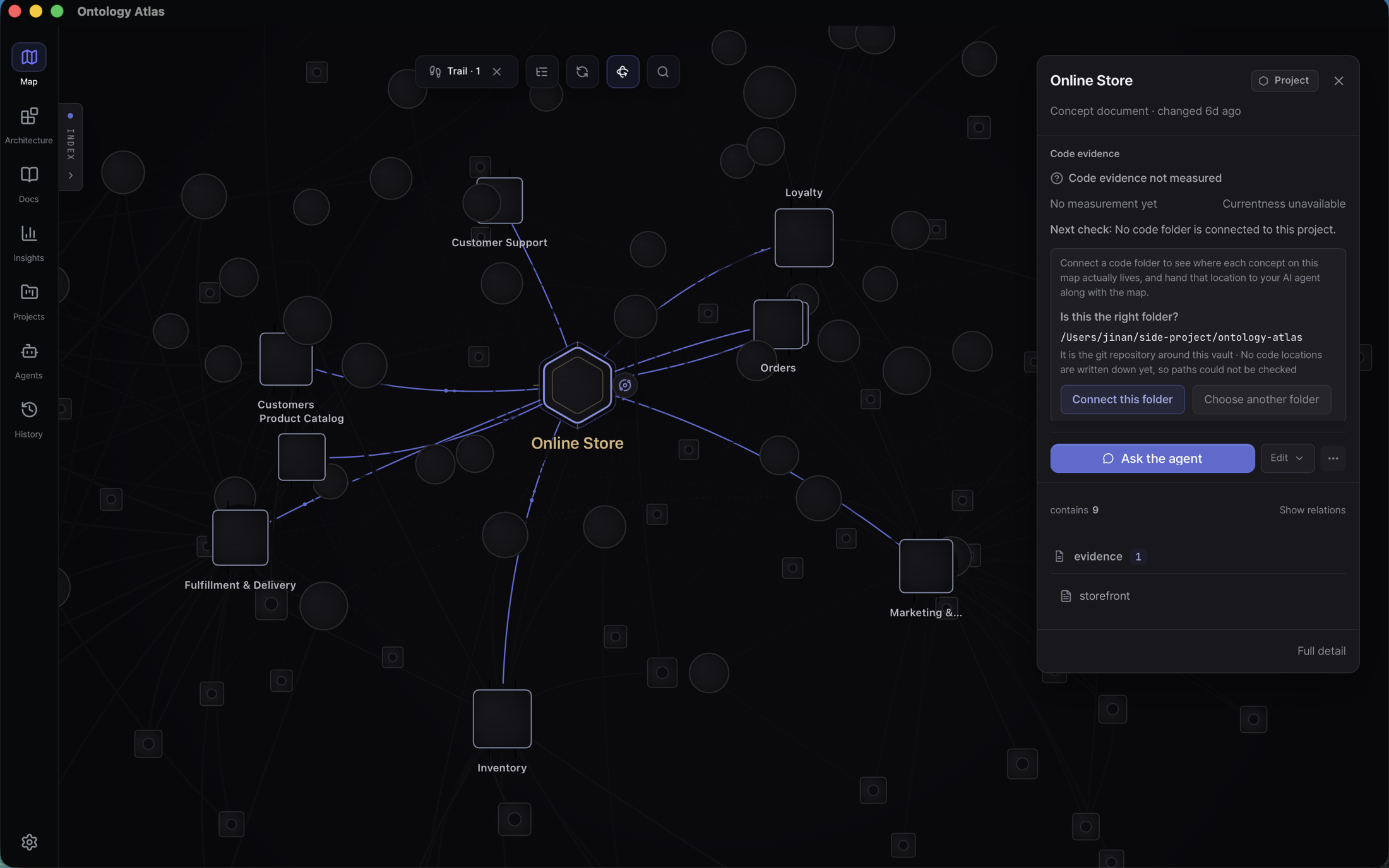
The current Ontology Atlas macOS app with the Online Store project selected: the domains it contains named around it, everything unrelated receding, and the right inspector showing the project record, its code-evidence state, and the offer to connect a code folder

The installed macOS app reading samples/storefront — an online store written as nothing but Markdown files in a folder. Every write, human or agent, lands as Markdown a person reviews in a Git diff; the feature inventory is the current behavior contract.

MIT license MCP runtime inventory Local CLI Local-first


In 30 seconds

AI agents change a codebase faster than a person can review every line. A Git diff records which lines moved; the agent's summary is its own claim. Neither preserves which product capability the code serves, why its boundaries exist, or what the change can affect.

Atlas keeps those answers in an atlas/ folder of Markdown inside the repository, so meaning is cloned, branched, and reviewed with the code. Each file's frontmatter declares what it is — project, domain, capability, element, or a linked document — and what it points at. That folder is the whole database.

Because the kinds and relation types are a small fixed set, the folder is not just readable but computable. Atlas compiles it and answers what a notes tool cannot: what breaks if I change this, what is this capability's blast radius, which paths connect these two things, what is disconnected, what is stale. Your agent asks over MCP; you read the same answers as a map. An agent's write is not accepted meaning — it lands as Markdown and a Git diff a person can correct, reject, or keep, and the answers stay bounded: observed capabilities are never treated as exhaustive and unknown coverage is never shown as green. The five-kind discriminator and the standards boundary live in the vault specification.

Status — read this before installing

The download page is the release authority: a generated record of the published tag, real asset sizes, checksums, platforms, and signing state. This README pins no tag, so it cannot contradict the files you are about to install. GitHub Releases is the second direct source.

  • The unsigned Windows beta is a real risk, not a formality. SmartScreen may warn about an unknown publisher, and a managed work PC may refuse the installer outright. Security states what is and is not promised.
  • Installing the desktop app installs the agent surface. Both bundles carry the compiled MCP server. There is no npm package; every other platform runs the browser app, the CLI and MCP server from a source checkout, or the MCP server as an .mcpb bundle or a container image (channels).
  • A -rc.N build walks the same signing, notarization, installer, and updater checks as a final one — what it lacks is a wide run behind it. The in-app updater reads a fixed Pages manifest staged from the newest non-draft release, release candidates included, and every archive must pass the bundled signature check before installation.
  • Screenshots demonstrate the product journey, not release availability.

Where it stands

Not a roadmap. This summarizes behavior documented in the feature inventory, the specification, and the decision ledger.

Working today

  • A Markdown folder is the whole database — read and written in place, with no import step, no index to build, and no account.
  • The macOS app, Developer ID signed and notarized, with the compiled MCP server inside its bundle, and the hosted web app as a no-install gateway.
  • MCP over stdio for Claude Code, Cursor, VS Code, Codex, and any other client, typed and advertised through tools/list. Agent guide.
  • One-button agent setup that ends in a real proof — paths shown before writing, then an agent restart and mcp-verify. File presence is never presented as a live connection.
  • A CLI with the same authority as the agent — scaffold, validate, dry-run writes, traversal, blast radius, commit preflight, agent handoff. CLI reference.
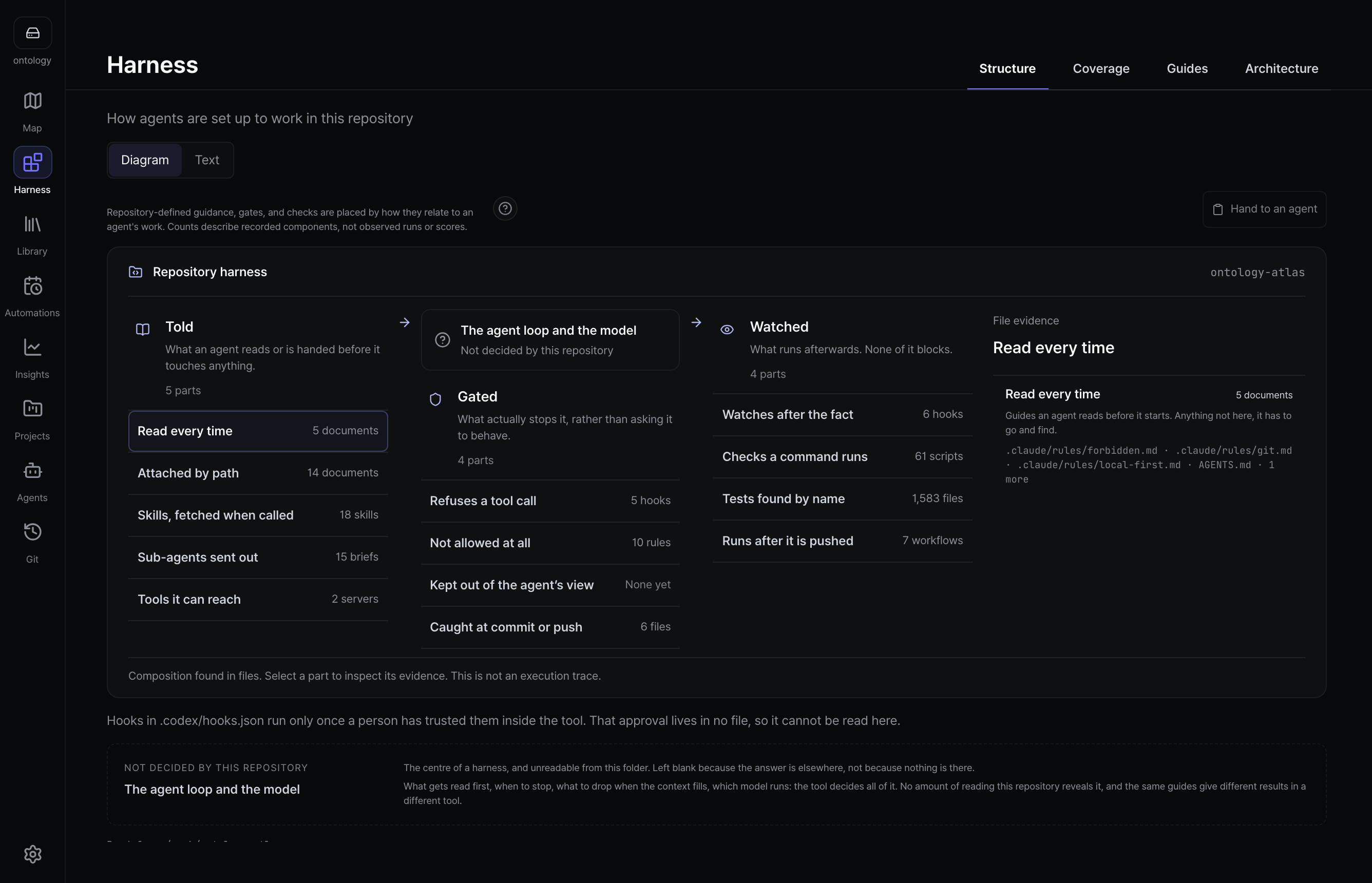
  • Every surface reads that one folder — Map, Architecture, Docs, Library, Insights, Projects, Agents, MCP, and Git History.
  • Versioned AI analysis kept as local Markdown, with its evidence and selectable history, and measured violations instead of an invented maintainability score. Analysis records.
  • Documents of any format gather in the Library, kept byte for byte, with wiki pages required to cite their source on every fact.
  • External MCP servers attach to the in-app chat — one switch per server, off by default, tokens only in the keychain. Atlas never sits in that path.
  • JSON-LD and GraphML export off the same deterministic compile artifact, so the vault opens in rdflib, Protégé, Gephi, Cytoscape, NetworkX, or Neo4j.
  • init installs the agent's procedures where the agent runs, and prints the one sentence to paste into your own CLAUDE.md or AGENTS.md. Atlas does not edit files you wrote.

Shipping, not settled

  • Windows x64 is an intentionally unsigned public beta — same folder and MCP surface as macOS, no signature.
  • The vault format is v2.0-rc, an RFC open for comment that documents behavior already enforced by contract tests here and carries its own kill criterion. Specification §0.
  • Linux has no packaged build — the browser app or a source checkout, same vault, fewer screens.
  • Web and desktop do not promise the same screens, and that is not a backlog. Git history and offline work are desktop capabilities; the web cannot run git or native bridges.

What we decided not to build is What this is not.

The journey

1. Open a folder

Point the app at a directory of Markdown and it reads it in place. Ask it to start from your code instead, and it creates exactly one folder inside the project you picked:

your-repo/
├── src/
├── package.json
└── atlas/                 ← the whole ontology, and nothing else
    ├── project.md         one project document
    ├── domains/           what the product is made of
    ├── capabilities/      what each area can do
    ├── elements/          the implementation pieces they work with
    ├── architecture/      reviewed role and dependency profiles, when you have one
    ├── sources/           the documents around the code, kept exactly as they arrived
    ├── wiki/              one page written from those sources, each fact cited
    └── .ontology-atlas/   gitignored, local only: bindings, audit log, activity

That location is a decision, not a default. A map kept outside the repository travels on one laptop, and the change to the code lands in a pull request while the change to its meaning does not. Inside, the two move together in one diff — so commit atlas/, push it, or copy it to another machine, and the map goes with it. The exact path is shown before anything is written, and an existing atlas/ is reused and reported rather than overwritten.

Every screenshot below reads samples/storefront, an example folder in this repository; node cli/src/index.mjs overview samples/storefront prints its current census.

The current Docs workspace in the installed macOS app, with the vault tree open on the capabilities folder, the Checkout document beside it, its expanded frontmatter, word count and source date, its backlinks, and a link back to the same node on the map

Docs is the same folder without the canvas: preview or edit Markdown, inspect the frontmatter that becomes the graph, follow backlinks, and jump back to the map. There is no imported copy to synchronize.

2. Connect your agent

The current Agents screen in the installed macOS app, listing the three coding tools found on this computer with their readiness, Open a chat with this tool and Check connection for the two that can run inside Atlas, the note on which tools can pause writes for review, and the option to show the other 36

Agents finds the coding tools already installed on this computer and opens a conversation beside the map. MCP holds the folder's own connection, the setup for each client, and the Connectors that attach external servers to that conversation.

The current MCP screen in the installed macOS app, with Share this folder open: how many connection files are ready and which file comes next, one connect button each for Claude Code, Codex, Cursor and Antigravity, the note that the server runs only while a conversation needs it, and the two later steps to restart the agent and confirm the connection

  • Connect once, with visible scope. The flow names the folder and config it will change, and writes plain text you can inspect. Claude Code, Codex, Cursor and Antigravity get one button each; any other client uses the snippet.
  • Then prove it from the agent's folder. mcp-verify starts the bundled server, reads the active vault, and reports the real result or failure.
  • The conversation does not stop at the first map. Up to three next steps derived from the current vault appear under a completed answer; choosing one fills the composer for review and never sends or writes on its own.
  • Nothing stays running. The server speaks stdio, opens no port, and makes no network request (Security).

3. Read the map

The current map with the Orders domain selected: unrelated concepts recede, the concepts it contains are named on the canvas, and the right inspector lists contains, used by, leans on, and belongs to beside Ask the agent, Edit, and full detail

Selecting a node dims everything unrelated and opens its record without hiding the node behind the inspector — a visual hierarchy for a person and typed parents, evidence and actions for an agent, from the same fact. Recent changes can narrow the map while keeping project and domain context, and Footprints record the order in which you opened concepts.

The current 3D picker in the installed macOS app, offering Flat for the ordinary 2D map, Cone for containment drawn as nested cones, and Cloud for clustering by what relates to what

Three spatial readings stay explicit rather than mixed: Flat is the normal 2D map, Cone hangs each parent's children on a cone with height as the containment tier, and Cloud lets relations determine all three axes. Changing the view never changes the graph.

4. Gather the documents in the Library

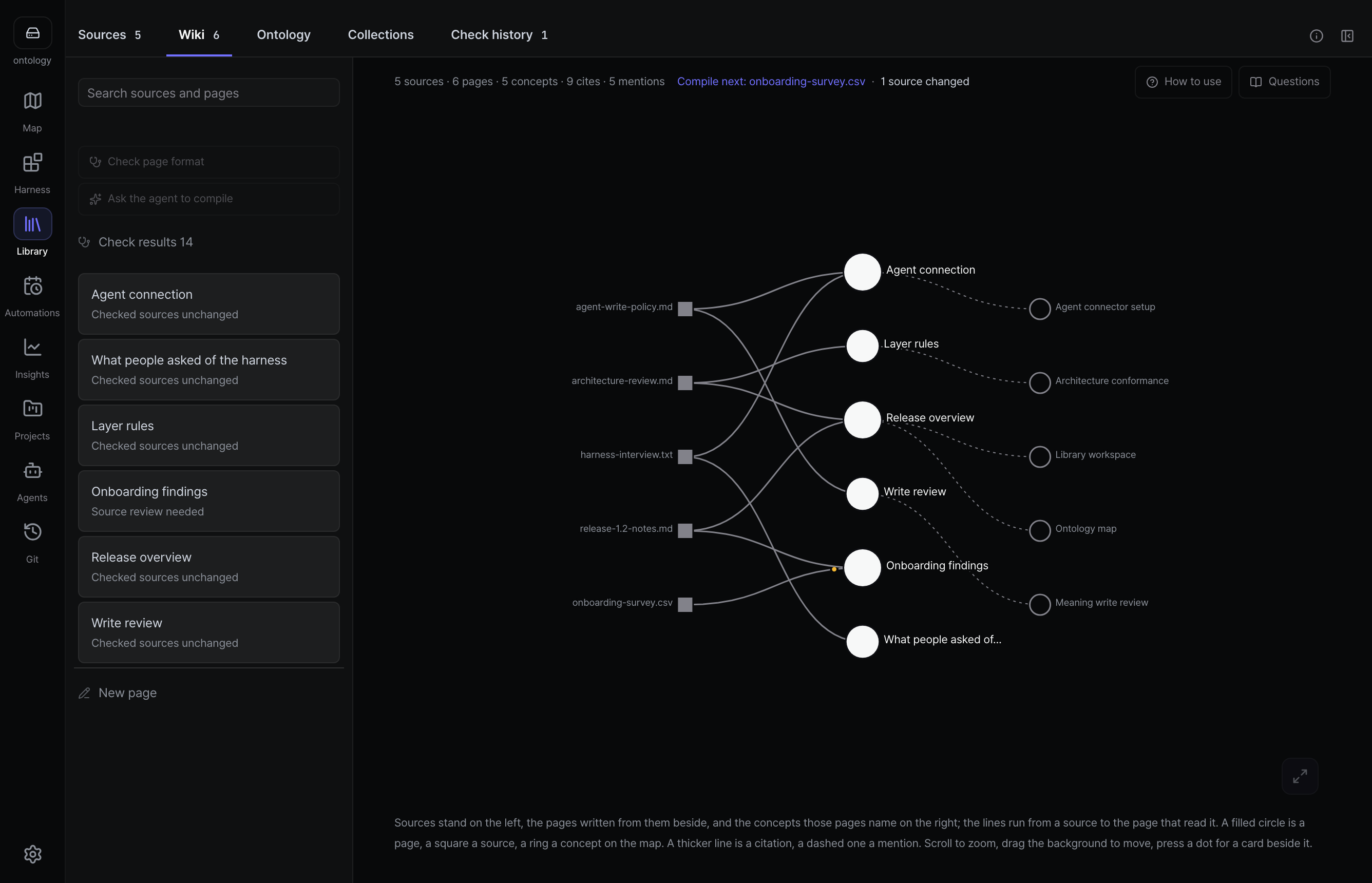
The current Library in the installed macOS app: the Sources 3 and Wiki 1 tabs over Add files, Find documents and Bring from a service, three gathered documents with their format, byte size and either a not-compiled badge or a written-up check, the line saying two are not written up yet, and beside them the Gather, Compile and Read stages with Gather done, Compile next on the two waiting sources, and Read offering the one page that exists

A codebase's meaning is rarely only in the codebase. The plan, the spreadsheet, the handover note, the page somebody wrote on a wiki — the Library keeps those exactly as they arrived, under sources/, and nothing is parsed on arrival. Each row carries only what a folder listing can say: format, byte size, and whether it has been written up. Open one and Atlas says so in as many words — it has never read the file, and the hash it shows exists because a page claimed the source.

What is written from them is the other half, and the counts stay honest about it: two of these three are not written up yet, and the folder says so rather than presenting one page as coverage. A wiki page cites its source on every fact, from the same template whether a person or the in-app agent writes it, and wiki-validate names the lines that do not carry a citation rather than grading the page. Compile starts one conversation that reads the sources and writes the page; the traffic goes from your coding agent straight to its own provider, which the screen states instead of implying that Atlas sits in the middle.

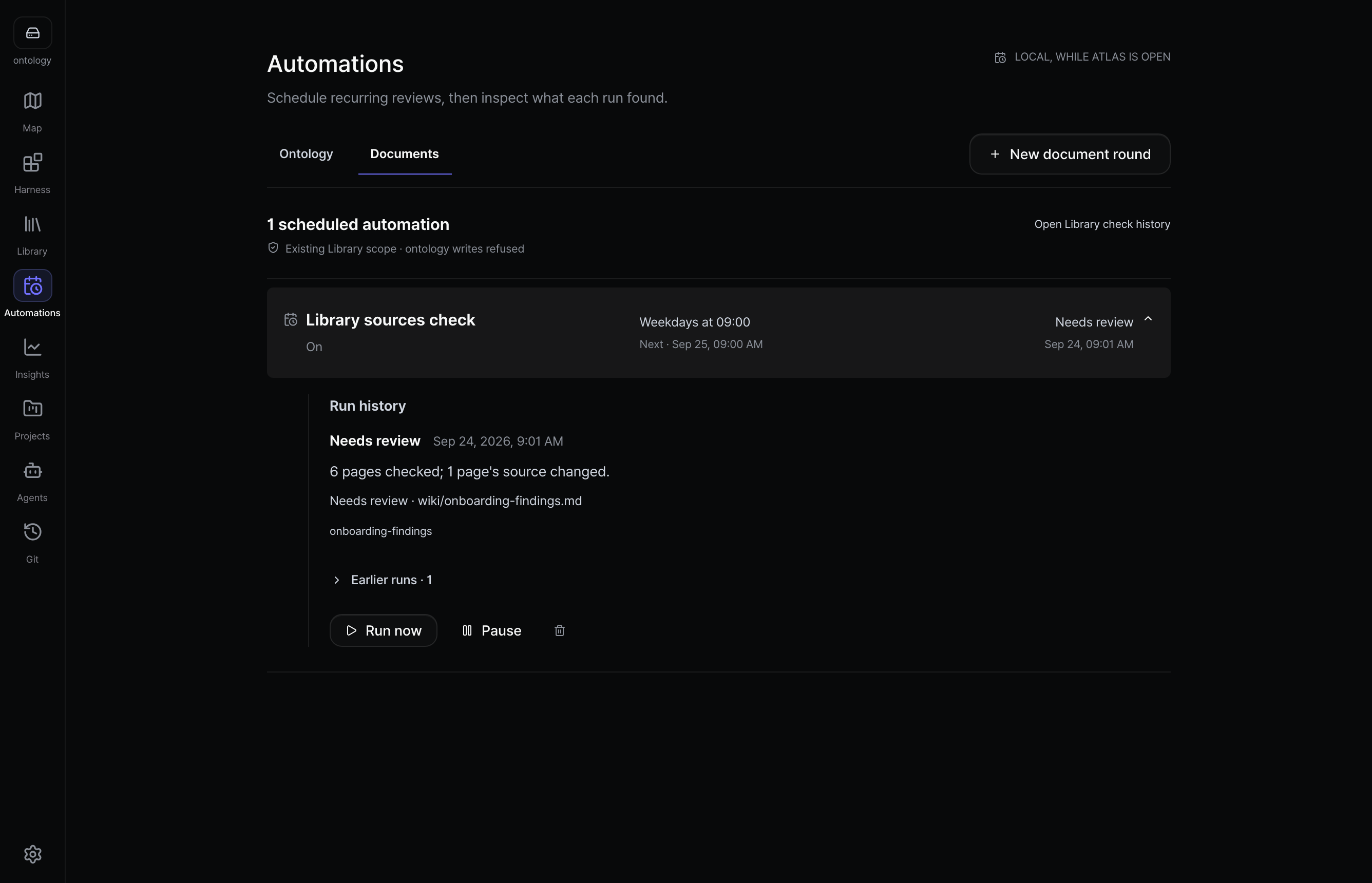
Library also works without code or ontology nodes. Keep a question and its cited answer, inspect source changes, request an updated draft through Claude Code or Codex ACP, and compare before saving a new revision. Earlier answers remain available. Local Compile has its own read and approval path. See retained answers.

5. Plan against reviewed architecture

The current Architecture screen in the installed macOS app, comparing the seven reviewed roles of this repository, numbered from Routes down to Shared foundation with what each role is in two lines, against the imports observed in code beside each one, a check in the Delta column where they agree, every stroke stating its rule as a sentence and the measured crossing with its import count, and the reviewed structure and inspection receipt named above with Re-inspect source and Roles and rules

This screen reads Atlas's own repository rather than the storefront example, because measured import traffic needs a connected code folder.

Architecture stays separate from the map. It sets what a person reviewed beside what an agent observed in the code, one role per row, with the difference in the middle; every stroke states its own sentence, and the same profile always draws the same picture. Findings & history keeps every inspection receipt. Pattern names such as Feature-Sliced Design, Hexagonal or Clean Architecture are reviewed declarations: conformance is derived from source evidence, never inferred from folder names.

6. Review a relation beside its node

The current relation review beside the map, showing the source, relation type, target and the reason typed for it, then what the concept depends on as a Now list and an After list and the connection reason that will be written, above Keep editing and Confirm and write

Atlas shows a directional preview on the map, then a compact review of the source, type, target, reason, and exact frontmatter fields. Confirm and write is the only point that changes the file.

7. Review the change, then record it

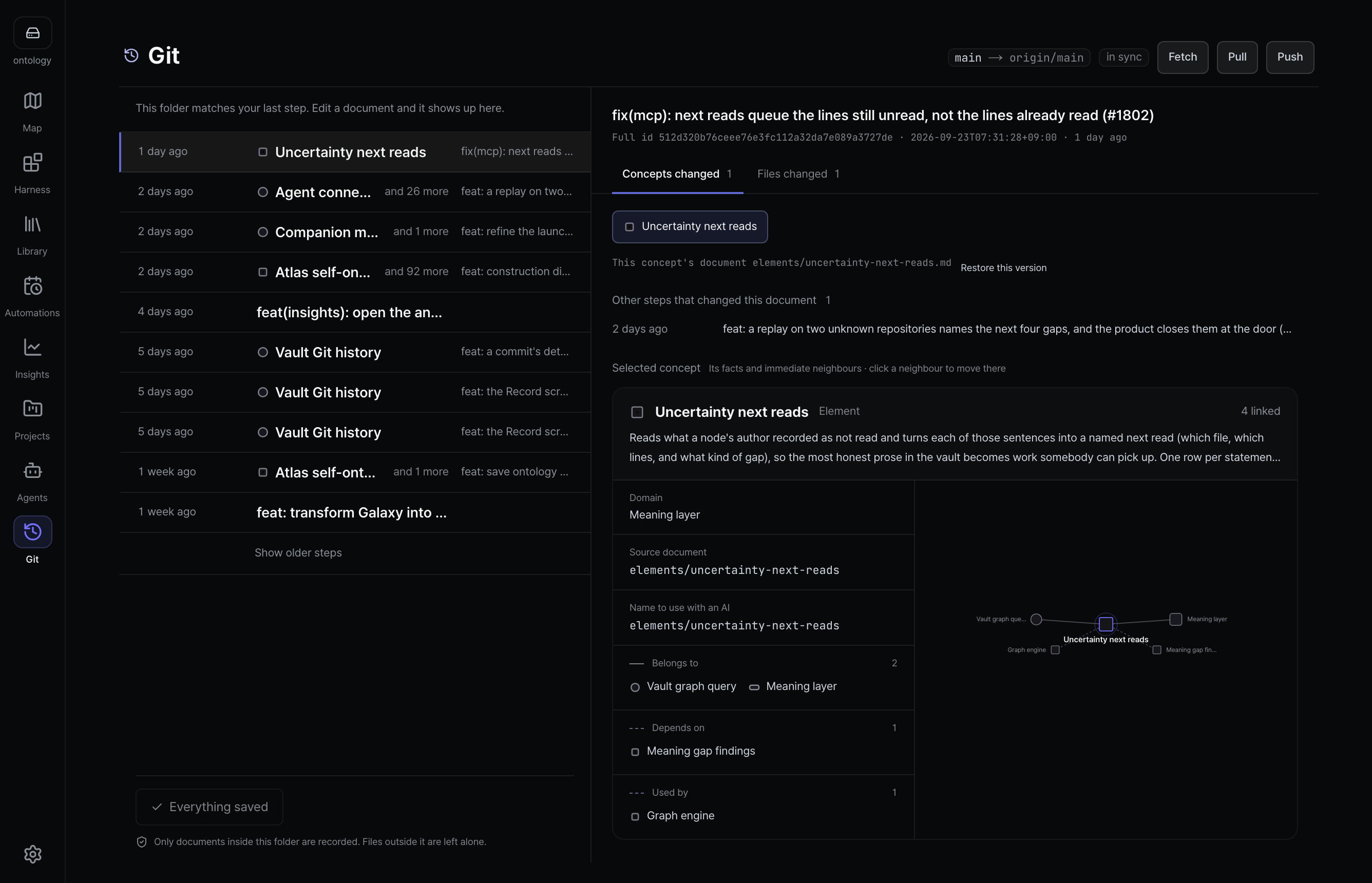
The current History screen in the installed macOS app, showing one unsaved concept change, the exact Markdown diff of the dependencies and relation_notes lines, the current branch and its remote with Fetch, Pull and Push, earlier vault commits, and the explicit save action

Whatever wrote — you, the map editor, the CLI, or an agent over MCP — lands here first as a diff you read before it becomes history. Above is the change confirmed in step 6: two frontmatter lines, still unsaved. Git is scoped to the vault, and files outside the folder you picked are never touched.

The CLI writes the same two lines, says what it would do before touching a file, and refuses a dependency nobody explained ($ATLAS is the entrypoint set in Running from source):

$ node $ATLAS relate capabilities/order-cancel capabilities/refund dependencies ./storefront --dry-run \
    --why "Cancelling a paid order has to give the money back, so cancellation cannot finish without refund processing."

capabilities/order-cancel --dependencies--> capabilities/refund
  verdict matches_existing_schema · exists no
  schema  capability --dependencies--> capability
  pattern count 53 · resolved 53 · external 0 · unresolved 0
  recommendation safe_to_add · No exact or inverse edge found; capability --dependencies--> capability is an existing schema pattern.

dry-run would write dependencies on capabilities/order-cancel → capabilities/refund (no file changed)

Drop the --why and it stops rather than guessing one. An edge in a shape the vault has never used comes back as new_schema_pattern · review_new_schema, so a drifting agent is visible before it writes.

8. Keep it healthy

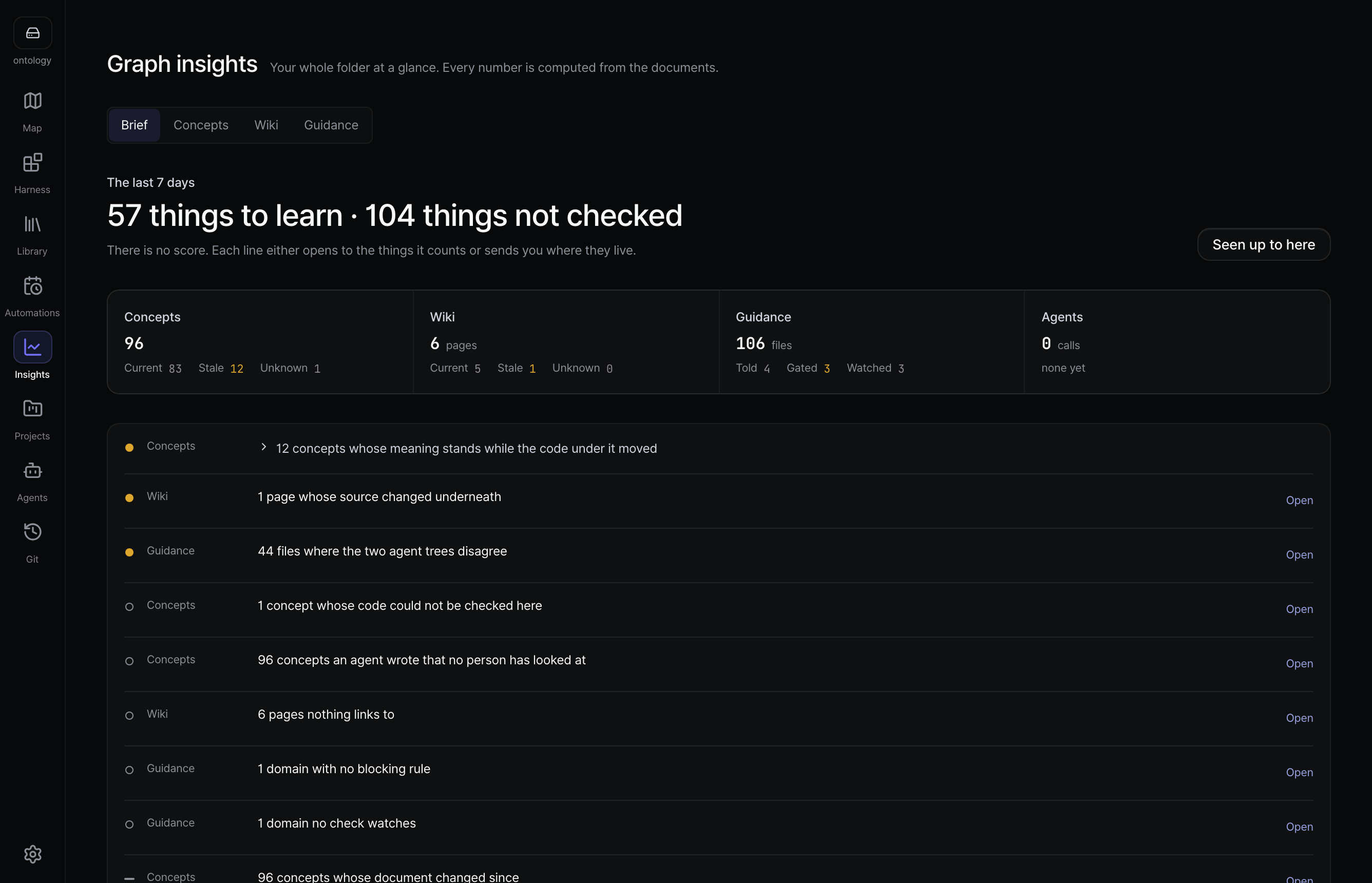
The current Analysis screen in the installed macOS app, with four measurements above the tabs (concepts by kind, relations by type, health in words, the last four weeks), the Do next, Not held, Inventory, Connections, Boundaries, Growth, Recent changes, Structure and Flow tabs, and the things to fix grouped by kind with the first group open on a pair whose names overlap

Insights opens on four measurements: concepts by kind, relations by type, the folder's health in words rather than a score, and the last four weeks of change. Do next is one row per kind of finding, and the counts add up to the title, always. Where a missing back-link can be repaired from two facts already on disk, one sheet names each file it would touch and nothing is written until you apply.

Growth replays the folder's own Git history week by week and stores nothing — the numbers are recomputed from commits each time the tab opens. A folder with no commits is told there is no history to show rather than drawn as a row of zeroes, because a zero would claim the folder was empty.

9. See the shape of the whole project

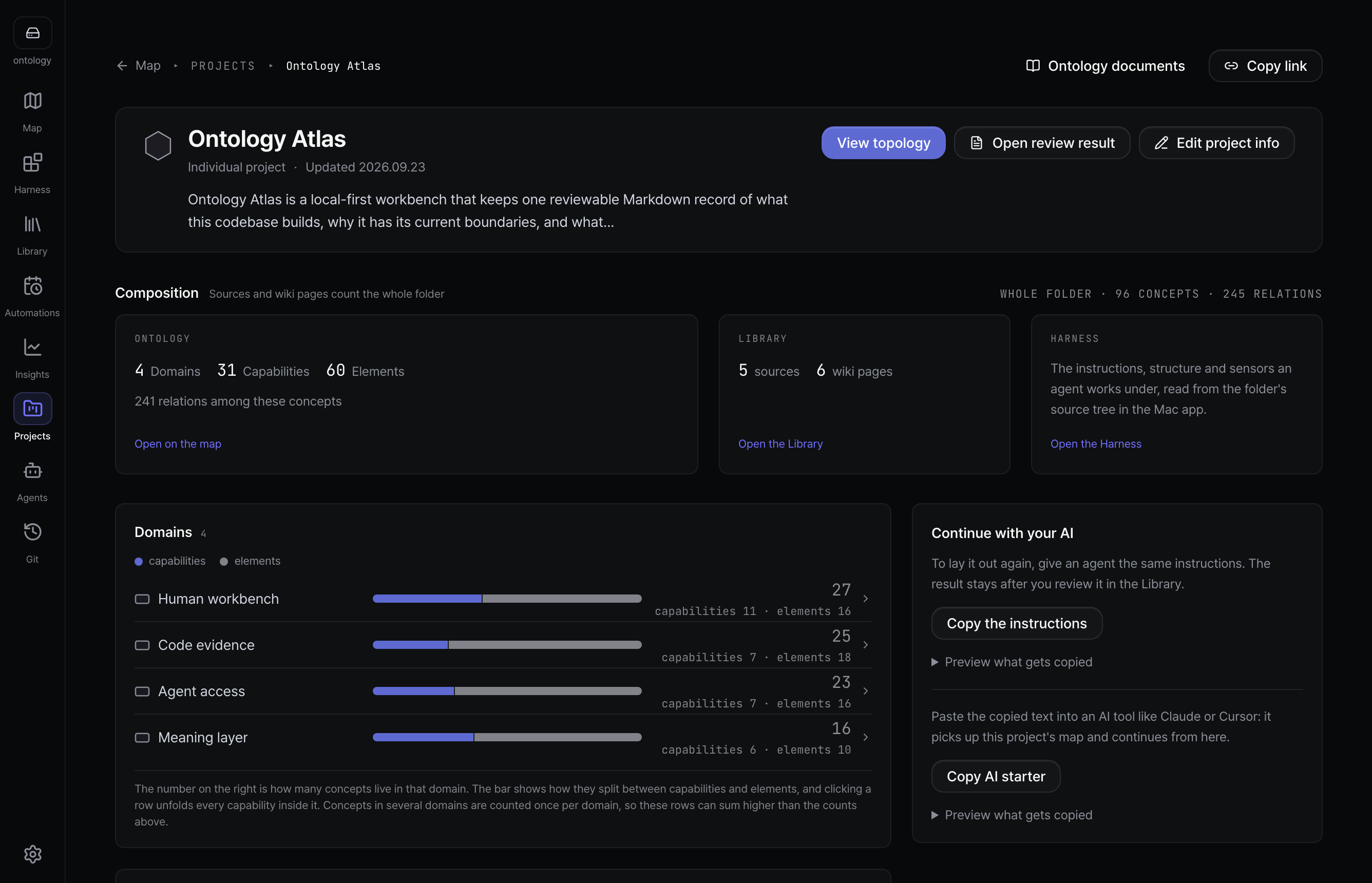
The current Projects screen in the installed macOS app, showing the Online Store project, its derived capability, element, domain, document and relation totals, nine aligned domain composition rows, and routes back to details and the map

Nothing here is maintained by hand. Frontmatter has no project: key — the runtime walks the containment graph from each project root and derives coverage from how the documents link to each other.

What your agent gets

Ask what breaks if I change this? and Atlas follows only approved dependency declarations. It does not turn folder structure into causal confidence:

$ node $ATLAS blast-radius capabilities/mcp-server docs/ontology --depth 2
capabilities/mcp-server — blast radius (depth 2, incoming)
  risk unknown · 1 node · 1 relation · 0 cross-domain

impact certainty unknown · declared 1 · rationale 0 · source-backed 0
Counts below follow declared depends_on only. Use reachability/subgraph for structure;
do not read unknown as low risk.
  • Focused context, not a repository dump. A brief carries the project, domain, evidence, impact boundary, first tools, and stop conditions; for a task that only reads, OATLAS_READ_ONLY=1 returns one compact batch.
  • Typed answers. Paths and reachability explain structure, blast radius follows declared dependencies only. No graph database, no hosted memory.
  • Writes that survive review. Analysis is side-effect free by default, destructive operations dry-run first, renames repair backlinks, and mtime guards protect concurrent human edits.

The CLI carries the same authority for sessions that cannot attach a connector: MCP guide · CLI reference.

What we measured, and the mistake we found in it

A paired benchmark gives two sides the same source and question — one with a prepared vault, one with nothing. The first run looked like a large win, 0.25 against 0.875, until re-scoring showed most of that gap was not a comparison: the answer key mostly required Atlas's own concept names, which exist only inside the vault. We had published, in part, a vocabulary test that only one side could sit.

SubjectThe part both sides could earnThe part only Atlas could earnWhat we published before
Greenfield fixture0.75 → 1.000 → 0.830.25 → 0.875
Brownfield fixture0.75 → 1.000 → 0.570.28 → 0.74

Each cell reads without Atlas → with Atlas. The control side named 100% of the source files it should have named in every run, and the gap left over rests on one word: the key wanted excludes, and an answer saying "explicitly outside it" scored zero.

So the honest status is that we have not yet measured a difference in answer quality, and Atlas was slower — a median of 17 and 33 seconds here, 28.2 and 51.1 in a separate run that carried one change through code, tests, commit, merge and cleanup on both sides. What it does show is narrower: only the Atlas side returned names you can look something up by. capabilities/checkout is an address a person or an agent can resolve next session, in another tool, months from now; "the checkout feature" is not. The re-scoring found a bug on our side too — the Atlas run dropped its own concept names in a third of the harder cases. Blind human grading is next; a stronger claim waits on unfamiliar repositories, that grading, and the measured cost of maintaining a vault. Method and every raw answer: paired findings · the correction · change-flow run · benchmark log.

Why not just use a notes tool

Local Markdown, git diffs, and MCP are table stakes; notes tools such as Basic Memory already provide them. Atlas adds a product ontology and a workbench where people and agents judge the same facts. If you only need an agent to remember conversations, a notes tool is lighter.

Notes with MCPHosted graph memoryOntology Atlas
StoreMarkdown you ownVendor databaseMarkdown you own
StructureFreeform notes and linksVendor-defined typesProject → domain → capability → element, documents, typed relations
Graph questionsNote traversalGraph engineBlast radius, reachability, cycles, paths, centrality, health
Evidence from codeHand-authoredCorpus ingestionBounded read-only proposals; nothing lands until approval
Human surfaceNotes appVendor consoleLocal Map, Architecture, Docs, Library, Insights, Projects, Agents, MCP, History

The argument and its sources are in Foundations.


A vault is just files

Everything below is the contract rather than the tour: how the folder is stored, what Atlas will never do, and how to run and verify it from source.

One Markdown file is one node. Frontmatter is the machine-readable record; the body is the explanation a person judges.

---
uid: 71890f3e-7b5d-4c0a-8f14-123456789abc   # permanent identity, kept through renames
slug: capabilities/token-issue
kind: capability
title: Token issue
domain: domains/auth
path: src/auth/token-service.ts          # a path — code evidence
elements:
  - elements/jwt-signer                  # a slug — an implementation-role node
dependencies:
  - capabilities/session-refresh         # a slug — another node
---

Issues access and refresh tokens for authenticated users.

A path points at code; a slug points at a node. Mixing them is the most common first mistake, and node $ATLAS validate reports it as a dangling reference. uid is the permanent identity, minted once and kept through a rename; the slug is the readable current address; a source location belongs in path:, never in a slug. Relations sit on the declaring file the same way, one frontmatter line from which Atlas derives the edge and its backlink — dependencies directed, relates symmetric, so the map never turns similarity into causality.

The reading spine is small on purpose — project → domain → capability → element, with document describing concepts anywhere on it — and an artifact earns a node only when it helps someone understand a capability, trace impact, or run the right proof. Curated, not exhaustive. There is no cap on how many nodes a vault holds: a wide hub is a review signal, not a limit, an analyzer's packet bound keeps one proposal readable and is never a graph bound, a bridge node has to earn its layer, and an external field trial's ontology is never merged into this product's vault. Each rule's authority is the quality authority map, and the practical test is what becomes a node?.

Three kinds of file share the folder, and only one is the graph:

KindWhereWhat makes it thatIn the graph?
Raw sourcesources/**any format, kept exactly as it arrivedno — only .md reaches the parser
Wiki pagewiki/**.mdMarkdown with no kind:no — kind: is what makes a node
Ontology nodeanywhere elsekind: in frontmatteryes, and only these

Inside wiki/, _template.md is the shape every page is held to and _log.md records each compile or check; _-prefixed files are furniture, not pages. The folder is always named atlas/ (step 1), fixed so a teammate can say it and an agent's config can point at it without guessing, and init --documents writes the same folder without the node starters for people who have documents and no code. Full contracts: the relations guide and the vault specification.

Local-first, by construction

  • Your disk is the database. Frontmatter is the graph, confirmed writes go back to the folder you picked, and Git is the history. There is no other store.
  • No Atlas backend, account, or telemetry. The web app is a static export; the desktop app checks the public updater manifest once a day and uploads no vault content. A connected coding agent talks to its own provider only when you ask.
  • Two ways in, one folder. The hosted web app can open a local folder through the File System Access API. The desktop app uses a Tauri bridge to your selected folder and keeps it open as a workspace.
  • The Tauri macOS shell is a shell, not a silo. MCP and CLI still read the selected folder directly, and the bundled server is a file your agent launches itself, so it keeps working when the app is closed.

What this is not

  • Not a general-purpose ontology editor. The ontology describes a codebase; a business concept belongs there when it explains what that codebase builds, why a boundary exists, or what a change can affect. The Library takes general sources and wiki pages with no code nodes at all.
  • Not a code index, and not an IDE. Grep, language servers, AST indexes and CodeGraph answer where a symbol lives and what calls it; Atlas replaces none of them and answers why that artifact matters, which capability it serves, and what to verify before changing it. An IDE for codebase meaning is the useful analogy, and it stops there: Atlas does not edit, build, run, or debug code.
  • No automatic acceptance of generated knowledge. Saving a wiki page or answer preserves it for review; it does not make its claims true or promote it into accepted ontology meaning.
  • Not an RDF, OWL, SKOS, or SHACL implementation. The export is a bounded graph shape; the vault is not an RDF serialization, the validator is not a SHACL processor, and the query engine is not a reasoner. A persisted relation is a declared claim, never an entailment; an absent one is a visible gap, never a negative fact. Specification §5.2.
  • Not a service, and not on npm. No backend, account, telemetry, daemon, or port; npx ontology-atlas is a 404 and not a future feature. The MCP server still reaches the ecosystem's registries as a release bundle or a container image, neither of which is a package registry.
  • Not extensible by running other people's code. There will be no third-party plugin runtime. Extension happens through MCP tools, agent skills, and files in your own vault — things a git diff shows you before they run.
  • Not finished. Every public build so far is a release candidate.

Running from source

Linux and every other platform without a packaged build run the browser app, or the CLI and MCP server from a source checkout: Node.js 24 and pnpm, one clone outside the project you are describing, then init inside your own repository and mcp-verify to prove the live connection. The exact commands, the two required installs, and the reason init refuses to run inside the Atlas clone are in set up from a source checkout.

Documentation

Use it: hosted guide · features · MCP setup · CLI reference Model a vault: what becomes a node? · relations · v2 specification · quality authority map Understand it: product direction · foundations · architecture · security · decisions

Contributing

Issues and pull requests are welcome, and the most valuable report today is pointing Atlas at a real repository and showing where the proposed meaning, the agent handoff, or the validation falls short.

Read CONTRIBUTING.md first — external pull requests come from forks, and that is a security boundary rather than a formality. Inside this repository AGENTS.md is canonical for people and agents alike, and product decisions route through pnpm po:route -- --help from change facts rather than a self-declared risk.

Verification starts with pnpm checks:changed, which picks the focused gates for the files you changed; -- --run executes every recommendation and stops at the first failure, and it is the last command before a pull request.

CommandWhat it answers
pnpm checks:changedWhich gates this change actually needs
pnpm docs:checkDocs gates, including pnpm docs:language, pnpm source:language, pnpm changelog:check, pnpm dev-checks:check
pnpm knipDead files, exports and types across every scope
pnpm decisions:find <terms> · pnpm decisions:checkThe decision record to cite or overturn, and whether this change owes one
pnpm harness:report · pnpm harness:outcomesWhat the agent hooks caught, and whether that lane still earns its place

Development checks is the full gate reference, one entry per area; map testability owns canvas performance, readability, contrast, and instrumentation.

License

MIT