SearXNG HTTP MCP
Self-contained SearXNG MCP server in Docker with 200+ search engines, dual transport (HTTP + stdio), API key auth, and built-in Web UI.
Documentation











中文 · Quick Start · Features · Architecture · Comparison · Usage · MCP Tools · Client Config · Plugin · Contributing
A self-contained MCP server that wraps SearXNG — a free, privacy-respecting metasearch engine that aggregates results from 200+ search engines.
🚀 Quick Start
Server mode — deploy once, connect from any client:
docker run -d --name searxng-mcp --restart unless-stopped \
  -p YOUR_PORT:8888 --memory=512m --cpus=1 \
  ghcr.io/whw23/searxng-http-mcp:latest
Then connect your client to http://YOUR_HOST:YOUR_PORT/mcp/. To enable API key auth, see Authentication.
Local mode — no server needed, run directly in your client:
docker run --rm -i --memory=512m --cpus=1 ghcr.io/whw23/searxng-http-mcp:latest --stdio
Add this as a stdio MCP server in your client — see Client Configuration for details.
uvx mode — if you already have SearXNG running (install guide):
uvx searxng-http-mcp
Set SEARXNG_URL to point to your SearXNG instance (default: http://127.0.0.1:8080).
✨ Features
Search
- 🔍 200+ search engines — Google, Bing, DuckDuckGo, Brave, and more via SearXNG
- 📂 30+ categories — news, images, videos, science, IT, and more
- 📄 Multi-page fanout — up to 5 pages per call
- 💡 Autocomplete suggestions — discover relevant search terms
- 🗂 Engine discovery — query available engines grouped by category
- 🎯 Token-efficient — results trimmed to essentials
Infrastructure
- 📦 Self-contained — SearXNG built into Docker image
- 🔄 Triple transport — HTTP server, Docker stdio, and uvx standalone
- 🔐 Authentication —
x-api-key+ HTTP Basic Auth - 🌐 Reverse proxy — SearXNG Web UI on the same port
- ⚡ Dynamic tool descriptions — live category lists injected at startup
- 📐 Rich JSON Schema — enum constraints, range limits, and descriptions on every parameter
🏛 Architecture
graph LR
  Client(["client:YOUR_PORT"]) --> Expose(":8888")

  subgraph Container["🐳 Docker Container"]
    direction LR
    Expose --> Auth{Auth}
    Auth -->|/mcp| MCP[FastMCP Server]
    Auth -->|/*| Proxy[Reverse Proxy]
    MCP --> SearXNG[SearXNG :8080]
    Proxy --> SearXNG
  end

  style Expose fill:none,stroke:#2496ed,stroke-dasharray:5 5,color:#2496ed

  style Client fill:#4a90d9,color:#fff,stroke:#3a7bc8
  style Container fill:#f0f4f8,stroke:#2496ed,stroke-width:2px,color:#2496ed
  style Auth fill:#f5a623,color:#fff,stroke:#d4900e
  style MCP fill:#50c878,color:#fff,stroke:#3da85e
  style Proxy fill:#9b59b6,color:#fff,stroke:#8344a5
  style SearXNG fill:#e74c3c,color:#fff,stroke:#c0392b
📊 Comparison with Alternatives
Why these five?
There are 20+ SearXNG MCP servers and many more general-purpose search MCPs. Most SearXNG wrappers only expose a basic search tool, leaving SearXNG's categories, autocomplete, and engine metadata unused. We picked five alternatives that each represent a distinct category:
- 88plug/searxng-mcp — richest tool surface among SearXNG MCPs (7 tools: rendered fetch, research mode, parallel queries)
- ihor/mcp-searxng — most GitHub stars among SearXNG MCPs
- open-webSearch — top free multi-engine alternative outside the SearXNG ecosystem (Bing, Baidu, DuckDuckGo, Brave, etc.)
- exa-mcp-server — most popular commercial search API MCP
- Perplexity MCP — commercial AI-powered search, highest star count in the search MCP space
| Feature | ✨ This project | 88plug/searxng-mcp | ihor/mcp-searxng | open-webSearch | exa-mcp-server | Perplexity MCP |
|---|---|---|---|---|---|---|
| Search | ||||||
| 200+ engines via SearXNG | ✅ | ✅ | ✅ | ❌ | ❌ | ❌ |
| 30+ search categories | ✅ | ❌ | ❌ | ❌ | ❌ | ❌ |
| Multi-page fanout | ✅ | ❌ | ❌ | ❌ | ❌ | ❌ |
| Autocomplete suggestions | ✅ | ❌ | ❌ | ❌ | ❌ | ❌ |
| Engine discovery tool | ✅ | ❌ | ❌ | ❌ | ❌ | ❌ |
| Dynamic tool descriptions | ✅ | ❌ | ❌ | ❌ | ❌ | ❌ |
| Infrastructure | ||||||
| Self-contained (built-in search) | ✅ | ❌ | ❌ | ✅ | N/A | N/A |
| Zero-install Docker deploy | ✅ | ❌ | ❌ | ✅ | ❌ | ❌ |
| HTTP + stdio transport | ✅ | ✅ | ✅ | ✅ | ✅ | ✅ |
| Authentication | ✅ | ❌ | ❌ | ❌ | ✅ | ✅ |
| Web UI reverse proxy | ✅ | ❌ | ❌ | ❌ | ❌ | ❌ |
| AI Coding Agent Plugin | ✅ | ❌ | ❌ | ❌ | ❌ | ✅ |
| General | ||||||
| Free & open source | ✅ | ✅ | ✅ | ✅ | ❌ (paid API) | ❌ (paid API) |
| Privacy (self-hosted) | ✅ | ✅ | ✅ | ✅ | ❌ | ❌ |
| Language | Python | Python | Node.js | TypeScript | TypeScript | TypeScript |
| GitHub Stars |  |  |  |  |  |  |
Why fewer tools?
MCP is designed for composition — clients connect multiple specialized servers, each doing one thing well. Some alternatives bundle URL fetching, rendered page extraction, multi-query fan-out, or research modes into the search server. We keep the tool surface to three (search, autocomplete, engine discovery) by design:
- URL fetching is a separate concern. MCP clients already ship dedicated tools (WebFetch, Playwright MCP, Jina Reader). Bundling fetch into a search server mixes responsibilities and duplicates the client ecosystem.
- Multi-query parallel search is client-side orchestration. LLM clients can fire multiple
searchcalls in parallel — asearch_manytool only adds token overhead for tool selection with no real benefit. - Research / synthesis belongs in the LLM layer. The model is the best synthesizer. Pushing multi-step research logic into the MCP server couples application concerns to infrastructure.
Instead we invest in what the alternatives above lack: complete SearXNG API coverage (categories, autocomplete, engine metadata — capabilities most wrappers leave on the table), self-contained deployment, authentication, Web UI reverse proxy, and AI coding agent plugin integration (Claude Code / Copilot CLI / Codex CLI).
📖 Usage
🌐 HTTP Mode (default)
# Without authentication
docker run -d --name searxng-mcp --restart unless-stopped \
  -p YOUR_PORT:8888 --memory=512m --cpus=1 \
  ghcr.io/whw23/searxng-http-mcp:latest

# With authentication
docker run -d --name searxng-mcp --restart unless-stopped \
  -p YOUR_PORT:8888 --memory=512m --cpus=1 \
  -e API_KEY=your-secret-key \
  ghcr.io/whw23/searxng-http-mcp:latest
| 🔗 MCP Endpoint | http://YOUR_HOST:YOUR_PORT/mcp/ |
| 🖥 SearXNG Web UI | http://YOUR_HOST:YOUR_PORT/ |
📡 stdio Mode
docker run --rm -i --memory=512m --cpus=1 \
  ghcr.io/whw23/searxng-http-mcp:latest --stdio
No ports exposed. Communication via stdin/stdout. SearXNG runs internally for the MCP tools.
🐍 uvx Mode
# Connect to a local SearXNG instance (default: http://127.0.0.1:8080)
uvx searxng-http-mcp

# Connect to a remote SearXNG instance
SEARXNG_URL=http://YOUR_SEARXNG_HOST:YOUR_SEARXNG_PORT uvx searxng-http-mcp
Requires Python 3.14+ and an existing SearXNG instance. No Docker needed.
⚙️ Environment Variables
| Variable | Default | Description |
|---|---|---|
API_KEY | (empty, no auth) | API key for authentication |
SEARXNG_URL | http://127.0.0.1:8080 | SearXNG instance URL (for uvx/standalone mode) |
🔐 Authentication
When API_KEY is set, all requests require one of:
x-api-keyheader — for MCP clients:x-api-key: your-key- HTTP Basic Auth — for browsers
[!TIP] Browser Login: When accessing the Web UI with
API_KEYenabled, the browser will show a login dialog. Leave the username empty and enter your API key as the password.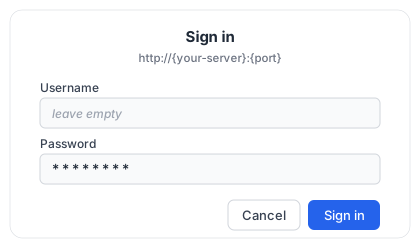
When API_KEY is not set, all requests are open.
🔧 MCP Tools Reference
🔍 search — Search the web using SearXNG
Aggregates results from 200+ search engines with privacy.
| Parameter | Type | Required | Default | Description |
|---|---|---|---|---|
query | string | yes | — | The search query to use |
categories | string | no | "" | Comma-separated category names (e.g., general,news,science) |
engines | string | no | "" | Comma-separated engine names (e.g., google,arxiv,wikipedia) |
language | string | no | "" | Search language code (e.g., en, zh, ja) |
time_range | enum | no | null | day, week, month, year |
safesearch | enum | no | 0 | 0=off, 1=moderate, 2=strict |
pageno | int ≥1 | no | 1 | Starting page number |
pages | int 1–5 | no | 1 | Number of pages to fetch in parallel |
max_results | int 1–100 | no | 10 | Maximum number of results to return |
format | enum | no | compact | compact (title/url/content) or full (+ engines/score/category/date) |
Returns: results, answers, suggestions, corrections, infoboxes.
💡 autocomplete — Get search query suggestions
| Parameter | Type | Required | Description |
|---|---|---|---|
query | string | yes | Partial query string to get suggestions for |
🗂 engine_info — Discover available engines and categories
No parameters. Returns the list of enabled engines grouped by category.
Returns:
{
  "categories": ["general", "images", "videos", "news", ...],
  "engines": ["google", "bing", "duckduckgo", ...],
  "category_engines": {
    "general": ["google", "bing", "duckduckgo", "brave", ...],
    "science": ["arxiv", "google scholar", "pubmed", ...],
    ...
  }
}
Use this to discover what engines are available before calling search with specific engines or categories filters.
🔌 Client Configuration
The following is a baseline server-mode (remote HTTP) example using the standard mcpServers JSON structure. Many clients accept this structure, but field names and required type values differ — see the NOTE below and adjust for your client:
{
  "mcpServers": {
    "searxng": {
      "type": "http",
      "url": "http://YOUR_HOST:YOUR_PORT/mcp/",
      "headers": {
        "x-api-key": "your-secret-key"
      }
    }
  }
}
[!NOTE] Field-name differences: ZCode uses
mcp.servers; Kilo Code uses a top-levelmcpkey with"type": "remote"; Windsurf usesserverUrlinstead ofurl; VS Code Copilot uses a top-levelserverskey; OpenCode nests undermcpwith"type": "remote"; Codex and Hermes usemcp_servers(TOML/YAML). For Claude Code,"type": "http"is required — without it the entry is read as a stdio server and skipped. For Cline, set"type": "streamableHttp"on remote HTTP servers.
 Claude Desktop
Server mode — edit ~/Library/Application Support/Claude/claude_desktop_config.json:
{
  "mcpServers": {
    "searxng": {
      "url": "http://YOUR_HOST:YOUR_PORT/mcp/",
      "headers": {
        "x-api-key": "your-secret-key"
      }
    }
  }
}
Local mode:
{
  "mcpServers": {
    "searxng": {
      "command": "docker",
      "args": ["run", "--rm", "-i", "--memory=512m", "--cpus=1", "ghcr.io/whw23/searxng-http-mcp:latest", "--stdio"]
    }
  }
}
uvx mode:
{
  "mcpServers": {
    "searxng": {
      "command": "uvx",
      "args": ["searxng-http-mcp"],
      "env": { "SEARXNG_URL": "http://YOUR_SEARXNG_HOST:YOUR_SEARXNG_PORT" }
    }
  }
}
Claude Code
Server mode (CLI):
claude mcp add --transport http searxng http://YOUR_HOST:YOUR_PORT/mcp/ \
  --header "x-api-key: your-secret-key"
Server mode (JSON) — the same mcpServers structure works in a team-shared project .mcp.json or a user-wide global ~/.claude.json:
{
  "mcpServers": {
    "searxng": {
      "type": "http",
      "url": "http://YOUR_HOST:YOUR_PORT/mcp/",
      "headers": {
        "x-api-key": "your-secret-key"
      }
    }
  }
}
Local mode:
claude mcp add --transport stdio searxng -- docker run --rm -i --memory=512m --cpus=1 ghcr.io/whw23/searxng-http-mcp:latest --stdio
uvx mode:
claude mcp add --transport stdio searxng -- uvx searxng-http-mcp
 Codex
Codex
Server mode — add to ~/.codex/config.toml:
[mcp_servers.searxng]
url = "http://YOUR_HOST:YOUR_PORT/mcp/"
http_headers = { "x-api-key" = "your-secret-key" }
Local mode:
[mcp_servers.searxng]
command = "docker"
args = ["run", "--rm", "-i", "--memory=512m", "--cpus=1", "ghcr.io/whw23/searxng-http-mcp:latest", "--stdio"]
uvx mode:
[mcp_servers.searxng]
command = "uvx"
args = ["searxng-http-mcp"]
 Cursor
Server mode — edit .cursor/mcp.json:
{
  "mcpServers": {
    "searxng": {
      "url": "http://YOUR_HOST:YOUR_PORT/mcp/",
      "headers": {
        "x-api-key": "your-secret-key"
      }
    }
  }
}
Local mode:
{
  "mcpServers": {
    "searxng": {
      "command": "docker",
      "args": ["run", "--rm", "-i", "--memory=512m", "--cpus=1", "ghcr.io/whw23/searxng-http-mcp:latest", "--stdio"]
    }
  }
}
uvx mode:
{
  "mcpServers": {
    "searxng": {
      "command": "uvx",
      "args": ["searxng-http-mcp"],
      "env": { "SEARXNG_URL": "http://YOUR_SEARXNG_HOST:YOUR_SEARXNG_PORT" }
    }
  }
}
 VS Code Copilot
Server mode — add to .vscode/mcp.json:
{
  "servers": {
    "searxng": {
      "type": "http",
      "url": "http://YOUR_HOST:YOUR_PORT/mcp/",
      "headers": {
        "x-api-key": "your-secret-key"
      }
    }
  }
}
Local mode:
{
  "servers": {
    "searxng": {
      "type": "stdio",
      "command": "docker",
      "args": ["run", "--rm", "-i", "--memory=512m", "--cpus=1", "ghcr.io/whw23/searxng-http-mcp:latest", "--stdio"]
    }
  }
}
uvx mode:
{
  "servers": {
    "searxng": {
      "type": "stdio",
      "command": "uvx",
      "args": ["searxng-http-mcp"],
      "env": { "SEARXNG_URL": "http://YOUR_SEARXNG_HOST:YOUR_SEARXNG_PORT" }
    }
  }
}
 Windsurf
Server mode — add to ~/.codeium/windsurf/mcp_config.json:
{
  "mcpServers": {
    "searxng": {
      "serverUrl": "http://YOUR_HOST:YOUR_PORT/mcp/",
      "headers": {
        "x-api-key": "your-secret-key"
      }
    }
  }
}
Local mode:
{
  "mcpServers": {
    "searxng": {
      "command": "docker",
      "args": ["run", "--rm", "-i", "--memory=512m", "--cpus=1", "ghcr.io/whw23/searxng-http-mcp:latest", "--stdio"]
    }
  }
}
uvx mode:
{
  "mcpServers": {
    "searxng": {
      "command": "uvx",
      "args": ["searxng-http-mcp"],
      "env": { "SEARXNG_URL": "http://YOUR_SEARXNG_HOST:YOUR_SEARXNG_PORT" }
    }
  }
}
 Cline
Cline
Configure via Cline's MCP settings panel in VS Code (Cline > MCP Servers > Add).
Server mode:
{
  "mcpServers": {
    "searxng": {
      "type": "streamableHttp",
      "url": "http://YOUR_HOST:YOUR_PORT/mcp/",
      "headers": {
        "x-api-key": "your-secret-key"
      }
    }
  }
}
Local mode:
{
  "mcpServers": {
    "searxng": {
      "command": "docker",
      "args": ["run", "--rm", "-i", "--memory=512m", "--cpus=1", "ghcr.io/whw23/searxng-http-mcp:latest", "--stdio"]
    }
  }
}
uvx mode:
{
  "mcpServers": {
    "searxng": {
      "command": "uvx",
      "args": ["searxng-http-mcp"],
      "env": { "SEARXNG_URL": "http://YOUR_SEARXNG_HOST:YOUR_SEARXNG_PORT" }
    }
  }
}
 OpenCode
Server mode — edit opencode.json:
{
  "mcp": {
    "searxng": {
      "type": "remote",
      "url": "http://YOUR_HOST:YOUR_PORT/mcp/",
      "headers": {
        "x-api-key": "your-secret-key"
      }
    }
  }
}
Local mode:
{
  "mcp": {
    "searxng": {
      "type": "local",
      "command": ["docker", "run", "--rm", "-i", "--memory=512m", "--cpus=1", "ghcr.io/whw23/searxng-http-mcp:latest", "--stdio"]
    }
  }
}
uvx mode:
{
  "mcp": {
    "searxng": {
      "type": "local",
      "command": ["uvx", "searxng-http-mcp"]
    }
  }
}
 Hermes Agent
Server mode — edit ~/.hermes/config.yaml:
mcp_servers:
  searxng:
    url: "http://YOUR_HOST:YOUR_PORT/mcp/"
    headers:
      x-api-key: "your-secret-key"
Local mode:
mcp_servers:
  searxng:
    command: "docker"
    args: ["run", "--rm", "-i", "--memory=512m", "--cpus=1", "ghcr.io/whw23/searxng-http-mcp:latest", "--stdio"]
uvx mode:
mcp_servers:
  searxng:
    command: "uvx"
    args: ["searxng-http-mcp"]
🟦 ZCode (Zhipu AI · GLM)
Server mode — edit ~/.zcode/cli/config.json (user-wide) or .zcode/config.json (project):
{
  "mcp": {
    "servers": {
      "searxng": {
        "type": "http",
        "url": "http://YOUR_HOST:YOUR_PORT/mcp/",
        "headers": {
          "x-api-key": "your-secret-key"
        }
      }
    }
  }
}
Local mode:
{
  "mcp": {
    "servers": {
      "searxng": {
        "command": "docker",
        "args": ["run", "--rm", "-i", "--memory=512m", "--cpus=1", "ghcr.io/whw23/searxng-http-mcp:latest", "--stdio"]
      }
    }
  }
}
uvx mode:
{
  "mcp": {
    "servers": {
      "searxng": {
        "command": "uvx",
        "args": ["searxng-http-mcp"],
        "env": { "SEARXNG_URL": "http://YOUR_SEARXNG_HOST:YOUR_SEARXNG_PORT" }
      }
    }
  }
}
ZCode also accepts the standard mcpServers structure (e.g. in .agents/mcp.json). Alternatively, add servers via Settings → MCP Servers → New MCP Server.
⚡ Kilo Code
Server mode — edit ~/.config/kilo/kilo.jsonc (global) or .kilo/kilo.jsonc (project):
{
  "mcp": {
    "searxng": {
      "type": "remote",
      "url": "http://YOUR_HOST:YOUR_PORT/mcp/",
      "headers": {
        "x-api-key": "your-secret-key"
      },
      "enabled": true
    }
  }
}
Local mode:
{
  "mcp": {
    "searxng": {
      "type": "local",
      "command": ["docker", "run", "--rm", "-i", "--memory=512m", "--cpus=1", "ghcr.io/whw23/searxng-http-mcp:latest", "--stdio"],
      "enabled": true
    }
  }
}
uvx mode:
{
  "mcp": {
    "searxng": {
      "type": "local",
      "command": ["uvx", "searxng-http-mcp"],
      "environment": { "SEARXNG_URL": "http://YOUR_SEARXNG_HOST:YOUR_SEARXNG_PORT" },
      "enabled": true
    }
  }
}
🥧 Pi
Install the MCP adapter once, then add a standard mcpServers block — e.g. in ~/.pi/agent/mcp.json (all projects) or .pi/mcp.json (project):
pi install npm:pi-mcp-adapter
Restart Pi after installing.
Server mode:
{
  "mcpServers": {
    "searxng": {
      "url": "http://YOUR_HOST:YOUR_PORT/mcp/",
      "headers": {
        "x-api-key": "your-secret-key"
      }
    }
  }
}
Local mode:
{
  "mcpServers": {
    "searxng": {
      "command": "docker",
      "args": ["run", "--rm", "-i", "--memory=512m", "--cpus=1", "ghcr.io/whw23/searxng-http-mcp:latest", "--stdio"]
    }
  }
}
uvx mode:
{
  "mcpServers": {
    "searxng": {
      "command": "uvx",
      "args": ["searxng-http-mcp"],
      "env": { "SEARXNG_URL": "http://YOUR_SEARXNG_HOST:YOUR_SEARXNG_PORT" }
    }
  }
}
🧩 AI Coding Agent Plugin
Compatible with Claude Code, GitHub Copilot CLI, and OpenAI Codex CLI. Add the marketplace, then install the plugin that fits your setup:
/plugin marketplace add whw23/searxng_http_mcp
All plugins include:
- 🔍
/web-search-via-searxngskill — search the web with category selection guide and usage rules - 🤖
web-searcheragent — research subagent with:- 🌐 Multi-language parallel search — auto-detects query language, searches in multiple languages for broader coverage
- 🛡 Source credibility tiers — Tier 1/2/3 classification with AI poisoning defense
- ✅ Cross-validation — key facts require 2+ independent sources
- 🔍 WebFetch deep reading — reads full pages from credible sources, not just snippets
- 🔄 Multi-round iterative search — up to 3 rounds with automatic deepening on gaps
- ⏱ Timeliness evaluation — flags outdated content, states source date ranges
- 📝 Footnote-style references — structured output with inline source citations
🐍 Standalone mode — uvx, no Docker, bring your own SearXNG
/plugin install searxng-http-mcp-standalone@searxng-http-mcp
Runs via uvx. Requires Python 3.14+ and an existing SearXNG instance. Set SEARXNG_URL in ~/.claude/settings.json:
{
  "env": {
    "SEARXNG_URL": "http://YOUR_SEARXNG_HOST:YOUR_SEARXNG_PORT"
  }
}
🐳 Local mode — Docker stdio, zero config
/plugin install searxng-http-mcp@searxng-http-mcp
Runs SearXNG in a local Docker container via stdio. Requires Docker installed.
🌐 Remote mode — connect to a deployed server via HTTP
/plugin install searxng-http-mcp-remote@searxng-http-mcp
Connects to a deployed SearXNG MCP server. Requires env vars SEARXNG_MCP_URL and SEARXNG_API_KEY.
Add to ~/.claude/settings.json under the env field:
{
  "env": {
    "SEARXNG_MCP_URL": "http://YOUR_HOST:YOUR_PORT/mcp/",
    "SEARXNG_API_KEY": "your-api-key"
  }
}
Then restart Claude Code.
🛠 SearXNG Configuration
🖥 Via Web UI
Access the SearXNG Web UI at http://YOUR_HOST:YOUR_PORT/ to configure search engines, languages, and other settings. Changes persist during the container's lifetime.
💾 Via Volume Mount — persistent configuration
Mount the SearXNG config directory for persistent configuration:
docker run -d --name searxng-mcp --restart unless-stopped \
  -p YOUR_PORT:8888 --memory=512m --cpus=1 \
  -v /path/to/searxng-config:/etc/searxng \
  ghcr.io/whw23/searxng-http-mcp:latest
SearXNG generates settings.yml on first startup. The container automatically enables JSON format output required by MCP tools.
🏗 Build from Source
git clone https://github.com/whw23/searxng_http_mcp.git
cd searxng_http_mcp
docker build -t searxng-http-mcp:local .
docker run -d --name searxng-mcp --restart unless-stopped \
  -p YOUR_PORT:8888 --memory=512m --cpus=1 \
  searxng-http-mcp:local
🤝 Contributing
See CONTRIBUTING.md for the full workflow, CI requirements, and development setup.
- 🍴 Fork the repository and enable GitHub Actions in your fork
- 🌿 Create a feature branch from
dev - ✍️ Make your changes
- ✅ Run tests:
pytest tests/ -v— CI must pass in your fork before opening a PR - 📬 Submit a PR to
dev
Development happens on the dev branch. Merges to main trigger image builds.
📄 License
MIT — MCP server code.
SearXNG itself is licensed under AGPL-3.0-or-later.