webmcpify (Agent Skill)
Make any web app agent-ready with WebMCP: inventory user actions, approve a tool manifest, integrate tools, verify them in Chrome, and heal failures.
Documentation
webmcpify — the WebMCP agent skill



Website · Docs · Install · Demo · Changelog
webmcpify is an agent skill that makes an existing web app callable by browser
AI agents through WebMCP —
document.modelContext, the proposed standard incubated in the W3C Web Machine
Learning Community Group and in Chrome origin trial. Your coding agent inventories
the app, proposes a tool manifest for your approval, integrates the tools with a
tiny vendored runtime, and proves each one works in real Chrome. Unrelated code
stays untouched — from a static landing page to a multi-tenant SaaS.
npx skills add TueJon/webmcpify     # once
/webmcpify                          # in your app's repo, inside your coding agent
[!TIP] New in v0.6.0: evidence-aware resume — changed app files, contracts or browsers invalidate the verification they affect — plus scoped browser access and independent checks for every mutation.
How it works

- One human checkpoint. You approve the tool manifest: names, schemas, examples, coverage reasons, and a read-only or mutating class per tool. After that the agent only comes back for what it genuinely can't resolve — an app that won't start, or a tool that still fails after its capped heal attempts.
- Loops over persisted state. Every phase reads and writes
.webmcpify/manifest.json, so a run resumes across sessions, context windows and even different agents. Recorded evidence tells it which checks are still valid. - Proof, not promises. Each tool is enumerated and executed through Chrome's
native
getTools()/executeTool(), asserting on the tool result and the resulting UI state.
What your agent adds to your app
From the reproducible proof fixture. First, the manifest entry you approve at the gate (abridged):
{
  "id": "set_release_filter",
  "mutating": "client",                        // browser state only — no server write
  "inputSchema": {
    "type": "object",
    "properties": { "category": { "type": "string", "enum": ["all", "feature", "fix"] } },
    "required": ["category"],
    "additionalProperties": false
  },
  "source": ["proof/demo/app.js:applyFilter"],  // the UI's existing code path
  "examples": { "valid": { "category": "fix" }, "invalid": { "category": "private" } },
  "expect": { "result": "2 release notes visible",
              "ui": "only the two synthetic fix notes remain visible" },
  "cleanup": "execute the same UI path with category=all"
}
Then the integration: a registration that calls the code path the UI already uses, through the vendored runtime.
import { createToolScope } from './webmcpify.js';  // vendored, MIT, ~290 lines
import { applyFilter } from './app.js';           // existing UI logic, unchanged

createToolScope('proof-release-notes', [{
  name: 'set_release_filter',
  description: 'Filters the visible synthetic release notes by category '
    + "using the page's existing filter path.",
  inputSchema: schema,                             // the approved schema above
  annotations: { readOnlyHint: false, untrustedContentHint: false, consequentialHint: false },
  execute: ({ category }) => {
    if (!schema.properties.category.enum.includes(category)) {
      return 'ERROR: category must be one of all, feature, or fix.';
    }
    return `${applyFilter(category)} release notes visible for ${category}.`;
  },
}]);  // feature-detected: a safe no-op in browsers without WebMCP
See it run
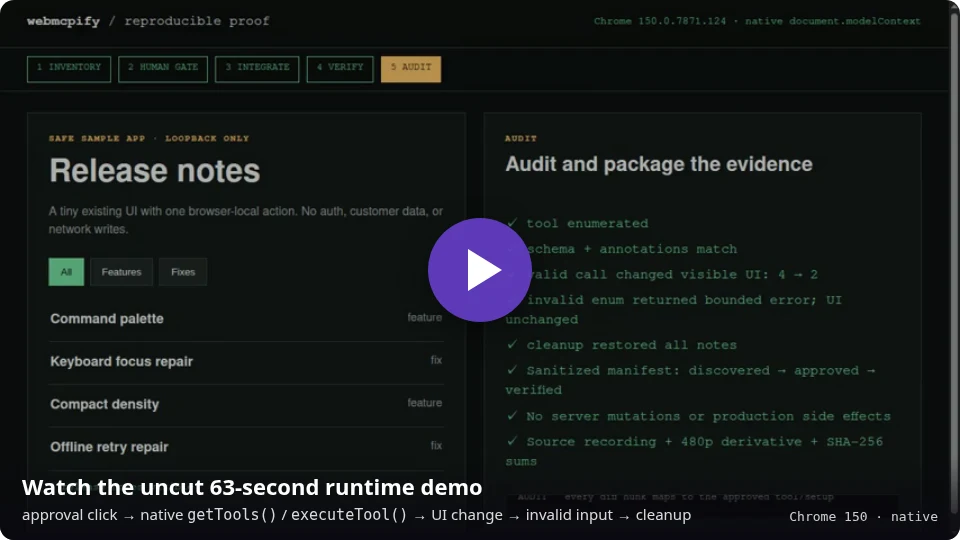
A prepared local fixture passes a real approval click, registers one client-only tool,
then exercises native document.modelContext.getTools() / executeTool(), a visible
UI change, invalid-input handling and cleanup. The runtime registration and browser
assertions are real; the phase labels are advanced by a script for legibility, so the
recording does not run the skill's inventory, integration or audit phases. Reproduce
the native checks with npm run proof:verify; the proof/ pack
holds the fixture, before/after manifests, an illustrative patch and checksums.
Install
| Where | How |
|---|---|
| Any agent — Claude Code, Codex, Cursor, opencode, Copilot and 70+ more | npx skills add TueJon/webmcpify |
| Claude Code plugin | /plugin marketplace add TueJon/webmcpify then /plugin install webmcpify@webmcpify |
| Manual | Copy skills/webmcpify/ into your agent's skills directory, or tell your agent to follow SKILL.md |
The skill directory is self-contained: pipeline, phase guides, vendorable runtime and the verification template all ship inside it.
Use
Open your agent in the target repo and pick a scope — or just say "webmcpify this app".
| Command | What happens | Changes your code |
|---|---|---|
/webmcpify | Full pipeline, resuming wherever the manifest says | After your approval |
/webmcpify inventory | Investigate and propose the tool manifest | Never |
/webmcpify integrate | Integrate the approved manifest in small batches | Yes |
/webmcpify workbench | Agent launches a temporary visual tool inspector | No — development aid only |
/webmcpify verify | Verify and heal what is integrated | Only to fix a failing tool |
/webmcpify status | Where are we, what's next | Never (read-only) |
/webmcpify full parity | Census every interactive element on every authenticated route | After your approval |
Curated core or route-by-route parity
| Curated | Parity | |
|---|---|---|
| Goal | A usable toolset for the actions that matter | Auditable completeness |
| Output | Reviewed route → tool map for core actions | Per-route element census: every interaction maps to a tool or a written reason |
| Keeps it usable by | Priority waves, an overlap rule (no two tools match the same request), role/tenant coverage | Route-scoped registration; client-capacity gaps are reported, never guessed |
The agent asks you to choose before inventory — there is no silent default — and a tool count alone is never called 100%.
Guarantees
| Guarantee | How it's enforced | |
|---|---|---|
| 🧩 | Unrelated code stays untouched | Every diff hunk traces to a manifest entry; a final audit checks against the recorded baseline commit; files already dirty at the start are never modified or reverted |
| 🔒 | Read-only first | Server mutations need your explicit per-tool approval; auth, signup, billing, payment and credential-returning tools stay excluded; irreversible deletes can only open the app's own confirmation UI |
| 🛡️ | Your server stays the trust boundary | Tools only call code paths your UI already uses — no new endpoints, no bypasses |
| 📦 | Zero dependencies | A small MIT runtime is vendored and feature-detected; the app behaves the same in browsers without WebMCP |
| 🚦 | No ambiguous imperative results | The runtime rejects accidental bare null / undefined; route-changing tools return a structured result before navigation and route-scope disposal |
| 🧪 | Exercised, not assumed | Every tool runs in real Chrome against the result and the UI state; mutations are confirmed through an independent read path with an unchanged neighbor; declarative forms get the real submit click |
| 📝 | Crash-safe mutation checks | A dependency-free host helper journals dispatches and cleanups, settles verified outcomes atomically, and serializes runners through an advisory-lock sidecar on Linux and macOS/FreeBSD |
| ♻️ | Honest resume | Changed files, contracts, runtimes or browsers invalidate the evidence they affect, unknown dependencies mean a full re-check, and interrupted mutations are reconciled before any retry (re-verification) |
| 🔐 | Scoped access | A dedicated test context with approved origins, accounts and fixtures; official guidance is read directly, never executed as an unreviewed package |
| 🧭 | Spec over scoreboard | Checker findings are classified, not chased; the public discovery layer (/.well-known/webmcp) is a separate approval |
Built to scale to large codebases
- Inventory maps the codebase into areas (routes, views, modules) first, then deep-reads one area per iteration — a 500-file SaaS is processed area by area, never in one context-busting sweep. Sub-agent fan-out writes per-area shard files; a single coordinator merges them.
- Integrate works in batches of one area or at most five tools, each built and typechecked — committed per batch only if you opted in.
- Verify / Heal iterate per tool with attempt caps and honest escalation; mutating tools get cleanup steps between retries.
- Interrupt anywhere. The next run resumes from the manifest;
statusstays read-only.
Platform status and compatibility
WebMCP is an origin trial (Chrome 149 onward; the stable milestone is an
estimate, not a commitment). Production exposure needs an
origin-trial token; local development
needs chrome://flags/#enable-webmcp-testing. The API has already changed during
the trial (testing API removed 2026-07; navigator → document) — webmcpify
isolates that churn in one vendored file, and its verification probes whether the
browser takes current object input or Chrome 150's legacy JSON-string input without
retrying real tools. Integration reads the official Chrome guides and the CG draft
directly.
ChatGPT's separate, model- and account-gated client surface is documented as Site tools, with dated availability facts and a troubleshooting order. Release-by-release spec adaptations are in the changelog.
What's in this repo
| Path | Purpose |
|---|---|
skills/webmcpify/SKILL.md | The pipeline your agent follows |
skills/webmcpify/references/ | Phase guides: inventory, integrate, Workbench, runtime, verify, re-verify, heal, security, discovery, client surfaces |
skills/webmcpify/templates/ | Vendorable runtime (TS + JS), durable mutation journal, temporary visual Workbench, ambient types, Playwright verification template, discovery manifest |
proof/ | Reproducible native-Chrome proof: fixture, manifests, recording, checksums |
Related projects
- webmcpify.at — the project website, itself agent-ready in all three layers: imperative tools via the vendored runtime, a declarative install form, and a published
/.well-known/webmcpmanifest - webmachinelearning/webmcp — the spec draft (W3C WebML CG)
- GoogleChromeLabs/webmcp-tools — Google's demos, types and evals CLI (webmcpify follows these patterns)
- GoogleChrome/modern-web-guidance — official best-practice guides (optional CLI; exact version and execution approval required)
- Puppeteer WebMCP — experimental first-class WebMCP automation API (Chrome 151+ as documented 2026-08-29; alternative verify harness)
- MCP-B / WebMCP-org — polyfill, extension, transports and dev tooling (webmcpify vendors a minimal runtime instead of adding dependencies)
License
MIT — © Jonas Tüchler