Omem
Memory for AI agents that tracks what is believed, when, and why. Contradictions are surfaced instead of overwritten, and identity is pinned to the process so a model cannot read another agent's or user's memory.
Documentation
OMEM




The system of record for what an AI agent believed and did. Append-only, with the evidence under every belief, both sides of every contradiction kept, and a named human behind every risky action. So when an agent acts and someone asks "why did it do that", you answer with a record instead of an investigation.
OMEM sits where a memory layer sits and does a different job. Instead of dumping text into a vector store and hoping for the best, it tracks what each agent believes over time, keeps the evidence under every belief, and handles contradictions explicitly, so an agent can reason about what it knows, when it learned it, and why it holds.
And it does not start from nothing. Installs that choose to pool what they work out about people in general, as counts that name nobody, and a young install borrows that intuition on day one instead of spending six months earning it. What you contribute is counts; what you get back is everyone else's. A borrowed pattern is born weaker than one you learned yourself, and still yields the moment a person's own evidence disagrees, so the general never overrides the individual.
The bank is empty today. No installation has contributed yet, which means the first ones decide what it learns, and it is worth knowing that a corpus of regularities about people can carry the biases of whoever filled it. The mining rule was rebuilt so that a pattern has to beat the base rate rather than ride it (Working Paper No. 1); whether the contributing population is representative is a separate question and an open one.
It runs locally with no external services and no dependencies to install.
pip install omem-infrastructure && omem-server
Or deploy a private server in one click:

The blueprint provisions one small service with a persistent disk, password
auth on (the first signup is the operator account), and a generated master
key. Fly.io works too: fly launch --copy-config with the included
fly.toml.
Docs: infrastructure.omem-cloud.com · Quickstart · Security · Contributing
Shipping agents to clients? The audit trail and the approval gate are the point: what a client's security review asks for, and a small number of hands-on design-partner pilots are open.
Want to see the whole pattern run before reading another word? refund-desk is the reference integration: a support agent that moves money, with receipts. One file, runs in a minute, asserts every claim it makes.
That is scripts/demo_reasoning.py, abridged. Every line is an
asserted behaviour that runs in CI, so this picture cannot quietly stop being true.
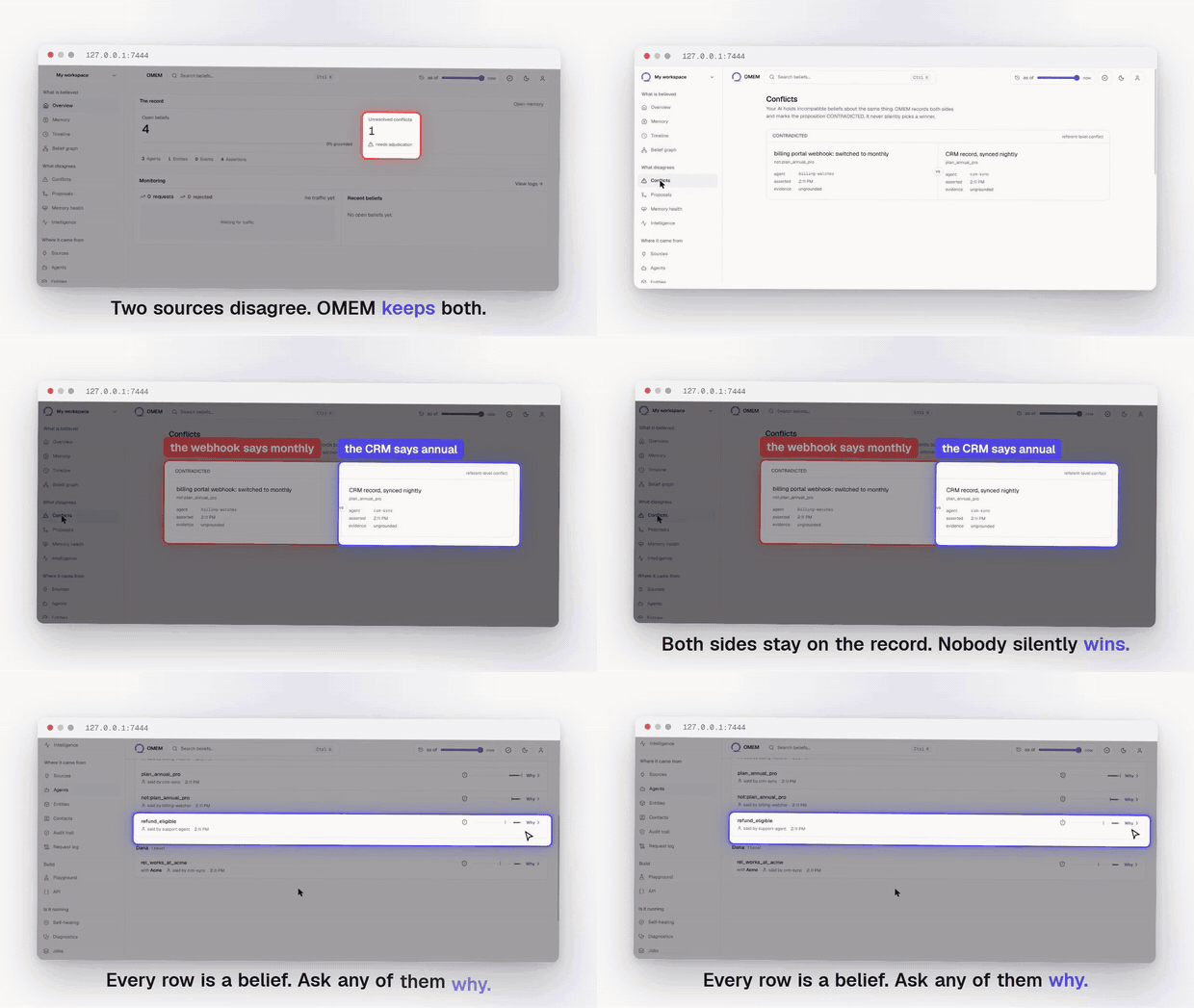
Two sources disagree. Neither is overwritten. See the whole thing running.
What makes it different
Most agent memory is a list of facts. When two facts conflict, one silently overwrites the other and the history is gone. OMEM keeps both, tracks which one is currently believed, and can tell you why. A few things it does that a plain vector store does not:
- Belief state over time. Every fact has a state (believed, contradicted, unknown) that the engine computes from the evidence, not a static row.
- Contradiction handling. Conflicting information is surfaced, not lost.
Claims named
Xandnot:Xare treated as opposed automatically; for anything else,mem.contradict("prefers_annual", "prefers_monthly")says so once. OMEM never decides two claims disagree by reading them, because that judgment is what would stop the same question having the same answer a year later. - Provenance. Ask why something is believed and get the chain that led there.
- Cross-agent memory. Memory is private to an agent by default; you choose what to share with a team or the whole project.
- Semantic recall. Finds relevant memories even when the wording differs
from how they were stored. Works offline with a dependency-free embedding;
set
OMEM_EMBED_MODELto use your provider's real embedding model, with cached vectors and automatic fallback if the provider is down. - A learning loop. Memories that prove useful rank higher over time.
- Self-healing that refuses. OMEM records failures and runs repairs under policy, and will not run a repair nobody authorised. A model can propose a plan; only actions registered in code execute, and risk class comes from OMEM's registry rather than from the plan claiming its own. See Self-healing.
Quick start
You need Python 3.9 or newer. No other dependencies.
Option 1: install from PyPI (server included).
pip install omem-infrastructure
omem-server
Upgrading from an earlier version? pip install --upgrade omem-infrastructure.
Plain pip install on a package you already have reports "Requirement already
satisfied" and does nothing, which is a quiet way to keep running the version
you were trying to leave. python -c "import omem; print(omem.__version__)"
says what you actually have.
That starts the server on http://127.0.0.1:8787 and, on first run, prints a project id and an API key: no signup call, no dashboard visit, nothing to configure. Paste them straight in:
from omem import Memory

mem = Memory(api_key="omem_sk_...", base_url="http://127.0.0.1:8787",
             project="proj_...")
mem.remember(agent="support", about="customer:1", claim="prefers_annual_billing")
print(mem.believes(about="customer:1", claim="prefers_annual_billing"))
# -> BELIEVED_TRUE
QUICKSTART.md takes that to a contradiction and a provenance chain in about five minutes, which is where the difference from a vector store actually shows.
Option 2: run from this repo.
cd server
python api.py            # or: python api.py 9000 for a different port
Same server, same first-run project id and key, started from source. Setup takes about a minute either way. Two differences worth knowing:
- The database lands in a different place. From source it is
server/data/omem.db;omem-serverwrites./omem-data/omem.dbin whatever directory you ran it from.OMEM_DBoverrides either. - The dashboard needs building once. The wheel ships a built copy; a clone
does not, so the server prints "dashboard not bundled" until you run
cd web && OMEM_STATIC=1 npm run build. The API is identical either way.
Option 3: Docker.
docker run -p 127.0.0.1:8787:8787 -p 127.0.0.1:3000:3000 \
  -v omem-data:/app/server/data ghcr.io/troybrandonc-bit/omem
API on 8787, dashboard on 3000, data in the named volume. The ports are
published to loopback on purpose: the container runs in local mode, which has
no passwords, so reachability is the access control. Putting it on a network
means setting OMEM_AUTH=password and OMEM_MASTER_KEY first, and
docker-compose.yml in this repo shows that shape.
Self-healing
OMEM records what breaks and repairs it under policy. This is infrastructure for your agents, not something OMEM does to itself: you register a component and the hooks it can be repaired with, and OMEM owns the memory, the safety boundary and the lifecycle.
The part that matters is what it refuses. A model may propose a repair plan; OMEM decides what is permitted. Only action types registered in code can execute, risk class comes from that registry and never from the plan, high-risk actions need explicit approval, and a repair is not successful until it verifies.
mem.healing.report_health("vector-index", "healthy", "12,400 vectors")

result = mem.healing.handle(
    error={"component": "vector-index", "error_type": "StaleShard"},
    plan={"diagnosis": "replica fell behind after a partition",
          "confidence": 0.8,
          "actions": [{"type": "rebuild_index"}, {"type": "exec_shell"}]},
)
result["status"]     # -> "denied"
result["decisions"]  # rebuild_index: permitted (low risk)
                     # exec_shell:    unknown action type (not registered)
Nothing ran. The plan is kept with the reason each action was permitted or refused, so the refusal is a record rather than a silence. Error text and model output are data here, and neither can name an action into existence.
Everything else you would want is enforced too: failures are fingerprinted so a thousand identical errors are one entry, a repair storm is capped per component, one recovery per component is claim-enforced in the database, secrets are stripped before anything is persisted, and an internal error escalates rather than retrying wild.
The Self-healing screen in the dashboard shows component health, the failure
record, and how far each repair got, with the step it stopped at marked, and the
diagnosis it acted on. server/healing.py is the whole subsystem and is worth
reading if you are deciding whether to trust it.
The dashboard
The dashboard ships inside the package. Start the server and open the same address, http://127.0.0.1:8787. It is all there: memory, conflicts, the belief graph, the timeline, logs and the audit trail. No Node, no second process, no second port.
In local mode (the default) there is no login; it opens on the project the
server created for you. On a server running OMEM_AUTH=password it shows a
sign-in form instead.
It is a static export of web/, the only UI in this repository, copied into the
wheel at build time. To work on it:
cd web
npm install
npm run dev          # http://localhost:3000, proxying to the API on 8787
and to rebuild the bundled copy, OMEM_STATIC=1 npm run build.
Authentication
OMEM runs in one of two modes, and the difference matters before you put it anywhere other than your own machine.
OMEM_AUTH=local: the default, and what makes the quickstart a minute.
There is no login: the dashboard provisions a session against the server it can
see. That is only safe while nothing else can reach the server, so local mode
refuses to bind a non-loopback address. If you mean it (a container whose
ports are published to 127.0.0.1, a single-user VM), set
OMEM_ALLOW_INSECURE_BIND=1.
OMEM_AUTH=password: required for a server other people can reach.
Accounts have passwords, hashed with PBKDF2-SHA256. Signing up with an address
that already has a password returns 409 rather than a session, TOTP is enforced
where it is enrolled, and the server refuses to start unless OMEM_MASTER_KEY
is set to something other than its development default.
export OMEM_AUTH=password
export OMEM_MASTER_KEY="$(python3 -c 'import secrets;print(secrets.token_urlsafe(32))')"
omem-server
TLS
Point OMEM_TLS_CERT and OMEM_TLS_KEY at a certificate and the server speaks
HTTPS itself (TLS 1.2 floor). Setting only one is a startup error, not a quiet
fall back to plaintext. A terminating proxy is still better at scale, but
running without one no longer means running in the clear.
Encrypting memory at rest
pip install "omem-infrastructure[encryption]"
export OMEM_ENCRYPT_AT_REST=1
export OMEM_MASTER_KEY="$(python3 -c 'import secrets;print(secrets.token_urlsafe(32))')"
Encrypts the operations log, ingested source payloads and the quoted evidence behind each memory with AES-GCM. Existing plaintext rows keep working, so it can be switched on for a database that already has data. It refuses to start on the development master key, and refuses to run without a real AEAD library rather than falling back to the stdlib keystream used for OAuth tokens.
Lose the key and the data is gone: there is no recovery path, and no rotation tooling yet.
When two entities are one person
Formation mints entity ids from what it can see, so one human can arrive
twice: person:sarah_chen from a sentence in a message body,
person:sarah_chen@acme from writing the mail. Each id holds half the beliefs
about one person, and they can neither corroborate nor contradict each other.
curl -X POST "$OMEM/v1/memory/resolve?project=$PROJECT" \
  -H "Authorization: Bearer $KEY" -d '{}'
Decisive evidence merges: the same full name in the same organisation, which
is the rule formation itself already applies within one path. The merge is a
recorded coreference by agent:omem-resolution with a derivation to its
anchors, so /why explains it and a split undoes it. Suggestive evidence
("Sarah" against "Sarah Chen" at acme) becomes a proposal in
GET /v1/memory/merge-proposals that changes nothing until a person approves
it -- and the approval is recorded under the approver's name, not the
machine's.
The refusals are the feature: never across organisations, never without one,
never on conflicting surnames or role vocabulary, never when ambiguous, and
never re-merging what a split separated. Pass {"apply": false} for a dry
run that records nothing. From the SDK it is mem.resolve(),
mem.merge_proposals(), and mem.approve_merge(id, agent=...); the
dashboard's Proposals screen is the same queue with buttons.
Rules that conclude, and take it back
Contradiction is declared, never inferred from text. Inference works the same way: a rule is data you declare, and the machine composes exactly what you said and nothing else.
curl -X POST "$OMEM/v1/rules?project=$PROJECT" -H "Authorization: Bearer $KEY" \
  -d '{"when": [{"rel": "works_at", "dir": "fwd"}, {"rel": "owns", "dir": "rev"}],
       "then": {"rel": "involves", "dir": "rev"}}'
curl -X POST "$OMEM/v1/memory/infer?project=$PROJECT" \
  -H "Authorization: Bearer $KEY" -d '{}'
Sarah works at Beta; Acme owns Beta; OMEM concludes Acme's orbit involves
Sarah -- as an ordinary assertion derived from the exact premises it used, so
/why walks from the conclusion to the evidence, and as a real graph edge, so
recall reaches it in one hop.
The reason to want this is what happens on the way down. Retract the ownership and the conclusion is withdrawn in the same request; a conclusion resting on that conclusion falls after it. Every withdrawal is an ordinary retraction in the op log. Evidence is spent once -- a conclusion you close is never re-litigated from the same premises -- and a deactivated rule's conclusions are withdrawn on the next pass.
All of it is a script rather than a paragraph, same contract as the refusal demo below -- every behaviour asserted, non-zero exit if one stops holding, run in CI:
python3 scripts/demo_reasoning.py
Shapes that ask questions
Two beliefs conflict only over the same subjects, which is what keeps belief state reproducible -- and it means "Sarah works at Acme" and "Sarah works at Beta" never contradict. Whether that is fine is domain knowledge, so you declare it:
mem.declare_constraint("works_at", "one_dst_per_src")   # one employer at a time
mem.check()
A violation becomes a tension in the Proposals queue. OMEM does not pick the newer employer: you name the one that survives (the rest are retracted under your name, and anything the rules engine concluded from them falls in the same request), or dismiss it, which is permanent for exactly that evidence. The machine never nags twice about a question a person already answered.
Hunches with case files
Humans learn from one example by leaping to conclusions. That reflex is also why human memory confabulates. OMEM keeps the speed and drops the confabulation: it leaps, and then it doubts the leap harder than you would.
mem.leap()                              # one similar case is enough
mem.expects(about="customer:gamma")
# -> wants_pdf_invoices, strength 0.35, "beta holds it; gamma resembles
#    beta (both prefer annual billing, both use crm)", docket attached
mem.interrogate()                       # the skeptic works every open case
A hypothesis is never a belief. It never enters the engine, believes()
stays UNKNOWN however good the hunch, and only reality about the target can
support or refute it -- look-alikes just move strength. Verdicts teach: a
source whose leaps keep being confirmed generates stronger hunches, one
that keeps being wrong generates weaker ones, and a refuted leap is never
made again from the same evidence. A case that will not resolve starts
asking, and the question lands on the dashboard where a yes or no becomes
real evidence under your name -- the verdict still comes from
interrogation, never by decree.
Resemblance works the way human analogy does: one rare shared trait binds
harder than three common ones, differently-worded experience counts as the
same experience when an embedding model is configured, and shared context
weighs less than shared character. And mem.calibration() is the
metacognition: OMEM knows which kinds of claims it guesses well, and its
boldness follows its record.
Priors: what it learns about people in general
A leap projects from one look-alike person. A prior projects from a regularity learned across many: "people who hold P tend to hold Q." OMEM mines these from what it already knows and uses them to interpret someone new from very little.
A pair is kept only where holding P measurably moves the odds of Q beyond how common Q is on its own, and that test is applied to the lower bound of the rate rather than the rate itself, so a pattern resting on a handful of people must be far cleaner than one resting on hundreds.
mem.learn_priors()                      # mine regularities across everyone
mem.priors()
# -> holds likes_dashboards -> holds wants_pdf_invoices
#    in_population: 41 of 52     wants_pdf_invoices on its own: 0.29
#    kept because the lower bound of that rate clears 0.29, not
#    because wants_pdf_invoices happens to be common
#    when_applied: supported 3, refuted 0
That rule replaced one that asked only whether sixty per cent of the holders
of P also held Q. Measured against 19,668 real respondents with a known latent
structure, the old rule recovered that structure at 0.185 where chance is
0.184: it was selecting consequents by how common they were. The current rule
recovers it at 0.875, using 94% fewer priors that cover more claims than
before. The study is
Working Paper No. 1 and the harness
is in benchmarks/external/.
The point is that a prior never overrides a person. It fires only into a silence: if someone holds P but has said nothing about Q, OMEM leaps Q onto them as a hunch; the moment that person's own evidence speaks, the prior is refused, and if their evidence later contradicts an accepted hunch, the interrogate loop refutes it and the prior takes the loss. Two honest numbers travel with every prior: the rate it held in the population it was learned from, and its separate record when actually applied. A pattern seen on too few people is not allowed to fire at all.
A prior stores counts, never a person. It is knowledge about people in general with no fact about anyone in it, which is what lets you read the whole set, or hand it to someone, without leaking a single subject. The general pattern always yields to the individual, by construction rather than by policy.
Everyday behaviour is memory too
Not everything worth remembering is a contract. "Mornings work best for me", "email is the best way to reach me", "I don't work Fridays" are the small repeated preferences of ordinary correspondence, and OMEM extracts them offline, no LLM required. A first-person sentence attaches to the person who wrote it, the same node their employment is inferred onto from the address they write from, while "we prefer async" stays a fact about the company. A role address like support@ never mints a fake person, and every habit carries the sentence it came from as evidence. These are exactly the regularities the priors tier generalises: "people who prefer mornings usually prefer email" is a learned pattern, not a guess.
The right to be forgotten, executed
Retraction is not erasure: an append-only log keeps history, and a real
erasure request means the personal data is gone. POST /v1/entities/{id}/forget rewrites the op log for real: every record that
references the person, everything that cascaded from those, the events that
carried only their words, and the evidence quotes, edges, hypotheses and raw
source messages behind them. A sentence of theirs quoted under a surviving
belief is redacted, because the sentence is the person's even when the
belief is a company's. The pruned log is replay-verified through a scratch
engine before anything is touched, and what remains afterwards is one row
holding a hash, counts and a date: proof the erasure happened, retaining
nothing. It is an admin act, it asks for explicit confirmation, and it
cannot be undone.
The commons, and what it will never take
On first open the dashboard asks one question: contribute anonymous patterns to the shared OMEM commons? What leaves the machine if you say yes is counts, like "held for 5 of 7". Never a name, a company, a message, or a number from your data; the exact file sits on your own disk to inspect, and either answer is revocable in Settings. Silence sends nothing, forever. The commons pools those counts across consenting installations to study human working behaviour in general. Anonymity is structural at both doors: a contribution carrying anything identifying is refused on arrival, so the pool cannot leak what it never held.
Teaching AI what people are like
The commons exists for one objective: to connect humans and AI by giving AI a better understanding of our nature and behaviour. Models today learn about people from scraped text that was never offered and that names everyone in it. The commons is the opposite offer: regularities in how people actually work, contributed on purpose, holding nobody.
It ships as a training corpus. One JSON line per pattern carries the counts and a plain-English rendering ("subjects who prefer morning meetings usually also prefer email contact: 24 of 31 with a stance, 77%"), with a dataset card stating the provenance, the consent story, and the license, CC BY 4.0 with attribution to the OMEM commons. A model trained on it learns the rate, never a person, and the card says the operative sentence out loud: rates are population tendencies, never rules about individuals. A real person can and will contradict any of them, and a system that respects people treats every pattern as a prior that yields to the individual, the same way OMEM itself does.
What changed while you were gone
The question every agent asks at session start, answered from the same as_of machinery every query already uses:
d = mem.changes(since=last_seen)
Beliefs that appeared; beliefs that closed, each saying how -- superseded and by what, or withdrawn; conflicts newly opened and newly resolved; referents that merged or split. Read-only, deterministic, and scope-safe: your diff contains only what you could have recalled.
Seeing what it refuses
The self-healing boundary is the part that is hard to believe from a description, so it is a script rather than a paragraph:
python3 scripts/demo_refusal.py
It drives a real server through the two ways a repair plan actually goes wrong.
A model proposes reload_config (registered) alongside exec_shell (not
registered anywhere): the first is permitted on its merits, the second is
refused by name, and the plan as a whole is denied. A plan that claims its own
risk class gets it ignored, because risk comes from the registry. An
instruction embedded in the error message the model read executes nothing.
Every verdict is kept and readable afterwards, and a secret in the error
context is not in storage.
Registration happens in code. There is no API that adds an executable action type, so no plan and no prompt widens what is permitted.
Every refusal in it is asserted and it exits non-zero if one stops happening, so it runs in CI. A demo that can quietly become untrue is worse than none.
The Witness benchmark
Memory benchmarks measure recall. Witness measures the opposite duty: does a memory system assert things nobody told it, keep repeating what was withdrawn, silently resolve disagreements, merge two people who share a name, or hold on to conclusions whose premises died?
Six scenarios, ten axes, deterministic scoring, no LLM judges. Adapters are
included for OMEM, Mem0 and Graphiti; each system is fed through its own
native path, and a probe a system cannot express reports as unsupported
rather than passed or failed. This repository publishes no numbers it did
not run: OMEM's card, every probe passing on every axis, is asserted by
server/tests_witness_benchmark.py against a live server on every commit.
Run the others with your own keys and read your own card.
The claims ledger
Marketing that cannot fail is indistinguishable from marketing that is false. CLAIMS.md maps every load-bearing sentence this project says about itself to the executable statement that would go red if it stopped being true, and the ledger is itself guarded in CI: a row whose file goes missing fails the build.
Two rows worth calling out because nobody else in this niche can write
them. It phones home to nobody: tests_airgap.py installs a guard under
the socket layer, then drives every major feature through a live server and
fails on a single outbound connection or DNS lookup that is not loopback.
Upgrades never rewrite your past: a log frozen on 2026-08-29 replays to a
byte-identical state digest on every commit, so no future version can
quietly reinterpret a history you already recorded.
Proving the state follows from the log
Memory is rebuilt by replaying an append-only log. That is easy to claim and was not checkable from outside, which is a weak place for a project whose whole argument is that you can reconstruct what an agent believed and why.
omem-verify
proj_a14ce3f94fab  My first project
  replayed 4 operations -> 2 assertions, 2 propositions
  state digest  cd95d761079a2388...
  deterministic yes
It replays the log into two independent fresh engines and compares the resulting state. A difference would mean replay depends on something outside the log, and that the same question does not give the same answer.
That check cannot detect tampering, because a rewritten log replays perfectly consistently with itself. For that, record a digest and keep it somewhere OMEM cannot write:
omem-verify --record          # writes .omem-state.json
omem-verify --anchor kept-elsewhere.json
  anchor        DOES NOT MATCH cd95d761079a2388... the log has changed
  audit chain  org_f4f3bdfa7a82  MISMATCH
The same file anchors the audit chain head, for the same reason. That chain is tamper-evidence rather than tamper-proofing: someone with write access can rewrite it from the edit forward and it stays internally consistent. Only a head hash kept where OMEM cannot reach it detects that. Two anchors in two places is two habits, and the one you skip is the one that mattered.
It proves the state follows from the log, and that neither the log nor the audit chain has changed since the anchor. It does not prove the beliefs are correct, or that nothing was removed before the first anchor was taken.
The bill of materials
python3 scripts/gen_sbom.py > sbom.json     # CycloneDX
python3 scripts/gen_sbom.py --check         # fails if a runtime dep appears
The server and the SDK have no runtime dependencies, so the SBOM is one
component and the transitive surface is the standard library. The optional
extras are listed and marked optional, because "no dependencies" would
otherwise be a half-truth. --check runs in CI so the claim cannot quietly
stop being true.
Refusing ungrounded writes
Every belief carries a grounding verdict: GROUNDED if its provenance reaches a
recorded event, UNGROUNDED if it only ever rests on other claims. That verdict
is returned on every read, so a caller can filter on it.
Filtering only helps the caller who remembers to filter. Set
OMEM_REQUIRE_GROUNDED=1 and OMEM refuses the write instead:
OMEM_REQUIRE_GROUNDED=1 omem-server
mem.remember(agent="support", about="customer:1", claim="prefers_annual")
# -> 422 R_UNGROUNDED: cite `because` evidence that reaches a recorded event

mem.remember(agent="support", about="customer:1", claim="prefers_annual",
             because=["evt_call_2026_08_26"])   # accepted
Evidence counts if it is a recorded event, or an assertion that is itself grounded, so a chain of reasoning that bottoms out in something observed is admitted while a chain that bottoms out in nothing is not.
It applies to direct writes. Supersede and retract replace a claim that already
passed admission and inherit its provenance, and the ingestion path has always
had its own gate: every candidate is graded before the engine sees it, and
DO_NOT_STORE and LOW never become assertions.
Off by default, because it is a real constraint on how you write and existing callers should not break on upgrade.
What is in this repo
-
server/is the OMEM server: an HTTP API wrapping the memory engine. The engine itself lives inserver/omem_engine/and is the source of truth for all memory decisions. -
sdk/python/is the Python SDK and theomem-server/omem-mcpcommands. It is the one that is published:pip install omem-infrastructure. -
sdk/typescript/is the TypeScript SDK, published asnpm install @omem/sdk. It lags the Python SDK, and it builds and tests itself against a real server:cd sdk/typescript npm install && npm test # builds, then runs test_parity.mjs against a live servertest_parity.mjsstarts the Python server, drives the built SDK against it and reports what is missing. Closing that gap is the most useful contribution available right now. -
web/is the dashboard.
Use it from LangChain
OMEM implements LangGraph's BaseStore, which is how LangChain agents hold
long-term memory:
pip install "omem-infrastructure[langgraph]"
from omem import Memory
from omem.integrations.langgraph_store import OmemStore

store = OmemStore(Memory(api_key="omem_sk_...", project="proj_..."))
store.put(("memories", "alice"), "pref", {"text": "prefers annual billing"})
store.get(("memories", "alice"), "pref").value
# -> {"text": "prefers annual billing"}
Pass it to create_react_agent(..., store=store) or any LangGraph graph, the
same as InMemoryStore.

The difference from the built-in stores is what happens on the second write.
They overwrite, and delete erases. Here a put over an existing key
supersedes: the previous value stays on the record with the moment it
stopped being believed, and delete retracts rather than destroys. Every
write is attributed, so mem.why(assertion_id) answers where a memory came
from. That costs a network round trip per operation, which is the trade.
Vector search on the store is not implemented yet. search() filters by
namespace and by field; passing query= raises rather than quietly returning a
substring match dressed as semantic search.
Use it from an MCP client
Installing the package gives you an omem-mcp command that speaks MCP over
stdio, so MCP clients like Claude Desktop can use OMEM as a memory tool:
pip install omem-infrastructure
Then, in your MCP client's config, the whole entry is:
{ "mcpServers": { "omem": { "command": "omem-mcp" } } }
No key, no URL, no separate server to start. On first run it starts the bundled
server itself, creates a project, and remembers it in ~/.omem. Restarting the
client reuses the same memory.
Ten tools. Five are the record: omem_recall, omem_observe,
omem_remember, omem_why and omem_believes. Five are the intuition layer,
all reads: omem_expects (what OMEM suspects and does not believe, with its
case file), omem_priors (the regularities it has learned about people in
general), omem_brief (one call at the start of a task, instead of assembling
the same picture from four others), omem_ask (one question, answered from what this install has seen itself
first and the commons second, each labelled with the people and installations
it rests on), and omem_weigh (weigh a belief you already hold against the
population).
omem_ask refuses rather than returning nothing when too few people support an
answer, because "no such pattern" and "too few people to say" are different
answers and an agent acts differently on each. It reads from disk: the commons
snapshot is already here, so asking works with the commons unreachable or never
contacted at all.
There is no tool that promotes a hypothesis, answers its open question, or
triggers a leap. A hunch takes its verdict from reality during interrogation,
and a model does not get a lever that marks one true by saying so. Anything
omem_expects lists still reads UNKNOWN through omem_believes, and a test
asserts exactly that.
observe hands OMEM raw conversation and lets it decide what is durable, which
is what you want over a transcript. remember records a fact you have already
identified:
{"about": "customer:acme", "claim": "prefers_dark_mode",
 "because": "said on the 3 Nov call"}
Use remember when you know the fact. Extraction runs a deterministic
vocabulary aimed at decisions and commitments, so a claim outside it records
nothing at all, and a model naming a claim is not a model deciding what is
true: OMEM still owns belief state, contradiction and provenance.
Identity is fixed by the environment, never by a tool argument, on both axes
that scope memory: OMEM_AGENT is the agent whose memory this is, and
OMEM_USER is the end user it is acting for. A model speaking MCP cannot name
either, so it cannot ask for another agent's or another user's private memory.
OMEM_USER is optional; leave it unset and no user-scoped memory is visible,
which is the right default for a process that has not been told who it acts for.
To wire it into Claude Desktop, start omem-server once to get a project id and
key, then add this to claude_desktop_config.json and restart the app:
{
  "mcpServers": {
    "omem": {
      "command": "omem-mcp",
      "env": { "OMEM_AGENT": "claude", "OMEM_USER": "you@example.com" }
    }
  }
}
Both of those are optional. OMEM_AGENT names the agent whose memory this is
and OMEM_USER the end user it acts for; neither is a tool argument, so a model
cannot name either one. Point it at a server you already run by setting
OMEM_API_KEY, OMEM_BASE_URL and OMEM_PROJECT instead, and explicit
configuration always wins over the bundled one.
The config file lives at ~/Library/Application Support/Claude/claude_desktop_config.json
on macOS and %APPDATA%\Claude\claude_desktop_config.json on Windows.
Status and price
Free, and free while it stays in beta: no plans, no card, no quota.
This is early software under active development. It is meant for testing and feedback right now. The security page lists what it protects and, just as importantly, what it does not yet: no SSO, no certifications, no key rotation, an audit chain that detects tampering rather than preventing it, and one process holding authoritative state, enforced now, so a second one refuses to start rather than diverging, but that is the honest absence of high availability rather than the presence of it. Read that before you plan around it. If you try it and something breaks or feels wrong, that feedback is exactly what is useful at this stage.
License
MIT. See LICENSE.
Development history and detailed engine notes are in CHANGELOG-dev-notes.md,
ENGINE.md, and ENGINE_VALIDATION.md.