tri-train
Your triathlon training in Claude: activities, PMC load, plans pushed to Garmin, races, recovery.
Hosted MCP Server
npx add-mcp 'https://tri-train.com/api/mcp'Installs into Claude Code, Codex, Cursor and more
Documentation
Hosted MCP server · OAuth · 20+ tools
Garmin MCP Server for Claude.
Tri-Train pulls your activities from Garmin and Strava and exposes them to Claude through a hosted MCP server — nothing to install, no script, no API key. You ask in plain sentences, Claude reads your real training data — no export, no screenshot, no numbers typed by hand.
What you can ask Claude
You never need to know tool names — Claude picks the right one itself.
„How much did I run this week?“
„Show me every run over 15 km since June.“
„How did I sleep before the hard sessions?“
„Plan next week with four sessions.“
„Why was my heart rate so high on the long run?“
„Add an easy hour on the bike for Thursday.“
Connected in three steps
1
Connect your account
Sign up for Tri-Train and link Garmin and Strava. New Strava activities arrive seconds after upload, Garmin values such as sleep and HRV once a night.
2
Add the connector
In claude.ai go to Settings → Connectors, add a custom connector and enter the address below. There is nothing else to configure.
3
Allow access
Claude opens Tri-Train in your browser and you confirm once via OAuth. No API key, no config file, no password handed to Claude.
The only address you need
https://tri-train.com/api/mcp
Opened in a browser it returns an error — it is meant for Claude, not for reading.

Connected apps in your settings: every grant listed separately and revocable at any time.
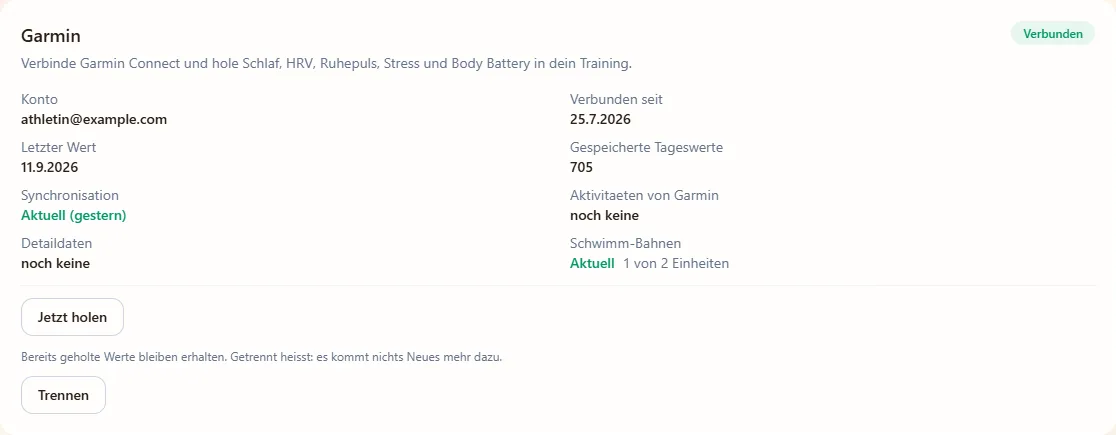
The Garmin connection: sleep, HRV, resting heart rate and Body Battery feed into your training — and into the conversation with Claude.
What Claude sees — and what it doesn't
Your account only
Every tool filters on your user ID. Other people's data is not reachable through the connector.
Two separate permissions
Reading and changing are two separate permissions, and the server checks them on every call. The consent page names both before you allow access. A read-only connection can't be chosen at the moment.
Revocable any time
One click on “Disconnect” in your settings ends the access immediately — no need to delete the connector in Claude.
Undo built in
Every writing action is journalled and can be taken back if Claude misunderstood you.
And back onto the watch
What Claude plans lands on your Garmin as a structured workout — intervals, target zones and pool lengths included. The path runs both ways: Garmin delivers the data, Tri-Train does the maths, Claude discusses it with you, and the finished session is on your wrist in the morning.